See this post.
after adding the device updated the device from web ui and selected Zooz 4 in 1 device
I can get the hub to recognize the device during a general exclusion, but when I try to pair it, the hub never discovers it. The amber LED just flashes 5 times.
Hi there. You can try to reset the sensor (see the first post for reset instructions), reboot the hub, bring the device within 5ft if the hub and then try to pair it.
Also check if you have any unused device handlers in your IDE that may need to be republished which may prevent the pairing from completing. Please see this topic for details: FAQ: My lock/device does not pair or appears to pair but it won't show up in the mobile app or IDE - stale DTH
 Did you get an answer to this question? I’m having the same problem. I would buy
I purchased several of these sensors. I installed @RBoy DTH before pairing any of them and they seemed to pair correctly. I set the parameters from the app and did a refresh and double clicked the button on the sensor. Looking at the IDE log, get a response back that shows everything except the PIR. In the app it is always reporting MOTION is active. Tried 2 different sensors with the exact same results.

That indicates a possible loss of packets in the mesh. Try to reset the device to factory defaults (see first post) and then add a buffering device (mains powered zwave device) between the sensor and the hub.
Thanks for the reply. I followed the exclusion, factory reset and inclusion with no luck. With regards to the packet losses, I read your linked post and had a couple questions. I am curios what a person should do if the footprint of the home doesn’t allow for more than 5 ft distance between hub and device? Put the hub outside in the yard? Maybe on the neighbors house? If I add a mains powered device it would be less than 3 ft from the hub. Is that the only way? Any other ideas?
these motion sensors are definitely not for the impatient and/or weak at heart. i just had to re-pair a couple and some took multiple resets and pairings to get them to work right. had the multiple yellow flashing light and then the purple flashing like before i finally got them to work.
The new Alexa skill is now allowing us to see these sensors (yay!). However it only shows as a motion sensor (primary sensor is set to temperature in Smartthings with rboy’s latest handler. Any advice?
I just added two Monoprice 4 in 1 sensors and having issue with the device stuck on Motion Detected. The firmware version is 5.1. I tried excluding, adding, reset, etc. One of the unit is only 3 feet from the hub so it’s not a signal issue. I noticed it had the same issue when I changed it to the ZooZ DTH. At least now it’s not showing 0 on the summary screen. Primary sensor is motion. All other sensors is working.
Help anyone?
FYI: Looking at the event log for the device, I only see the motion sensor event once after first association. Since then, I have not seen a motion sensor event. All other sensors are periodically sending events.
These monoprice 4-1 are going back if I can’t figure this out. It’s taking too much time. The Zooz version worked right away.
Here is something interesting. Ive been using this DH for a while and I’m re-pairing monoprice 4-in-1 devices. several times now they are pairing as Name “Vision Multipurpose sensor” and Type “Zooz 4-in-1 sensor” which is the ST ‘built-in’ DH and working. i could manually change to your DH that i was previously using. have you seen this yet?
That means you have another custom DTH in your account which uses the same “fingerprints” as your monoprice sensors so the platform is getting confused on which one to use and picks one at random. Delete your other custom DTH’s and it should pick up the correct DTH.
thats the thing though, i dont have any other dh that have the same fingerprints as your " [Monoprice 4 in 1 Motion, Humidity, Illuminance and Temperature Sensor (Enhanced)]" dh. it appears to be using the ST ‘built-in’ dh called “zooz 4-in-1 sensor” which may have the fingerprints from the monoprice 4-in-1 device
i went ahead and changed the dh to yours and everything, including the lux is working now.
I checked and SmartThings doesn’t have native support, it’s a custom DTH in your account which is conflicting. Also the way the platform works, custom DTH’s always take preference over a built in DTH so this only happens when you have more than once custom DTH using the same fingerprints.
i dont have a “zooz 4-in-1” dh though. i searched through all my dh’s for “zooz” and found nothing.
I’ve gone out and bought the access so i could use the Monoprice Enhanced 4 in 1 Motion, Humidity, Illuminance and Temperature Sensor and the Extreme Humidity and Temperature Management and set it all up easily enough. I went to the app, set it up to turn on a outlet that powers my humidifier if the humidity falls below 45%. I can’t figure out how to turn it off once the humidity is back up where I want it. It seems the app will turn on things but never ever turn them back off. What am I missing?
Assuming you’re referring to this app: [RELEASE] Humidity and Temperature Management with Scheduling (homes without HVAC/thermostats / using heaters and cooling appliances / vacation home / remote homes)
It has a separate setting for lower and upper humidity settings, make sure you’ve set the upper limit if you want the app to turn off the humidifier when it cross that threshold. Also note it will send a command to turn off the humidifier when the threshold is crossed (also account for the swing value that you’ve defined), which means if you’ve set it and it’s not turning off then either the sensor isn’t reporting the humidity or the switch isn’t receiving the off command.
Official Monoprice 4 in 1 Motion Sensor with Temperature, Humidity, Light, Battery and Tamper Notifications Device Handler - Version 02.00.00
- Added support for new ST app
Enhanced features
- Ability for users to choose between reporting Light as
Luxor%in settings - Support for LED modes
- Support for Temperature & Humidity correction offset
- Reporting Tamper Alerts to ST platform
- Custom wake up time
- Automatic switching between F and C
- Ability to select Primary Sensor to show on the dashboard


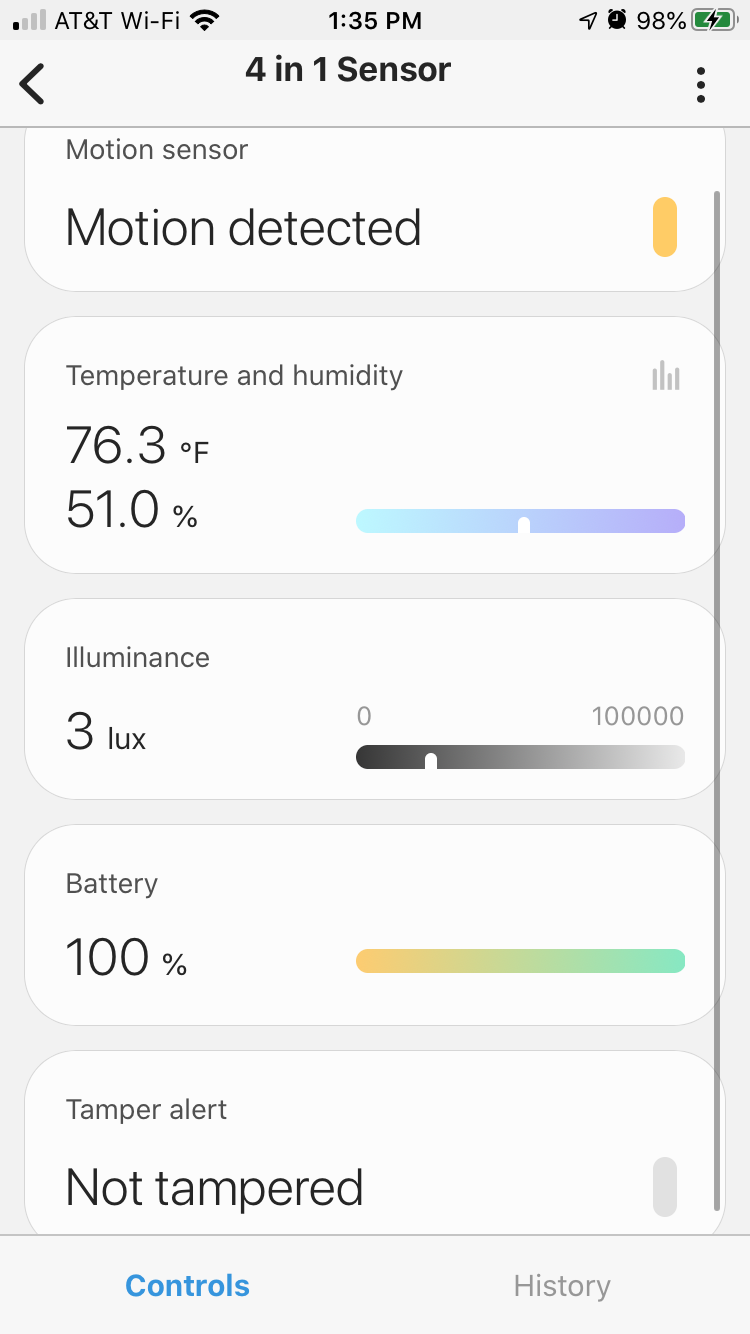
NOTES
- The UI changes can take 24 hours to take effect due to platform caching. One way to force the cache to clear is to change the device handler to a “Z-Wave Device” and then back to this device handler from the IDE, then sign out of the ST mobile app and sign back in.
- This can take up to 12 hours after an initial pairing to communicate properly with the mesh. IT also helps to keep the sensor within 20ft of a buffering device/repeater for best performance and reliability.