Wonder if this is from the Amazon AWS problems.
I think this should answer your question:
;; QUESTION SECTION:
;api.smartthings.com.           IN      A

;; ANSWER SECTION:
api.smartthings.com.    60      IN      A       3.128.231.181
api.smartthings.com.    60      IN      A       3.146.251.64
api.smartthings.com.    60      IN      A       3.143.155.172
api.smartthings.com.    60      IN      A       3.22.252.153
api.smartthings.com.    60      IN      A       3.138.218.217
api.smartthings.com.    60      IN      A       3.140.117.250
api.smartthings.com.    60      IN      A       18.224.86.29
api.smartthings.com.    60      IN      A       3.140.98.156
NetRange:       3.128.0.0 - 3.255.255.255
CIDR:           3.128.0.0/9
NetName:        AT-88-Z
NetHandle:      NET-3-128-0-0-1
Parent:         NET3 (NET-3-0-0-0-0)
NetType:        Direct Allocation
OriginAS:
Organization:   Amazon Technologies Inc. (AT-88-Z)
NetRange:       3.0.0.0 - 3.127.255.255
CIDR:           3.0.0.0/9
NetName:        AT-88-Z
NetHandle:      NET-3-0-0-0-1
Parent:         NET3 (NET-3-0-0-0-0)
NetType:        Direct Allocation
OriginAS:
Organization:   Amazon Technologies Inc. (AT-88-Z)
NetRange:       18.32.0.0 - 18.255.255.255
CIDR:           18.32.0.0/11, 18.128.0.0/9, 18.64.0.0/10
NetName:        AT-88-Z
NetHandle:      NET-18-32-0-0-1
Parent:         NET18 (NET-18-0-0-0-0)
NetType:        Direct Allocation
OriginAS:
Organization:   Amazon Technologies Inc. (AT-88-Z)
-
Routine name if you remember it: : I have had multiple disappear and not showing in the Advanced web app. In all cases but one, recreating the Routine seems to have fixed it. The Routine that disappeared and was recreated, only to disappear once again is called “Motion - Master Patio”. Since recreating this Routine for a second time it seems to be holding.
-
Confirm the email account registered in the forum is the same one you use for SmartThings. If not, please share it with me over DM: Yes, it is the same
-
Enable support access to your account: Done
I’m subscribed to email notifications from the SmartThings status page.
To the best of my recollection I have never gotten an email update about an outage until sometime after seeing discussion of problems here.
Ok, so, if I understand correctly, the Routine Motion - Master Patio appears correctly in the app?
I only found one called “No Motion - Master Patio”, so, it seems different
Well “Motion - Master Patio” DID appear it the app after I recreated for a second time. BUT, it has now disappeared appeared for the 3rd time. ???
Should I recreate the Motion - Master Patio routine for the 3rd time, or is having it missing again actually beneficial to whatever you are looking at? I could use it as a functioning routine, but I don’t want to mess up your investigation.
Just to confirm since this is the first thing the engineering team asks:
- Make sure the routine doesn’t contain any hidden device. By this I mean the ones you can hide from Devices > Manage devices
- Does the routine keep working even if you don’t see it? If it does, the best would be to leave it this way to see why it isn’t appearing despite it doesn’t contain hidden devices.
The engineering team can see the routines directly from the Data base to confirm it is there.
I can confirm the Motion - Master Patio routine, even though it had been recreated twice, is again missing from both the android and Advanced Web apps.
I can confirm the missing routine contained no hidden devices as I have no hidden devices.
As far as whether the routine is still functioning even though it is missing, I beleive that to be the case, but will confirm with certainty this evening after sunset. I will reply to you tomorrow with that confirmation.
I will withhold the recreation of the missing routine until you specifically ask me to do so.
Thanks for your help with this.
And I can now confirm the Motion - Master Patio routine is NOT functioning even though it is missing, To confirm, I looked at the history of the devices that should have activated the routine and the history of the devices that should have been triggered. There were scenarios that occurred that should have activated the routine and target devices but that did not happen. I also checked the general history and there was no entry that showed it had triggered. Interestingly… while checking the general history I did see entries for the missing routine which proves it did exist and did successfully run within the last 7 days.
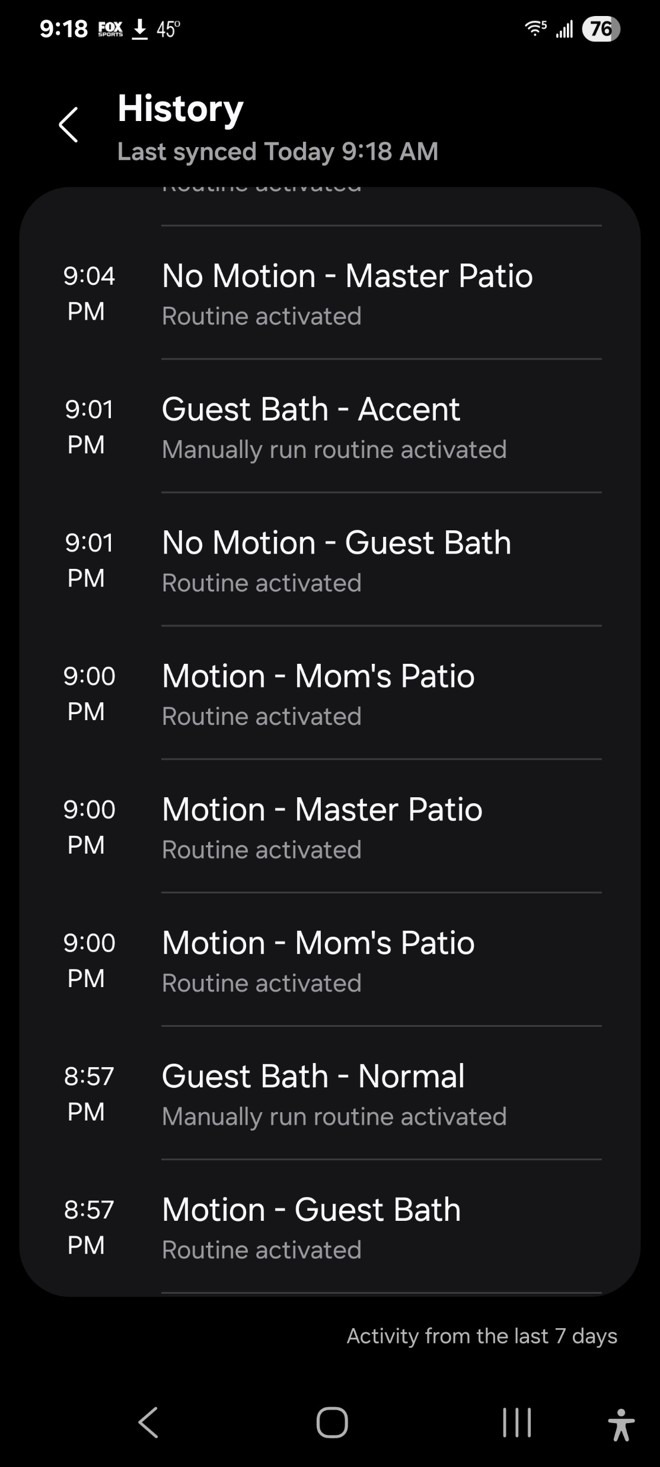
Hi, @ChetHammack
Can you let me know the date of that execution and your timezone, please? For example, October 20th, 9:00 PM GMT-6
This is for the engineering team to look at the logs of that event
Monday October 20, 9:00PM PDT
Hi, @ChetHammack. The engineering team checked your routine and they mentioned the following:
The “Motion - Master Patio” routine has been created or updated to run only once without repetition. If a routine is created without repetition under time conditions, it will be deleted once the conditions are met.
So, can you check the configuration you’re using for your Routine to avoid this happening, please?
I note that the Routine Builder calls this ‘Once’ when giving the overview but ‘Never’ whilst editing the specific time, and sometimes the ‘Never’ makes it to the overview.
I will recreate it once again and ensure run once is not chosen. Thanks
Hi, @orangebucket
Are you saying that there’s a mismatch in the labels shown in the different views of the Routine? If so, it is best to report it to Customer Support, please.
To recreate the deleted Motion - Master Patio routine I grabbed the sister routine Motion - Mom’s Patio routine and duplicated it. While doing that I observed that Motion - Mom’s Patio routine also had the condition of “Once” and repeat on “Never”, but although the routine had activated numerous times (multiple times on the same day) it somehow had never been deleted.


After looking into this, I can confirm that all of those routines I found missing over the last couple of weeks indeed had time conditions, and never did I set those conditions as “Once” and “Never”. After noticing that those conditions existed on the Motion - Mom’s Patio routine that I had never edited and it never went missing, I went back and looked at all of my routines with time conditions. What I found is the large majority of them were set as “Every day”, but there were least 5 others that had the conditions of “Once” and repeat on “Never”. All of these routines had been activated numerous times, but also never went missing/deleted. All of my routines have now been edited to “Every day”.
Well if the Routine ‘Never’ repeats then it will only run ‘Once’ so it isn’t wrong as such. It is more that ‘Never Repeat’ would better reflect the setting.
However I think that an option to have a Routine execute once and then be deleted probably merits more prominence in the UI. It’s not really a ‘repeat’ option, it’s an alternative to a repeat option. You should really be able to spot it in the list of Routines.
Isn’t having the Routine self-destruct a tad drastic anyway? Just disable it. You never know, the user might actually find the functionality useful and want to do it again.
Absolutely correct!
I’ve also been having these problems with routines, they’re working, but they don’t appear in the app and they don’t appear in AWA either.