RBoy
(www.rboyapps.com - Making SmartThings Easy!)
21
It’s working here on the iPhone 7/XS but I do see the issue with some Android phones where they crash when you try to assign an action to a child button. Try to reinstall the ST mobile app and if the ST app is still crashing then take a video and report it to SmartThings support. That’s a bug with the ST app possibly specific to your phone / model.
The 4th (generic) button is the parent button. It triggers whenever any of the 3 physical buttons (child) are pressed and reports which button was pressed (1, 2 or 3). This is reported for now since the new app is still buggy and automations don’t always recognize child devices. Once ST fixes the automation tool to recognize child buttons we will remove the parent button.
Also avoid cross posting across topics, it only makes it confusing.
I’m referring to here. Clicking the ‘held’ action to try and set it on the child devices does nothing, and clicking the parent device crashes smartthings. This is the only button related DTH I have this problem with.
Also, I’m still unclear about a few things. What is auto lock? And how can I get a countdown timer? For example I want it to countdown 30 seconds after pressing armed before it executes any assigned actions
I’m seeing the same as Matvei on Android. Trying to assign a button action on Android just flashes the screen and brings you back to the device page. It works fine on iOS.
3 Likes
RBoy
(www.rboyapps.com - Making SmartThings Easy!)
24
Yeah I see that with the Samsung J/S6. I would recommend taking a video and reporting to SmartThings support. It’s a bug with the Android app (DTH doesn’t control this). That’s a “button” plugin created by SmartThings for their new app. Also tagging @dkirker and @erickv
I was finally able to assign an action but only to the parent button and not the child. Not that it matters because I’m just using to trigger noonlight.
What about the countdown timer and auto lock functions, can you explain these
RBoy
(www.rboyapps.com - Making SmartThings Easy!)
26
The Auto lock is to emulate a lock style feature. When you arm the keypad it “locks” and when you disarm it “unlocks”. Many folks use the keypad to control a secondary device like a garage door or patio relay etc. When auto lock is enabled it will automatically relock after being unlocked after the configured time. The auto lock controls will show up in the new app once ST adds support for custom controls to the new app.
The countdown is a feature of the keypad where it announces the time remaining for arming or disarming the keypad. This is controlled through a supporting SmartApp when a delayed arming or disarming is setup in the app: [RELEASE] Security System: Intruder Alert with Actions
I’ve tested some workflows and it seems that Pressed, Double pressed, and Held states are exempt from this issue. On the other side, building automations with any other state will throw an internal log, but the automation flow is available. However, if I try to automate over the Stand by state, it will crash as Jimmy refers, then automating any other state will crash the entire application.
I’ve documented the issue and our team will review it as soon as possible.
@RBoy and also, how do I select modes as an action in webcore? Lock does not offer a data field for 0 1 or 2.
And this doesn’t trigger my actions or do anything other than change the light on the keypad
RBoy
(www.rboyapps.com - Making SmartThings Easy!)
30
As indicated in my previous post, the arming/disarming (exit/entry) delays are controlled by the SmartApps and not by the device handler. Depending on the SmartApp you’re using you can configure it to have separate delays for different arming/disarming modes.
For example if you’re using Intruder Alert with Alarms, you may want to install two instances of the app, one for Armed away and one for the Armed stay (set in the Arming conditions page for each instance). Now for each instance of the app you can configure a separate Exit delay (arming delay). When the instance is activated (based on what’s set in the Arming conditions page), it will send the configured delay (or not) to the Ring keypad (via the device handler).
Regarding WebCoRE, there was a typo in the first post, sorry about that. You would need to subscribe to the attribute armMode for your keypad and the value of the attribute will tell you what mode it’s arming/disarming (rectified the description in the first post).
That sounds like it’s for the if side of a webcore automation. What about for an action, how do I specify the arm mode? And for the delays I’m talking about this in LUM. We have separate actions for the away and stay button but not separate conditions or delays, can you separate them?
I don’t want to replace STHM with intruder alert, it’d be nice if LUM could support spoken countdown delays by itself.
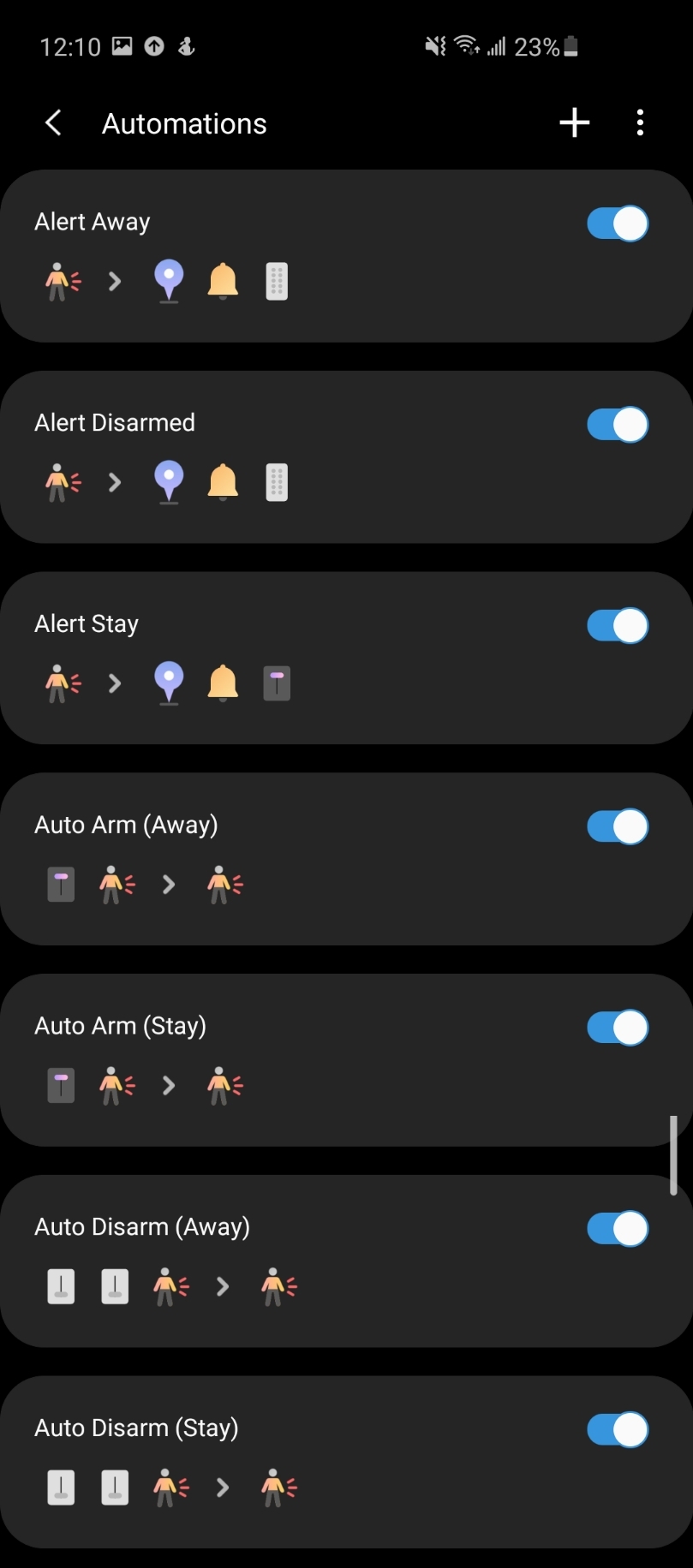
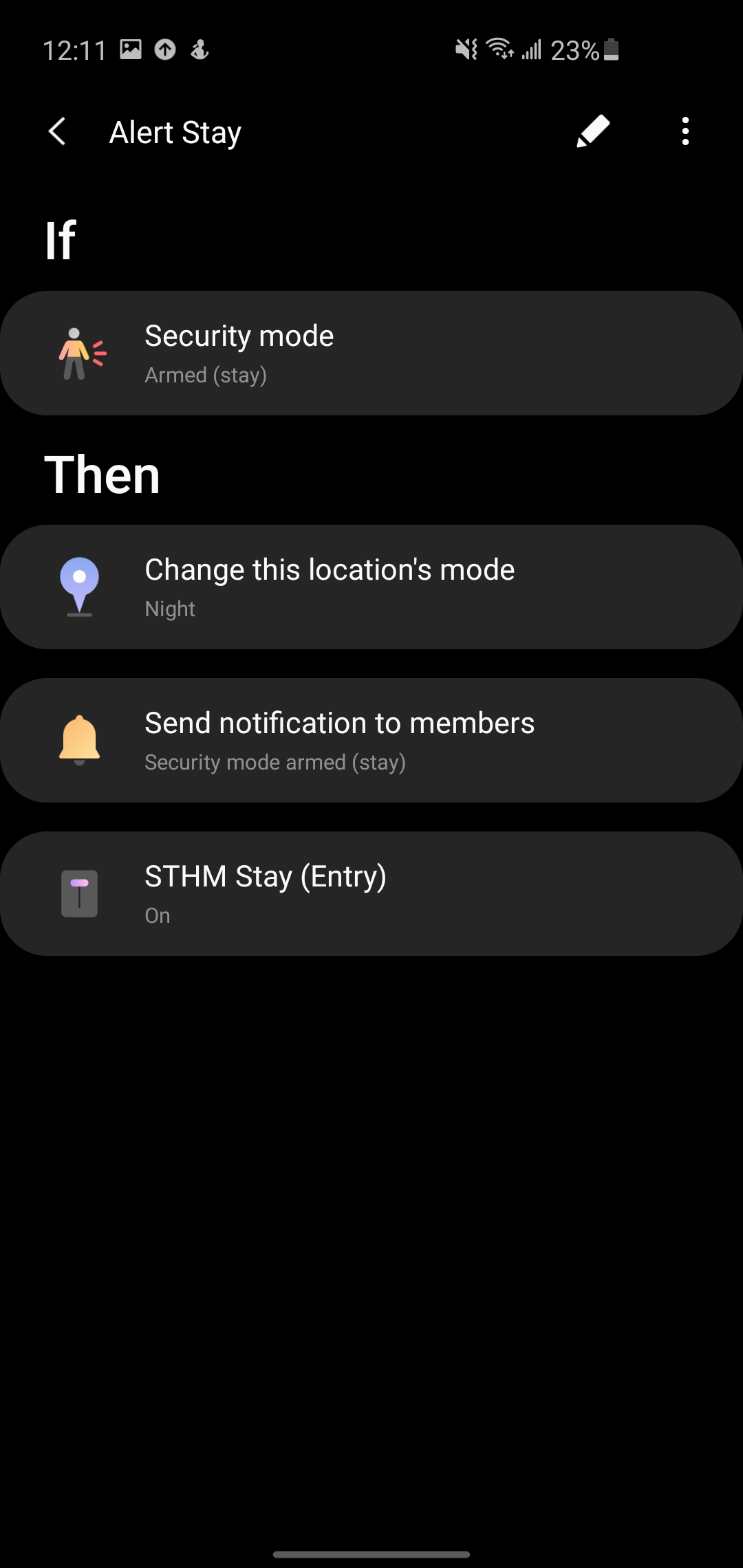
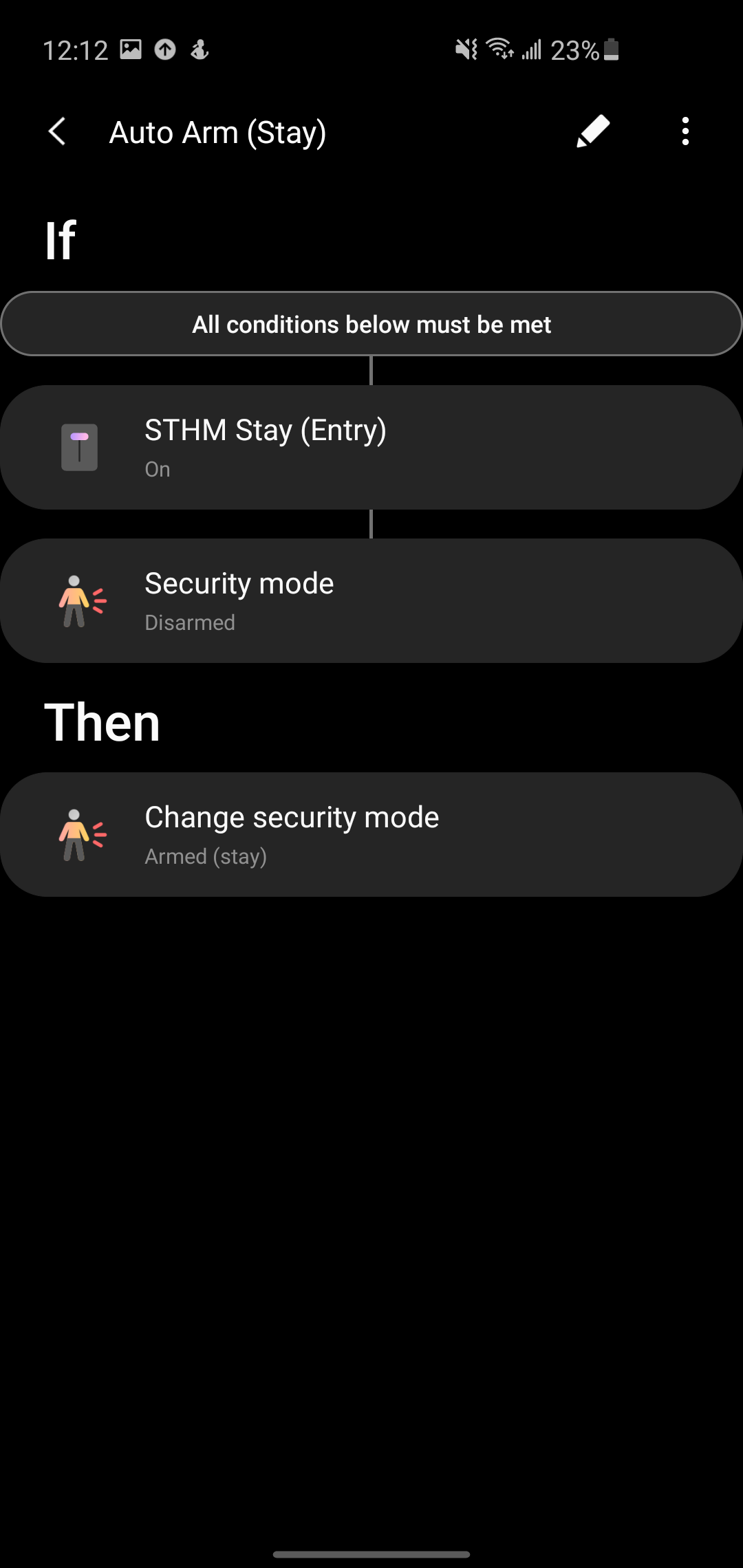
Ok I managed to get this working with STHM in the new app with all three modes staying in sync in both directions. It requires two virtual switches and one webcore piston. Three virtual switches is recommended but you can get it down to two with creative use of delays to prevent accidental triggers.
If anyone is stuck let me know and I’ll provide screenshots of each automation
In my case I have location mode and security mode synced together as well, my solution won’t work if you don’t do this because it needs location mode to prevent LUM from manually arming to away when you want stay.
I’ve searched but cannot find a scenario that I would like to use this for.
I had a DSC hardwired alarm before with a keypad.
I currently use Konnected alarm panel that integrates my wired 6 zone alarm and siren with STHM for arm/disarm/panic/ and general house alarm when one of my hardwired zones are tripped. Could this Keypad and device handler be used for the arm/disarm of this configuration. It seems that it would but I cannot find an actual post that says it will. I currently use the STHM App to do the arm and disarm functions. I would like to use the ring keypad to do that as someone enters the house (with a countdown chime to an actual alarm going off) like my DSC keypad used to.
Smitty
RBoy
(www.rboyapps.com - Making SmartThings Easy!)
34
To use STHM check out the Intruder Alerts link above which explains how to control STHM via a keypad and also the awesome post just above yours which explains how to setup a 2 way sync with STHM.
Thanks rboy
I started researching this a couple weeks ago so I must’ve just missed the above post. I did download the intruder alert smart app and started playing with it last night. My keypad is supposed to be here tomorrow so I could start doing some actual testing. I made the mistake of migrating to The new smart things app which was a mistake on my part. I was under the assumption that they were discontinuing it. Once I did that my action tiles would not work with the new app. I tried to go backwards to the classic app but it would not let me. The solution would be to add just the keypad For arm and disarm instead of using a locked tile in action tiles.
Hey there - check this post out to get Actiontiles working with STHM. Luckily its a similar idea to the post above to connect the keypad to virtual switches. FWIW I managed to get STHM/Keypads/Actiontiles in sync.
Bingo! I’ll try when I get home. I do use automation to arm at a certain time and disarm right before I leave for work but I still needed a tile to do it manually.
I’m having an extremely difficult time Syncing the Disarm, Arm away, and Arm Stay buttons with the STHM App buttons. I have everything set up correctly with the Intruder alert/actions Smart app along with the Device handler for the keypad and LUM. The key pad works with my set pins and it does the actions on the keypad (IE disarm, Arm away, arm stay) but not syncing with the STHM app. It seems at times that it will arm and disarm but not change the STHM status
It has some communication as far as doing my countdown delay and entry delay if set by either the STHM app or the keypad but no consistent communication between both. I need to quit for the night and start fresh tomorrow.