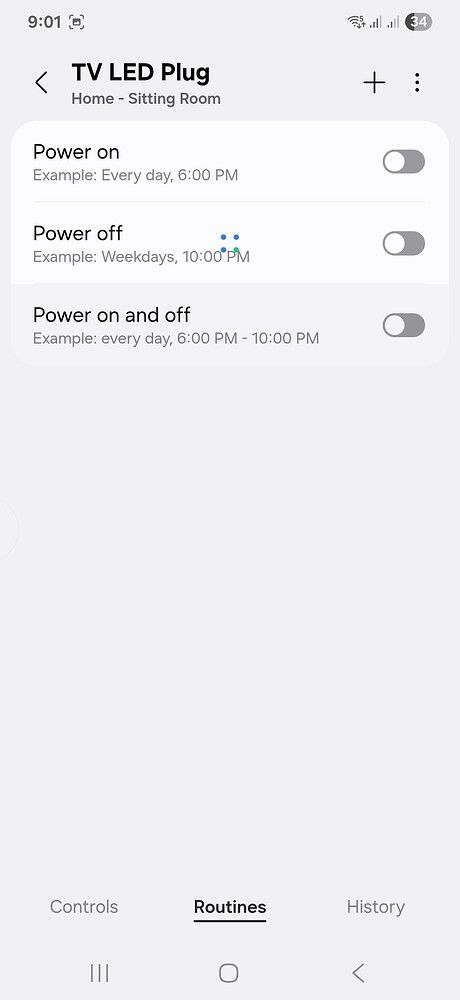
Previously, I used to go to a device in the ST app, click on routines tab to see the routines belonging to that device but for the past one month, I am not able to see any routines for the device. However, I can see all the routines in the main routines tab.
I tried clearing the app cache but no luck. Any suggestions?
Hi, @Subramanian_Swaminat
We have received other reports of this, but generally, the Routines disappear from the main list, not the one in the device.
Can you send the following information, please?
Screen recording of you showing a Routine that appears in the main list, open it to see the device belongs to it.
Then, go to the device to show the Routine is missing there.
Then, collect the app logs as follows:
Go to Menu > Gear Icon > About SmartThings
Tap the SmartThings logo 10 times.
This will open the developer’s space > tap ‘report a problem’
This will send you to the report page. Select a frequency and write a short description of the issue.
Click on “Report” and a log file will be generated for you to send over email, please do to build@smartthings.com
Finally, open support access:
Confirm the email account registered in the forum is the same one you use for SmartThings. If not, please share it with me over DM.
Select the time period and confirm - In this step, please select “Until turned off”, once the team finishes, we’ll let you know so you can disable it again.
I was hoping this was another user expressing a desire to see manual routines listed under “Routines” on the device pages along with automatic routines.
pretty please, with sugar on top? would make troubleshooting and adjustments so much more straightforeward!
The counter-10 minutes is a virtual device from Marianno’s driver - I have just named it counter - 10 min and am using it in some other routines for a different purpose. Sometimes the counter - 10 minutes turn off during night shutdown but other times it doesn’t turn off so this automation at 2:06 is mainly to turn the TV led plug but I also turned off counter -10 min just as a catch-all.
I created a new routine to turn off the TV Plug yesterday and the routine is showing in the main routines page but not in the routines tab in the device.
No, @Subramanian_Swaminat. It isn’t clear yet what the root cause is.
Therefore, we have no way of knowing how long it will take, since it depends on what needs to be fixed.
As soon as I get more info, I’ll let you know.
Something I forgot to ask was if you checked if you can see those Routines listed in the device’s details when you use the Advanced Users App.
Can’t see TV LED Plug off - 1 here but can see this routine in the app > routines. The problem I am facing is the routines within the device are not loading / visible but all routines in the main routines (app > routines) page are.
Did you confirm you’re showing all the routines on the same page or that there are no other pages left?
It would be weird if only one were missing, and also to add this to the report about the issue.
Hi, @Subramanian_Swaminat
I asked someone in my team about this behavior and since I also can’t see this routine in the list of routines (I only see one called “TV LED Plug Off - 2”), it can be due to hidden devices.
Have you checked if all of the devices that belong to this Routine are selected as visible in the SmartThings app?
Hiding devices also hide the routines where they are present, so please verify this isn’t your case.
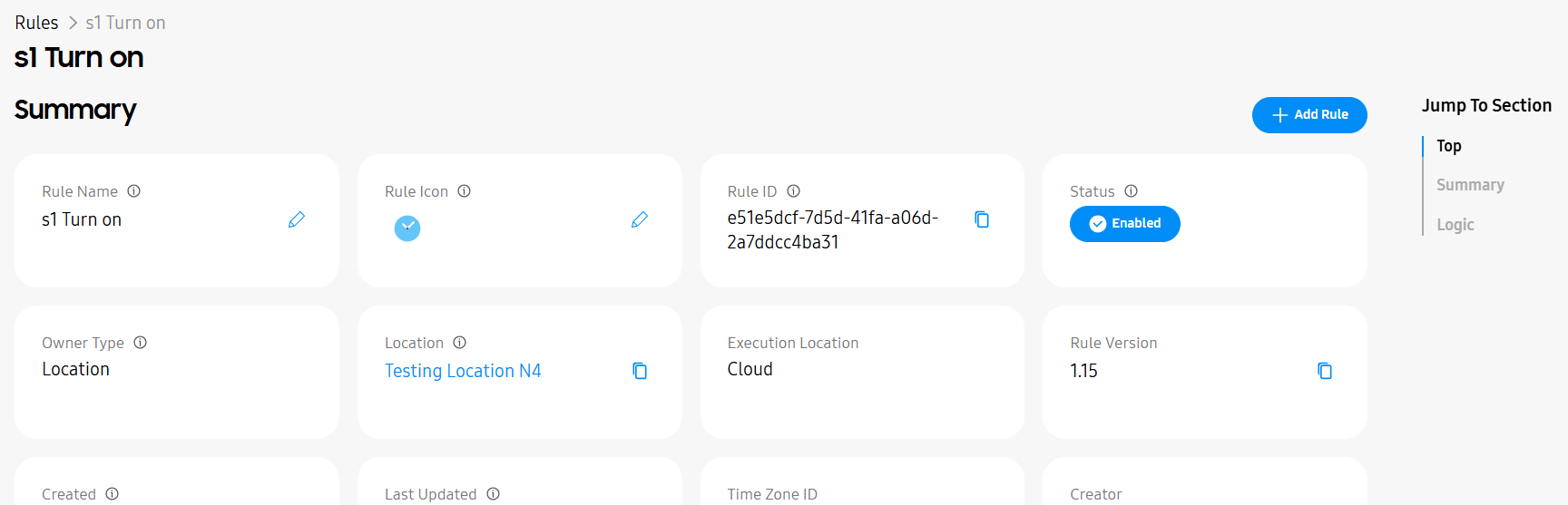
Yes all devices are visible but I am not able to see the routine in the rules page as per the screenshot below but some of the sections on the right are missing
To be honest, the purpose of opening the issue here was that I was not able to see any routines for devices in the routines page as per the screenshot below and not the fact that the routines for the devices don’t appear in the rules page unless both of them are linked.
As you can see from the screenshot, it is constantly loading but nothing happens after that which is why I tried to go to the rules page in the advanced app (webpage) to see the routines.
Without wishing to disrupt the conversation too much …
From your screenshots I can see that the mobile app is not populating the Routines tab for TV LED Plug with any of the routines the device is used in.
Is this particular issue limited to this one device? What about VS - Armed Away, Neon Lights and Counter - 10 Minutes? What about devices in routines where TV LED Plug isn’t used?
It would also appear that the equivalent functionality in the Advanced Web App is able to show a number of routines that TV LED Plug is used in but specifically not TV LED Plug Off - 1. Is that correct? Do the other devices I mentioned above also omit the same routine?
I don’t know what methods are being used to identify the routines a device is used in for either the mobile app or the AWA but to me it looks like it may be the same problem being presented differently because of different error handling.
If you temporarily remove TV LED Plug from TV LED Plug Off - 1 does that change anything?
From your screenshots I can see that the mobile app is not populating the Routines tab for TV LED Plug with any of the routines the device is used in. - That’s correct
Is this particular issue limited to this one device? What about VS - Armed Away, Neon Lights and Counter - 10 Minutes? What about devices in routines where TV LED Plug isn’t used? - No, I checked all the other devices and none shows anything in the Routines tab. I also deleted smartthings and re-installed it and tested but the same problem
It would also appear that the equivalent functionality in the Advanced Web App is able to show a number of routines that TV LED Plug is used in but specifically not TV LED Plug Off - 1. Is that correct? Do the other devices I mentioned above also omit the same routine? As I mentioned in my previous post, it is now showing the TV LED Plug Off - 1 but only a limited number of sections in the right
If you temporarily remove TV LED Plug from TV LED Plug Off - 1 does that change anything? - Tried doing this also but no effect in advanced user app and in mobile app
BTW, this problem happened only in the last one month so am thinking some recent update has messed this up.
We don’t know for sure, but I just wanted to confirm since it was strange that only this Routine was missing from the Advanced Users app, but now it’s present. I don’t know what changed there
Also, something to note: your first comment here was confusing, if it wasn’t for the screenshot, I would believe the routine is still missing:
The Menu you mention is the part of “Top”, “Summary” and “Logic”, right? I see the same options, so which ones are missing?
Sorry @nayelyz , meant to say I am able to see the routine but the sections on the right side are limited and yes I mean the top, summary and logic sections. Thought there were 6 other sections here it looks like but they are visible when I go to the device page so I got confused. The only issue that remains is the routines tab in the app does not show the routines for the device.