My Smart Lighting routines for Ring Door Bell motion to trigger GE Light switch have quit working after many years. I have tried deleting and re-creating the routine multiple times, deleted and Re-added and Authorized Ring Door Bell, deleted and re-added GE light switch. Routine stopped working after midnight Tuesday May 30th (Wednesday May 31st). All other lighting on motion (and other) routines are working. Ring.Door bell w/app is working fine.
After much troubleshooting, it looks like the SmartThings app is not clearing the motion detected alert once it is activated in a fresh new add of the Ring Bell Door bell now. Ring Door Bell App and Amazon Alexa recognize the Motion Detect.expiring after a few seconds, but the SmartThings app is not clearing showing no motion…so the condition based on Motion detection stays stuck.
Contacts Ring, they said everything is working fine on their end and must be a recently introduced by SmartThings App.
Following. Similar issue here, except mine stopped reliably working on June 2nd. On the 3rd, I got a motion active event for my doorbell. The next recorded inactive event does not show until the next day. Since then it just has not been working properly.
Do report it directly to ST Support through the app. Tap on Menu and selct Contact us. The more people who report it may lead to it being resolved quicker.
I have. And no meaningful fix response yet. Just the usual…try deleting and reinstalling Ring device.. that is definitely not the problem. Hopefully others report the same. Several on Facebook Smartthings groups reporting same problem,.that started in June 2nd/3rd.
Same issue. Mine last worked on June 2nd. Reported it this morning. Fingers crossed. What firmware is everyone using that’s experiencing this issue? I’m on the 6.1.6 beta.
I have two doorbell cameras and the spotlight cam. I have a routine that when any of them detect motion all of our outside lights turn on then turn back off 10 minutes later. Since last week it hasn’t been working. I’ve deleted the routine and made a new one, and even completely unlinked Ring from Smartthings and relinked. Nothing has fixed it.
Report it to ST customer support through the app. ST staff on the forum may offer assistance if they can or direct you to Customer Support. Tagging @nayelyz@Itati
Ring Spotlight Cam Pro (5E62E9), Ring Battery Doorbell Pro (5F79E9), Ring Video Doorbell 2 (8VR1S7-0EN0). The routine has worked perfectly for many years now. Support was less then helpful. They asked for a screen record of the failure to show it was reproducible. It’s an automatic routine.
Ring Doorbell Pro (wired version.. ie no battery operated). I don’t have an exact model listed in any apps and will have to pull it from the wall to see if anything inside. I’ve had this for years with no issues with ST, until June 2nd. Alexa proller detects and clears motion and works fine.
Only customer support query I got was very basic on telling me to remove and reinstall from Samsung SmartThings and same for the routine. I did this and responded to them and no further response. Started like everyone else on June 2nd.
I can tell you that it’s because once Samsung Smartthings notifies of Motion Detected it never clears or updates it’s status to a no-motion detected (cleared) state until you delete the device and re-add it… Then you get one Motion Detected status (and associated routine works just fine that first time as well) and it never clears from there. Rinse and repeat.
You can see that the embedded Ring video in the Smartthings App never clears the Motion Detected text in the top left corner of the video.
Ring app cleaners Motion Detected on its own just fine.
It seems to have nothing to do with the routine or other devices. I have other motion sensors (none Ring Doorbell), such as Zooz, that work fine still. Other routines work fine as well.
Sorry for asking for information separately, but I needed a little more context to know how to proceed.
So, it seems there are two behaviors; I don’t know if it could be related to the same issue.
For @RichieC, the routine isn’t triggered, but do you see the “motion” event being shown in the app for the camera?
The issue in this case could be that the motion-detected event is never received, and therefore the trigger for this routine does not meet the condition for it to run.
So, we need the following:
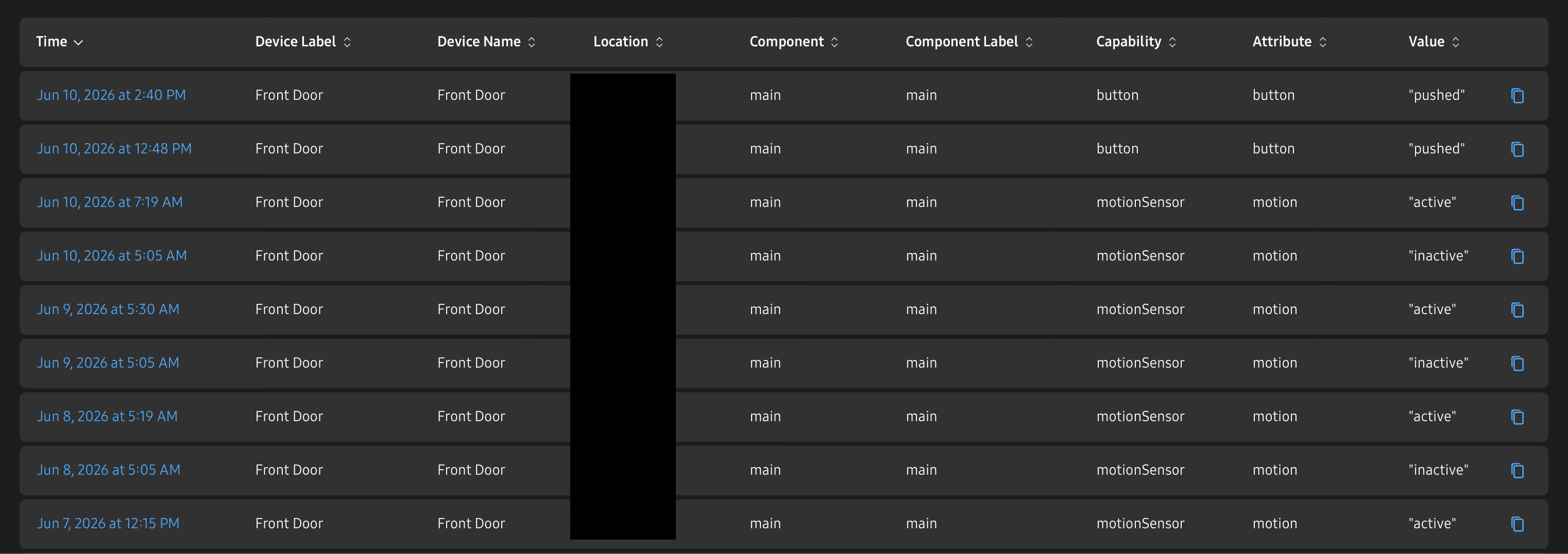
Trigger a motion event and see if the status changes in both the ST app and Ring app. Take note of the date and time when you perform this test, including your time zone, so we can look for it in the Cloud logs. For example: On June 10th at 16:40 CST
Let us know what you observed that happened. Did the motion event show in the ST app? If it did, did the routine still not run?
If the issue is only the routine, we would need the name of the routine to see its details and report it to the Rules team
But if the issue is the motion event, then the info above will help us find more in the logs
For @SatcomEng
In your case, I’m guessing the current motion status is “detected” and fixed in that value. Since this one seems to be initialized when you install the integration, have you checked if, when this happens, the device is in fact detecting motion?
If you can trigger a motion event and see the change in the app, it would be worth collecting the timestamp as well (date and time when you perform this test, including your timezone. For example: On June 10th at 16:40 CST).
Do you remember the last time you reinstalled it (date and time)? It would be useful to see those logs
For both of you, we need support access to your account to get the corresponding IDs and look at the logs for the investigation.
Confirm the email account registered in the forum is the same one you use for SmartThings. If not, please share it with me over DM
From what I can see in the logs, the issue is that the motion stays “active” for hours. It does not show “inactive” til the next day, thus not reporting all the motion that happens in between. The doorbell itself is sensing motion correctly. Activity is logged correctly in Alexa as well.
The door bell shares its motion status via the Ring Cloud->ST Cloud integration. Just because the Ring app shows the motion as cleared doesn’t mean that the Ring Cloud is reporting it properly to the ST Cloud. The ST cloud could be not handling the motion cleared event from Ring properly but it’s just as possible that the Ring Cloud isn’t reporting a motion cleared event. ST isn’t going to clear that status on its own without an event.
My Ring Camera.Pro.(wired) and conditions seem the same as Row’s.
I don’t think between all.the reports here that they are different root.causes. All of us here are reporting this problem started on June 2nd and all ultimately sound like the same problem. The question is more is it and ST handling problem w/ Ring or Ring API to ST problem.
Were there any ST changes pushed around/on June 2nd? If not, then we could be dealing with a Ring change that introduced the problem and/or incompatibility with ST.
I am experiencing the same problem with my ring motion routine. I don’t have an exact date but noticed it late last week, approx June 5, after having a power outage. Found this thread today. Will report to Support.
I did get an initial “motion detected” but it was outside the time period for the routine to trigger, I never got a “no motion” until the following day. I’ve endabled account data access and the email is the same.