I need help solving what seems to be a major capability loss in a Samsung multi-split AC setup using the MIM-H04N WiFi Kit .
Setup:
Samsung System A/C (4 indoor units)
Controlled via MIM-H04N WiFi Kit
Connected to SmartThings Cloud (OCF-based)
Each indoor unit appears as a child device
What works:
Basic HVAC control (mode, setpoint, fan speed, swing, etc.)
Power on/off
execute and switch capabilities on the parent (but very limited)
What doesn’t work (but should):
These features are 100% supported when the same AC unit is connected directly via Wi-Fi , but become unavailable when connected through the WiFi Kit:
Feature
Works via native Wi-Fi?
Works via WiFi Kit?
Beep sound toggle
Yes (API & UI)
No
Display light toggle
Yes (Lighting option)
No
sleepspeed Optional modes ( , , etc.)
Yes
Some are missing
Air quality options
(in capabilities)
Missing entirely
execute OCF options
Limited
NOT_FOUND Most fail with
I’ve tried:
SmartThings API (via Postman)
SmartThings CLI
Advanced Web IDE
Multiple execute paths (mode/vs/0 , etc.)
All known x.com.samsung.da.options
Monitoring event logs while pressing “Lighting” or “Beep” on physical IR remote → No events are captured.
Even tried polling capabilities like airConditionerLighting , audioVolume , airConditionerBeep , airConditionerOptionalMode , airConditionerFanOscillation , doNotDisturb , etc. — but none are exposed on the child devices, or on the parent.
Important detail:
The same model indoor unit, when connected without the MIM-H04N (i.e. Wi-Fi embedded), exposes all capabilities in SmartThings.
So it’s not a model limitation — it’s a firmware/API exposure limitation through the MIM-H04N .
My questions:
Is there any hidden execute command or undocumented capability that can trigger these functions?
Has anyone hacked/extended functionality of the MIM-H04N via SmartThings (Edge Driver, OCF, CLI)?
Is there any official roadmap or workaround from Samsung to fix this limitation?
Goal:
Enable full automation and voice control over all features already supported by the device — not just the basics.
Any insights, deep dives, or clever hacks are very welcome.
I’m happy to share my API logs, device dumps, and test cases.
Hi, @Jovane_Rambo
I asked the engineering team and they mentioned that the following which should explain why there’s a difference:
The Wi-Fi Kit is a device that allows AC devices to connect to the platform when they don’t have the possibility of connecting indepently through Wi-Fi
Since this device is compatible with several AC devices, it has the generic/basic functions available since it doesn’t really “know” the capabilities of all of them.
When the device is connected directly, it is exposing its complete functionality to the platform since the device itself “knows” what it is capable of.
So, to your questions:
If there is, only the device manufacturer would know and decide to expose it.
Since it’s a Samsung appliance, only their team that is in charge of the integration development would know. The SmartThings side doesn’t control the changes made to it.
I understand the explanation that the Wi-Fi Kit is designed to offer generic functions for broad compatibility.
However, I believe this limitation could be easily resolved if the execute command were allowed to act as a simple pass-through. In this scenario, the kit wouldn’t need to “know” the specific commands; it would just serve as a bridge, forwarding the encapsulated commands directly to the indoor unit. The indoor unit, which already has the full capability set, would then execute them.
This would unlock the full potential of the connected appliances without requiring complex firmware updates on the Wi-Fi Kit for every feature of every AC model.
You mentioned this is managed by the Samsung appliance team. Do you have a contact or a specific channel I could use to send this feature request? I would like to formally propose this pass-through interface solution to the team in charge of the Wi-Fi kit’s development.
Sorry, but I don’t have a contact for that. You will have to contact Samsung’s Customer Support, but I suggest you choose your words wisely to avoid this being categorized as customization-related, because you might be redirected incorrectly. Mention this is a proposal to improve the integration of the Wi-Fi kit to expose more capabilities for example.
That’s right, @Victor_Barreira. I’d really like to know how to do that. Maybe @nayelyz could help us, as it’s something that would be really useful for many people. I’m also counting on you, Victor, to send messages to Samsung demanding a response, because they haven’t replied to me. I’ve posted in several communities, but no one has suggested anything yet. It’s getting complicated to resolve this.
The reason is that I have a multi-split system with four air conditioners connected to it. The AC WiFi Kit is a much cheaper option than buying individual Wi-Fi modules for each of the four units separately, as this single module allows me to connect up to eight pieces of equipment.I think the three of us are Brazilian, and we’re speaking in English here, lol.
Ok, in that case the individual devices are not “smart” by default
Well regarding your suggestion about pass-through all possible commands to all devices, can be a problem to handle failure situations and manage device status. Also, don’t know if every possible device uses the same protocol specifications or has different messages format for same functions.
This is probably a limitation of the serial protocol used to communicate with the units, thats is why you are limited to the basic functions.
Sorry, but we don’t have access to any “backlog” for the Samsung appliance development team to share this request with them.
Also, since the Adapter that allows all devices to connect is not designed to receive and transmit all the values that the devices can support, it requires intervention from the manufacturer, since this must involve the device’s core.
Not an expert, but at least the individual module is more integrated with the equipment. The wifi kit has only to wires connected with the devices for communication.
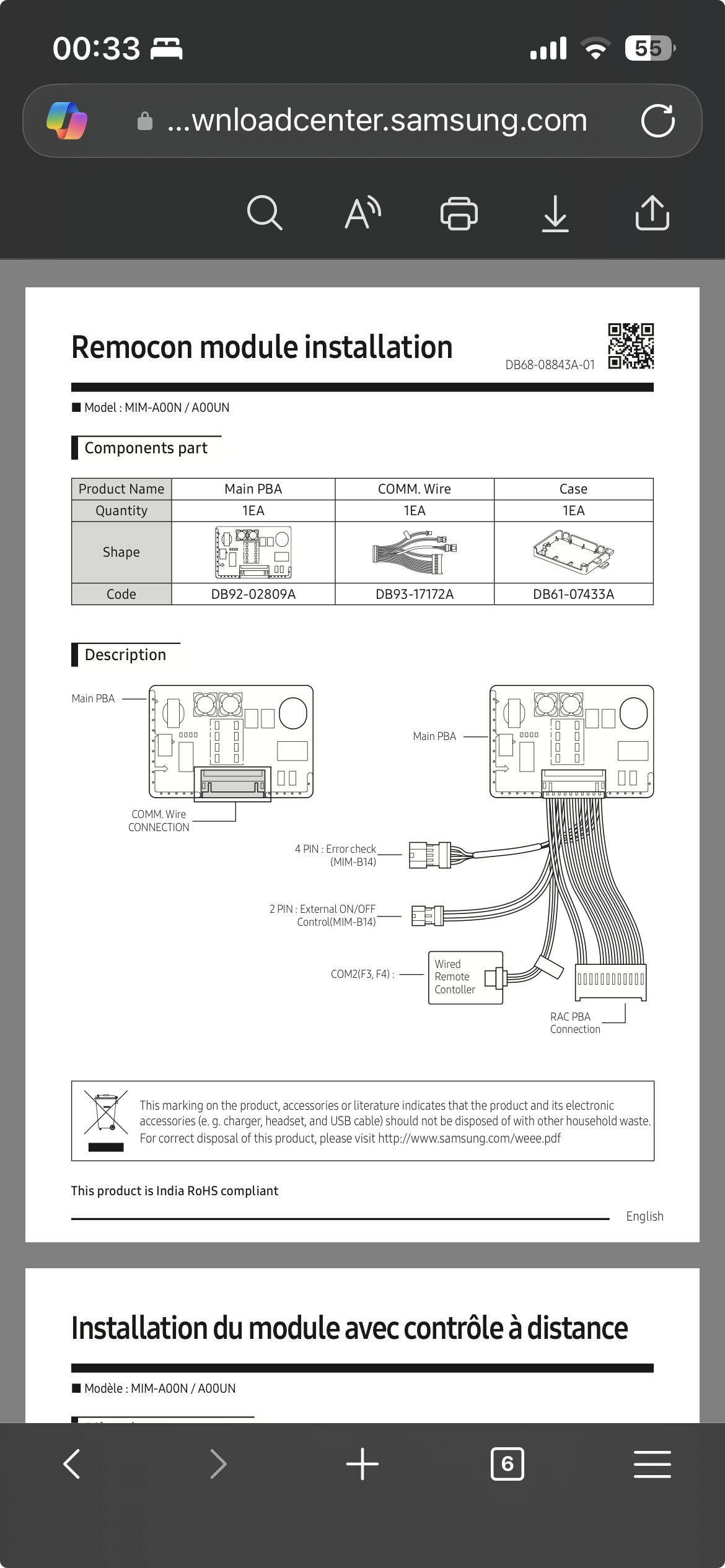
The individual module is connected to the main board, sensors, manual on/off button, and the remote receiver:
Multi-Split Samsung Para as Evaporadoras Cassete 1 via | Cassete 4 vias - Não precisa do módulo adaptador MIM-A00N Para as Evaporadoras Hi-Wall - Nessecita do módulo adaptador MIM-A00N + Kit Módulo Wi-Fi | MIM-H04N (Vendido Separadamente) 1 Módulo adaptador para cada Módulo Wi-Fi
You can try to talk with an authorized dealer/installer.
Thanks for the tip, @marcos.scheffler and @Victor_Barreira The problem is that I only found that MIM-A00N module in one place for R$ 400.00, and at that price, it’s simply not viable because I would have to install one on each of my four splits. That’s why I bought the Wi-Fi Kit, so it wouldn’t be so expensive.
One alternative would be to use IR (Infrared) in each room. That option isn’t as integrated; I even used it in my old apartment and it worked well, controlling all the functions and being cheaper, but still not as seamlessly integrated. I think the kit won’t be enough to solve this.
I also bought the Wi-Fi kit thinking I could save some money. I have a penta split system with 3 high-wall units and 2 ducted units.
However, the beeping sound and LED are really annoying me. Now I’m wondering if the Wi-Fi kit will work alongside the individual MIMs.
I will buy one MIM, run some tests, and post the results here.
Thank you for your previous response. I understand the limitations with the Samsung appliance development team access.
I wanted to follow up to ask if there’s any news from the development team regarding re-enabling access for Home Assistant integration? This feature was previously available and would be extremely valuable for our smart home setups.
Hi, @Victor_Barreira
What do you mean by re-enabling access for Home Assistant? There’s an official integration between SmartThings and HA, which was announced here:
It’s different than the original one since that one was a SmartApp. Now, they’re using the OAuth flow, which allows them access to the devices you decide to authorize.

 Setup:
 What works:
 What doesn’t work (but should):
 Yes (API & UI)
 No
No Important detail:
 My questions:
 Goal:
Goal: