The Smartthings app seems to not be functional this morning. I launch and it crashes before fully loading. All I get is the Smartthings logo. Restarted my phone and still have the same result.
I think your app is updated to 2.0.1. In the notes it said you need to uninstall and reinstall the app. Same thing happened to me this morning, after reinstalled issue was gone.
That fixed it. Thanks.
It was very frustrating this morning when I had an alarm go off yet I was unable to shut it off because my app kept crashing. I can confirm that yes, uninstalling and reinstalling does fix the issue. However, it’s an incredible joy to have to do that while a blaring siren is going off. 
I wish SmartThings would have at least posted a “heads up” notice somewhere other than the fine print in the app store so we’re not in a situation like this again.
I thought Apple used to reject app updates that had a description of “Please delete and re-install” as that violates their app quality guidelines, but I guess those have slipped a lot over the years and they don’t really do any validation anymore.
Re-install fixed the problem, but I’m not sure why they released an update with a bug requiring that; they should have pulled the update and tried again after getting it right. A lot of people have automatic updates turned on or don’t read the patch notes; they’re going to wonder why their app doesn’t work anymore (and have a broken smarthome today since their presence sensor on the phone won’t work.)
My wife’s phone is having this issue, I uninstalled and re-installed earlier today and its still doing it. I’ll try it again when I get home. My phone is fine.
In case this is affecting anyone…
If your account is set up to use smartthings widgets on either an iPad or an Apple Watch, you need to remove the widgets before you uninstall the old app before you install the new app.
I think the widgets may be causing some of the crashes.
From the dashboard, tap the three vertical dots in the upper right. Choose “my account”
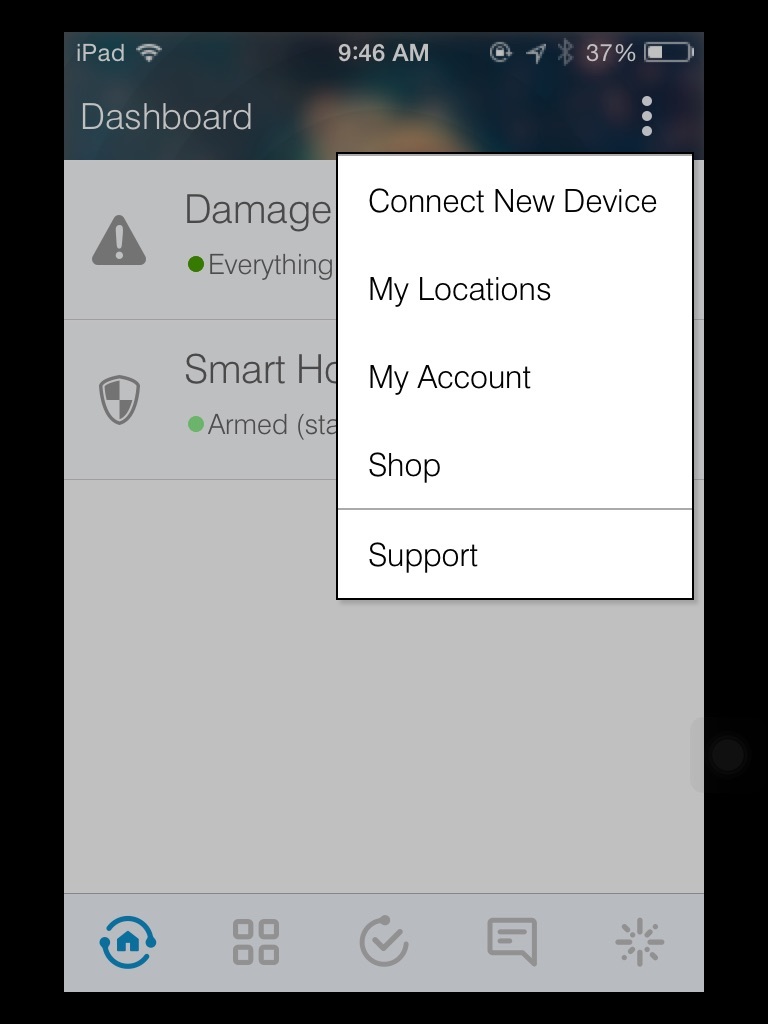
Now choose “manage watch and widgets” to turn off all widgets. Tap done in the upper right to save the changes.
Separately, if you also have the app on your watch, you need to go into the Apple Watch management app and uninstall smartthings there.
Then you can delete the smartthings mobile app and install the new version.
Remember to Add back the widgets that you want, and then reinstall it to your watch.
I had auto update setup and it did update sometime this morning but I didn’t get any crashes on iOS. I didn’t have the ST widgets enabled. So, as @JDRoberts said, its probably something to with the widget.
Missus’s iPhone doesn’t have the auto update set. So, probably she is still on 2.0.0 Will update her’s following the steps as has the widgets enabled, I think.
Can’t open the app- keeps crashing. Alarm still armed 
I have auto updates on and use the widgets and once I removed and reinstalled the app I had to add the widgets back. It probably is the widgets causing the problem. I wonder if you already are updated and crashing if you can just turn the widgets off and try the app again. If it works then turn the widgets back on.
I am now experiencing the same issue. Just fired off email to ST Support.
Should have known better something was wrong as ‘Hello Home’ did not trigger from iPhone presence (first time in many months). Walked in the door and my custom alarm triggered… tried opening App to shut it off and noticed the issue with crashing. Luckily widgets for modes in iOS Notification Center still worked and was able to shut it off.
Same issue here. Uninstalling and reinstalling the app fixed it, although that’s not a normal thing to have to do with iOS apps.
First outages, then half my smartapps quit working for no apparent reason, now this. Keep swinging, SmartThings. Batting about .001 with me this month.
My phone is fine but my wife’s is not, i’ve uninstalled/reinstalled and shutdown and restarted her phone to no avail. It keeps crashing. I’m new to smart things, but don’t think we have widgets?
I’ll open a support case tomorrow I guess. Maybe i’ll also try logging in as my email on her phone instead of her email, but meh I don’t like that solution.
Thank you! This resolved the issue for me too.
This is not an acceptable approach to app updates on a platform that allows automatic updates of apps without user interaction.
Just to give some more information here, I did have auto updates on and was running the ST app last night and this morning with no issues. Only noticed issue this evening when I returned home.
Also I just deleted app from my iPhone, missed @JDRoberts suggestion to delete widgets before deleting app. When i reinstalled the iPhone App I had to reset widgets.
I experienced the same thing too, but like a few people mentioned, as well as the in the update notes of 2.0.1, having widgets or iwatch support enabled would require a uninstall/reinstall process.
Not the smoothest update, but at least its very do-able.
First thing I did when I saw this was look for the thread about it
Similar experience here, reinstall fixed it and my presence kicked back in about 10 secs after I logged in. Thanks for the heads up guys.
The SmartThings app (v. 2.0.1) works just fine on my phone with my login. The same app version on my wife’s phone using her login crashes instantly. Widgets/watch not enabled. Uninstalled/reinstalled three times with the same result.
Update: I have tried uninstalling/reinstalling the app on my iPhone - same results. I tried to remove/add my wife as a user, but I only receive an error message (“Error removing [user] from the account.”). I cannot resend an invitation. Now when trying to install & login on my wife’s phone, the app asks for location and a Welcome code (as if the user is setting up a new account).
In short, broken.
2.0.1 on iOS is broken. Also this is the third time this year that an update from SmartThings has broken my ability to communicate with my smart home. way to go SmartThings. Stop using me as your guinea pig. Get a QA department.