Everything is working again for me too now. Sent a reboot from the IDE and I am in na04-useast2.
1 Like
I sent a reboot from the IDE and everything is working with the exception of one light bulb. It shows it is on, but it’s not. When I try to switch on and off nothing happens. I have the same bulb in a light fixture in the same room, and it works just fine.
2 Likes
I sent a reboot from the IDE and it is working now.
1 Like


Here is where i am at: https://youtu.be/7Y7bqZUDEsA
Still doing the offline thing for me (I’m in na04 useast2). It happened a day or two ago, pulled the plug on it and it came back online. Was offline again today and as others have said, green light on the V2 hub, and everything shows disconnected but still works. Rebooted via the IDE today and everything is back online…we’ll see if it stays that way.
Hi folks. We are still digging in here, but can the people who have tried rebooting their Hub confirm how long they had it powered down? As Blake mentioned earlier, the reboot is to help re-fire the health events through the platform to get the state synced back up and that may not happen if the Hub is only offline for a few minutes.
If you power down the Hub for 5+ minutes and upon powering it back on and the LED going green still don’t see it online, can you please DM me so that we can dig into some specific examples?
1 Like
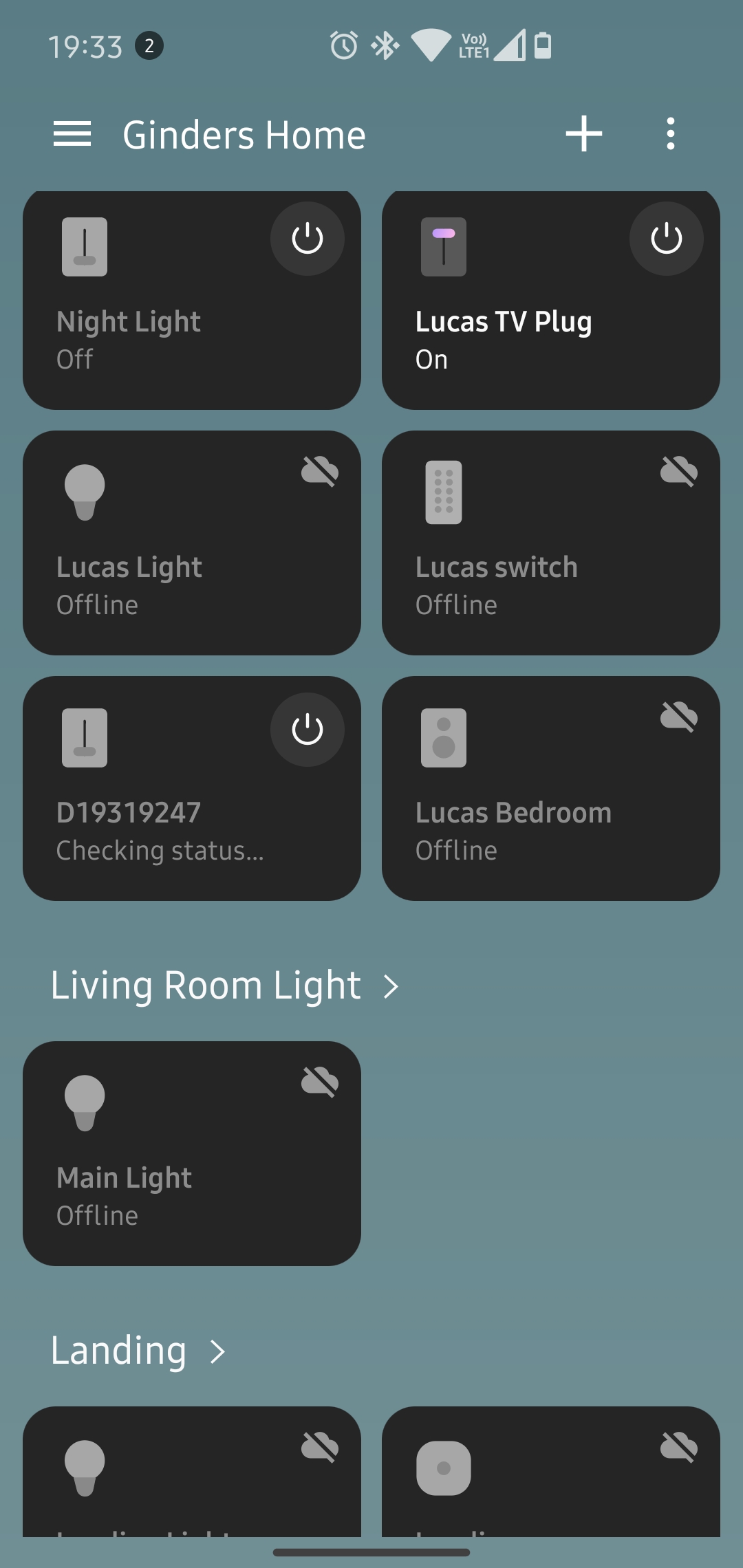
UK checking in all devices showing offline in classic app and IDE, except HubConnect devices
I’m in UK. Classic app on the wife’s phone says online and can set and reset the home monitor. New app on my phone says hub offline and all sensors offline - so clearly ongoing…
Not exactly impressive…!
This has started for me this afternoon in the UK, all devices both in the new app and on the IDE.
I have sent the reset command and unplugged for 5 minutes with no luck.
The only devices online are my cloud connected TP-Link Kasa plugs


1 Like
here is what I did. maybe it will help
I tried rebooting the hub but only left the power off for about 30 sec but this did not work.
I then did a reboot from the IDE page using the hub command…but it seemed like it didnt do anything.
I waited a min and then did a ping from the page and it responded with “The hub responded 4.885 seconds ago”
after this the hub was back online in the app and I could control items in the app and using alexa.
I did what was mentioned above where I left my hub unpowered for at least 15 minutes. Got a notification that it was offline at some point. Powered it back up, and now the app shows that it is online! Will keep monitoring it to see if it stays connected. Thanks for the tip!
1 Like
Sent you a PM. Did another reboot. Disconnected/reconnected from WiFi. Still same offline status.
What did change is the display on my ADT hub no longer properly updates the icon to show if a sensor is open/closed. Security Manager within the app does update correctly.
at 3:27 CDT time I tried doing a hub reboot and a hub ping. Only cloud based devices and smartthing devices are online. 2 Wemo switches offline, innovelli light bulb Offline, ALL virtual switches are Offline, Smart Weather Station Offline.
1 Like
It’s been a few days now but with this issue. I power cycle the hub, Rebooted in ide have a green light and still the hub is reporting offline and devices are offline. I reported here since this issues started. Still not resolved.
1 Like
Chiming in that I’m experiencing the same thing. Hub and all devices show offline in the new ST app but online in the Classic app. In both apps I can still control devices even though they show as offline.
Alexa integration is hit or miss…sometimes it works, sometimes she says the device is offline, and sometimes it works AND she says the device is offline.
The hub has a solid green light and I can ping it. I have tried rebooting it and signing out/in of the app.
1 Like
Update: Even though the app now shows the hub online after the long reboot process, I can’t control anything through Google Assistant.
Update again: Went through the painful process of unlinking everything from Google. Found my wife had a lock on some of the devices as well so needed to use her phone to unlink. Now after resyncing things appear to be back!
Finally figured out how to get the battery backup disconnected one ADT Hub. Everything is showing online now.
1 Like
I have the ADT/Smartthings security panel. Smartthings app (new) reports that the hub is offline along with the sensors. Two days now. I can still manually arm and disarm from the hub itself and get audible opened/closed notifications from all my ADT/Smartthings sensors. Is this the end for the security hub or some sort of glitch that needs to be remedied?
Mine is also down. Restarting the hub and waiting 30 minutes did not resolve the issue. Running v3 of the hub. My doors are no longer responding either. I though you could use this device locally…