We have these at my local Lowe’s but I’m afraid to pull the trigger due to integration. I have a couple of Nest Protects, but I’d like to replace them with something that integrates directly to SmartThings. @dkirker or @csuk, any update on official integration?
Did they have them in stock or just the cards out? Mine had the cards out but 0 in stock…
I’m chomping at the bit for ST support on this
Now that you’ve asked, I’m not sure. I assumed since the cards were out they had them, but I didn’t ask, so they may not.
I just scoped out their website and see they are selling directly on there. The specs for hardwire confirm ZigBee so I hope one our great devs can get this integrated.
We’ve started certification of the Halo integration! Can’t speak to a release date yet, but we’re actively working on it.
Cheers!
 I Received six Halo Smoke Detectors today to replace 12 y/o Honeywell models. Mfg Date stamps on back: 1/31/2017. I was able to order 6 of them through their online store @ Halo smart labs.com. (Regular models w/o Wx alert since my ST severe Wx smart app already handles that function). Installation was as simple as plugging into the existing pigtail and screwing in the new mounting plate. I opened ST App and found Halo is now available in the marketplace (marketplace>Smoke Detectors & Alarms). Halo was already in pairing mode and pairing was completed in ~ 10 secs. Total installation time < 5 mins. I was surprised to see RGB lighting control included in the DH. Overall look and function are great thus far except The Alarm “hush” feature is disabled in ST app (although functioning in Halo app). [UPDATE Hush function is enabled in ST App when alarm is triggered] Will update once I’ve had an opportunity to further test functions and review logging. Pics show DH features in ST app.
<src="//cdck-file-uploads-global.s3.dualstack.us-west-2.amazonaws.com/smartthings/original/3X/b/b/bbfd523039f335541c66ce4557de95c7eeffc46a.PNG" width=“281” height=“499”>

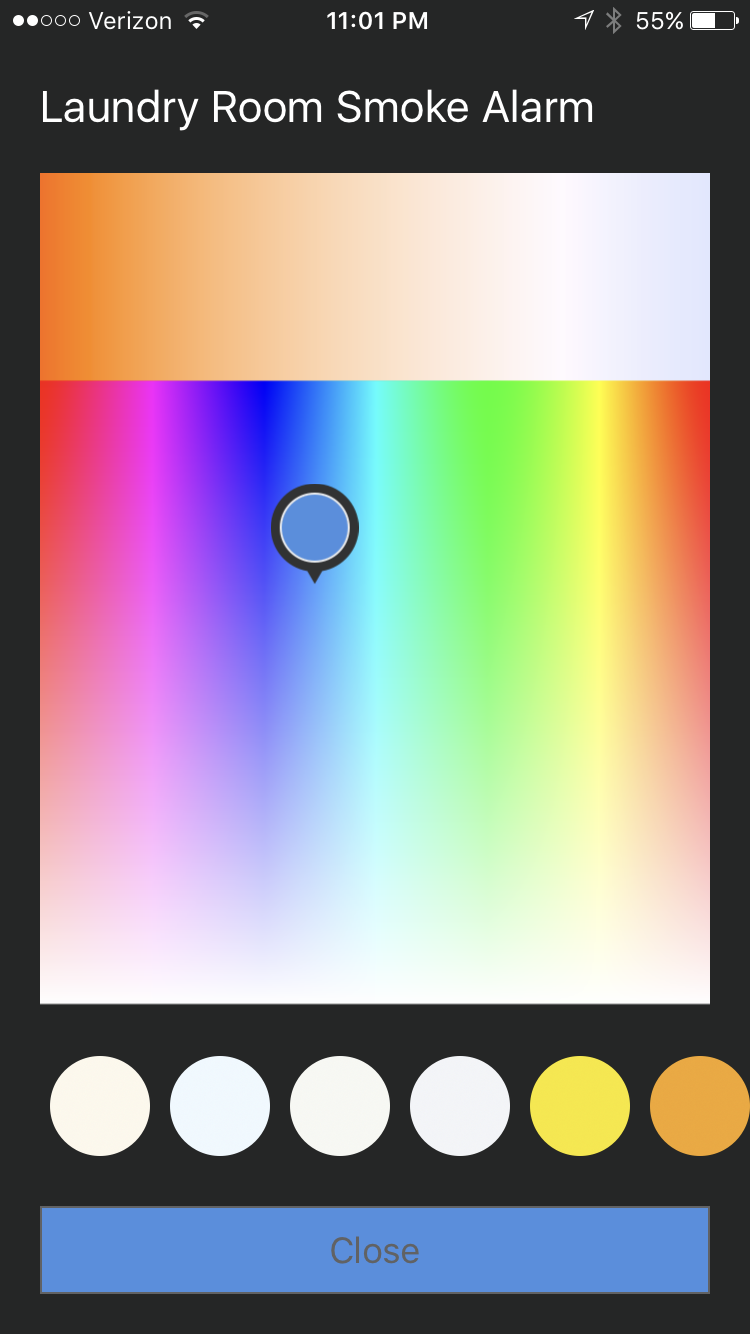
Keep us posted. I’m looking to purchase these in the coming weeks.
Did you purchase any Halo+ models? I’m considering at least 1 Halo+ near our master bedroom to add the weather warning feature.
Definitely interested. I don’t want to replace all of mine, only a couple
so interested to hear if there is some interoperability between Halo and
"dumb" hard wired smoke detectors
Just finished first round of tests on the Halo’s. Setup: 3 x Downstairs / 3 x Upstairs, residential; two were installed with Halo App via WiFi, the other four were installed with ST via Zb. One old detector remains upstairs.
Tests were completed successfully from all Detectors with the following notes:
- Voice announcements only indicate specific location of alarm from alarm device connected through wifi to Halo App (ST will notify you of specific device through app, just not through voice alerts)
- Alarms cannot connect to both Halo App and ST simultaneously.
- Alarm notifications were received on mobile device In ~ 30 sec and alarm “hush” commands were received by device in ~ 5 sec
- there was some observed lag in device state pushes when conducting alarm tests. (May continue to display status as testing in app 10-15 mins after testing is completed
After tests I decided to pair all alarms with ST to lessen burden on Wifi network and for ease of use with my smarttiles enabled smart panel (mounted iPad).
So far, very impressed with ST App control functions (13 tiles in all) and dependability of alarm.
Not yet, but I do still have one old model alarm left to replace, so I’m considering installing the Halo +. I will let you know if I do
was your “old” one connected via interconnect? Did it go off when you tested the Halo?
All my Detectors are hard interconnected. The old detector did sound during all tests, and I was able to sound all alarms from testing the old one. The Halo will charge the interconnect wire when alarm is activated and also broadcast alarm type via zigbee or WiFi, depending on which protocol it is paired with. It’s important to consider that without an interconnect wire other Alarms will not activate unless they are activated through an independent controller. With all Halo Detectors, this is best accomplished through their app (via WiFi), as wireless interconnection is only supported by Halo through their app (per Halo user manual). For wireless interconnection through ST, this is accomplished by enabling a “virtual alarm” through a smart app. Hope this helps.
I’m relatively new ST and have been slowly adding to my home system. Next on my list are smoke detectors and alarm sirens. I am impressed with the ability of the Halo to signal different types of audio and visual alerts. I am curious if there is a way to use this functionality from an trigger external to the Halo, such as using a Halo as the ST Alarm Monitor siren. I havent been impressed with the supported sirens, but if a Halo could be used that way in addition to its primary purpose, I would be completely sold
I don’t believe this is possible to do (at least in any official manner).
I have a couple of Halos, and they don’t show up as available sirens (for other types of activity alerts) in the Smart Home Monitor.
I’m not an expert, but I suspect the primary reason why is that the audio alert on the Halo itself is not customizable. It wouldn’t make sense to trigger an audio fire alert for a water leak.
Perhaps there will be an option in the future to customize those Halo alerts though - you could suggest it to the Halo product team to consider as an enhancement
I think smoke detectors aren’t really allowed to do this. What if you had it setup to alarm when your laundry is finished? The alarm goes off, but what if it’s really trying to tell you there’s a CO leak coming from your dryer? Or the CO alert would be delayed because the device is communicating with your ST hub already to set off a non-essential alert.
@JDRoberts knows more about this.
What @marktheknife said. 
In the US, a distinction is made between residential smoke alarms and multipurpose security alarms, particularly those for offices.
In the US, residential smoke alarms, from the first alert to nest protect to halo are not supposed to use their speakers for any other notifications, as the fear is that you might get a notification that the laundry was done and miss a smoke alarm.
Multi-purpose Alarm systems such as those used in offices don’t have the same restriction as they are supposed to be part of a system that also has a separate set of fire only alerts.
@Hydro
Halo does show the IAS WD cluster in the logs, so maybe a future feature? 
Got two of the halo+ in a couple days ago and got them setup pretty quickly. Overall these seem like the best option for wired smokes with SmartThings right now. The weather radio works except they don’t actually have any information to tell you which radio station is yours, just an option of 1-7. I googled and guessed my station based on the frequencies available and which frequency was listed for my city, and that seemed to work. Theoretically I also don’t have any fire or CO in my house right now too, but basically works as expected as a regular smoke detector…
Otherwise, the humidity and temperature sensors were a pleasant surprise; you could theoretically use these as temperature sensors with your thermostats. The only other thing that was weird is that using the light on the halo seems to spike the temperature sensor and after 30ish minutes the light turns itself off. Does this happen to anyone else? Seems strange that they would stick the leds right next to the sensors, but i see it steadily increase something like 15 degrees over ambient while its on, and then just turn itself off and not respond until i force it on/off/on again.
The time limit on the light is a limitation built into the Halo. If you were to set up the Halo in the Halo brand app you would have the option of 15 or 30 minutes for the light when it’s turned on. However you can only set it up in SmartThings or the Halo app - Not both. Halo says they’re working on that and the option to have the light on longer.
Has anyone had problems turning the light on? It never responds for me the first button push. It says it’s “on” in the app but the light on the Halo itself requires two button pushes in the app to actually get the it to turn on.
Matt
Nice to know it’s just something specific to the lights in general, although the temperature sensors do sitll seem a bit wonky. As for the problems turning the light on, that’s pretty similar to what i’d been seeing. Sometimes the lights respond the first time I hit the button and other times it takes a couple presses. No real rhyme or reason when it does work the first time, but it was generally after the light turned itself off.