Could I get the user limit increased significantly, please?
App Id 0ddfb7ee-e085-4a1c-bf9b-5031e596e5bf
App Name a-8afe3474-9378-4360-9da1-6270cc9dab9b
Description Naver Weather Edge Driver
This App ID is shared across multiple Edge Drivers (Naver Weather, TTS, SmartThings Edge, 3D Floorplan, etc.), and each driver has its own user base. Several of these drivers include features that are believed to be world-first implementations on the SmartThings Edge platform.
The Naver Weather driver alone has reached 2,000 installs within just 2 days of release and is growing rapidly. We are unable to introduce these drivers to the wider community until the authentication limit is resolved.
Could you please increase the limit to 10,000 or higher if possible?
Thank you!
RBoy
(www.rboyapps.com - Making SmartThings Easy!)
2
Are you taking about a SmartApp or an edge driver?
If it’s an edge driver there are no limits and how are you tracking installs? I don’t see any driver for this, there just appears to be a website.
If it’s a smartapp I’m surprised you got to 2000 installs because the default limit is 100 followed by 500.
This is not about the shared Edge driver Channel install limit.
The Edge drivers themselves are already being installed through a Channel.
The issue is a separate OAuth authorization flow used by companion browser-based features for already-installed Edge driver users.
The local Edge driver exposes a browser page, and that page uses SmartThings OAuth for two purposes:
resolving the driver’s current local hub address after port changes
optional user device control features, including TTS and commands sent to user-selected SmartThings devices
This same pattern is used in more than one of my Edge drivers, including Naver Weather and 3D Floorplan.
Users are getting the following actual OAuth error:
error=max_installs_exceeded
error_description=The app cannot exceed a max of 20 installs
So the problem is not Edge driver installation.
The problem is that the companion OAuth app appears to be capped at 20 installs/authorizations.
Could SmartThings please clarify whether this API_ONLY app is currently limited to 20 installs, and if so, how it can be moved to the documented default of 500 installs, or what the correct supported path is for this kind of companion authorization scenario?
To clarify in more detail, the Edge driver is not directly launching a browser process by itself.
What it does is expose a local web page through a local HTTP server running on the hub, and then expose that page to the user through the SmartThings device UI.
The architecture works like this:
The Edge driver starts a local HTTP server on the SmartThings hub.
This local server is created by the Edge driver.
It serves a browser page for the installed device.
Because it runs locally on the hub, the assigned port may change after hub or driver restart.
The Edge driver stores the current local server address in a device attribute / custom capability.
For example, it stores a value like http://<hub-ip>:<dynamic-port>.
That current address is shown in the SmartThings device detail board.
In the device detail board, the user can see the current server address exposed by the Edge driver.
In my case, I show this in the device UI as the current local server value.
So the Edge driver is not “launching” the browser directly.
Instead, it makes the local page discoverable through the device UI, and the user opens it from there.
When the user opens that local page in a browser, the page acts as a companion web client for the already-installed Edge driver.
It is not just a static page.
While the page is open, it can periodically fetch data from external web sources such as weather sites.
It parses the results in the browser.
It then sends the parsed results back to the local Edge driver HTTP server.
The Edge driver receives those results and updates the SmartThings device attributes.
The same browser page is also used for companion SmartThings-authorized features.
Because the local hub port can change after restart, the browser page may need to resolve the latest local hub address again.
To do that, the browser page uses SmartThings OAuth to read device attributes from the already-installed Edge driver.
The same authorization path is also used for optional user-facing control features, such as TTS and sending commands to user-selected SmartThings devices.
So the important distinction is this:
The Edge driver itself is not doing OAuth internally.
The Edge driver itself is not directly launching a browser process.
What the Edge driver is doing is:
hosting a local browser page on the hub
exposing that local page address through the SmartThings device UI
letting the user open it in a browser
using that browser page as an active companion web client for the installed Edge driver
This same general pattern is used in more than one of my Edge drivers, including Naver Weather and 3D Floorplan.
In both cases, the browser page is not only a UI.
It is also an active companion client that:
communicates with the local Edge driver server
periodically reads external web data
updates device attributes
and can optionally use SmartThings OAuth for companion features such as resolving the latest local address or controlling user-selected devices
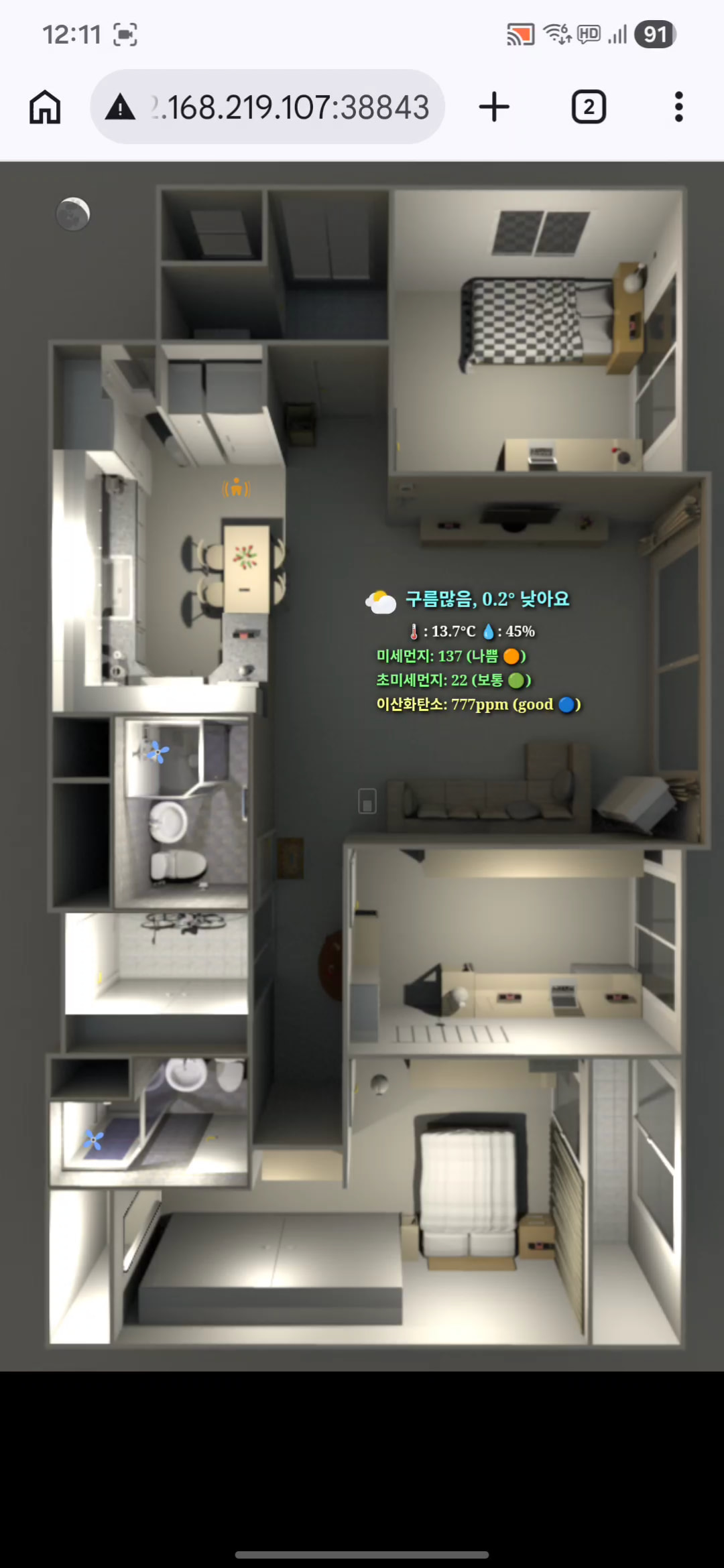
I am attaching screenshots for clarity:
The first screenshot shows the SmartThings device detail board, where the Edge driver exposes the current local server address.
The second screenshot shows the browser page served by the local HTTP server of the Naver Weather Edge driver.
The third screenshot shows the same pattern being used by the 3D Floorplan Edge driver, where a browser page served by the local Edge driver HTTP server provides a companion interactive view.
So this is not just a static external website.
It is a browser-based companion layer attached to an already-installed local Edge driver.
Hi, @clipman
We’ll ask the engineering team to increase the limit to the default of 500.
To request another increase, you need to submit the form mentioned in this section of the documentation:
The responses to those questions will be sent to us. This information will be shared with the Business Development Team. They’ll communicate directly if they want to pursue a partnership to increase this limit.
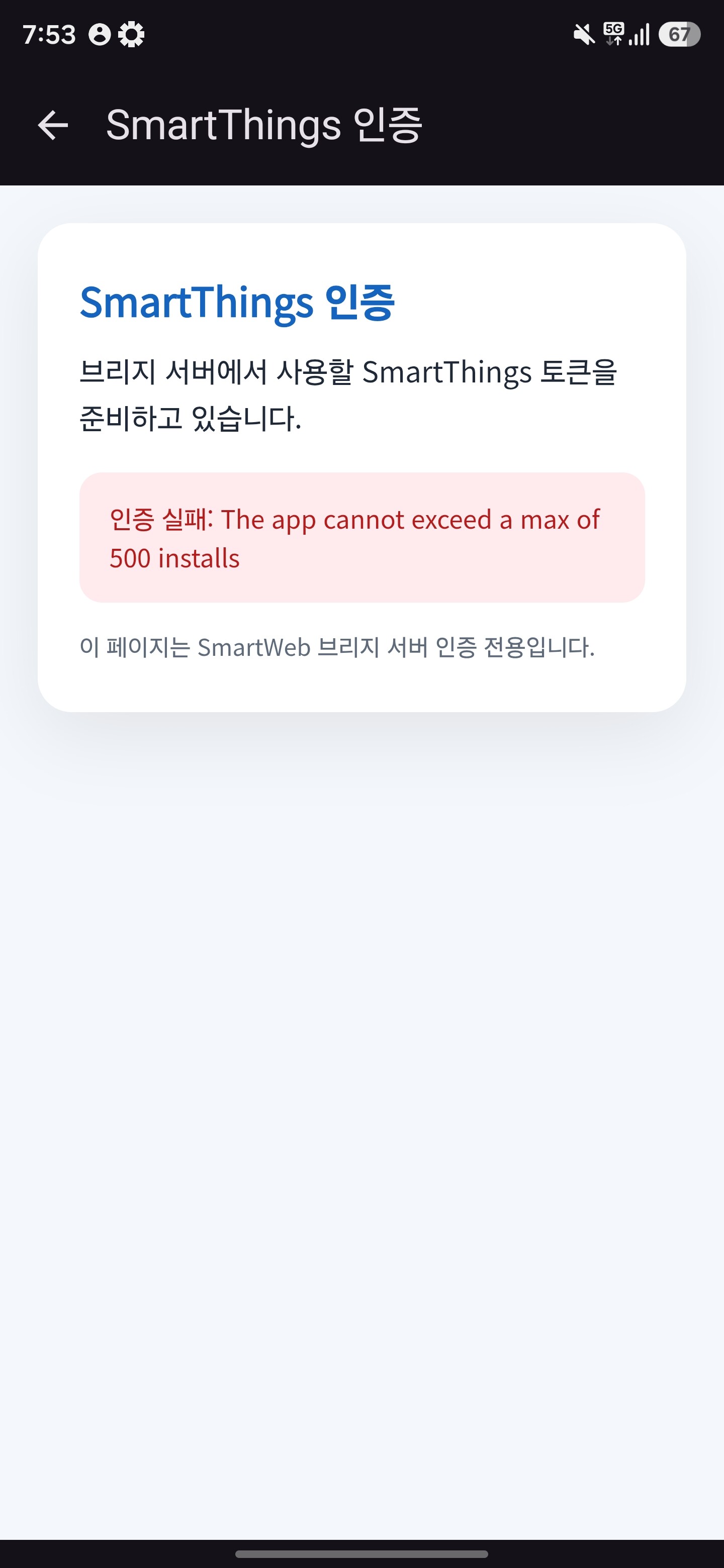
Follow-up: Now exceeding the 500 install limit (screenshot attached)
Hi again,
Following up on my previous request above. After that post, the limit was raised from 20 to 500 installs, which we appreciated.
However, we’ve now exceeded that 500 install limit as well, and users are hitting an authentication error when trying to connect (screenshot attached: “인증 실패: The app cannot exceed a max of 500 installs”).
App Id: 0ddfb7ee-e085-4a1c-bf9b-5031e596e5bf
App Name: a-8afe3474-9378-4360-9da1-6270cc9dab9b
Description: Naver Weather Edge Driver
Given that we’ve already outgrown the 20 → 500 increase in a short period, could we request a larger increase this time (e.g. 5,000–10,000) to avoid needing to file another request again soon?
Happy to provide any additional details needed to process this. Thanks for your help!