I have been working on a dedicated SmartThings Edge driver for the SONOFF Hydro ONE, SONOFF Hydro ONE Lite and, experimentally, the SONOFF Hydro DUO Zigbee smart water valves. I don’t have these devices, so @Chris74 did the real-world tests for the full Hydro ONE models and provided a massive amount of logs. Hydro DUO support is new and still needs real-device validation.
The supported and test-supported models are:
| Model | Device | Region / thread type |
|---|---|---|
| SWV-ZFE | Hydro ONE, with flow meter | EU / UK / many regions, G 3/4 / BSP thread |
| SWV-ZFU | Hydro ONE, with flow meter | North America, NH 3/4-11.5 thread |
| SWV-ZNE | Hydro ONE Lite, without flow meter | EU / UK / many regions, G 3/4 / BSP thread |
| SWV-ZNU | Hydro ONE Lite, without flow meter | North America, NH 3/4-11.5 thread |
| SWV-ZF2 | Hydro DUO, dual-channel, with flow meter | base model string used by public Zigbee integrations |
| SWV-ZF2E | Hydro DUO, dual-channel, with flow meter | EU / UK / many regions, G 3/4 / BSP thread |
| SWV-ZF2U | Hydro DUO, dual-channel, with flow meter | North America, NH 3/4-11.5 thread |


From the driver’s point of view, the full Hydro ONE models use the same Zigbee behaviour, while the Lite models use a separate profile with the flow-meter-related parts removed. The Hydro DUO models use another separate profile with two SmartThings components, one for each valve channel. The important buying difference is still the physical thread standard, so please do not buy the wrong one unless you enjoy adapter archaeology.
This driver is intended for the Hydro ONE models SWV-ZFE and SWV-ZFU, the Hydro ONE Lite models SWV-ZNE and SWV-ZNU, and experimental Hydro DUO support for SWV-ZF2, SWV-ZF2E and SWV-ZF2U.
It is not intended for the older SONOFF Zigbee Smart Water Valve model SWV / SWV-BSP / SWV-NH. That device is related, but not identical, and should be treated in a separate driver.
What are the SONOFF Hydro ONE, Hydro ONE Lite and Hydro DUO?
The SONOFF Hydro ONE is a battery-powered Zigbee 3.0 irrigation valve with an integrated flow meter. It is designed for garden watering, balcony irrigation, greenhouse setups, drip systems, raised beds, lawns and similar outdoor watering use cases.
The Hydro ONE Lite models SWV-ZNE and SWV-ZNU are the related Lite variants without the flow meter. They are still Zigbee smart water valves, but they do not measure irrigation volume. For SmartThings this means they should expose valve control, timed watering and duration-related status, but not litre-based values or flow-meter alerts.
The Hydro DUO models SWV-ZF2E and SWV-ZF2U are the dual-channel variants with a flow meter. They are designed for two watering zones and appear as one SmartThings device with two controllable valve channels. SONOFF states that the two channels cannot operate at the same time, so the driver handles them conservatively.
The full Hydro ONE can open and close the valve, run timed watering, measure irrigation duration and volume, detect abnormal valve states, and expose safety-related settings such as child lock, shortage alarms, leakage alarms and auto-close behaviour. SONOFF also documents the Hydro ONE models and their specifications in the official help center page for SWV-ZFU / SWV-ZFE.
SONOFF’s own ecosystem also supports more advanced irrigation features such as schedules, rain delay, seasonal adjustment and history records. Some of those features are implemented through manufacturer-specific Zigbee payloads, so they are not automatically available through a generic SmartThings Zigbee driver.
That is why this custom driver exists.
SmartThings can treat these valves as a basic switch or valve, but they are more than that. They are water-control devices, and water-control devices deserve slightly more respect than “turn mysterious switch on and hope the garden does not become a lake”.
Why a custom Edge driver?
The goal of this driver is to expose the SONOFF Hydro valves as proper SmartThings irrigation devices:
- locally controlled through a SmartThings hub;
- usable in SmartThings routines;
- readable as a valve, switch and irrigation device;
- able to expose SONOFF’s private irrigation/status data;
- able to configure the important safety settings through device preferences where supported;
- able to handle the Hydro DUO as one device with two valve channels;
- conservative enough for sleepy battery-powered Zigbee end devices.
The driver does not try to recreate the full eWeLink irrigation planner inside SmartThings. That would be possible only after much more reverse engineering and testing, and it would also make the first public driver unnecessarily fragile. SmartThings’ daily routines are the way to go.
The current driver focuses on the useful and validated core.
Driver features
Basic valve control
The driver maps the standard Zigbee On/Off cluster to SmartThings valve and switch behaviour.
In practice:
| Action | Result |
|---|---|
| Switch on | Valve opens |
| Switch off | Valve closes |
| Valve open | Valve opens |
| Valve close | Valve closes |
The normal SmartThings switch and valve capabilities are both exposed so the device remains easy to use in routines and in the app.
For the Hydro DUO, the driver creates one SmartThings device with two controllable components:
| SmartThings component | Hydro DUO channel | Zigbee endpoint |
|---|---|---|
main |
Channel 1 | Endpoint 1 |
channel2 |
Channel 2 | Endpoint 2 |
Each channel can be opened and closed separately in SmartThings.
Hydro DUO channel safety
SONOFF states that the two Hydro DUO channels cannot run simultaneously. The driver therefore handles the DUO conservatively:
| Requested action | Driver behaviour |
|---|---|
| Open Channel 1 | cancel driver timers, send Off to Channel 2, then open Channel 1 |
| Open Channel 2 | cancel driver timers, send Off to Channel 1, then open Channel 2 |
This should avoid SmartThings showing two active watering channels when the hardware itself does not support simultaneous operation.
Timed watering
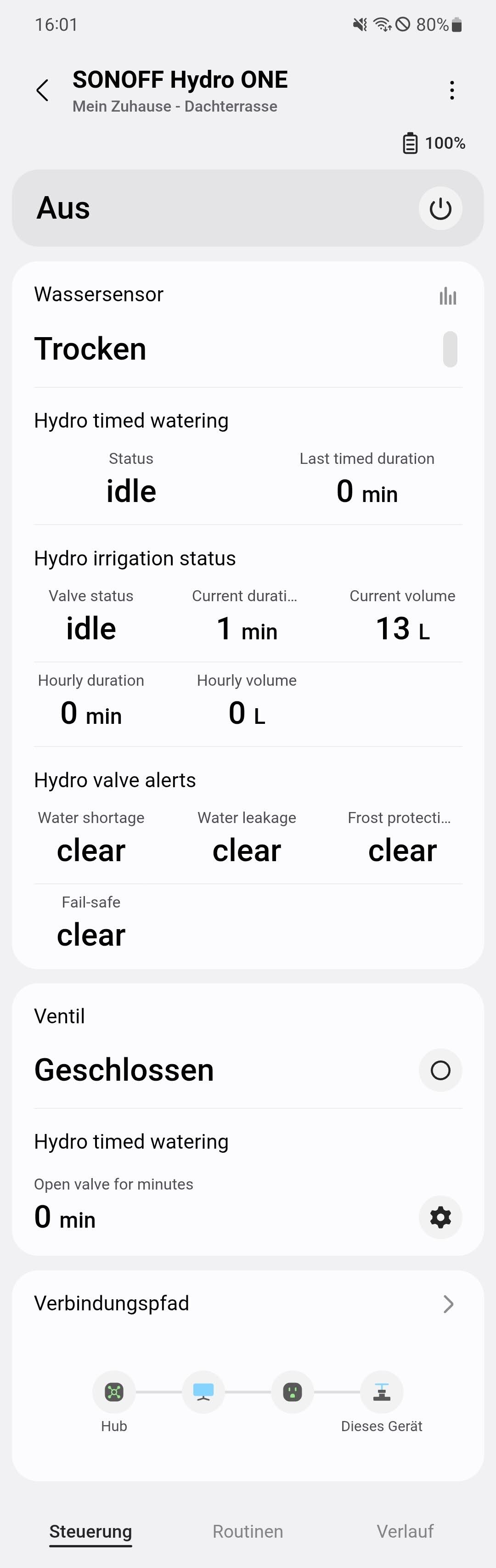
The driver includes a custom Hydro timed watering capability.
This allows the valve to be opened for a selected number of minutes. In the current driver, timed watering uses a driver-managed timer by default: the driver opens the valve, schedules the close command locally on the hub, and then closes the valve after the requested time. The older native Zigbee OnWithTimedOff path remains available as an experimental option in preferences.
The UI exposes:
- timed watering state;
- last requested timed duration;
- “Open valve for minutes” control.
This is probably the most useful everyday feature of the driver. A manual valve is fine until someone forgets it. A timed valve is much better. The plants get water; the garden does not apply for wetland status.
Manual watering duration
The driver also exposes Manual watering duration as a device preference.
This is the device-side manual watering limit used when the valve is opened normally through Valve open or Switch on. Some devices close themselves after about 10 minutes because of this internal setting.
The preference range is:
| Setting | Range |
|---|---|
| Manual watering duration | 1–719 minutes |
Technically, this writes SONOFF’s private manual_default_settings payload on cluster 0xFC11, attribute 0x501D. This was only figured out recently in public deCONZ integration work for the Hydro ONE Lite, and it is a useful missing piece for SmartThings as well.
If you want a normal routine like this:
Open valve → wait 30 minutes → close valve
then set Manual watering duration to at least 30 minutes, preferably a bit higher.
Battery reporting
The Hydro ONE, Hydro ONE Lite and Hydro DUO are battery-powered and use the standard Zigbee Power Configuration cluster for battery reporting.
The driver exposes this through the normal SmartThings battery capability. For the Hydro DUO, battery is a shared device value and is exposed on the main component.
Child lock
Child lock is supported through SONOFF’s private Zigbee cluster.
In the current driver, child lock is configured through device preferences, not as a custom dashboard tile. This is intentional: child lock is a configuration setting, not something most users need on the main device screen every day.
For the Hydro DUO, child lock is treated as a shared device setting.
Irrigation status
For the full Hydro ONE models, the custom Hydro irrigation status capability exposes several useful runtime values:
- valve work state;
- current irrigation duration;
- current irrigation volume;
- hourly irrigation duration;
- hourly irrigation volume.
For the Hydro ONE Lite models, the driver uses a separate Hydro lite irrigation status capability with only the values that make sense for a valve without a flow meter:
- valve work state;
- current irrigation duration;
- hourly irrigation duration.
For the Hydro DUO alpha path, the driver uses the normal Hydro irrigation status capability on both channels. The goal is to expose per-channel duration values and available volume-related values from SONOFF’s private cluster. This part still needs real-device validation on SmartThings.
The driver handles a SONOFF-specific quirk where the same duration value can arrive in different byte order depending on whether it is received as a read response or as a report. The driver therefore uses adaptive decoding for the private uint32 values instead of assuming one fixed byte order.
This is one of those small details that makes Zigbee reverse engineering such a relaxing hobby.
Valve alerts
For the full Hydro ONE models, the custom Hydro valve alerts capability exposes abnormal valve states decoded from SONOFF’s private bitmask:
- water shortage;
- water leakage;
- frost protection;
- fail-safe.
Water leakage is also mapped to the standard SmartThings waterSensor capability where appropriate, so it can be used more naturally in routines.
The Hydro ONE Lite models do not expose this alert capability in the current driver. They do not have a flow meter, and the first Lite support path intentionally avoids showing unsupported or untested flow/alert fields.
For the Hydro DUO alpha path, the driver exposes shared alert state on the main component. Current public ZHA work maps the DUO abnormal-state bitmask as water shortage channel 1, water leakage, anti-frost/frost and water shortage channel 2. A dedicated DUO fail-safe bit is not confirmed, so the driver keeps fail-safe clear for DUO until real logs prove otherwise.

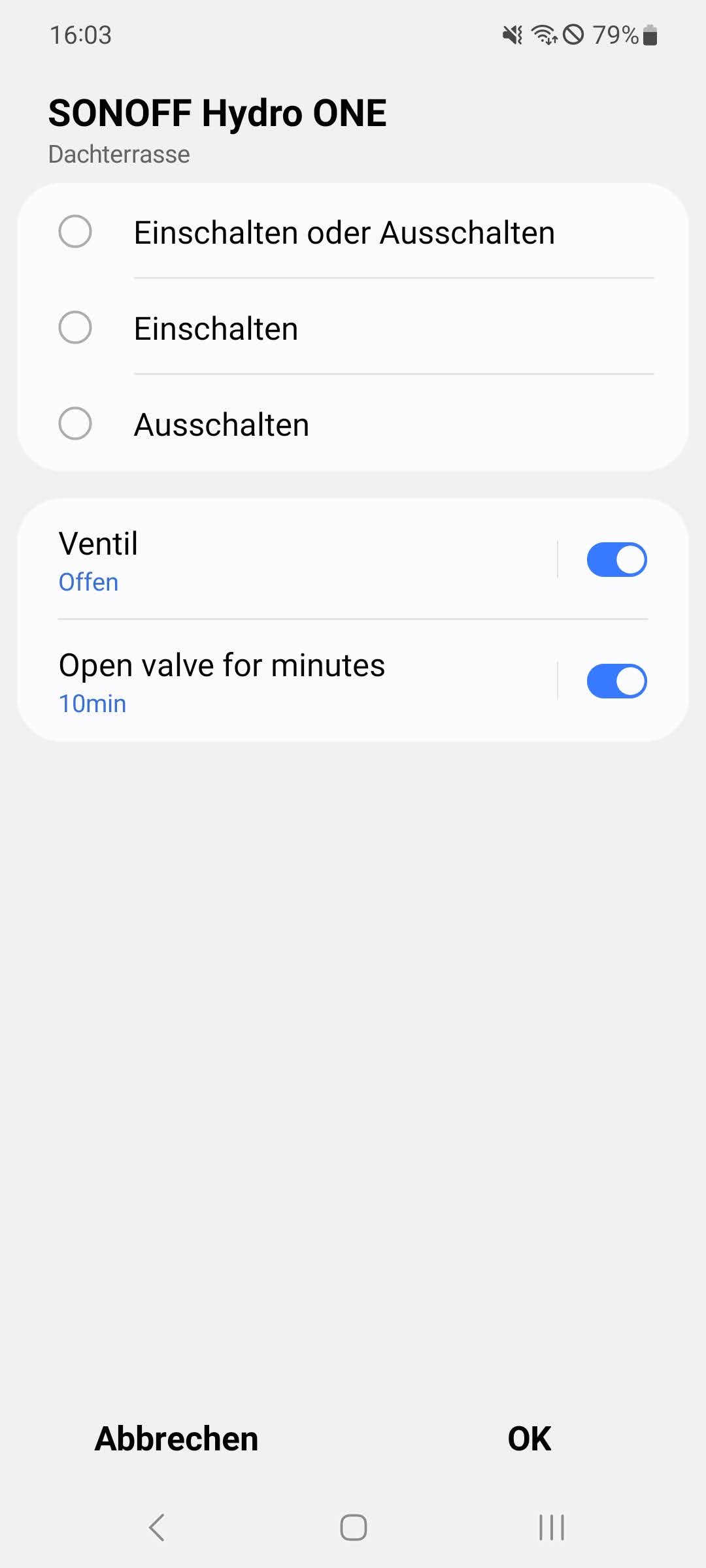
Example routine ideas for the full Hydro ONE models and, where supported, Hydro DUO:
- If water shortage is detected, notify me.
- If water leak is detected, close another upstream valve.
- If frost protection is active, stop watering routines.
- If fail-safe is active, send a high-priority notification.
Device settings in Preferences
The current driver deliberately keeps the valve configuration in the Settings menu instead of cluttering the main device screen.

Available settings for the full Hydro ONE models include:
- child lock;
- manual watering duration;
- timed watering mode;
- water shortage alarm;
- water leak alarm;
- frost protection alarm;
- water shortage auto-close;
- water leak auto-close;
- shortage alarm duration;
- leak alarm duration;
- frost threshold;
- timed-open scaling;
- real-time duration unit;
- debug logging;
- private-status reads on refresh.
Available settings for the Hydro ONE Lite models are intentionally reduced:
- child lock;
- manual watering duration;
- timed watering mode;
- timed-open scaling;
- real-time duration unit;
- debug logging;
- private-status reads on refresh.
Available settings for the Hydro DUO alpha path are also conservative:
- child lock;
- manual watering duration;
- timed watering mode;
- water shortage alarm;
- water leak alarm;
- water shortage auto-close;
- shortage alarm duration;
- leak alarm duration;
- timed-open scaling;
- real-time duration unit;
- debug logging;
- private-status reads on refresh.
The alarm and auto-close settings on the full Hydro ONE models are stored in SONOFF’s private 0x5020 payload. The driver reads the current payload first, modifies only the requested part, writes it back, and then reads it again.
For the Hydro DUO, the driver currently exposes only the safer subset of 0x5020 settings. Frost threshold, frost alarm and leak auto-close are deliberately not exposed for DUO until real-device logs confirm the exact layout.
That read-before-write behaviour is important. Blindly overwriting a water valve’s safety settings would technically be automation, but only in the same way that kicking a ladder is “height adjustment”.
0x5020 fallback parser
One of the more interesting parts of the driver is the fallback parser for SONOFF’s 0x5020 settings payload on the full Hydro ONE models.
On real hardware, SmartThings can receive the 0x5020 read response as a generic body because the returned ZCL Array shape is unusual enough that the normal parser may fail with a “buffer too short” error.
The driver therefore includes a defensive GenericBody fallback for the SONOFF 0xFC11 private cluster. It manually extracts the four settings bytes from the raw Zigbee frame and feeds them into the normal settings logic.
This was the key fix that made the alarm and auto-close preferences actually save correctly during testing.
The Hydro ONE Lite profile does not use these 0x5020 alarm/settings preferences in the current driver. The Hydro DUO alpha path uses only a conservative subset.
Clean SmartThings UI
The current release uses four custom capabilities across the visible profiles:
| Capability | Purpose |
|---|---|
oceancircle09600.hydroTimedWatering |
timed watering state and timed-open command |
oceancircle09600.hydroIrrigationStatus |
runtime irrigation status and measured values for full Hydro ONE models and Hydro DUO channels |
oceancircle09600.hydroLiteIrrigationStatus |
duration-only irrigation status for Hydro ONE Lite models |
oceancircle09600.hydroValveAlerts |
shortage, leak, frost and fail-safe states for full Hydro ONE models, and shared alert state for Hydro DUO |
Earlier development builds exposed valve settings as a custom capability. That was useful for debugging, but it was not the right long-term UI design. These settings now live where they belong: in device preferences.
The main device screen is therefore focused on actual device state, while configuration lives in the settings menu.
Installation
- Open the driver channel invite link.
- Enroll your hub.
- Install the SONOFF Hydro ONE Water Valve driver.
- Remove and reset the Hydro valve if it was previously joined with another driver.
- Pair the device again.
- Confirm that it joins with the custom driver.
If the device already exists in SmartThings, switching the driver may work, but for a private-cluster device I recommend a clean pairing during the first test.
Supported devices
Currently supported or test-supported:
| Manufacturer | Model | Profile |
|---|---|---|
| SONOFF | SWV-ZFE |
Hydro ONE, with flow meter |
| SONOFF | SWV-ZFU |
Hydro ONE, with flow meter |
| SONOFF | SWV-ZNE |
Hydro ONE Lite, without flow meter |
| SONOFF | SWV-ZNU |
Hydro ONE Lite, without flow meter |
| SONOFF | SWV-ZF2 |
Hydro DUO, dual-channel, with flow meter, alpha support |
| SONOFF | SWV-ZF2E |
Hydro DUO, dual-channel, with flow meter, alpha support |
| SONOFF | SWV-ZF2U |
Hydro DUO, dual-channel, with flow meter, alpha support |
Not currently supported:
| Device | Reason |
|---|---|
Older SONOFF SWV / SWV-BSP / SWV-NH |
different device family and protocol details |
The fingerprints are intentionally strict. It is better to support a few devices correctly than to accidentally claim a whole family of similar valves and discover the difference one flooded planter later.
Technical details
Zigbee endpoints
The Hydro ONE and Hydro ONE Lite expose their main functionality on endpoint 1.
Expected single-channel signature:
| Item | Value |
|---|---|
| Endpoint | 0x01 |
| Profile | 0x0104 Home Automation |
| Device type | 0x0002 On/Off Output |
| Manufacturer | SONOFF |
| Full Hydro ONE models | SWV-ZFE, SWV-ZFU |
| Hydro ONE Lite models | SWV-ZNE, SWV-ZNU |
The Hydro DUO uses two endpoints:
| SmartThings component | Hydro DUO channel | Zigbee endpoint |
|---|---|---|
main |
Channel 1 | 0x01 |
channel2 |
Channel 2 | 0x02 |
Hydro DUO fingerprints currently target:
| Manufacturer | Models |
|---|---|
SONOFF |
SWV-ZF2, SWV-ZF2E, SWV-ZF2U |
Standard clusters
Relevant standard clusters include:
| Cluster | Purpose |
|---|---|
0x0000 Basic |
identity information |
0x0001 Power Configuration |
battery |
0x0003 Identify |
identify support |
0x0006 On/Off |
valve open/close |
0x0020 Poll Control |
sleepy-device behaviour |
0x0019 OTA |
OTA output cluster |
For the Hydro DUO, On/Off control is handled per endpoint.
Manufacturer-specific clusters
The important private cluster is:
| Cluster | Purpose |
|---|---|
0xFC11 |
SONOFF / eWeLink private cluster |
0xFC57 |
present in signature, currently unmapped |
Manufacturer code used by the private cluster:
| Value | Meaning |
|---|---|
0x1286 |
SONOFF manufacturer-specific code, decimal 4742 |
Important private attributes
For the full Hydro ONE models:
| Attribute | Meaning |
|---|---|
0x0000 |
child lock |
0x5006 |
real-time irrigation duration |
0x5007 |
real-time irrigation volume |
0x500C |
abnormal valve state bitmask |
0x5010 |
valve work state |
0x501B |
hourly irrigation volume |
0x501C |
hourly irrigation duration |
0x501D |
manual default watering duration |
0x5020 |
valve alarm/settings payload |
For the Hydro ONE Lite models, the current driver uses the duration-only subset:
| Attribute | Meaning |
|---|---|
0x0000 |
child lock |
0x5006 |
real-time irrigation duration |
0x5010 |
valve work state |
0x501C |
hourly irrigation duration |
0x501D |
manual default watering duration |
For the Hydro DUO alpha path, the current driver uses:
| Attribute | Meaning |
|---|---|
0x0000 |
shared child lock |
0x5006 |
per-channel real-time irrigation duration |
0x5007 |
shared / device-wide real-time irrigation volume |
0x500C |
shared abnormal-state bitmask |
0x5010 |
valve work state |
0x501B |
shared / device-wide hourly irrigation volume |
0x501C |
per-channel hourly irrigation duration |
0x501D |
shared manual default watering duration |
0x5020 |
conservative shared alarm/settings subset |
Abnormal-state bitmask
For the full Hydro ONE models, the driver decodes 0x500C into separate user-facing states:
| Bit | Meaning |
|---|---|
| Bit 0 | water shortage |
| Bit 1 | water leakage |
| Bit 2 | frost protection |
| Bit 3 | fail-safe |
For the Hydro DUO alpha path, the currently safer public ZHA mapping is:
| Bit | Meaning |
|---|---|
| Bit 0 | water shortage, channel 1 |
| Bit 1 | water leakage |
| Bit 2 | anti-frost / frost |
| Bit 4 | water shortage, channel 2 |
There is currently no confirmed dedicated DUO fail-safe bit in the public ZHA mapping, so the driver keeps fail-safe clear for DUO until real logs prove otherwise.
0x501D manual default settings
The driver can write SONOFF’s manual default watering duration through private attribute 0x501D.
This controls the device-side auto-close duration used for normal manual watering. It is separate from the custom Open valve for minutes control.
0x5020 settings payload
For the full Hydro ONE models, the driver handles the 0x5020 valve settings as a compact four-byte payload.
It currently uses this layout:
| Byte | Meaning |
|---|---|
| Byte 0 | alarm / auto-close bit flags |
| Byte 1 | water-shortage alarm duration |
| Byte 2 | water-leak alarm duration |
| Byte 3 | frost threshold |
The driver reads the current payload first, updates only the relevant bits or values, then writes the modified payload back.
For the Hydro DUO alpha path, only the conservative subset is exposed for now.
What is currently not implemented
The following features are known from SONOFF / eWeLink / Zigbee2MQTT / ZHA research, but are intentionally not implemented in this release:
- full irrigation plan creation;
- cyclic timed irrigation plans;
- cyclic quantitative irrigation plans;
- rain delay;
- seasonal watering adjustment;
- 24-hour / 30-day / 180-day history record retrieval;
- full weather-based scheduling;
- older SONOFF SWV model support.
Those features require larger private payloads and more real-hardware validation. They are possible future targets, but they are not needed for the first clean SmartThings release. Most of it could be done in routines anyway.
The Hydro ONE Lite models also do not expose volume or flow-meter values in this driver, because they do not have a flow meter.
For the Hydro DUO, full support is still alpha. In particular, the two-channel component mapping, per-channel duration reporting, shared volume reporting, alert decoding and conservative 0x5020 subset still need real-device SmartThings logs before I would call it stable.
Current status
Confirmed during external testing on the full Hydro ONE path:
- pairing;
- on/off valve control;
- battery reporting;
- timed watering UI;
- child lock setting;
- shortage detection;
- duration decoding;
- volume reporting with normal water throughput;
- valve work state;
- alarm/settings preferences;
0x5020read/write path through the fallback parser;- manual watering duration through
0x501D; - cleaner SmartThings UI using preferences for configuration.
Added after the original Hydro ONE release:
- Hydro ONE Lite support for
SWV-ZNEandSWV-ZNU; - separate Lite profile without volume, water sensor, valve alerts or
0x5020settings; - Lite-specific irrigation status capability with duration-only values;
- driver-managed timed watering as the default mode;
- restored
switchcapability alongsidevalvefor routine compatibility; - manual watering duration preference for normal Valve open / Switch on sessions;
- experimental Hydro DUO support for
SWV-ZF2,SWV-ZF2EandSWV-ZF2U.
Still pending:
- real-hardware validation of the Hydro ONE Lite path, depending on available testers;
- real-hardware validation of the Hydro DUO alpha path;
- Hydro DUO logs for channel mapping, per-channel duration, shared volume values and alert states.
During early testing with a Gardena Micro-Drip setup, the full Hydro ONE continued to report 0 L. A later normal-flow bucket test confirmed that volume reporting works correctly. If your device does not show volume readings, test with proper water throughput before assuming a driver problem.
Troubleshooting
The device joins as a generic switch
Remove the device from SmartThings, reset it, make sure the custom driver is installed on the hub, then pair again.
The valve settings do not appear on the main device screen
That is intentional. Valve settings are in the device settings menu.
Hydro ONE Lite models have fewer settings because flow-meter and alarm-setting features are not exposed in the Lite profile.
Hydro DUO currently exposes only a conservative subset of shared settings because the dual-channel private payloads still need more real-device validation.
The valve closes after about 10 minutes
Open the device settings and change Manual watering duration.
This setting controls the device-side manual watering limit for normal Valve open / Switch on control. Set it to at least as long as your intended manual routine, preferably a bit higher.
Volume stays at 0 L
This applies only to the full Hydro ONE and Hydro DUO models with flow meter.
Use a normal-flow bucket test before assuming a driver problem. Very low-flow drip irrigation may not be enough for reliable metering. If volume still stays at 0 L with proper water flow, check for a possible hardware issue with the internal flow wheel/impeller.
Hydro DUO channels do not run at the same time
That is expected. SONOFF states that the two Hydro DUO channels cannot operate simultaneously. The driver therefore closes the other channel before opening the requested one.
Debug logging
Debug logging can be enabled in device preferences. When enabled, the driver logs additional private-cluster read/write details, including the decoded SONOFF 0xFC11 payloads.
For Hydro DUO testing, debug logs are especially useful.
Sources and references
This driver was built by combining official device information, public Zigbee integration work, SmartThings Edge documentation, and real hardware feedback.
Main references:
- SONOFF Hydro ONE official product page
- SONOFF Hydro ONE Lite official product page
- SONOFF Hydro DUO official product page
- SONOFF Help Center: SWV-ZFU / SWV-ZFE
- Zigbee2MQTT device page for SWV-ZFE
- Zigbee2MQTT device page for SWV-ZFU
- Zigbee2MQTT device page for SWV-ZNE
- Zigbee2MQTT device page for SWV-ZF2
- ZHA / zigpy device-handler PR #4993
- ZHA / zigpy device-handler PR #4927
- deCONZ PR #8624 for Hydro ONE Lite duration support
- SmartThings Edge driver components and structure
- SmartThings capability presentations
- SmartThings device profiles
Final note
This driver exists because the Hydro ONE family is not just a switch.
It is a set of Zigbee irrigation valves with safety states, timed watering, private settings, duration reporting, optional flow-related attributes, dual-channel variants and a few very SONOFF-specific quirks. SmartThings can handle that nicely, but only if the driver does a little more work than simply mapping On/Off.
And with a water valve, “a little more work” is usually preferable to discovering that the tomatoes have entered their rice-paddy era.
 I’ll be testing the driver on my valve over the next few weeks.


