I am definitely (definitely) not complaining but removal of on/off prevents a toggle action for a button press, needs 2 routines now instead of one  …
… 
As always, thank you for making your fantastic, useful and well executed drivers available to us 
I am definitely (definitely) not complaining but removal of on/off prevents a toggle action for a button press, needs 2 routines now instead of one …
As always, thank you for making your fantastic, useful and well executed drivers available to us
I’ll add it back tomorrow.
My computer would probably break down immediately if I turned it on in this heat. For days now, it has been 40°C / 104 °F during the day and 30°C / 86 °F at night. No AC here…
Thanks Andreas, I sympathise with you and the heat, we are through it now ( UK) , but hot was an understatement!
Hi @Pajacyk0v , the latest driver update with the new preference mentioned above does a much better job for timed watering.
We’re also about to get very hot in my part of the US (North Carolina).
Which preference?
switch capability is now back in version 2026-06-29T10:11.
Sorry, but I’m a little confused. Which timer should I use so that the irrigation doesn’t turn off after 10 minutes when I open the valve manually (using the physical button, through the ST app, or via the ST procedure)?
Ok, I think I understand your question a little better after doing some testing on my end.
The new preference “Timed watering mode” set to “driver timer” is working as expected to run a timed watering request. But when I just open the valve (using the Valve capability), it runs for just 10 minutes. I believe @Andreas_Roedl explained above that it’s a function of the devices to make sure it’s not left open and forgotten.
With the latest driver update to add back the Switch capability, I’m testing to see if turning on the valve as a switch will run more than 10 minutes.
EDIT: Even with turning the valve ON manually as a switch it only ran for 10 minutes.
The 10-minute shutoff appears to be the device’s own manual-watering default, not a driver limitation. The restored Switch capability still uses the same Zigbee On/Off command as Valve open, so it cannot bypass that device-side limit. For reliable timed watering, use the driver’s “Open valve for minutes” action. I’ll look into exposing the SONOFF manual default settings in the next driver version, because that should allow changing the device-side manual watering duration.
I have just updated the driver with a new Manual watering duration preference.
This is meant to address the issue where the valve may close by itself after about 10 minutes when it is opened normally through Valve open or Switch on.
The new setting is available in device preferences:
Manual watering duration
Range: 1–719 minutes
Default shown in SmartThings: 10 minutes
Technically, this writes SONOFF’s private manual_default_settings payload on cluster 0xFC11, attribute 0x501D. This was only figured out very recently (two weeks ago) in the deCONZ integration work for the SONOFF Hydro ONE Lite, so it was a useful missing piece for this driver as well. So instead of trying to work around the 10-minute limit in SmartThings, the driver now changes the device’s own manual watering duration.
If you want a routine like:
Open valve → wait 30 minutes → close valve
then set Manual watering duration to at least 30 minutes, preferably a bit higher.
This is included in the latest driver version 2026-06-30T14:40. Existing timed watering through Open valve for minutes is unchanged.
CC: @Pajacyk0v
Awesome, thanks!
Thank you for doing this so you have any plans to expand the driver to cover their new hydro duo (swv-zf2e) device?
Its basically the same but had 2 outlets instead of 1
Thank you, really appreciate it
Check back in one or two hours.
Install the SONOFF Hydro Water Valves (Beta) driver from this channel.
Delete the device from SmartThings and add it back again.
This beta build adds initial support for the SONOFF Hydro DUO dual-channel Zigbee smart water valve.
The driver now includes fingerprints for the Hydro DUO family:
| Manufacturer | Model |
|---|---|
SONOFF |
SWV-ZF2 |
SONOFF |
SWV-ZF2E |
SONOFF |
SWV-ZF2U |
A new SmartThings profile has been added:
name: sonoff-hydro-duo
components:
- id: main
  label: Channel 1
  capabilities:
  - id: valve
    version: 1
  - id: switch
    version: 1
  - id: battery
    version: 1
  - id: waterSensor
    version: 1
  - id: refresh
    version: 1
  - id: healthCheck
    version: 1
  - id: oceancircle09600.hydroTimedWatering
    version: 1
  - id: oceancircle09600.hydroIrrigationStatus
    version: 1
  - id: oceancircle09600.hydroValveAlerts
    version: 1
  categories:
  - name: WaterValve
- id: channel2
  label: Channel 2
  capabilities:
  - id: valve
    version: 1
  - id: switch
    version: 1
  - id: oceancircle09600.hydroTimedWatering
    version: 1
  - id: oceancircle09600.hydroIrrigationStatus
    version: 1
  categories:
  - name: WaterValve
preferences:
- name: debugLogging
  title: Debug logging
  description: Log additional raw 0xFC11 private-cluster reports and write attempts.
    Useful for diagnostics.
  required: false
  preferenceType: boolean
  definition:
    default: false
- name: realTimeDurationUnit
  title: Real-time duration unit
  description: Public sources disagree whether 0x5006 is reported in minutes or seconds.
    Default follows current Zigbee2MQTT. Change only if real-device testing proves
    otherwise.
  required: false
  preferenceType: enumeration
  definition:
    options:
      minutes: minutes
      seconds: seconds
    default: minutes
- name: timedOpenMode
  title: Timed watering mode
  description: How the custom Open valve for minutes command closes the selected
    valve channel. Driver timer is recommended; native device timer uses On-with-Timed-Off
    and is experimental on this firmware.
  required: false
  preferenceType: enumeration
  definition:
    options:
      driver: driver timer (recommended)
      native: native device timer (experimental)
    default: driver
- name: timedOpenScale
  title: Native timed-open scale
  description: Only used when Timed watering mode is set to native device timer. Keep
    seconds unless testing shows a 10x timer error.
  required: false
  preferenceType: enumeration
  definition:
    options:
      seconds: seconds / Sonoff-normalized
      tenths: tenths of a second / strict ZCL
    default: seconds
- name: manualDuration
  title: Manual watering duration
  description: Device-side manual watering limit in minutes for normal Valve open
    / Switch on. This controls the valve's built-in auto-close duration and writes
    SONOFF manual_default_settings in duration mode. Change this if the valve closes
    after about 10 minutes.
  required: false
  preferenceType: integer
  definition:
    minimum: 1
    maximum: 719
    default: 10
- name: readPrivateOnRefresh
  title: Read private status on refresh
  description: Read key SONOFF 0xFC11 attributes from both channels when Refresh
    is pressed. Disable only if the sleepy valve becomes sluggish.
  required: false
  preferenceType: boolean
  definition:
    default: true
- name: childLock
  title: Child lock
  description: Writes the shared SONOFF child lock setting. The current readback
    is logged during Refresh; SmartThings preferences show the requested configuration.
  required: false
  preferenceType: enumeration
  definition:
    options:
      unlocked: unlocked
      locked: locked
    default: unlocked
- name: shortageAlarm
  title: Water shortage alarm
  description: Enable or disable the valve's water-shortage alarm in the private 0x5020
    settings payload. Written only when this preference changes.
  required: false
  preferenceType: enumeration
  definition:
    options:
      disabled: disabled
      enabled: enabled
    default: disabled
- name: leakAlarm
  title: Water leak alarm
  description: Enable or disable the valve's water-leak alarm in the private 0x5020
    settings payload. Written only when this preference changes.
  required: false
  preferenceType: enumeration
  definition:
    options:
      disabled: disabled
      enabled: enabled
    default: disabled
- name: shortageAutoClose
  title: Shortage auto-close
  description: Enable or disable automatic valve close on water shortage. Written
    only when this preference changes.
  required: false
  preferenceType: enumeration
  definition:
    options:
      disabled: disabled
      enabled: enabled
    default: disabled
- name: shortageDuration
  title: Shortage alarm duration
  description: 'Water-shortage alarm duration in minutes. Valid device range: 1-10.
    Written only when this preference changes.'
  required: false
  preferenceType: integer
  definition:
    minimum: 1
    maximum: 10
    default: 1
- name: leakDuration
  title: Leak alarm duration
  description: 'Water-leak alarm duration in minutes. Valid device range: 1-3. Written
    only when this preference changes.'
  required: false
  preferenceType: integer
  definition:
    minimum: 1
    maximum: 3
    default: 1
The Hydro DUO is represented as one SmartThings device with two controllable components.
| SmartThings component | Hydro DUO channel | Zigbee endpoint |
|---|---|---|
main |
Channel 1 | Endpoint 1 |
channel2 |
Channel 2 | Endpoint 2 |
mainChannel 1 exposes the primary device functions and shared device state:
valveswitchbatterywaterSensorrefreshhealthCheckchannel2Channel 2 exposes the second valve channel:
valveswitchBattery, alerts, refresh, and shared settings are exposed on the main component.
SONOFF states that the two Hydro DUO channels cannot run at the same time. The driver therefore handles the device conservatively.
When Channel 1 is opened:
Cancel driver timers → send Off to Channel 2 → open Channel 1
When Channel 2 is opened:
Cancel driver timers → send Off to Channel 1 → open Channel 2
This should prevent SmartThings from showing two active watering channels when the hardware itself does not support simultaneous operation.
The beta build includes initial support for the SONOFF private cluster data used by the Hydro DUO.
Implemented for the DUO path:
0x501D0x5020 alarm settingsThe following DUO settings are intentionally not exposed in this beta build:
Zigbee2MQTT’s current SWV-ZF2 support exposes only a safer subset of the alarm settings. For that reason, the driver does not blindly reuse all of the full Hydro ONE 0x5020 settings for the dual-channel model.
Writing unknown or only partially confirmed valve-safety settings would be too risky without real-device validation.
Hi @Andreas_Roedl ,
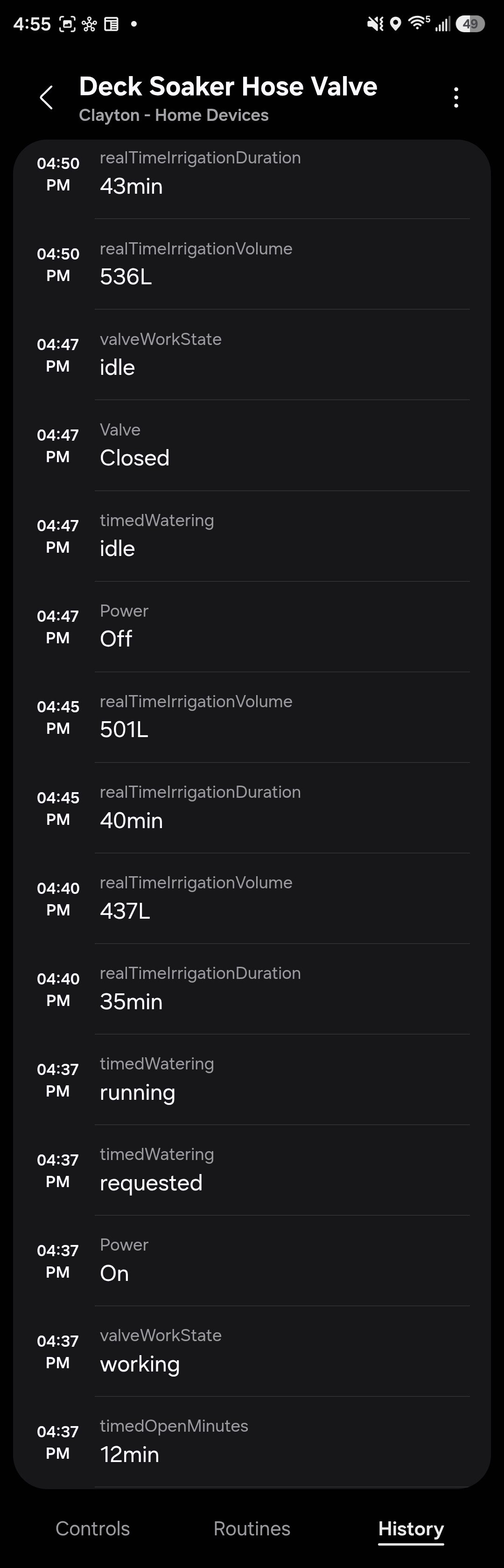
Looks like the timed watering will stop at 10 minutes again, but only if the value requested is more than 10 minutes. Anything below 10 minutes is OK. See below where I requested 12 minutes but it closed after 10.
The log at 4:37pm requested 12 minutes, and the valve closed 10 minutes later (4:47pm):
I ran some tests in the garden today and I’m still having issues with the 10-minute limit.
manualDuration to 60 minutes.The device reported the following status at startup:
Test 1: I just opened the valve in the ST app. Unfortunately, it closed on its own after 10 minutes.
Test 2: I opened the valve using the physical button. As before, the valve closed on its own after 10 minutes.
Test 3: I set the timed watering to 15 minutes. Same result. Valve was closed after 10 minutes
Is there something I missed in the configuration?
Has anyone else experienced similar issues? I
'm wondering if my unit is working properly. It keeps showing “waterSensor = dry.”