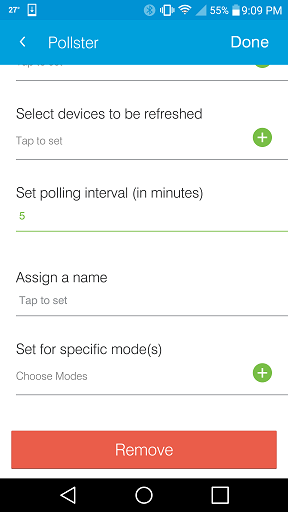
According to the API documentation they allow 300 API calls per site per IP per day so I set mine to refresh every 15 mins since I know that watching the web monitoring its not real time but I’m not sure what the interval is that the box outside checks in with the mothership. I hope that this helps.
Hmm I’m not sure there about that. Mine just started to show up after that. Make sure in the preferences that you don’t have any spaces in there and also make sure that you put the url string in there as well. I found it was easier to put everything in the IDE under the preferences for the device since I could just copy and paste. The URL is just the same thing from the app but you still gotta just plug it in.
deleted it and re-added using ide, and works, must add the url in also, thanks guys, brilliant david! thanks so much, im telling you without this forum I would have punted my smartthings clear out of the house
I just installed this and it is working just fine (for manual refreshes). Thank you!
I also just installed Pollster to do this… but I don’t see an option in there that lets you restrict the hours it runs. How did you set up the time restriction?
I’m probably going to do some more work on this device type in the next few days - please let me know if you have any suggested changes / additions / requests, and I’ll see whether I can incorporate any.
I was looking into using Rule Machine to refresh this only between sunrise and sunset, rather than Pollster. But I’ve also been looking over other device code and the ST APIs. Why not just use runEvery15Minutes() to call refresh(), and stop doing so after dusk; e.g., I see that in the new open-source ecobee3 device:
This thread contains somewhat similar code (although he’s using runIn()), and handles the dawn/dusk.
I encountered a 500: Internal Server Error. I searched the community found one but that support solved his issue on the backend, I already sent an email to support. One thread also mentioned about issue with his github repository, I’m currently checking on it right now. Seeking help here as well. On side note, I added another device type using other device handler and it worked successfully.
Also another question what do you need to enter on “Device Network ID”
Oh No! Something Went Wrong!
Error
500: Internal Server Error
URI
/device/save
Reference Id
xxxxxxx-xxxx-xxxxx-xxxx-xxxxxxxxxxxx
Date
Thu Jan 21 15:58:52 UTC 2016
There is a lot of additional platform instability at the moment - I have had various unexplained outages and IDE issues over the last few days, i.e. more than is normal for SmartThings. So its hard to know if the problem stems from the platform or from the DeviceType.
The Device Network ID is actually not important for this, as the code does not look for your device on the network - instead it is reading all its data from the Solaredge cloud via their API. You do have to put domething in, so I just called mine “Solaredge1”. In my mind it is probably better practice to call the device “Solaredge:My_Site_Id”