OK. I’m busy for the next week or so, but perhaps middle of next week or shortly after I can give it a go.
Following!
I just wanted to say thank you for creating this app. I picked up a V1 PowerView Hub in eBay, synced it up with a Smartthings and saved $350 on the V2 Hub they tried to sell me during the install. Everything has been working perfectly for 2 weeks.
@Puzio0 glad to hear that it’s working out for you. As far as I have gathered, the v2 hub only adds HomeKit support so there’s not a whole lot that is lost. One can always bridge ST to HK if that is really needed.
Did this end up working? I got sold on the v2 hub 
Just sent you a pull request with my changes.
I dunno if the gen1 hub will work with the new capitalization, but this works for me and my gen2 (mostly). See details in the pull request.
1 Like
It did! (Mostly).
If/when @johnvey takes my pull request, you can give it a spin.
Hope it works for ya!
1 Like
+1 Also waiting for V2 hub support.
About to get a V2 hub, would be great to know there’s a fix available
@rossc719 I merged in your pull request. Everything seems to still work with gen 1 hubs, so thanks a bunch for your work!
@Jim_Newman @light_treason @sgonsalves @Shinedown78 can you give this a spin to see if it works on your gen 2 hubs? Per Ross’ commit, scenes and scene collections should work now – however individual shade control does not.
Lol I actually just finished converting over to a v1 from eBay (working fantastically) this past weekend. Appreciate all the work though!
Not got mine yet - just in the process of purchasing but told it will arrive with a V2 hub. A little concerned that individual blinds can’t be controlled though? Having not yet downloaded the DTH, I’m guessing that there is some sort of a workaround that allows this to happen?
@Shinedown78 as I understand it, the individual shades will show up as a device, but the buttons don’t do anything (from ST). The scene and scene collection devices will work correctly. There isn’t any difference in the code for gen 1 and 2, or any kind of toggle. Until someone sniffs the updated HTTP calls (or someone lets me debug their system), I won’t be able to say for sure.
1 Like
Thanks @johnvey, scene control is working for me. I’d be willing to provide debug information to get individual shade control.
@sgonsalves, the first question is: does the reading of current shade status working? If you change the state of the shade from your PowerView app, does the ST device page reflect that state (after hitting the refresh)?
Figuring out how to get the buttons working really involves debugging the PowerView app and its communication with the hub. One can either:
- sniff the HTTP traffic via proxy app (like mitmproxy or Fiddler) to see what the PowerView app is sending, or,
- use trial and error HTTP requests to poke at the PowerView hub until it does something
Doing (1) is the best and most accurate method, but requires installing software and that you have some familiarity of rearranging your network to route traffic through this proxy. Doing (2) is far easier and doesn’t require anything except a browser, but you’re effectively stabbing in the dark and may not actually discover the right command.
Let me know if you can work with either of those.
@johnvey, shade status is working with the ST device. I installed mitmproxy and configured my iPhone to use the proxy. When I open and close the shades with the PowerView app I see the following entry displayed in the terminal.
192.168.1.160:55680: PUT http://192.168.1.182/api/shades/26813
<< 200 OK 248b
Entering that URL in a browser returns the following info…
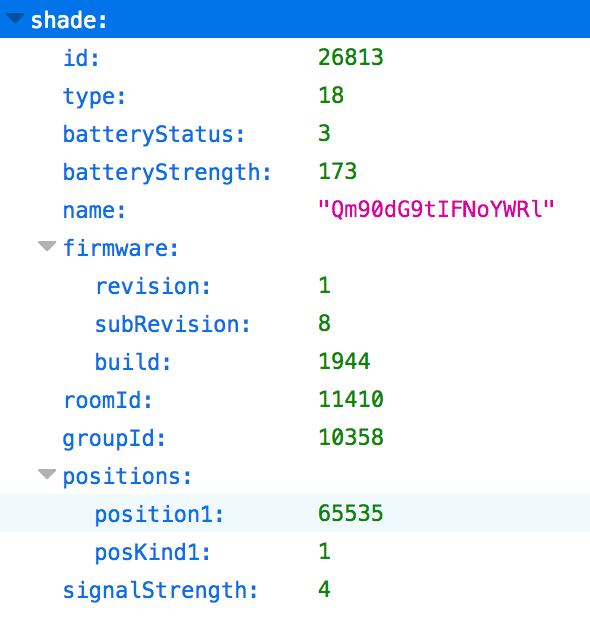
@sgonsalves thanks for setting up mitm. Can you post the raw request and response as well? Given that the URL looks to be the same, I suspect that the PUT request body is what has changed.
Not sure if I’m doing this right, but when I click raw and download the file from mitmweb interface. I get this for the request ->
{“shade”:{“id”:26813,“positions”:{“position1”:61460,“posKind1”:1}}}

and this for the response ->
{“shade”:{“id”:26813,“type”:18,“batteryStatus”:3,“batteryStrength”:173,“name”:“Qm90dG9tIFNoYWRl”,“firmware”:{“revision”:1,“subRevision”:8,“build”:1944},“roomId”:11410,“groupId”:10358,“positions”:{“position1”:61460,“posKind1”:1},“signalStrength”:4}}

Yes, that’s exactly what is needed. There isn’t any change to the API, but I have a theory that the gen 2 hub is much more sensitive to some input values.
@sgonsalves I’ve updated the repo with a possible fix:
- update your shade device handler (via the Smartthings IDE)
- goto your shade device on your ST app
- click the gear icon to edit the config
- save it (you don’t have to change anything, you just need to cause the app to trigger the
install()method)
Please let me know if this resolves anything.
1 Like
Well your theory was bang on  Works like a charm, thank you!