Arn, this is awesome. I’ll give this a try when I get home tonight.
Thank you!
Arn, this is awesome. I’ll give this a try when I get home tonight.
Thank you!
Added the SHM Delay Talker Child module to my install and added the code per your email, it all worked perfectly.
Thanks again for the quick response and the help. It’s all working smoothly now.
August 7
ChiefSpice:
Which module / line would do you think would be the best place to add it?
Module: Shm delay talker child
Code is untested
after line 246 add
subscribe(location, "alarmSystemStatus", alarmStatusHandler)
After line 248 before TalkerHandler, add
 def alarmStatusHandler(evt)
{
if (evt.value == "off")
theTTS.off()
}
So I still can’t get past the first screen on the SHM Delay. I have tried everything. I have uninstalled twice now but still no luck. When I try to create a profile the wheel just spins in the app on my phone. Any ideas what I am doing wrong? I have looked at the logs but don’t see anything. I am no expert but normally I can figure out things like this.
No idea what may be wrong, logs show me nothing I understand, but I will do what I can to help.
Assuming you using the Classic phone app and have set Global Settings, if not do that and retry.
If you are attempting to set a Delay Profile, enter the page 1 settings, then take a screen shot of all the parameters (may need 2 or 3 images), prior to tapping “Next”.
Also please let me know if there are any non-physical or unusual devices being used except the Simulated Contact sensor, or you are attempting to force a real Contact Sensor by entering the contact name info.
I’ve occasionally bumped into a system loop for very odd reasons, including not entering a required setting, although the logic attempts to handle that issue.
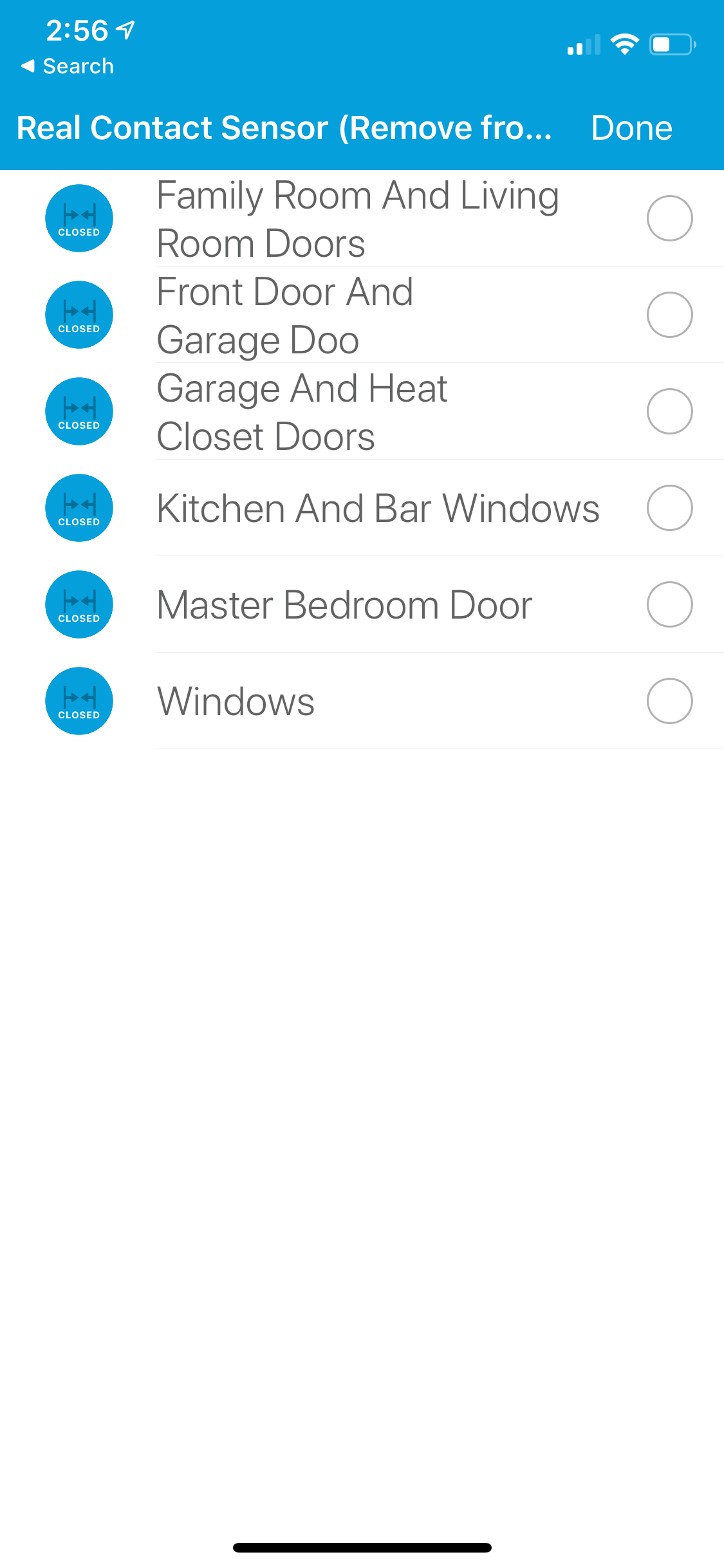
In image 3948 it shows “Front Door and Garage Doo” as the monitored sensor and “Family Room and Dining Room Doors” as the simulated sensor.
Exactly what are these devices: real, simulated, combined? Please send screen shot or text description. I suspect this is the issue.
They are open close sensors. I am using Konnected and the front door and garage door are connected together as a zone. The others are the other zone I want it to simulate which are more door open close sensors that are on the same zone.
Follow the directions at the top off this thread. Create a simulated sensor, then use it as defined in the documentation. As for Konnected Zones, never heard of this being used and have no idea what it may be, you are on your own with that. I know some folks use Konnected sensors with the app, but as a solo sensors that need the forced Contact Name to be accepted as a real sensor.
Create a delay profile for each real sensor used for actual access and egress, rather than zones and it should work.
Hello All - I’m trying to get a Talker profile to work with Echo Speaks. Is this possible?
I seem to be having the same challenge @keatonhoskins reported in post 881. Entry Delay message works. Exit Delay Non-Keypad does not work.
I can’t find a resolution. If one was provided please point me to it.
Thanks in advance.
Hi, @arnb - So, I enabled debugging and was able to walk through the code enough to determine the root cause of why the exit delay messages will not play for Non-Key Pad. It has to deal with having Active Mode Fix Settings enabled. I used all defaults when setting it up. If it’s not enabled the Home Mode is not being updated, so it’s something I definitely would like to leverage.
That said, I have no idea how to update the code to fix it.
Willing to test if you get around to looking at the code.
This is an EXCELLENT app!! Thank you for your hard work and putting this out there.
Suggest turning on the Global “Mode Fix when system armed from Non-Keypad Source” to On if not already On (default), then update the Mode Fix Settings profile.
This app is stabilized as I have mostly moved to the Hubitat platform, however if you provide the module and line where you feel there is an issue, I will take a look.
hi @arnb,
Thank you for the reply. Sorry for the delay. I’m just getting into the ST universe and taking in a lot of information and learning some coding. I’ll dig in deeper and try to narrow it down to where I think the issue may be. What I’ve done to date is uncomment out some of the existing debug lines you had in there and then was following along in Live Logging and reading the code. When I started seeing more messages around the Mode Fix logic I admittedly got lost but thought I’d turn it off to see if it made a difference and sure enough it did.
It may take me a few more days before I have something more but I appreciate you willing to take a look.
Mike
I’m trying to setup some kind of beep/sound/something for my entry delay but I just can’t figure out what the steps are for using Lannouncer. I have lannouncer installed on my tablet and its set to auto start. But when I bring up the LanNouncer/DLNA list in SHM Delay, only my Amazon Echo’s show up. What do I need to do to make my tablet show up as an option as well?
The tablet must be added as a Lannouncer Alerter device
Should you be using an Amazon tablet, be aware that while Lannouncer is a good product, it does not play happily with the Amazon OS. Should you also be running the Fully Browser take a look at the Fully Kiosk Browser Controller.
Thank you. I am using a Fire HD Tablet. I got it added as a LANnouncer Alerter and added it to my SMH Delay. I now get chimes but no voice messages. Is that the issue with FireOS?
Have you setup and installed the Talker module and profile?
Yes. I created a test device to my Samsung tablet and i got entry speech, although no exit speech. Only got the chimes on my 9th gen Fire HD 7.
Hey Guys, Apologies for the silly question
@arnb - When setting this up i can only choose real contact sensors . None of my Konnected motion sensors are available. Is this app only intended to work with contact sensors?
Apologies for the n00b question. Still learning over here in Aus 
@asb924
Installed new sensors to ST. Tried to add them to SHM delay but it gives “error bad state”. Unable to complete page configuration". Can’t also modify configuration with old sensors that are already insalled to SHM delay. What’s up with this?
EDIT. it’s not SHM Delay problem. IDE gives internal server error 500. So something is fu**** up in ST.