The woox siren is pretty loud:
And my Zigbee Frient smoke detectors are even louder.
The woox siren is pretty loud:
And my Zigbee Frient smoke detectors are even louder.
There is no siren matter yet…
There are several videos on the same channel as above.
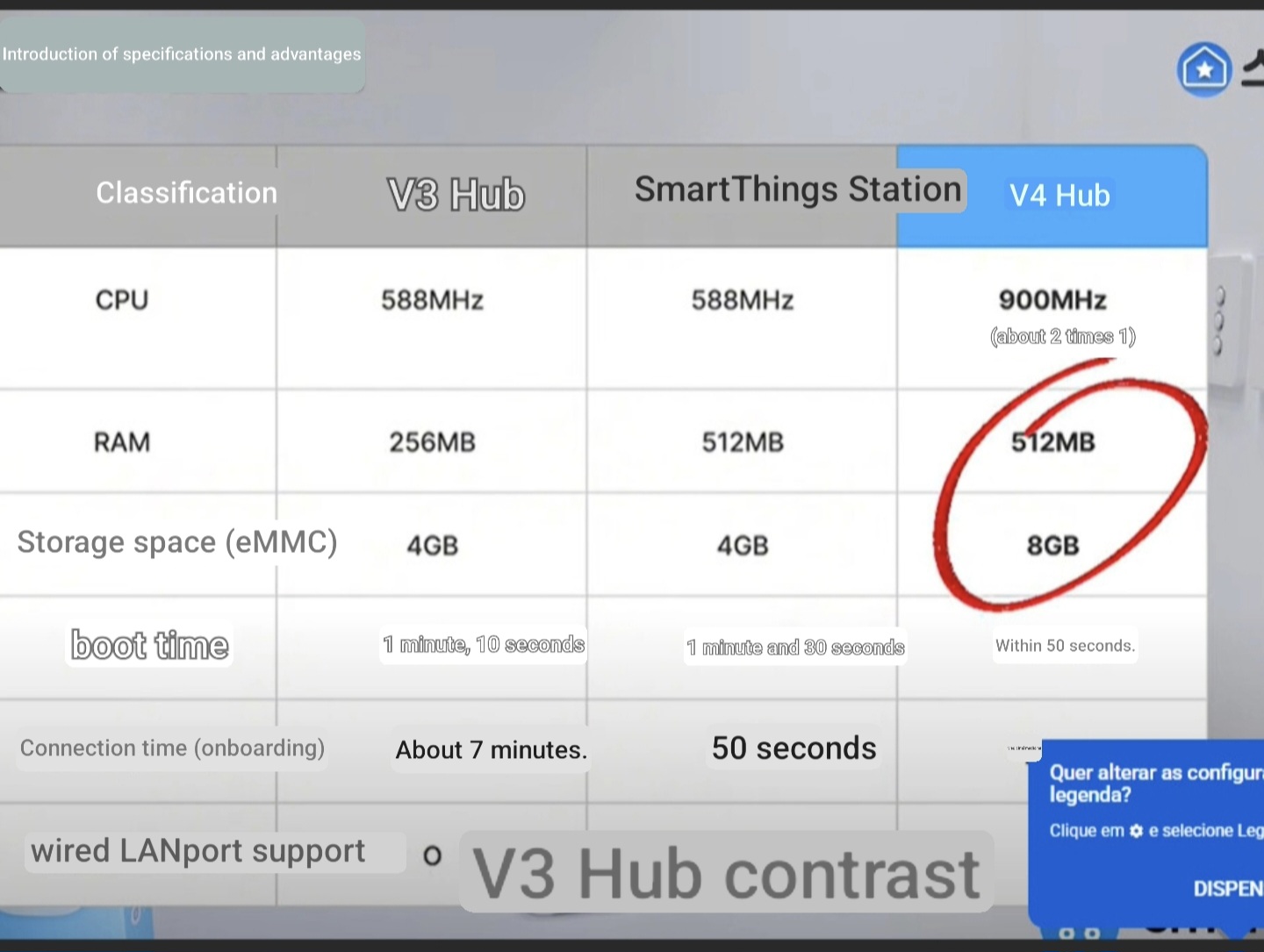
From what I have seen the SmartThings Hub V4 is Matter compatible with thread, zigbee, WiFi 2.4, WiFi 5.0, ethernet, USB-A, USB-C (for power), BLE, 512MB Ram 8GB Storage.
Interesting.
Samsung has previously released some home automation devices only for the Korean market, including a zwave security system panel, a Bixby smart speaker, and some smart locks.
So it will be interesting to see if this ever gets outside the Asian region. 
I’ve been talking to him for a while now. Interestingly, it’s not the same person in every video. I notice the details of their hands—they’re different, and their tone of voice is different. He once told me it was the Samsung ST Pro, now he’s talking about the V4 version. This is all very interesting, to say the least.
Nothing certified for zwave yet.
It looks like the v4 has the same ram capacity as v2 which is twice v3. So for hub users currently on soft or hard limit is that constrained by ram or storage? I’m expecting it is possibly ram, are all installed drivers resident in memory? In which case it will be better than v3 but not really better than v2? It will have a faster cpu I suppose.
Maybe this time the USB port isn’t useless.

Maybe i’m missing something, but if you plug a Z stick or anything similar into a smartthings hub, how are you going to access the software to run the network? It requires either windows or Linux or OSX, none of which are available to us on a smartthings hub.
Plug Z-Stick 10 Pro into a host controller and find the serial port identifier (that can be a PC, Mac, RPi, etc):
Z-Wave may show up as COM6 (COM numbers depend on the USB port used
Zigbee 3.0 may show up as COM5 (COM numbers depend on the USB port used)

Z-Stick 10 Pro user guide : Aeotec Help Desk
Just having a USB port isn’t enough. You could power it on, but you couldn’t run it.
Again, unless I’ve just missed something.
First: the big grin smiley indicates that I was joking.
Second: I know exactly how USB works under Linux. Don’t get me started, because I know it’ll end in a lecture - especially when it comes to tty (and modem) devices. BTW: lsusb exists.
Third: A firmware update could in fact add support for Z-Wave sticks. Who knows…
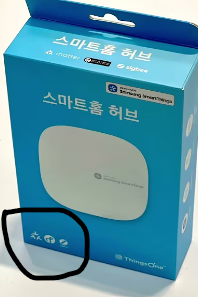
Right—no zwave logo, in spite of what some bloggers have said.
And no zwave certification filed with the alliance.
So far, it looks like those who suggested this might be an updated Station but without the charging plate are likely to be right.
Can just zigbee devices be migrated to the V4 and keep z wave devices on the V3? I’m at the “hard limit” on the v3.
Let’s wait and see if there will be an Aeotec version. They surely want to continue to sell their Z-Wave devices.
And yes, you can manually migrate devices between your hubs. With the downside that automations that involve devices from two different hubs won’t run locally.
It’s a little bit complicated. If you want to keep them all in the same “hub group,“ assuming it works like other smartthings hubs, then the primary hub owns all the edge drivers and devices, and you have the same memory issues. The other hub just works as a satellite.
If you set them up as two different “locations“ even though they are physically in the same building, then, sure, you could have Zigbee on one and Z wave on the other, but as @Andreas_Roedl noted, then routines using devices from both locations will not run locally.
So it depends what you’re specifically trying to accomplish.
Was hoping the V4 with increased memory would solve my memory limit. Guess I need to start looking at other brands of hubs.
oh man this is super exciting as ive been at the hard limit for months now! But no z-wave support is a fail. This will be waste if theirs no zwave support. im way too deep with zwave devices to give it up. PLEASE samsung, add z-wave!
If you watch the videos on the same youtube channel you will see the zwave logo which I am sure I did, unless I was halucinating?!
Edit there was a zwave logo in the videos must have been for something else.