This is exactly how my system functions: exit/entry delays, multiple pins, burnable pins, “followed**” motion sensors and more.
Arm/disarm is as follows:
- Via a keypad (my preferred method)
- Using the Dashboard to set the SmartHome Monitor (my secondary method)
- Setting SmartHome mode by tapping on a Routine in Automations.( I rarely use this, others prefer it)
Selecting a Keypad
Available Smartapps and device handlers generally support the Iris Generation 2 keypad, available at Lowe’s in the US and manufactured by Centralite, and the Centralite 3400, which is also rebadged as an Xfinity keypad.
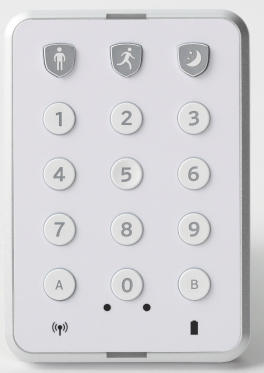
They both work well, but there is a differance in the form factor, the Iris has a Panic key and Off key, the Centralite/Xfinity has a third arming mode they call “Stay”, in additon to “Night”, and “Away” icons, but no “Off” or “Panic” keys. The Iris “On” key equates to ST Away mode, and the “Partial” key equates to ST Night mode.
When using the Centralite/Xfinity and the community Smartapps you can acheive the following:
Night - Instant alarm when door opens, motion sensors generally not monitored by SmartHome
Stay - Entry Delay when door opens, motion sensors generally not monitored by SmartHome
Away - Entry Delay when door opens, motion sensors monitored by SmartHome
When using the Iris and the community Smartapps you can acheive the following modes:
Night - may one time select Instant alarm or entry delay when door opens, motion sensors generally not monitored
Away - Entry Delay when door opens, motion sensors generally monitored by SmartHome
Selecting your Smartapps and Device handler
There is a plethora of information on this community forum about using a keypad, some of it is conflicting and confusing, but most everything was built upon the efforts of a few people who wrote the basic applications and device handlers a few years ago. The SmartApps I suggest using are:
@ethayer Lock Manager (Allows for multiple keypads, multiple users each with a unique pin, including date and time sensitive pins, one time use pins, and an Exit Delay)
@arnb SHM Delay (Adds Exit and Entry Delays to Smarthome, supports multiple doors (contact sensors), optional multiple keypads, optional siren beep tones, followed motion sensor on Entry Delay, (must use another app for motion on Exit delay) and more.)
The Keypad Device Handler I use and suggest is found at miriad (Zack Cornelius) · GitHub by Mitch Pond, Zack Cornelius
Definition: **Followed Motion Sensor. When monitored by SmartHome a motion sensor when tripped creates an instant alarm. However, a “followed” motion sensor does not create an alarm when it is tripped during an Entry/Exit Delay time period
I hope this helps with your decision. Feel free to post additional questions or help requests.