That didn’t work for me. I changed the device’s driver to Explorer but the Value fields were blank.
This driver was written several years ago and there have been changes in the ST app that have broken the output. Unfortunately, Phil no longer develops on the ST platform nor participates in this forum. Someone else would have to look into a way to fix it for the app.
However, you can do as TapioX suggested and use the ST Advanced Web App to access the deviceInformation attribute and copy its value (See the post before yours).
Here is an example of the copied attribute:
| Device Network ID: [3D] |
| Fingerprint: 0063-4944-3038 |
| Firmware: 5.29 |
| Security Level: UNSECURE |
| Route: [3D] <-> [70] <-> [42] <-> [01] |
| Transmitted: 5123 Received: 4963 Failed: 0 |
I don’t see deviceInformation attribute on any of my devices on ST Advanced.
Do you happen to know if the rboy paid driver is better than the PH driver? I’m trying to set alerts when a specific user code unlocks a door. I’m currently using the PH driver but the lock keeps going offline. It has Zooz long-range and Leviton switches right next to it, so while it is pretty far from the hub, it is right next to wired switches that are online. I have done 2 Z-wave repairs and the lock is still going online and offline every few hours. I’m just looking for stability and the ability to trigger off unlock code.
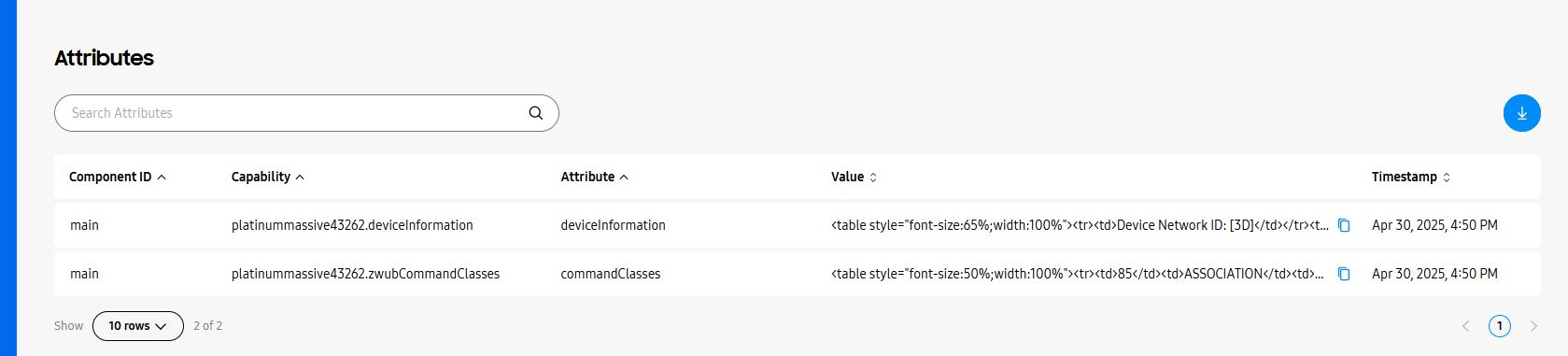
Is the Route pulled by this Edge driver dynamic? Because I am seeing routes (in ST Advanced UI) that include nodes that are no longer in the system. Also, for some nodes I am seeing blank device information after switching to the driver, although the device functions normally.
Is this Zwave Explorer driver pulling my leg?
I believe it pulls the info from the device. I see Z-Wave command sent to the device and see the device respond when I do a Refresh command from the AWA. If you are seeing blank data for the route, I would suggest doing a Refresh command.
Refresh doesn’t help fill in the blanks.
Zwave repair doesn’t remove the dead devices from the route.