It is a CO, Nedis SmartLife Zigbee 3.0 CO detector Nedis SmartLife Häkävaroitin Zigbee 3.0 - 24hshop.fi
Added to this driver version
───────────────────────────────────────────────────
 Name         Zigbee Smoke/CO Detector Mc
 Version      2023-08-06T14:47:55.005633191
───────────────────────────────────────────────────
- id: "TS0212/_TYZB01_07m83470"
    deviceLabel: Nedis CO Sensor
    manufacturer: _TYZB01_07m83470
    model: TS0212
    deviceProfileName: co-battery
Thank you it is working fine!
Hi Mariano,
Thanks for a great effort - would you be able to add the device / fingerprint for a Heiman smoke sensor with “Model: SMOK_YDLV10”, “Manufacturer Code: Heiman” - also a HS1SA-M variant…
Hi Mariano, where can I find the version? I installed the Zigbee Smoke/CO detector MC , but for some reason ST App does not provide it as an option for the device… Github list does not seem to contain Nedis information yet (dont know if it should).
You can check the driver version like this:
- Open your ST hub detail view in ST App
- From menu (three dots) select Driver
- Driver list opens
- Select Zigbee Smoke/CO detector MC driver
- Driver information opens and you can check driver version
Check that you have latest driver version.
Thanks, I seem to have that specific version. I’ll retry adding the device during the weekend.
Hi Mariano, Sorry, my bad. It seems that I made a mistake when I used pic text recognition. There were errors in the finger print. Here is the correct data (and also a picture of it):
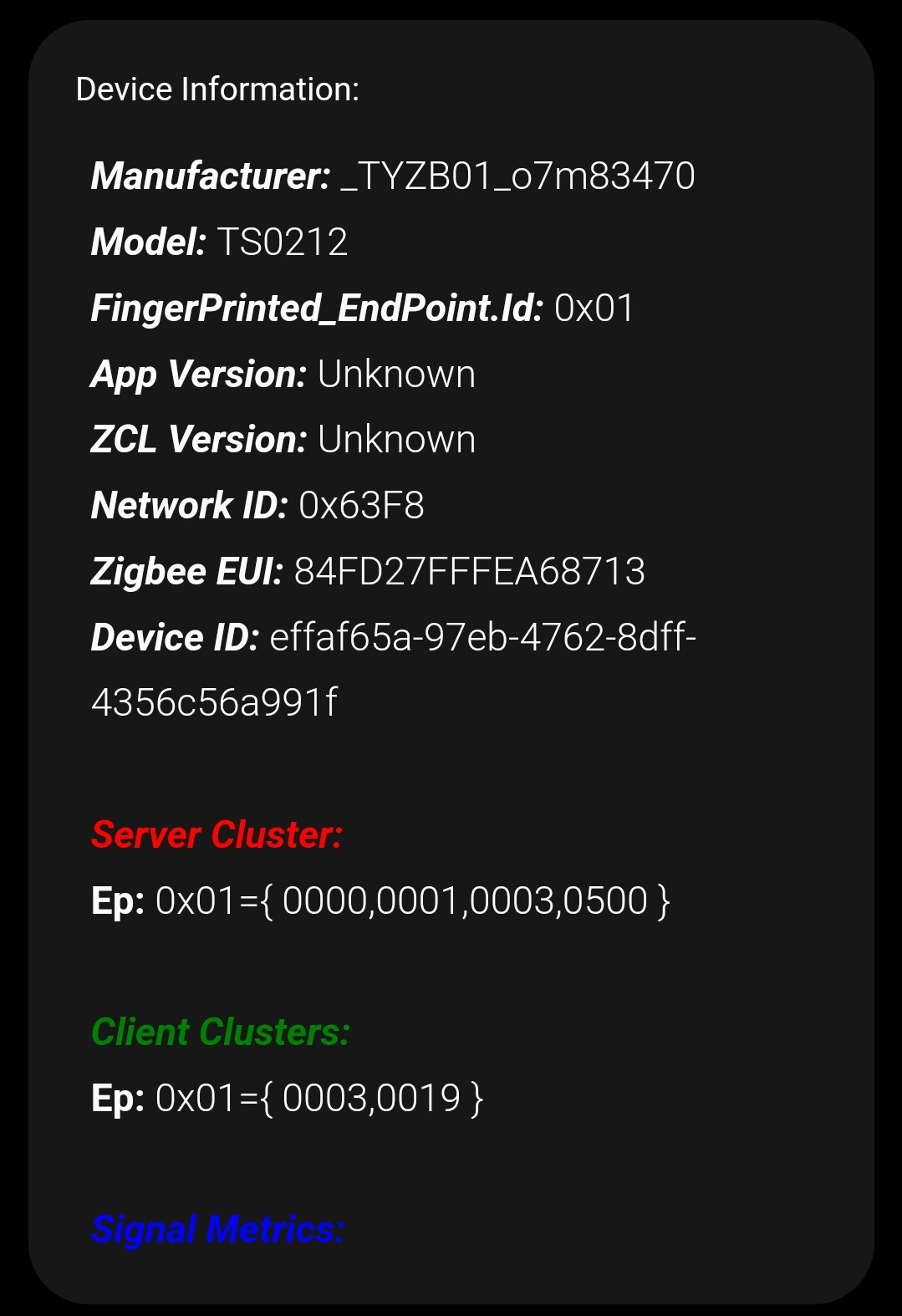
Device Information:
Manufacturer: _TYZB01_o7m83470
Model: TS0212
FingerPrinted_EndPoint.ld: 0x01
App Version: Unknown
ZCL Version: Unknown
Network ID: 0x63F8
Zigbee EUI: 84FD27FFFEA68713
Device ID: effaf65a-97eb-4762-8dff-4356c56a991f
Server Cluster:
Ep: 0x01={ 0000,0001,0003,0500 }
Client Clusters:
Ep: 0x01={ 0003,0019 }
Hi @Ville_Rahkonen
Fixed in this driver version
───────────────────────────────────────────────────
 Name         Zigbee Smoke/CO Detector Mc
 Version      2023-08-12T11:04:44.268949997
───────────────────────────────────────────────────
- id: "TS0212/_TYZB01_o7m83470"
    deviceLabel: Nedis CO Sensor
    manufacturer: _TYZB01_o7m83470
    model: TS0212
    deviceProfileName: co-battery
1 Like
Thanks! Now it appears as Nedis CO sensor. At first addition, it didn’t update any other state data. When I removed it and added it again, it showed battery state (100%) and signal metrics, however it didn’t show any info on the CO section - not even when I pressed the test button on the device. It appeared online for 2 hours and than went offline. Are there any more tricks I could try? Should I just try adding it again?
Sorry, I forgot modify the manufacturer in subdriver
Fixed in this driver version
───────────────────────────────────────────────────
 Name         Zigbee Smoke/CO Detector Mc
 Version      2023-08-12T15:39:47.872461458
───────────────────────────────────────────────────
1 Like
Now it works! It shows the CO state and makes an alarm to ST when I press the test button. It still appears offline sometimes, but gets back online and makes alarm immediately when test button pressed. Thank you for the great work!
Hi,
If it shows offline defpyes for a while it may not have been configured correctly.
Will it pair directly with the driver or did you change the driver from zigbee thing Mc?
If you did the latter, I recommend that you try to delete the device with the app and pair it again directly with the zigbee smoke/co detector Mc driver
Hi Mariano,
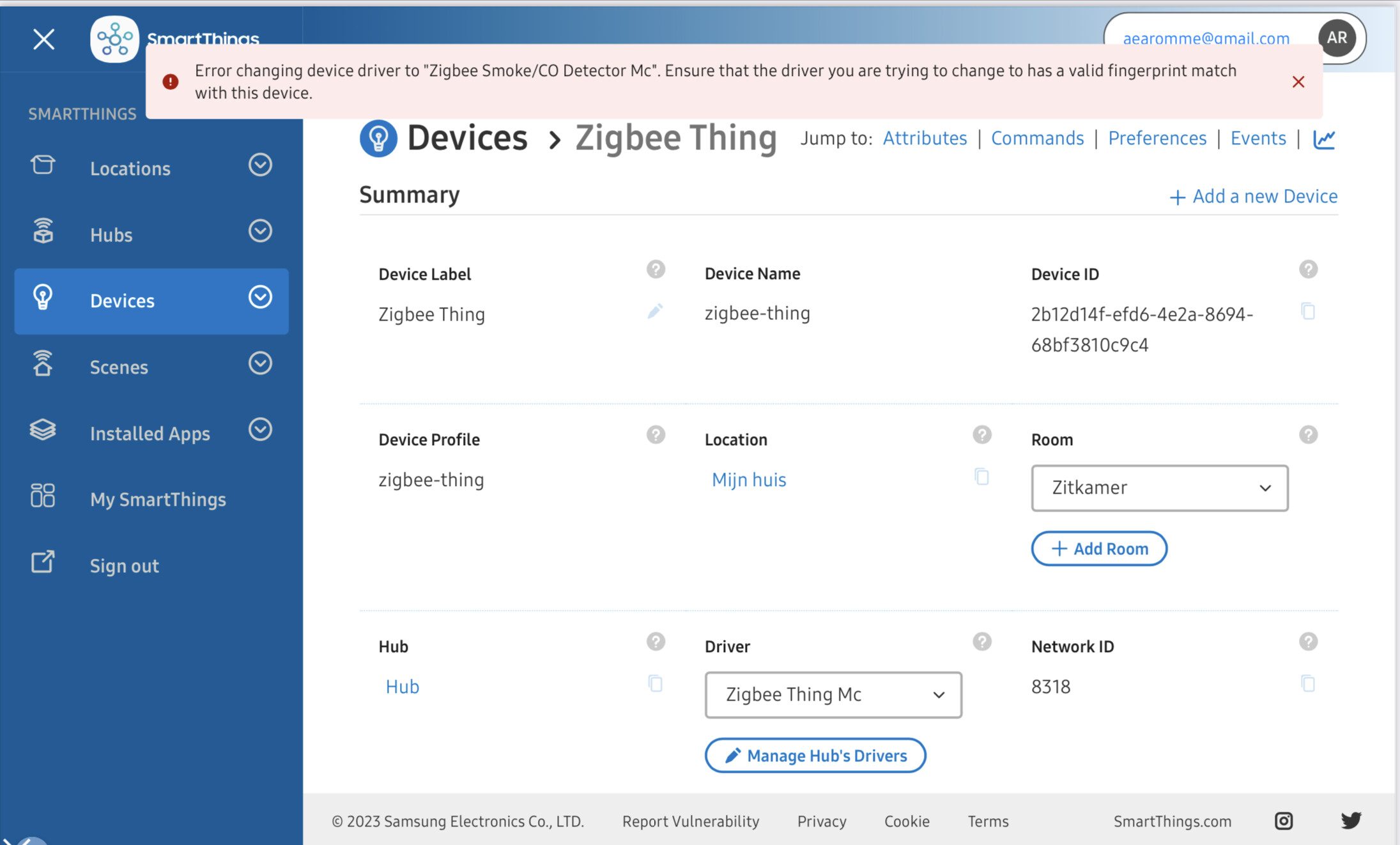
Sorry for my late response. Just came back from vacation. Unfortunately it doesn’t work. Changing the driver is not possible. I get the following remark:
Hi @DerAnton
What is your device?
The Trust CO Senssor.
Sorry, fixed in this version correct model: COSensor-EM instead model: COSenssor-EM
───────────────────────────────────────────────────
 Name         Zigbee Smoke/CO Detector Mc
 Version      2023-08-21T10:26:23.32755445
───────────────────────────────────────────────────
- id: "Trust/COSensor-EM"
    deviceLabel: Trust CO Detector
    manufacturer: Trust
    model: COSensor-EM
    deviceProfileName: co-battery
Hi Mariano,
Perfect. It is working now. Thanks a lot for the effort.
Hi Mariano,
It appears offline sometimes, but gets back online and makes alarm immediately when test button pressed. The right driver is installed and I have removed and reinstalled the driver and the CO several times. Any ideas?
Hi @all, I bought the Heimann HS1SA-Z smoke sensor.
I get it as Z-Wave Device listed.
When trying to change the driver on my.smartthings.com
I get the same message as “DerAnton”:
"Error changing device driver to “Z-Wave Smoke Alarm-Mc”. Ensure that the driver you are trying to change to has a valid fingerprint match with this device. "
Could it be, it’s notsupported?
Thanks in advance!
Frank