Hi.
I have been browsing internet and Smartthings community for some days now, but finding it hard to get started.
I know programming in general(C#, Visual Basic, scripting, php and so on) and use of xml/yml files. I do not work as a programmer, but I have coded few smaller projects.
I have set up the environment (windows), Visual Studio Code and Smartthings CLI.
I will be working with Zigbee-devices to start with.
This source, Zigbee Libraries — SmartThings Edge Device Drivers documentation, seems to be a good refernce.
What would help me a lot is if some one could give a real sample for a multibutton that I want to make a driver for.
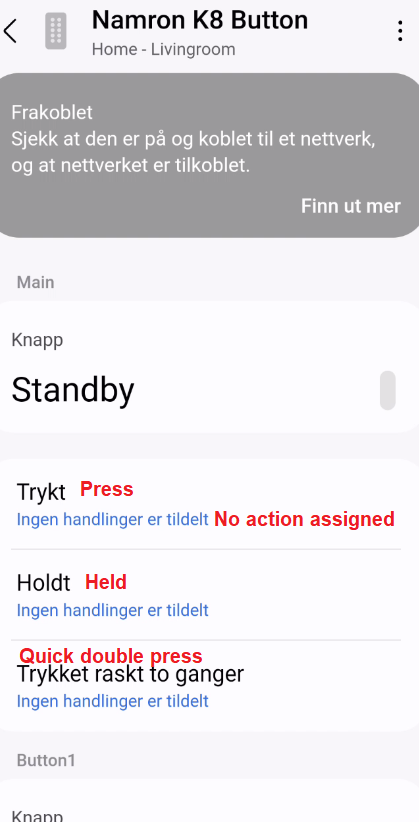
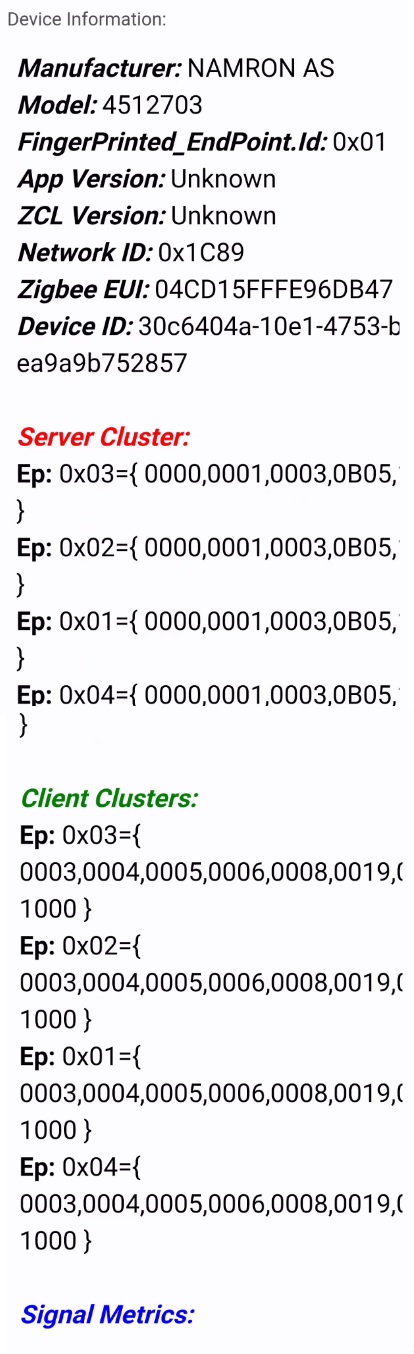
It is a 8-button switch. Pictures of the button and info from “Zigbee Thing mc” attached.
How wil config.yml, fingerprints.yml, profile.yml and init.lua look for this device?
To start with On/Off functionality will be enough, but if someone has time I will appriciate code showing more functionality.

Hi @Nazar_Khan
In @erickv github there are drivers for Tuya multi-button devices.
Basically they could work in a similar way to the namrom that you show with cluster 0006
Mariano_Colmenarejo Thank you. I will check.
In smartthings drivers there are examples of multibutton devices in the zigbee button driver
@Mariano_Colmenarejo Thank you.
I see in profiles/eight-buttons-battery.yml id button, button1, button2 and so on. I guess I could do same for this button.
Regarding fingerprints.yml. In my case, would it be like this:
zigbeeManufacturer:
- id: “NAMRON AS/4512703” - Is this what must match the device to pick the driver?
deviceLabel: Namron K8 Button
manufacturer: NAMRON
model: 4512703
deviceProfileName: ?? (name of x-profile.yml or the ‘name:’ value in the profile.yml file. And should name of the yml file be the same as the value in ‘name:’ attribute in the file.)?
I appriciate you taking time to help me. I have seen your many contributions. Great work.
Again, Thank you.
You have to create a main button profile with 8 buttons.
- Use the four-button.yml profile in smartthings zigbee button driver, and add 4 more buttons, copying and pasting and changing the button number.
- change the profile and file name to eight-button.
- in fingerprints.yml you should put this:
- id: NAMRON AS/4512703
deviceLabel: Namron K8 Button
manufacturer: NAMRON AS
model: 4512703
deviceProfileName: eight-button
Then I’ll explain to you what I think you can do, now I’m going to eat and mess around for a while putting tiles.
@Mariano_Colmenarejo Thank you so much.
You take all the time you need. I also have to get home to wife and kid. I will maybe do this later today, or maybe tomorrow.
Thank you.
You can add all modifications to zigbee button driver and pair the device.
-
open the CLI to see the driver logs
-
press each button on the device and see the CLI that the device sends with each button press
-
With this information, for example:
- if you press button 1, device send the On command of cluster 0006 and endpoint 1
- if you press button 2, send the Off command of cluster 0006 and endpoint 1
-
search in the subdrivers init.lua code, which handles this type of commands
-
If you find it, then use it as a base to create your own subdriver for Namron
You’ll tell me!
The fingerprint is the combination of the manufacturer code and the model number.
You can find it in the web UI to your smartthings account in the device details:

Thank you.
Thank you.
I have modified fingerprints, config and eight-buttons yml files. Below are listing of the files.
Under profiles folder, I have only kept eight-buttons.yml (deleted the others).
Under src folder I see many subfolders. Should I keep them, or just delete them. Or which one to keep if any.
I guess I could keep all the files. I am doing this to not be confused about what is needed and whats is not.
Should I keep “button_utils.lua” that is in the src folder?
Regarding testing:
I will test tomorrow or in the weekend.
I know that I first need to run
smartthings edge:drivers:package D:\EdgeDrivers\NamronK8
I am not sure about the rest in the video https://www.youtube.com/watch?v=-qxG3cY2RhA
Do I need to create a new channel every time I make a driver? What If I update a driver? We can work on these things later.
Once again: your help is much appreciated. Thank you.
fingerprints.yml:
zigbeeManufacturer:
  - id: "NAMRON AS/4512703"
    deviceLabel: Namron K8 Button
    manufacturer: NAMRON AS
    model: 4512703
    deviceProfileName: eight-buttons
config.yml:
name: 'Namron Zigbee K8'
packageKey: 'namron-zigbee-k8'
permissions:
  zigbee: {}
description: "SmartThings driver for Namron Zigbee button K8"
vendorSupportInformation: "https://support.smartthings.com"
eight-buttons.yml:
name: eight-buttons
components:
  - id: main
    capabilities:
      - id: button
        version: 1
      - id: firmwareUpdate
        version: 1
      - id: refresh
        version: 1
    categories:
      - name: RemoteController
  - id: button1
    capabilities:
      - id: button
        version: 1
    categories:
      - name: RemoteController
 . . .
 . . .
  - id: button8
    capabilities:
      - id: button
        version: 1
    categories:
      - name: RemoteController
I’m not a fan of deleting anything until I know what need the existing code.
Zigbee buttons are like being in a jungle, each manufacturer uses the clusters, values and attributes as they want to make their device work.
In Zwave it is much easier, manufacturers use the established command classes for the buttons, in fact the firmware libraries have default handlers that work in most cases or with small variations.
I have searched for the documentation for this device and it is totally different from all the existing ones in the stock driver.
I think only the battery information will help you.
https://www.elektroimportoren.no/docs/lib/4512703-Brukerveiledning-5.pdf
This device is mainly designed to perform its functions by pairing directly with the zigbee devices to control, up to 30 bulbs, without the need to use a Hub using groups and TouchLink. Use 4 groups to send on, off and level commands
If you pair with the Hub it looks like it will send messages from endpoint 1 to 4 and I hope you can see in the CLI Log what cluster, attributes and values it uses.
So, don’t delete anything else for now and with the CLI:
-
Create a channel to assign the created driver
-
Package and assign the driver to the channel you created.
-
Install the driver on your Hub from the channel
-
Pair the device
-
Open a window to run the LogCat driver. This is a tutorial to capture CLI logs
Edge Driver or Device Handeler for a TUYA (Zemismart) Zigbee plug with energy mesurment capabilities - #18 by Mariano_Colmenarejo -
Press one by one on the 8 buttons and look for what messages the driver receives from the device
-
When you have that information, copy and paste the logs in an orderly manner and publish them and we will try to see what can be done.
This is a tutorial to modifiy and use custom drivers
As in the photo you posted, this device also exists in Zwave version and works well with my Zwave Button Mc driver
@Mariano_Colmenarejo Thank you for good information. I will put the deleted files back. I will start testing tomorrow and copy the logs.
I do not have many smart devices yet. I went for Zigbee because my understanding was that it performs better and because I started with a couple of Philips Hue lights and hub. I could switch to Z-wave.
@Mariano_Colmenarejo : A general question. My understanding is that when a light is in a smarthub, then the button/remote also needs to be in smarthub to control the light. Or can a light be in smarthub and also can be controlled directly by a remote like this? Or maybe it depends on the light?
Remote controls paired to the hub typically control devices by creating routines that are triggered by button actions sent by the remote, for example:
- If button 1 is pressed once then it turns on x,y,z lights or any other device, zigbee, zwave, lan, Matter.
- At the same time, they can send commands without going through the hub:
- Through thuchlink zigbee, they send commands to zigbee light bulbs or zigbee devices
- Through Zigbee Groups they control zigbee light bulbs or devices zigbee.
- Through zwave association groups send commands to zwave light bulbs or zwave devices, with a zwave remote control
@Mariano_Colmenarejo
I paired the device and had log window active. Below is the log. Let me know if I should use any other logging.
Device paired, but shows disconnected and nothing happens when any button press, double pressed, held. Nothing in the log and also not when I assigned one button to turn on a light. I will also upload screenshots from the app.
D:\Microsoft VS Code>smartthings edge:drivers:logcat
using previously specified default hub labeled "ST Hub" (c1e7cdc9-1f4a-4deb-b7fc-2dc5ab138a2a)
─────────────────────────────────────────────────────────────────────────────
 #   Driver Id                             Name
─────────────────────────────────────────────────────────────────────────────
 1   c856a3fd-69ee-4478-a224-d7279b6d978f  bose
 2   4eb5b19a-7bbc-452f-859b-c6d7d857b2da  Harman Luxury
 3   7beb8bc2-8dfa-45c2-8fdb-7373d4597b12  JBL
 4   afe43a34-b4c6-4f11-8df0-7bda5a5e61ea  Namron Zigbee K8
 5   cd898d81-6c27-4d27-a529-dfadc8caae5a  Philips Hue
─────────────────────────────────────────────────────────────────────────────
 6   dbe192cb-f6a1-4369-a843-d1c42e5c91ba  SamsungAudio
 7   c21a6c77-872c-474e-be5b-5f6f11a240ef  Sonos
 8   c0763968-6e4b-4cc0-94ca-7185e693f5c8  Vesternet Edge Zigbee Controllers
 9   afa89b57-acdd-4c76-a7b7-8bf3dfc951b3  Vesternet Edge Zigbee Modules
 10  d9c3f8b8-c3c3-4b77-9ddd-01d08102c84b  Wemo
─────────────────────────────────────────────────────────────────────────────
 11  d620900d-f7bc-4ab5-a171-6dd159872f7d  Zigbee Motion Sensor
 12  f2e891c6-00cc-446c-9192-8ebda63d9898  Zigbee Switch
 13  8bf71a5d-677b-4391-93c2-e76471f3d7eb  Zigbee Thing
 14  d692640b-402a-4d91-9151-d643ad4771f0  Zigbee Thing Mc
─────────────────────────────────────────────────────────────────────────────
? Select a driver. 4
connecting... connected
2023-11-26T09:28:08.116312197+00:00 TRACE Namron Zigbee K8  Setup driver zigbee_button with lifecycle handlers:
DeviceLifecycleDispatcher: zigbee_button
  default_handlers:
    doConfigure:
    added:
    driverSwitched:
  child_dispatchers:
    DeviceLifecycleDispatcher: zigbee_button -> Non holdable Button
      default_handlers:
        added:
      child_dispatchers:
    DeviceLifecycleDispatcher: zigbee_button -> Frient Button Handler
      default_handlers:
        doConfigure:
        added:
        init:
      child_dispatchers:
    DeviceLifecycleDispatcher: zigbee_button -> ZigBee multi button
      default_handlers:
        added:
      child_dispatchers:
        DeviceLifecycleDispatcher: zigbee_button -> ZigBee multi button -> IKEA Sweden
          default_handlers:
            doConfigure:
            added:
          child_dispatchers:
            DeviceLifecycleDispatcher: zigbee_button -> ZigBee multi button -> IKEA Sweden -> Remote Control
              default_handlers:
                added:
              child_dispatchers:
            DeviceLifecycleDispatcher: zigbee_button -> ZigBee multi button -> IKEA Sweden -> On/Off Switch
              default_handlers:
              child_dispatchers:
            DeviceLifecycleDispatcher: zigbee_button -> ZigBee multi button -> IKEA Sweden -> Open/Close Remote
              default_handlers:
              child_dispatchers:
        DeviceLifecycleDispatcher: zigbee_button -> ZigBee multi button -> SOMFY
          default_handlers:
          child_dispatchers:
            DeviceLifecycleDispatcher: zigbee_button -> ZigBee multi button -> SOMFY -> SOMFY Remote Control - 3 buttons
              default_handlers:
                doConfigure:
              child_dispatchers:
            DeviceLifecycleDispatcher: zigbee_button -> ZigBee multi button -> SOMFY -> SOMFY Situo 4 Remote Control
              default_handlers:
                doConfigure:
              child_dispatchers:
        DeviceLifecycleDispatcher: zigbee_button -> ZigBee multi button -> EcoSmart Button
          default_handlers:
            doConfigure:
          child_dispatchers:
        DeviceLifecycleDispatcher: zigbee_button -> ZigBee multi button -> Centralite 3450-L and L2 handler
          default_handlers:
            doConfigure:
            init:
          child_dispatchers:
        DeviceLifecycleDispatcher: zigbee_button -> ZigBee multi button -> AduroLight Device handler
          default_handlers:
            doConfigure:
          child_dispatchers:
        DeviceLifecycleDispatcher: zigbee_button -> ZigBee multi button -> Heiman Device handler
          default_handlers:
            doConfigure:
          child_dispatchers:
        DeviceLifecycleDispatcher: zigbee_button -> ZigBee multi button -> ShinaSystem Device Handler
          default_handlers:
            doConfigure:
            init:
          child_dispatchers:
        DeviceLifecycleDispatcher: zigbee_button -> ZigBee multi button -> ROBB Wireless Remote Control
          default_handlers:
            doConfigure:
            added:
            init:
          child_dispatchers:
        DeviceLifecycleDispatcher: zigbee_button -> ZigBee multi button -> Zigbee Wall Hero Button
          default_handlers:
            added:
            init:
          child_dispatchers:
    DeviceLifecycleDispatcher: zigbee_button -> Dimming Remote
      default_handlers:
        doConfigure:
        added:
        init:
      child_dispatchers:
    DeviceLifecycleDispatcher: zigbee_button -> Iris Button
      default_handlers:
        doConfigure:
        added:
        init:
      child_dispatchers:
    DeviceLifecycleDispatcher: zigbee_button -> Samjin Button Handler
      default_handlers:
        init:
      child_dispatchers:
    DeviceLifecycleDispatcher: zigbee_button -> eWeLink Button
      default_handlers:
        doConfigure:
      child_dispatchers:
    DeviceLifecycleDispatcher: zigbee_button -> ThirdReality Smart Button
      default_handlers:
        added:
      child_dispatchers:

2023-11-26T09:28:08.118989197+00:00 TRACE Namron Zigbee K8  Setup driver zigbee_button with Capability handlers:
CapabilityCommandDispatcher: zigbee_button
  default_handlers:
    refresh:
      refresh
  child_dispatchers:
    CapabilityCommandDispatcher: zigbee_button -> Non holdable Button
      default_handlers:
      child_dispatchers:
    CapabilityCommandDispatcher: zigbee_button -> Frient Button Handler
      default_handlers:
      child_dispatchers:
    CapabilityCommandDispatcher: zigbee_button -> ZigBee multi button
      default_handlers:
      child_dispatchers:
        CapabilityCommandDispatcher: zigbee_button -> ZigBee multi button -> IKEA Sweden
          default_handlers:
          child_dispatchers:
            CapabilityCommandDispatcher: zigbee_button -> ZigBee multi button -> IKEA Sweden -> Remote Control
              default_handlers:
              child_dispatchers:
            CapabilityCommandDispatcher: zigbee_button -> ZigBee multi button -> IKEA Sweden -> On/Off Switch
              default_handlers:
              child_dispatchers:
            CapabilityCommandDispatcher: zigbee_button -> ZigBee multi button -> IKEA Sweden -> Open/Close Remote
              default_handlers:
              child_dispatchers:
        CapabilityCommandDispatcher: zigbee_button -> ZigBee multi button -> SOMFY
          default_handlers:
          child_dispatchers:
            CapabilityCommandDispatcher: zigbee_button -> ZigBee multi button -> SOMFY -> SOMFY Remote Control - 3 buttons
              default_handlers:
              child_dispatchers:
            CapabilityCommandDispatcher: zigbee_button -> ZigBee multi button -> SOMFY -> SOMFY Situo 4 Remote Control
              default_handlers:
              child_dispatchers:
        CapabilityCommandDispatcher: zigbee_button -> ZigBee multi button -> EcoSmart Button
          default_handlers:
            refresh:
              refresh
          child_dispatchers:
        CapabilityCommandDispatcher: zigbee_button -> ZigBee multi button -> Centralite 3450-L and L2 handler
          default_handlers:
          child_dispatchers:
        CapabilityCommandDispatcher: zigbee_button -> ZigBee multi button -> AduroLight Device handler
          default_handlers:
          child_dispatchers:
        CapabilityCommandDispatcher: zigbee_button -> ZigBee multi button -> Heiman Device handler
          default_handlers:
          child_dispatchers:
        CapabilityCommandDispatcher: zigbee_button -> ZigBee multi button -> ShinaSystem Device Handler
          default_handlers:
          child_dispatchers:
        CapabilityCommandDispatcher: zigbee_button -> ZigBee multi button -> ROBB Wireless Remote Control
          default_handlers:
          child_dispatchers:
        CapabilityCommandDispatcher: zigbee_button -> ZigBee multi button -> Zigbee Wall Hero Button
          default_handlers:
          child_dispatchers:
    CapabilityCommandDispatcher: zigbee_button -> Dimming Remote
      default_handlers:
      child_dispatchers:
    CapabilityCommandDispatcher: zigbee_button -> Iris Button
      default_handlers:
      child_dispatchers:
    CapabilityCommandDispatcher: zigbee_button -> Samjin Button Handler
      default_handlers:
      child_dispatchers:
    CapabilityCommandDispatcher: zigbee_button -> eWeLink Button
      default_handlers:
      child_dispatchers:
    CapabilityCommandDispatcher: zigbee_button -> ThirdReality Smart Button
      default_handlers:
      child_dispatchers:

2023-11-26T09:28:08.122084530+00:00 TRACE Namron Zigbee K8  Setup driver zigbee_button with Zigbee handlers:
ZigbeeMessageDispatcher: zigbee_button
  default_handlers:
    attr:
      ZclClusterAttributeValueHandler: cluster: PowerConfiguration, attribute: BatteryVoltage
      ZclClusterAttributeValueHandler: cluster: PowerConfiguration, attribute: BatteryPercentageRemaining
      ZclClusterAttributeValueHandler: cluster: IASZone, attribute: ZoneStatus
      ZclClusterAttributeValueHandler: cluster: Thermostat, attribute: LocalTemperature
      ZclClusterAttributeValueHandler: cluster: TemperatureMeasurement, attribute: MeasuredValue
    global:
    cluster:
      ZclClusterCommandHandler: cluster: IASZone, command: ZoneEnrollResponse
    zdo:
  child_dispatchers:
    ZigbeeMessageDispatcher: zigbee_button -> Non holdable Button
      default_handlers:
        attr:
        global:
        cluster:
        zdo:
      child_dispatchers:
    ZigbeeMessageDispatcher: zigbee_button -> Frient Button Handler
      default_handlers:
        attr:
          ZclClusterAttributeValueHandler: cluster: BasicInput, attribute: PresentValue
        global:
        cluster:
        zdo:
      child_dispatchers:
    ZigbeeMessageDispatcher: zigbee_button -> ZigBee multi button
      default_handlers:
        attr:
        global:
        cluster:
        zdo:
      child_dispatchers:
        ZigbeeMessageDispatcher: zigbee_button -> ZigBee multi button -> IKEA Sweden
          default_handlers:
            attr:
              ZclClusterAttributeValueHandler: cluster: PowerConfiguration, attribute: BatteryPercentageRemaining
            global:
            cluster:
            zdo:
              ZdoHandler
          child_dispatchers:
            ZigbeeMessageDispatcher: zigbee_button -> ZigBee multi button -> IKEA Sweden -> Remote Control
              default_handlers:
                attr:
                global:
                cluster:
                  ZclClusterCommandHandler: cluster: Level, command: Move
                  ZclClusterCommandHandler: cluster: Level, command: Step
                  ZclClusterCommandHandler: cluster: Level, command: StepWithOnOff
                  ZclClusterCommandHandler: cluster: Level, command: MoveWithOnOff
                  ZclClusterCommandHandler: cluster: Scenes, command: 0x08
                  ZclClusterCommandHandler: cluster: Scenes, command: 0x07
                  ZclClusterCommandHandler: cluster: OnOff, command: Toggle
                zdo:
              child_dispatchers:
            ZigbeeMessageDispatcher: zigbee_button -> ZigBee multi button -> IKEA Sweden -> On/Off Switch
              default_handlers:
                attr:
                global:
                cluster:
                  ZclClusterCommandHandler: cluster: OnOff, command: On
                  ZclClusterCommandHandler: cluster: OnOff, command: Off
                  ZclClusterCommandHandler: cluster: Level, command: Move
                  ZclClusterCommandHandler: cluster: Level, command: MoveWithOnOff
                zdo:
              child_dispatchers:
            ZigbeeMessageDispatcher: zigbee_button -> ZigBee multi button -> IKEA Sweden -> Open/Close Remote
              default_handlers:
                attr:
                global:
                cluster:
                  ZclClusterCommandHandler: cluster: WindowCovering, command: DownOrClose
                  ZclClusterCommandHandler: cluster: WindowCovering, command: UpOrOpen
                zdo:
              child_dispatchers:
        ZigbeeMessageDispatcher: zigbee_button -> ZigBee multi button -> SOMFY
          default_handlers:
            attr:
            global:
            cluster:
            zdo:
              ZdoHandler
          child_dispatchers:
            ZigbeeMessageDispatcher: zigbee_button -> ZigBee multi button -> SOMFY -> SOMFY Remote Control - 3 buttons
              default_handlers:
                attr:
                global:
                cluster:
                  ZclClusterCommandHandler: cluster: WindowCovering, command: DownOrClose
                  ZclClusterCommandHandler: cluster: WindowCovering, command: Stop
                  ZclClusterCommandHandler: cluster: WindowCovering, command: UpOrOpen
                zdo:
              child_dispatchers:
            ZigbeeMessageDispatcher: zigbee_button -> ZigBee multi button -> SOMFY -> SOMFY Situo 4 Remote Control
              default_handlers:
                attr:
                global:
                cluster:
                  ZclClusterCommandHandler: cluster: WindowCovering, command: DownOrClose
                  ZclClusterCommandHandler: cluster: WindowCovering, command: Stop
                  ZclClusterCommandHandler: cluster: WindowCovering, command: UpOrOpen
                zdo:
              child_dispatchers:
        ZigbeeMessageDispatcher: zigbee_button -> ZigBee multi button -> EcoSmart Button
          default_handlers:
            attr:
            global:
            cluster:
              ZclClusterCommandHandler: cluster: Level, command: Move
              ZclClusterCommandHandler: cluster: Level, command: MoveToLevel
              ZclClusterCommandHandler: cluster: Level, command: MoveToLevelWithOnOff
              ZclClusterCommandHandler: cluster: OnOff, command: On
              ZclClusterCommandHandler: cluster: OnOff, command: Off
              ZclClusterCommandHandler: cluster: ColorControl, command: MoveToColorTemperature
              ZclClusterCommandHandler: cluster: ColorControl, command: MoveColorTemperature
            zdo:
          child_dispatchers:
        ZigbeeMessageDispatcher: zigbee_button -> ZigBee multi button -> Centralite 3450-L and L2 handler
          default_handlers:
            attr:
            global:
            cluster:
              ZclClusterCommandHandler: cluster: OnOff, command: On
              ZclClusterCommandHandler: cluster: OnOff, command: Off
            zdo:
          child_dispatchers:
        ZigbeeMessageDispatcher: zigbee_button -> ZigBee multi button -> AduroLight Device handler
          default_handlers:
            attr:
            global:
            cluster:
              ZclClusterCommandHandler: cluster: OnOff, command: On
              ZclClusterCommandHandler: cluster: OnOff, command: Off
              ZclClusterCommandHandler: cluster: 0xFCCC, command: 0x00
            zdo:
          child_dispatchers:
        ZigbeeMessageDispatcher: zigbee_button -> ZigBee multi button -> Heiman Device handler
          default_handlers:
            attr:
            global:
            cluster:
              ZclClusterCommandHandler: cluster: Scenes, command: 0x07
              ZclClusterCommandHandler: cluster: Scenes, command: RecallScene
            zdo:
          child_dispatchers:
        ZigbeeMessageDispatcher: zigbee_button -> ZigBee multi button -> ShinaSystem Device Handler
          default_handlers:
            attr:
            global:
            cluster:
              ZclClusterCommandHandler: cluster: OnOff, command: On
              ZclClusterCommandHandler: cluster: OnOff, command: Toggle
              ZclClusterCommandHandler: cluster: OnOff, command: Off
            zdo:
          child_dispatchers:
        ZigbeeMessageDispatcher: zigbee_button -> ZigBee multi button -> ROBB Wireless Remote Control
          default_handlers:
            attr:
              ZclClusterAttributeValueHandler: cluster: PowerConfiguration, attribute: BatteryPercentageRemaining
            global:
            cluster:
              ZclClusterCommandHandler: cluster: Level, command: MoveWithOnOff
              ZclClusterCommandHandler: cluster: OnOff, command: On
              ZclClusterCommandHandler: cluster: OnOff, command: Off
            zdo:
          child_dispatchers:
        ZigbeeMessageDispatcher: zigbee_button -> ZigBee multi button -> Zigbee Wall Hero Button
          default_handlers:
            attr:
            global:
            cluster:
              ZclClusterCommandHandler: cluster: Scenes, command: RecallScene
            zdo:
          child_dispatchers:
    ZigbeeMessageDispatcher: zigbee_button -> Dimming Remote
      default_handlers:
        attr:
        global:
        cluster:
          ZclClusterCommandHandler: cluster: Level, command: Move
          ZclClusterCommandHandler: cluster: Level, command: Stop
          ZclClusterCommandHandler: cluster: Level, command: MoveWithOnOff
          ZclClusterCommandHandler: cluster: OnOff, command: On
          ZclClusterCommandHandler: cluster: OnOff, command: Off
        zdo:
      child_dispatchers:
    ZigbeeMessageDispatcher: zigbee_button -> Iris Button
      default_handlers:
        attr:
          ZclClusterAttributeValueHandler: cluster: IASZone, attribute: ZoneStatus
        global:
        cluster:
          ZclClusterCommandHandler: cluster: OnOff, command: On
          ZclClusterCommandHandler: cluster: OnOff, command: Off
          ZclClusterCommandHandler: cluster: IASZone, command: ZoneEnrollResponse
        zdo:
      child_dispatchers:
    ZigbeeMessageDispatcher: zigbee_button -> Samjin Button Handler
      default_handlers:
        attr:
        global:
        cluster:
        zdo:
      child_dispatchers:
    ZigbeeMessageDispatcher: zigbee_button -> eWeLink Button
      default_handlers:
        attr:
        global:
        cluster:
          ZclClusterCommandHandler: cluster: OnOff, command: On
          ZclClusterCommandHandler: cluster: OnOff, command: Toggle
          ZclClusterCommandHandler: cluster: OnOff, command: Off
          ZclClusterCommandHandler: cluster: OnOff, command: OnWithRecallGlobalScene
          ZclClusterCommandHandler: cluster: OnOff, command: OnWithTimedOff
          ZclClusterCommandHandler: cluster: OnOff, command: OffWithEffect
        zdo:
      child_dispatchers:
    ZigbeeMessageDispatcher: zigbee_button -> ThirdReality Smart Button
      default_handlers:
        attr:
          ZclClusterAttributeValueHandler: cluster: 0x0012, attribute: 0x0055
        global:
        cluster:
        zdo:
      child_dispatchers:

2023-11-26T09:28:08.216861864+00:00 TRACE Namron Zigbee K8  Zigbee Device: 6d9f41e5-220e-4129-9516-71e28afd0399
Manufacturer: NAMRON AS Model: 4512703
        [1]: server: Basic, PowerConfiguration, Identify, Diagnostics, TouchlinkCommissioning | client: Identify, Groups, Scenes, OnOff, Level, OTAUpgrade, ColorControl, TouchlinkCommissioning        [2]: server: Basic, PowerConfiguration, Identify, Diagnostics, TouchlinkCommissioning | client: Identify, Groups, Scenes, OnOff, Level, OTAUpgrade, ColorControl, TouchlinkCommissioning        [3]: server: Basic, PowerConfiguration, Identify, Diagnostics, TouchlinkCommissioning | client: Identify, Groups, Scenes, OnOff, Level, OTAUpgrade, ColorControl, TouchlinkCommissioning        [4]: server: Basic, PowerConfiguration, Identify, Diagnostics, TouchlinkCommissioning | client: Identify, Groups, Scenes, OnOff, Level, OTAUpgrade, ColorControl, TouchlinkCommissioning
2023-11-26T09:28:08.218259864+00:00 TRACE Namron Zigbee K8  Received event with handler _resync
2023-11-26T09:28:08.219657197+00:00 TRACE Namron Zigbee K8  Received event with handler environment_info
2023-11-26T09:28:08.220874531+00:00 DEBUG Namron Zigbee K8  Z-Wave hub node ID environment changed.
2023-11-26T09:28:08.291032864+00:00 DEBUG Namron Zigbee K8  driver device thread event handled
2023-11-26T09:28:08.320759864+00:00 TRACE Namron Zigbee K8  Received event with handler environment_info
2023-11-26T09:28:08.322237531+00:00 TRACE Namron Zigbee K8  <ZigbeeDevice: 6d9f41e5-220e-4129-9516-71e28afd0399 [0x7D7E] (Namron K8 Button)> received unhandled lifecycle event: init
2023-11-26T09:28:08.323440197+00:00 DEBUG Namron Zigbee K8  Namron K8 Button device thread event handled
2023-11-26T09:28:08.329854531+00:00 TRACE Namron Zigbee K8  Received event with handler device_lifecycle
2023-11-26T09:28:08.331713531+00:00 INFO Namron Zigbee K8  <ZigbeeDevice: 6d9f41e5-220e-4129-9516-71e28afd0399 [0x7D7E] (Namron K8 Button)> received lifecycle event: added
2023-11-26T09:28:08.336953864+00:00 TRACE Namron Zigbee K8  Received event with handler device_lifecycle
2023-11-26T09:28:08.340124864+00:00 INFO Namron Zigbee K8  <ZigbeeDevice: 6d9f41e5-220e-4129-9516-71e28afd0399 [0x7D7E] (Namron K8 Button)> received lifecycle event: doConfigure
2023-11-26T09:28:08.344370197+00:00 TRACE Namron Zigbee K8  Found DeviceLifecycleDispatcher handler in zigbee_button
2023-11-26T09:28:08.348032197+00:00 INFO Namron Zigbee K8  <ZigbeeDevice: 6d9f41e5-220e-4129-9516-71e28afd0399 [0x7D7E] (Namron K8 Button)> emitting event: {"attribute_id":"supportedButtonValues","state":{"value":["pushed","held","double"]},"visibility":{"displayed":false},"component_id":"main","capability_id":"button"}
2023-11-26T09:28:08.360029197+00:00 INFO Namron Zigbee K8  <ZigbeeDevice: 6d9f41e5-220e-4129-9516-71e28afd0399 [0x7D7E] (Namron K8 Button)> emitting event: {"attribute_id":"numberOfButtons","state":{"value":1},"visibility":{"displayed":false},"component_id":"main","capability_id":"button"}
2023-11-26T09:28:08.379829197+00:00 INFO Namron Zigbee K8  <ZigbeeDevice: 6d9f41e5-220e-4129-9516-71e28afd0399 [0x7D7E] (Namron K8 Button)> emitting event: {"attribute_id":"button","state":{"value":"pushed"},"component_id":"main","capability_id":"button"}
2023-11-26T09:28:08.405376531+00:00 DEBUG Namron Zigbee K8  Namron K8 Button device thread event handled
2023-11-26T09:28:08.410347197+00:00 TRACE Namron Zigbee K8  Found DeviceLifecycleDispatcher handler in zigbee_button
2023-11-26T09:28:08.413260531+00:00 TRACE Namron Zigbee K8  Found CapabilityCommandDispatcher handler in zigbee_button
2023-11-26T09:28:08.419323531+00:00 DEBUG Namron Zigbee K8  Namron K8 Button device thread event handled
2023-11-26T09:28:08.429980197+00:00 DEBUG Namron Zigbee K8  Namron K8 Button device thread event handled
2023-11-26T09:28:09.200402531+00:00 TRACE Namron Zigbee K8  Received event with handler device_lifecycle
2023-11-26T09:28:09.203811198+00:00 INFO Namron Zigbee K8  <ZigbeeDevice: 6d9f41e5-220e-4129-9516-71e28afd0399 [0x7D7E] (Namron K8 Button)> received lifecycle event: infoChanged
2023-11-26T09:28:09.229655198+00:00 TRACE Namron Zigbee K8  <ZigbeeDevice: 6d9f41e5-220e-4129-9516-71e28afd0399 [0x7D7E] (Namron K8 Button)> received unhandled lifecycle event: infoChanged
2023-11-26T09:28:09.232594198+00:00 DEBUG Namron Zigbee K8  Namron K8 Button device thread event handled
2023-11-26T09:28:38.125835545+00:00 DEBUG Namron Zigbee K8  driver device thread event handled
2023-11-26T09:29:08.135848226+00:00 DEBUG Namron Zigbee K8  driver device thread event handled
2023-11-26T09:29:38.135861140+00:00 DEBUG Namron Zigbee K8  driver device thread event handled
2023-11-26T09:30:08.145879661+00:00 DEBUG Namron Zigbee K8  driver device thread event handled
2023-11-26T09:30:38.156544839+00:00 DEBUG Namron Zigbee K8  driver device thread event handled
2023-11-26T09:31:08.161556368+00:00 DEBUG Namron Zigbee K8  driver device thread event handled
2023-11-26T09:31:38.165859382+00:00 DEBUG Namron Zigbee K8  driver device thread event handled
2023-11-26T09:32:08.176580396+00:00 DEBUG Namron Zigbee K8  driver device thread event handled
2023-11-26T09:32:38.177594411+00:00 DEBUG Namron Zigbee K8  driver device thread event handled
2023-11-26T09:33:08.186543758+00:00 DEBUG Namron Zigbee K8  driver device thread event handled
2023-11-26T09:33:38.195879269+00:00 DEBUG Namron Zigbee K8  driver device thread event handled
2023-11-26T09:34:08.195802617+00:00 DEBUG Namron Zigbee K8  driver device thread event handled