Great, thanks @Mariano_Colmenarejo
Yes will be using the mosaic temp feature
All the best!
Ok I’ll let you know when it’s done
Please, could you delete all logs post except the last one?
@Mariano_Colmenarejo @fido
I have another question concerning the Fibaro 441. With two of these I used to switch 6 floor heating valves (simple open/close ones). Worked easily on a Micasaverde Vera: After inclusion you got 6 switches in the Vera UI including 4 switches for RGBW seperatly. Since each valve was connected to a different color connector on my two 441s I could just switch them on or off like that.
After switching to Smartthings I got it working on the old app through Codersaurs DTH that allowed each colour channel to be dimmed separatly.
The new ST app killed that solution.
So you might already guess what I´m going to ask… 
Is it at all possible to put those switches into your Edge drivers, Mariano?
Or get some buttons with the 441 like with the newer Fibaro 442: “…adding 4 buttons that are used to make Routines with the scenes sent with the switches connected to the IN1, IN2, IN3, IN4 inputs.”?
Or do you have another idea how I could get my switching/relay capabilities back?
Thank you, Mariano! Your effort for these drivers is highly appreciated!!!
@TimHamburg have you thought about getting something like this? It would be much easier and more versatile.
Hi @TimHamburg
The RGBW 441 does not send scenes and it would be more complicated than the 442.
It would be necessary to make an optional profile adding 4 buttons or 4 switches and add code to capture the values of the 4 color components to activate them when device not used as RGBW.
And also testing and debugging without having the device physically complicates it more
Thank you, @Mariano_Colmenarejo !
So I guess I´ll give up trying the 441s and switch to some kind of cheap Zigbee relays like what @Alwas just recommended.
Thank you, @Alwas.
I´ve looked into the MHCOZY Relays that you recommend, the 5-32V version actually because I need 24V.
Have you tried this one?
Because it seems to me that some of these only work with “Tuya Smart life Zigbee Gateway hub”. So they wouldn´t be fully Zigbee 3.0/Smartthings Hub compatible???
Right now I´m looking at this one:
MHCOZY 4 Channel USB 5V AC/DC 7-32V Smart WiFi Wireless Relay Switch Module,eWelink app Remote Control,Work with Alexa Google Home
I guess you want to have a dummy switch to open and close the valves.
If you only need to open and close them with routines or from the App, you can use a virtual switchBoard of 4 or 5 independent switches to control and do the automation.
It is in Virtual Appliances Mc driver
Hi Mariano!
You mean virtual switches to control the valves on/off by with the Fibaro 441?
Or with new relay hardware?
I need to look into this virtual switchboard which I obviously don´t know much about yet.
But anyhow: It seems like those very cheap China relays (MHCOZY) will only work with a separate Zigbee hub and are not really Zigbee 3.0 compatible.
In the Amazon device discriptiom they specifically mention that it “works with Tuya Smart life Zigbee Gateway hub” and I need it to work with the ST hub.
Pity: Would have bene a cheap alternative to my Fibaro 441 solution.
I have added several models of multiple TUYA zigbee relays to the zigbee multi switch driver.
Did you directly connect the RGBW outputs to each valve?
Or do the valves have their relay to activate and deactivate?
Hi @makrisn
I added three profiles for model 700 firmware 2.5 without the preferences for firmware 3.2
Try if works fine
────────────────────────────────────────────────────
 Name         Z-Wave Sensor and Child Thermostat Mc
 Version      2022-12-08T12:35:57.80939278
────────────────────────────────────────────────────
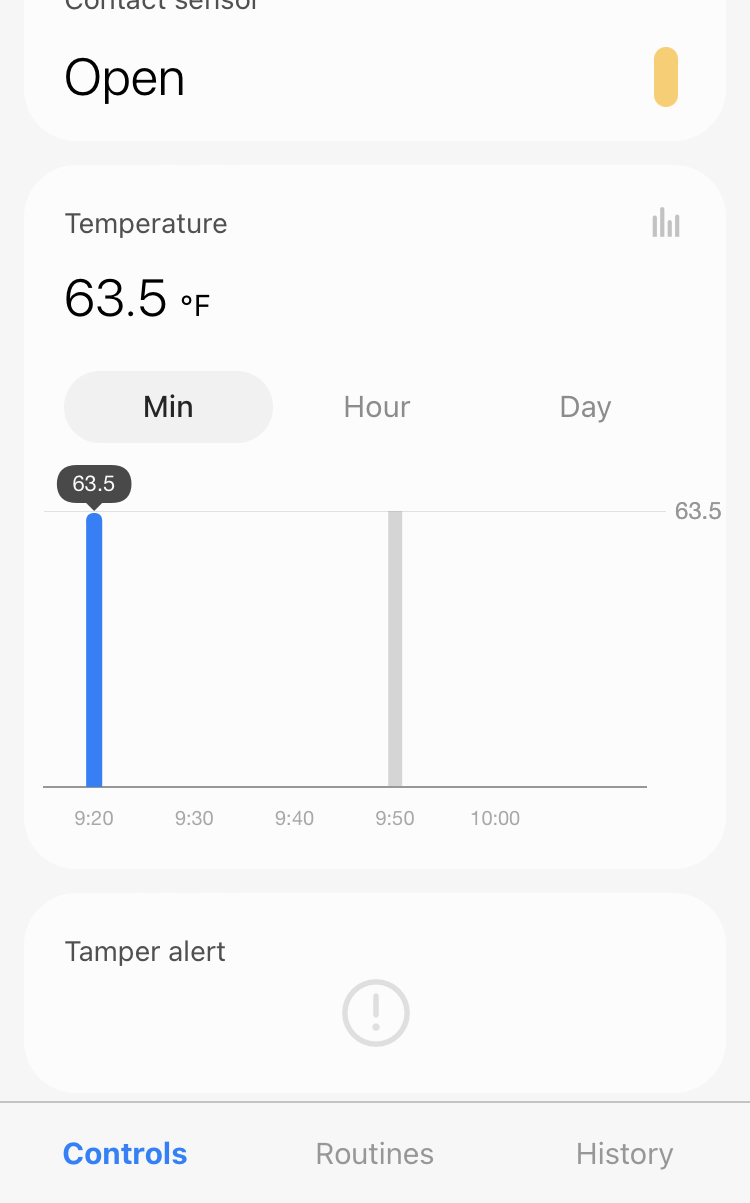
Hi @Mariano_Colmenarejo : In this version, it registered the first initial temperature, but no other since. Your previous version worked a lot better for me, as temp settings seemed responsive (was able to get temperature readings at shorter intervals).
In this version, I don’t see that option anymore, and so far, I don’t know if it will record another reading?
Can we bring back the last version?
cheers
The preferences that you had in the old profile were not valid for this firmware 2.5.
By default values should be sent with changes every 0.5ºc
I have added the preferences of this firmware 2.5:
- Parameter 12 -Sensitivity to temperature changes according to fibaro manual:
The maximum acceptable difference between the last reported temperature and the current temperature read from the sensor. If the temperatures differ by the set value or more, a report with the current temperature value is sent to the device assigned to association group no. 3.
Available settings: 0 – 255 (0°C to 16°C) (32°F to 60.8°F)
Default setting: 8 (0.5°C)
Parameter size: 1 [byte]To set an appropriate parameter value use the following formula:
x = delta T x 16 – for Celsius
x = delta T x 80 / 9 – for Fahrenheit
x = parameter value
delta T – maximum acceptable temperature gradient in Celsius or FahrenheitIf the value is set to 0:
– if the wake-up interval is set to 255 seconds, temperature report will be sent according to the interval,
– if the wake-up interval is set to over 255, temperature report will be sent each ca. 4 minutes.
I have varied the limits from 0 to 255 (0º to 16º) by 0 to 127 0º to 8º), which are the ones that can be sent with 1 byte. And I have left the default at 0 so that it sends the temperature every 4 minutes.
You can calculate the value of the parameter with the temperature increase that you need to report, with the formula in the manual.
When you change the value you should wake up the sensor with the TMP button, according to the manual
- Parameter 10 - Tamper Alarm Cancellation:
Available settings:
0 – Tamper alarm cancellation inactive
1 – Tamper alarm cancellation active
Default setting: 1
Parameter size: 1 [byte]
Try to see if it works better and if it doesn’t work well I recover the original version
────────────────────────────────────────────────────
 Name         Z-Wave Sensor and Child Thermostat Mc
 Version      2022-12-08T16:27:29.336077928
────────────────────────────────────────────────────
It works now! Reporting temperature every 4 minute. Thanks again for your amazing help and patience @Mariano_Colmenarejo !
@Mariano_Colmenarejo
Hi Mariano,
I just ordered a 4 channel Zigbee relais that´s supposed to show up as Tuya TS0004 - which you have integrated into the Zigbee Driver. So we´ll see…
It´s this one: MHCOZY: Tuya 4 channel Zigbee relay
Yes, the valves were directly connected to the RGBW outputs of the Fibaro 441 and I just had to switch pure R, G, B or W (in Vera and the old ST app) which was simple and cheap 8 years ago.
Thanks again for your help, Mariano! It´s very much appreciated!
When you have it, if the fingerprints are not in the driver, tell me and I’ll add them
I answer you in this topic that is from Zwave devices
My driver does not provide anything different from the stock driver on this device.
If you accurately measure your fingerprints to identify you, I could change you to another profile with smarplug category.
But the problem that I was telling you is common to all drivers
@Mariano_Colmenarejo I’m sorry, I have a short memory. I can’t remember what you’re talking about 
Sorry @Diegocampy I got the wrong tag
@Mariano_Colmenarejo I am having trouble with your Z-wave Switch Mc driver with my qubino 2-relay device. Or maybe it’s just a problem with my configuration. I added the 2-relay device to ST using your driver. Then I created two virtual contact sensors to control the individual relays with Alexa. I made four routines in ST:
1-if either the Main or virtual switch 1 turn on, turn them both on
2-if either the Main or virtual switch 1 turn off, turn them both off
3-if either the Switch2 or virtual switch 2 turn on, turn them both on
4-if either the Switch2 or virtual switch 2 turn off, turn them both off
Unfortunately, when I turn on switch 2, within 5 minutes the main turns on. It seems like when switch 2 goes on, the device reports the main as on so then my routine turns on the main? Not sure what is going on. Any ideas for troubleshooting? Thanks!