(EDGE Driver-Mc): Z-Wave Edge Drivers and others with FIBARO devices:

Hi @Nezmo

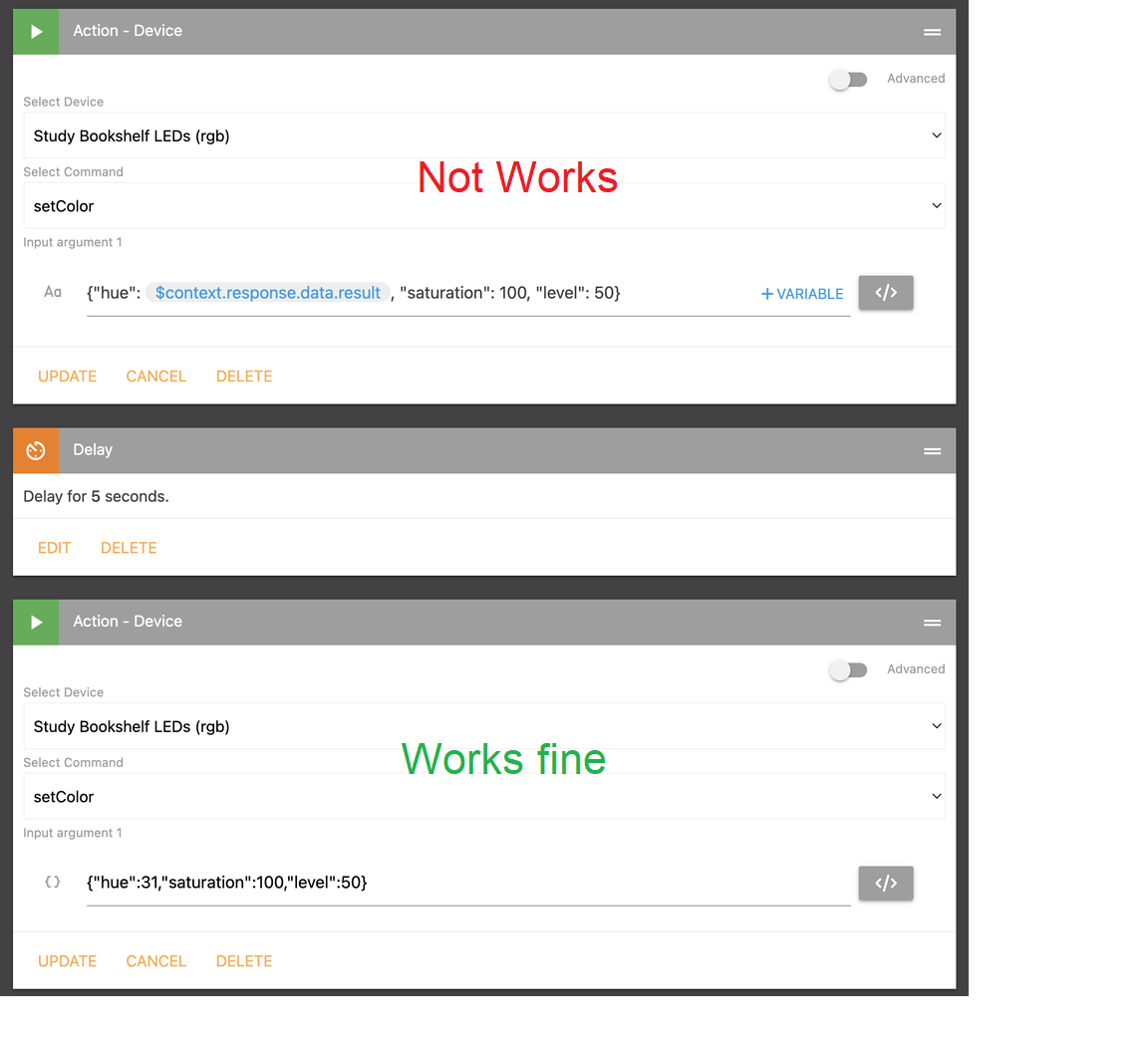
I don’t know how sharpTools handles the build of its automations internally, but the command that has to receive the driver, for zigbee device, has this format captured with the CLI. I do not have zwave bulbs, but de command had the same arguments: hue, saturation or hue + saturation depend of the command used: setHue, setSaturation or SetColor

2022-09-08T21:53:06.995024912+00:00 INFO Zigbee Light Multifunction Mc  <ZigbeeDevice: 0f922249-3c54-40fa-a217-ebe9eec40e53 [0x00F4] (LΓ‘mpara SofΓ‘s)> received command: {"args":{"color":{"hue":67.36,"saturation":96.47010980650435}},"capability":"colorControl","command":"setColor","component":"main","positional_args":[{"hue":67.36,"saturation":96.47010980650435}]}

It doesn’t matter if the command comes from a Routine or a Scene or from the capability colorControl/ Color Attribute/ setColor command of the detail view in the app.

The values of hue and saturation are numeric, it does not admit strings, if I understand correctly what you mean, the variable you want to introduce is a string type, or am I wrong?

On the other hand I see that in the setColor command of the sharpTools automation screenshot you send hue, saturation and level and this is not compatible with the setColor command.

The driver has to receive a setColor command with hue and saturation values and another command setLevel with the level value.
if a command with the level is not received, the driver executes an On command too and will go to the last level it had.

I don’t know if it was different with DTH.

What he’s saying is that SharpTools can either send the arguments across as a JSON object or a string formatted as a JSON object.

JSON Object (standard)

{"hue": 30, "saturation": 100}

String with JSON

'{"hue": 30, "saturation": 100}'

With other first-party SmartThings integrations I tested, they supported both formats. I originally suspected that the SmartThings REST API was doing the conversion of a string formatted as JSON to an object, but when @nezmo mentioned that it didn’t work with this driver, it had me questioning things.

The reason this is important to Nezmo is that SharpTools rules can use Variables in strings, but they can’t currently be used in objects. This let’s him create neat rules that can use random colors or other cool things with SharpTools variables.

It’s on my hit list to look at supporting variables in objects within SharpTools, but I won’t be able to get to it right away.

As such, we figured we would ask you if you had encountered this before and knew why the SmartThings first party devices handled the object encoded in a string whereas this driver didn’t. :smiley:

2 Likes

I don’t see that the problem here is the format in which the command is sent. String with JSON or JSON Object (standard)

I think the problem, from what I see in the screenshots, is that the hue value that is sent in the command is not correct.
When a numerical value between 0 and 100 is sent it works and when the result of a calculation is sent, as a variable it does not work

Let’s see if I understand correctly what you need to do:

  • From sharpTools you want to send a command from an automation so that the bulb randomly changes color.

  • Therefore periodically the automation will send the command with a new calculated hue value

  • In sharpTools a formula is implemented that calculates the value of hue randomly. The calculation is supposed to be done by sharpTools.

  • The random value calculated for hue you want to send in the setColor command as a result of the formula calculation

  • For the command to work, the value of the result must be a type number between 0 and 100.

  • SharpTools can not give the result in type number? I would have solved the problem.
    I have a similar function in a Zigbee driver and the random calculation of hue and saturation is a numerical value between the ranges that I request and then the command is sent to the device

if colorChangeMode == 2 then
        newSaturation = math.random(satMin, satMax)
        newHue = math.random(hueMin, hueMax)
end

device:send_to_component("main", zcl_clusters.ColorControl.server.commands.MoveToHueAndSaturation(device, newHue, newSaturation, 0x0000))
  • If @Nezmo captures the log of the command received with the CLI, you can see what error or what action the driver performs when it receives the command and what values it receives.
1 Like

The result of the pickRandom([0,31,67]) is one of those three numerical values.

But he can only use that returned result in a String which has JSON encoded in it. The encoded JSON within the string is correct and has the numerical value in it.

The problem is the string with JSON encoded doesn’t work in the setColor() command in this driver. (He is using this same concept with another device)

If he skips the random number part and hard codes the hue value, it works in a JSON argument type, but not in a string that includes a JSON object within it.

SharpTools doesn’t currently support variables in the JSON objects which is why he was trying the string formatted JSON which has worked with some other drivers. It’s on my hit list, but not something I will be able to get to right away.

–

We’ll see if @nezmo can capture the logs. Since he didn’t have the CLI installed yet, I figured it wouldn’t hurt to ask if you had seen this before, but it sounds like we might need to see what the driver itself is seeing.

1 Like

@Mariano_Colmenarejo @joshua_lyon

Thank you both. I will work on obtaining logs today and report back.

3 Likes

I have the CLI installed. I’ve Googled to death but just can’t figure out how to get the logs I need. Can you help?

Install CLI on your computer:
β€’ You have to download from this link release 34 or greater of the compressed file smartthings-win.zip, if you use windows or the one necessary for your operating system
β€’ In that link you also have installation help, use and all the commands you can use

smartthings-cli/packages/cli at master Β· SmartThingsCommunity/smartthings-cli - smartthings edge:channels:update [ID]

β€’ Unzip it and move the smartthings.exe file to a folder on your computer from where it will be used. for example to a new folder in documents/CLI
β€’ You have to open the windows powerShell terminal window and you have to go to the directory (folder) where the smarttings.exe file is.
β€’ Use the DOS commands β€œcd…” to move down directory and β€œcd directory name” to move to that directory. This is an example of my folder for CLI or VSC folder

β€’ the first time you type a CLI command it will take you to the smartthing page to authorize your account.
β€’ type .\smartthings edge:drivers:logcat
β€’ enter the IP of your HUB, you can see it in IDE
β€’ It will show you the list of drivers installed on your HUB
β€’ type the number corresponding to the driver you want to see
β€’ It will show you the activity of the device connected to that driver

Then:

Open a terminal window to execute the CLI:
type .\smartthings edge:drivers:logcat
enter the IP of your HUB, you can see it in IDE It will show you the list of drivers installed on your HUB type the number corresponding to the driver you want to see: Z-Wave Bulb Mc
With SharpTools send the automation with setColor command with random variable result
When the comman received in the driver the logcat shown the command and messages bettween hub driver and device.

1 Like

Thanks. I already had it installed - just needed the commands for the logging.

Following your instructions I have:

───────────────────────────────────────────────────────────────────────────
 #   Driver Id                             Name
───────────────────────────────────────────────────────────────────────────
 1   606efcfe-9ad2-4dd5-9f33-554da3fd5fca  LAN Device Monitor V1.3
 2   3c9378c1-79ab-4534-b8c3-4502bc0257b2  Roku Driver v0.1b
 3   fb89a65a-8df2-4725-99a4-07afd2a9be82  Virtual Calendar Mc
 4   58baa377-48f7-4039-9062-2c373a9a0e58  Virtual Calendar Mc-(OLD)
 5   0fd9a9a4-8863-4a83-97a7-5a288ff0f5a6  Virtual Devices V2
───────────────────────────────────────────────────────────────────────────
 6   054cf51f-0171-4d25-acd2-9dc739cce921  Virtual Things Edge Driver [YG]
 7   8307c33f-1e12-4cc7-98ed-8fe01b6666ec  Z-Wave Bulb Mc
 8   c820a266-62f6-487b-a00c-485459ea9886  Z-Wave Masquerade v1.00
 9   2cbf55e3-dbc2-48a2-8be5-4c3ce756b692  Z-Wave Switch
 10  af6a9a6b-063e-440b-92ea-91289b740455  Zooz Multisensor
───────────────────────────────────────────────────────────────────────────
 11  e0c8e9a1-b125-4a28-a3f6-1c6d9e829ce7  Zooz Multisensor
 12  7b81ba0f-d5d2-45e7-9add-92e894cbe37a  Zooz ZEN32 Scene Controller
 13  b1d9c9af-caa0-45a8-bd2b-7dab487dcecd  Zooz ZEN32 Scene Controller
───────────────────────────────────────────────────────────────────────────
? Select a driver. 7
connecting... connected

I ran the SharpTools rule which failed as expected but nothing is showing up in the CLI.

If I rerun the SharpTools rule with a JSON (not string) then I do get logging data in the CLI.

Please, send the command that works fine

I do get logging in the CLI for the working command.

Can you post the log of the command working fine?

Here you go:

2022-09-09T16:28:57.828698562+00:00 TRACE Z-Wave Bulb Mc  Received event with handler capability
2022-09-09T16:28:57.834360198+00:00 INFO Z-Wave Bulb Mc  <ZwaveDevice: c5786932-377b-4657-be95-19313c95bc76 [BE] (Study Bookshelf LEDs)> received command: {"args":{"color":{"hue":31,"level":50,"saturation":100}},"capability":"colorControl","command":"setColor","component":"rgb","positional_args":[{"hue":31,"level":50,"saturation":100}]}
2022-09-09T16:28:57.838407907+00:00 TRACE Z-Wave Bulb Mc  Found CapabilityCommandDispatcher handler in zwave_bulb -> Fibaro RGBW Controller
2022-09-09T16:28:57.843540730+00:00 INFO Z-Wave Bulb Mc  <ZwaveDevice: c5786932-377b-4657-be95-19313c95bc76 [BE] (Study Bookshelf LEDs)> sending Z-Wave command: {args={color_components={{color_component_id="RED", value=36}, {color_component_id="GREEN", value=255}, {color_component_id="BLUE", value=0}}}, cmd_class="SWITCH_COLOR", cmd_id="SET", dst_channels={}, encap="AUTO", payload="\x03\x02\x24\x03\xFF\x04\x00", src_channel=0, version=1}
2022-09-09T16:28:57.856580095+00:00 TRACE Z-Wave Bulb Mc  Z-Wave command(6e2879fd) queued for radio transmission: CC:Switch Color, CID:0x05
2022-09-09T16:28:57.862570256+00:00 DEBUG Z-Wave Bulb Mc  Fibaro Light device thread event handled
2022-09-09T16:28:57.867368641+00:00 DEBUG Z-Wave Bulb Mc  Fibaro Light device thread event handled
2022-09-09T16:28:57.977931523+00:00 TRACE Z-Wave Bulb Mc  Z-Wave command(6e2879fd) transmit status: TRANSMIT_COMPLETE_OK
2022-09-09T16:28:59.878066463+00:00 INFO Z-Wave Bulb Mc  <ZwaveDevice: c5786932-377b-4657-be95-19313c95bc76 [BE] (Study Bookshelf LEDs)> sending Z-Wave command: {args={color_component_id="RED"}, cmd_class="SWITCH_COLOR", cmd_id="GET", dst_channels={}, encap="AUTO", payload="\x02", src_channel=0, version=1}
2022-09-09T16:28:59.898391213+00:00 TRACE Z-Wave Bulb Mc  Z-Wave command(84bbb664) queued for radio transmission: CC:Switch Color, CID:0x03
2022-09-09T16:28:59.902173130+00:00 DEBUG Z-Wave Bulb Mc  Fibaro Light device thread event handled
2022-09-09T16:29:00.040952171+00:00 TRACE Z-Wave Bulb Mc  Z-Wave command(84bbb664) transmit status: TRANSMIT_COMPLETE_OK
2022-09-09T16:29:00.101540880+00:00 TRACE Z-Wave Bulb Mc  Received event with handler unnamed
2022-09-09T16:29:00.106707838+00:00 INFO Z-Wave Bulb Mc  <ZwaveDevice: c5786932-377b-4657-be95-19313c95bc76 [BE] (Study Bookshelf LEDs)> received Z-Wave command: {args={color_component_id="RED", value=36}, cmd_class="SWITCH_COLOR", cmd_id="REPORT", dst_channels={}, encap="NONE", payload="\x02\x24", src_channel=0, version=1}
2022-09-09T16:29:00.119583005+00:00 TRACE Z-Wave Bulb Mc  Found ZwaveDispatcher handler in zwave_bulb -> Fibaro RGBW Controller
2022-09-09T16:29:00.122951422+00:00 INFO Z-Wave Bulb Mc  <ZwaveDevice: c5786932-377b-4657-be95-19313c95bc76 [BE] (Study Bookshelf LEDs)> emitting event: {"attribute_id":"switch","capability_id":"switch","component_id":"rgb","state":{"value":"on"}}
2022-09-09T16:29:00.133407338+00:00 INFO Z-Wave Bulb Mc  <ZwaveDevice: c5786932-377b-4657-be95-19313c95bc76 [BE] (Study Bookshelf LEDs)> emitting event: {"attribute_id":"hue","capability_id":"colorControl","component_id":"rgb","state":{"value":31}}
2022-09-09T16:29:00.145151213+00:00 INFO Z-Wave Bulb Mc  <ZwaveDevice: c5786932-377b-4657-be95-19313c95bc76 [BE] (Study Bookshelf LEDs)> emitting event: {"attribute_id":"saturation","capability_id":"colorControl","component_id":"rgb","state":{"value":100}}
2022-09-09T16:29:00.155721713+00:00 DEBUG Z-Wave Bulb Mc  Fibaro Light device thread event handled
2022-09-09T16:29:00.823675547+00:00 TRACE Z-Wave Bulb Mc  Received event with handler unnamed
2022-09-09T16:29:00.857243130+00:00 INFO Z-Wave Bulb Mc  <ZwaveDevice: c5786932-377b-4657-be95-19313c95bc76 [BE] (Study Bookshelf LEDs)> received Z-Wave command: {args={value=14}, cmd_class="SWITCH_MULTILEVEL", cmd_id="REPORT", dst_channels={2}, encap="NONE", payload="\x0E", src_channel=2, version=1}
2022-09-09T16:29:00.897234547+00:00 TRACE Z-Wave Bulb Mc  Received event with handler unnamed
2022-09-09T16:29:00.903834213+00:00 INFO Z-Wave Bulb Mc  <ZwaveDevice: c5786932-377b-4657-be95-19313c95bc76 [BE] (Study Bookshelf LEDs)> received Z-Wave command: {args={value=99}, cmd_class="SWITCH_MULTILEVEL", cmd_id="REPORT", dst_channels={3}, encap="NONE", payload="c", src_channel=3, version=1}
2022-09-09T16:29:00.908987255+00:00 TRACE Z-Wave Bulb Mc  Found ZwaveDispatcher handler in zwave_bulb -> Fibaro RGBW Controller
2022-09-09T16:29:00.932530005+00:00 DEBUG Z-Wave Bulb Mc  Fibaro Light device thread event handled
2022-09-09T16:29:00.937649338+00:00 TRACE Z-Wave Bulb Mc  Received event with handler unnamed
2022-09-09T16:29:00.982193213+00:00 INFO Z-Wave Bulb Mc  <ZwaveDevice: c5786932-377b-4657-be95-19313c95bc76 [BE] (Study Bookshelf LEDs)> received Z-Wave command: {args={value=99}, cmd_class="BASIC", cmd_id="REPORT", dst_channels={}, encap="NONE", payload="c", src_channel=0, version=1}
2022-09-09T16:29:00.986355505+00:00 TRACE Z-Wave Bulb Mc  Found ZwaveDispatcher handler in zwave_bulb -> Fibaro RGBW Controller
2022-09-09T16:29:00.989426172+00:00 DEBUG Z-Wave Bulb Mc  Fibaro Light device thread event handled
2022-09-09T16:29:00.993065547+00:00 TRACE Z-Wave Bulb Mc  Received event with handler unnamed
2022-09-09T16:29:00.998627963+00:00 INFO Z-Wave Bulb Mc  <ZwaveDevice: c5786932-377b-4657-be95-19313c95bc76 [BE] (Study Bookshelf LEDs)> received Z-Wave command: {args={value=99}, cmd_class="SWITCH_MULTILEVEL", cmd_id="REPORT", dst_channels={1}, encap="NONE", payload="c", src_channel=1, version=1}
2022-09-09T16:29:01.002943213+00:00 TRACE Z-Wave Bulb Mc  Found ZwaveDispatcher handler in zwave_bulb
2022-09-09T16:29:01.006331297+00:00 INFO Z-Wave Bulb Mc  <ZwaveDevice: c5786932-377b-4657-be95-19313c95bc76 [BE] (Study Bookshelf LEDs)> emitting event: {"attribute_id":"switch","capability_id":"switch","component_id":"main","state":{"value":"on"}}
2022-09-09T16:29:01.016349213+00:00 TRACE Z-Wave Bulb Mc  Found ZwaveDispatcher handler in zwave_bulb
2022-09-09T16:29:01.020447047+00:00 INFO Z-Wave Bulb Mc  <ZwaveDevice: c5786932-377b-4657-be95-19313c95bc76 [BE] (Study Bookshelf LEDs)> emitting event: {"attribute_id":"level","capability_id":"switchLevel","component_id":"main","state":{"value":100}}
2022-09-09T16:29:01.031264422+00:00 TRACE Z-Wave Bulb Mc  Found ZwaveDispatcher handler in zwave_bulb
2022-09-09T16:29:01.035492797+00:00 INFO Z-Wave Bulb Mc  <ZwaveDevice: c5786932-377b-4657-be95-19313c95bc76 [BE] (Study Bookshelf LEDs)> sending Z-Wave command: {args={scale=2}, cmd_class="METER", cmd_id="GET", dst_channels={}, encap="AUTO", payload="\x10", src_channel=0, version=3}
2022-09-09T16:29:01.048517088+00:00 TRACE Z-Wave Bulb Mc  Z-Wave command(dd15b7d1) queued for radio transmission: CC:Meter, CID:0x01
2022-09-09T16:29:01.051607838+00:00 DEBUG Z-Wave Bulb Mc  Fibaro Light device thread event handled
2022-09-09T16:29:01.056952172+00:00 TRACE Z-Wave Bulb Mc  Found ZwaveDispatcher handler in zwave_bulb -> Fibaro RGBW Controller
2022-09-09T16:29:01.059936297+00:00 DEBUG Z-Wave Bulb Mc  Fibaro Light device thread event handled
2022-09-09T16:29:01.136833963+00:00 TRACE Z-Wave Bulb Mc  Z-Wave command(dd15b7d1) transmit status: TRANSMIT_COMPLETE_OK
2022-09-09T16:29:01.181437880+00:00 TRACE Z-Wave Bulb Mc  Received event with handler unnamed
2022-09-09T16:29:01.191209922+00:00 INFO Z-Wave Bulb Mc  <ZwaveDevice: c5786932-377b-4657-be95-19313c95bc76 [BE] (Study Bookshelf LEDs)> received Z-Wave command: {args={delta_time=0, meter_type="ELECTRIC_METER", meter_value=8.8, precision=1, previous_meter_value=0.0, rate_type="IMPORT", scale="WATTS", size=2}, cmd_class="METER", cmd_id="REPORT", dst_channels={}, encap="NONE", payload="\x21\x32\x00\x58\x00\x00\x00\x00", src_channel=0, version=3}
2022-09-09T16:29:01.202473880+00:00 TRACE Z-Wave Bulb Mc  Found ZwaveDispatcher handler in zwave_bulb
2022-09-09T16:29:01.205856380+00:00 INFO Z-Wave Bulb Mc  <ZwaveDevice: c5786932-377b-4657-be95-19313c95bc76 [BE] (Study Bookshelf LEDs)> emitting event: {"attribute_id":"power","capability_id":"powerMeter","component_id":"main","state":{"unit":"W","value":8.8}}
2022-09-09T16:29:01.216169630+00:00 TRACE Z-Wave Bulb Mc  Found ZwaveDispatcher handler in zwave_bulb
2022-09-09T16:29:01.219727047+00:00 DEBUG Z-Wave Bulb Mc  Fibaro Light device thread event handled
2022-09-09T16:29:02.971655505+00:00 TRACE Z-Wave Bulb Mc  Received event with handler unnamed
2022-09-09T16:29:02.976174797+00:00 INFO Z-Wave Bulb Mc  <ZwaveDevice: c5786932-377b-4657-be95-19313c95bc76 [BE] (Study Bookshelf LEDs)> received Z-Wave command: {args={precision=1, scale="WATTS", sensor_type="POWER", sensor_value=9.6, size=2}, cmd_class="SENSOR_MULTILEVEL", cmd_id="REPORT", dst_channels={}, encap="NONE", payload="\x04\x22\x00\x60", src_channel=0, version=1}
2022-09-09T16:29:02.986335089+00:00 TRACE Z-Wave Bulb Mc  Found ZwaveDispatcher handler in zwave_bulb
2022-09-09T16:29:02.989728964+00:00 INFO Z-Wave Bulb Mc  <ZwaveDevice: c5786932-377b-4657-be95-19313c95bc76 [BE] (Study Bookshelf LEDs)> emitting event: {"attribute_id":"power","capability_id":"powerMeter","component_id":"main","state":{"unit":"W","value":9.600000000000001}}
2022-09-09T16:29:03.000286172+00:00 DEBUG Z-Wave Bulb Mc  Fibaro Light device thread event handled
1 Like

El st color se ejecuta correctamente.
Effectively the command with the level argument is received but the driver does not execute it.
Execute a command On and level 100% which would be the last one used

When you send the command that does not works if nothing is received in the driver, it could be blocked in the API and does not reach the hub

Hi @Nezmo

Are you try send the command as @joshua_lyon says?

String with JSON

'{"hue": $context.response.data.result, "saturation": 100}'

I will need @joshua_lyon to confirm, but when I send as a string with JSON the SharpTools log entries show the following:

Sending device command: {{device@samsung-smartthings:b323d184-74e9-46c6-aaf1-ec444d86c17b:c5786932-377b-4657-be95-19313c95bc76:rgb}} β–Έ setColor({"hue":31,"saturation":100,"level":50})

Yes, that’s the String with JSON format.

The β€˜input’ format in SharpTools has the context variable as you showed @Mariano_Colmenarejo – that’s what @nezmo sees when he configures things in SharpTools, but it gets converted and sent across as a normal numeric value to SmartThings (within the string containing formatted JSON).

SmartThings has no idea that it came from a SharpTools variable - it should look like any other string with JSON content.

1 Like

Hi @Nezmo

You can try something.

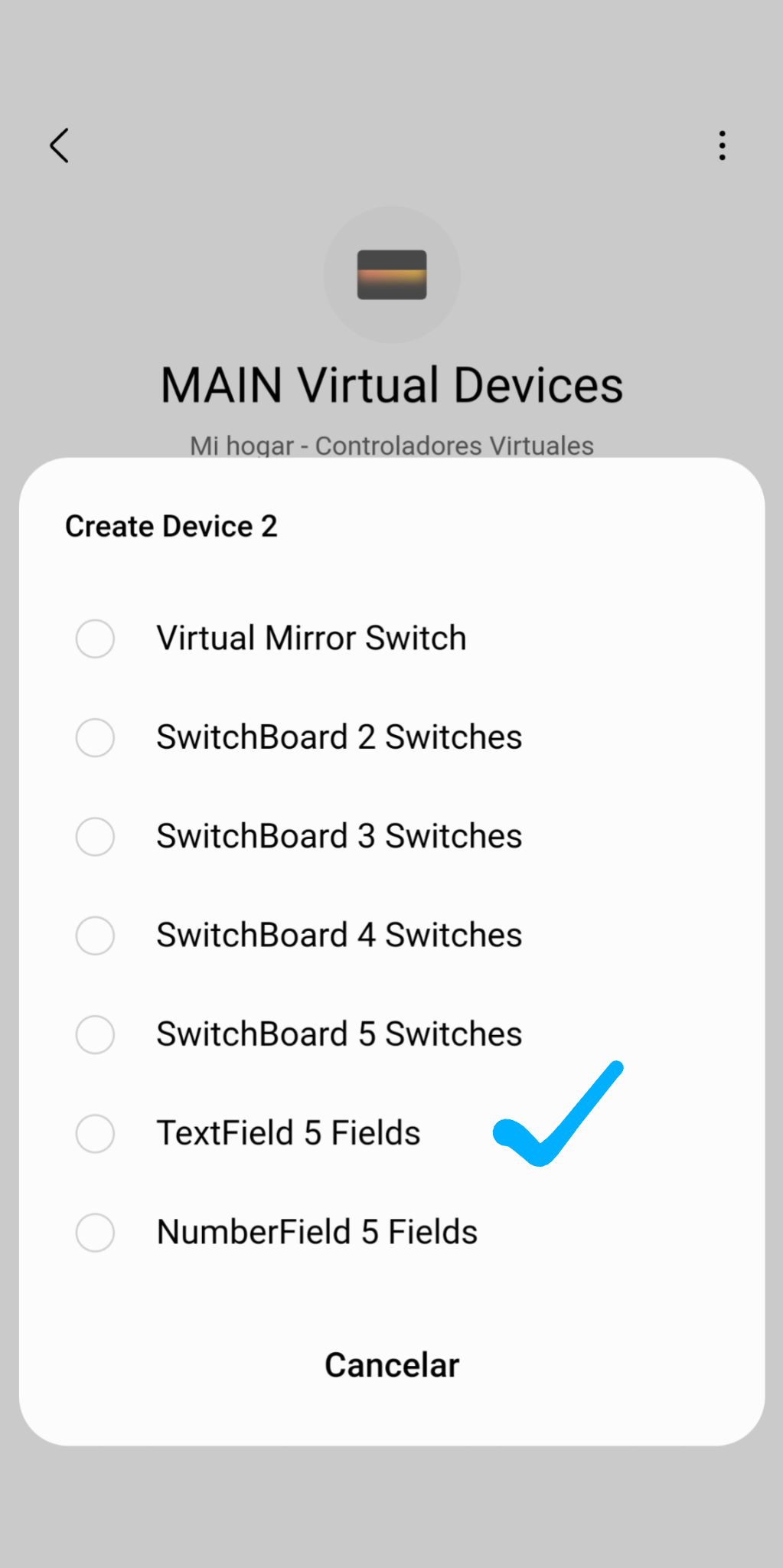
Install the Virtual Appliances Mc driver and create a TextField virtual device with 5 free text fields.
And send the variable with the value hue to one of these text fields, for example to the command setTextFieldOne and so I can see what arrives at the Virtual Appliances Mc driver

1 Like

Okay, I’ll try this today when I get chance.

Thanks

Installed the Appliances driver and submitted the same string command from SharpTools. Text was updated on the ST device. Here’s the CLI log:

2022-09-10T16:17:39.708382553+00:00 TRACE Virtual Appliances Mc  Received event with handler capability
2022-09-10T16:17:39.715600344+00:00 INFO Virtual Appliances Mc  <Device: f87b7d2d-5b1a-4881-a9ee-079aaa7a240e (Text Field (1662826282))> received command: {"args":{"value":"{\"hue\":67,\"saturation\":100,\"level\":50}"},"capability":"legendabsolute60149.textFieldOne","command":"setTextFieldOne","component":"main","positional_args":["{\"hue\":67,\"saturation\":100,\"level\":50}"]}
2022-09-10T16:17:39.724339594+00:00 TRACE Virtual Appliances Mc  Found CapabilityCommandDispatcher handler in VirtualDevice
2022-09-10T16:17:39.732587011+00:00 INFO Virtual Appliances Mc  <Device: f87b7d2d-5b1a-4881-a9ee-079aaa7a240e (Text Field (1662826282))> emitting event: {"attribute_id":"textFieldOne","capability_id":"legendabsolute60149.textFieldOne","component_id":"main","state":{"value":"{\"hue\":67,\"saturation\":100,\"level\":50}"}}
2022-09-10T16:17:39.744993136+00:00 DEBUG Virtual Appliances Mc  Text Field (1662826282) device thread event handled
2 Likes

Please, could you post a screenshot of the value in app?