Yet you have the Live View Option and I do not 
I agree that’s a little odd
Paaaaaaaaaaaaatttttttttttiiiiiiiiiiiiiiiiiiieeeeeeeeeeeeeennnnnnnnnnnnnnnnncccccccccccceeeeeeeeeeeee
@Benji Thank you 
I just checked and yep … don’ t have it yet  However I have not hit the doorbell yet and that makes since. I know that is how you change the sensitivity on the motion sensor.
No problem but no guarantees that’ll work either, I’m not sure what Ring’s schedule is on rolling out the updates necessary (app or firmware if at all).
Hopefully it will be soon
Is it here yet???
1 Like
How about now. Did it come??
1 Like
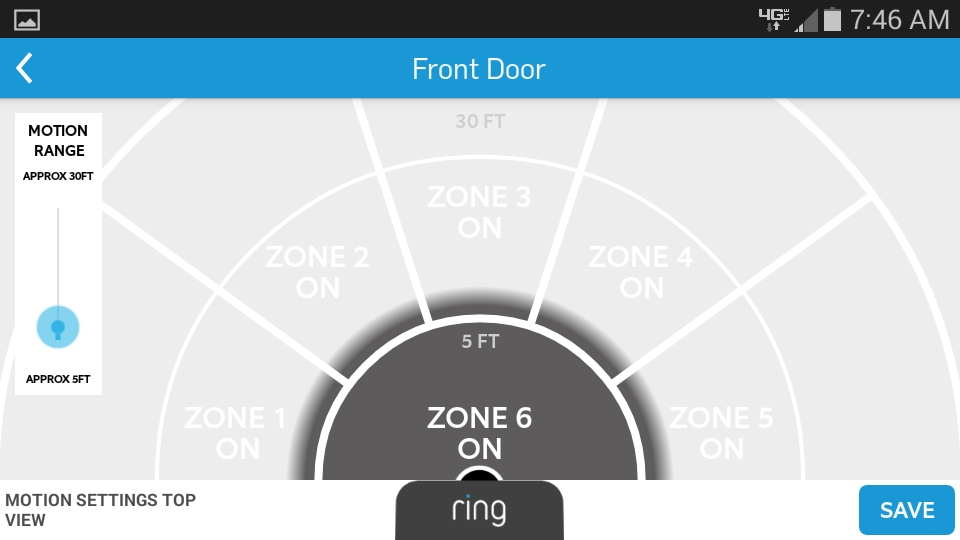
SAME PROBLEM! I’ve been in contact with ring doorbell support ( help@ring.com ). no luck so far. I’ve been through all the basic troubleshooting, uninstall/reinstall app, check firmware, play with settings, they even tried controlling settings remotely, and removing and adding unit back to my account. NOTHING! I just want it set to zone 6 only because the cars on the street (40 feet away) are still setting off motion alerts. it seems like you have no choice but to have at least one of the 1st 5 zones turned on . there’s no way to just save it to work with zone 6 only… there are explicit instructions on their website on how to do this but they don’t work!!!
Enabling Zone 6 Only
If you’re looking to turn on alerts for zone 6 only, you’ll have to turn on only one of the other 5 zones first . Once selecting any of the 15 zones, you’ll notice zone six automatically turns on. From there, lessen the motion range toggle all the way down so that only zone 6 is marked as “on” and zones 15 are marked as “off”.
you’re not alone
change to zone 6 only…
[new user - can’t post picture]
save…
[new user - can’t post picture]
doesn’t save … !
According to their FAQ they will contact you via email when your doorbell/account has been readied for Livestream. It has now been 2 weeks since their announcement (which suggested it was available then and there) and still no word. Wonder if the rollout got delayed because they have problems??
So the next day I gave them a call, They were wonderful and about 5 hours later I had live video. There was something behind the scenes that needs to be done for some users… just give them a call, they were very nice about it
Guys, how much battery are you getting on the ring doorbell and with what settings? im getting less than 2 months always, with the motion detection on minimun… 
Livestreaming showed up for me in the app before I got the official email. I think I got the email last week. Its really quite nice. Hope for hardwire people they start to cache video a little more, to reduce the delay.
@Eduardo_Veras I think 2 months is fairly average for battery. Depends on how often it triggers. I am guessing their 1 year mark, is no motion, and only 1 door bell ring a week (or maybe a month). This article said he got about 2.5 months during the cold period. http://www.pcmag.com/article2/0,2817,2479253,00.asp
1 Like
Thats some sad false advertising
Wifi and video have fairly high battery demands. I am actually surprised that it gets enough juice from the low power door bell lines. They should have listed how it was determined at a year.
Ring is going to start offering a solar panel
With IFTTT can you use Google Drive to backup the videos recorded? If so, do you need the cloud subscription for this to work?
I’m afraid not, Ring Cloud only.
Been playing around with Activator and managed to set up my iPhone so that it records the screen when the Ring app is launched and stops recording when the app is closed. Need to jailbreak and use Display Recorder plus Activator along if ActIf plug in (also Automa to stop message pop ups). Seems to work fine, and saves a copy of any video for easy access (export to camera roll, open in iFile, share). Only thing it won’t do is record unanswered calls.
1 Like
A nice hack! Sadly not very practical but still, very ingenious!
I’ve now had the Ring doorbell for a week. Here’s my initial feedback.
I don’t have a fitted doorbell, so I installed the Ring doorbell directly onto my UPVC door on the porch. It was very easy to fit and I had it connected to my home network (2G only) and fitted to the front door in less than 20 minutes.
I’ve answered a couple of doorbell presses on my iPhone inside the house on WIFI – perfect and fast, clear video.
I’ve answered a couple of doorbell presses on my iPhone outside the house. These vary in user experience greatly depending on what my 4G/3G coverage is like. But for the most part, it’s pretty good.
I’ve initially had a LOT of motion triggers as I’m only about 15 foot from a path and road. My Ring was catching pretty much every single person walking by and most cars too.
I then pulled the motion sensitivity down below the midway point. This improved the false triggers quite a bit, but it seemed that in the afternoon, once the sun had moved over the house, Ring suddenly become more sensitive and started triggering more motion detection. I thought this could have been the result of more activity as people were returning from school/work so I tested this by doing a few “drivebys” at different points of the day. The results showed that my Ring did indeed become more sensitive as the sun moved over the house in the afternoon.
Even with the sensitivity pulled right back to only zone one, I’d still get motion alerts when cars went by and people walked by my house. That’s when I decided to do a bit of DIY on the device!
On the top of the Ring doorbell is the motion sensor, I simply took the device off the door and stuck black Duct tape over roughly 50% of the top of the sensor. I then placed it back on the door. The results were pretty much instant! I now no longer get any motion alerts from cars/people passing by my house, but if someone walks onto my driveway, they are picked up (although there is a slight delay of a few seconds in the start of the recording, but this seems to be inherent to the device even before I taped up the sensor).
I’m now pretty happy with the outcome of my little experiment. After struggling for a few days trying to tweak the motion sensitivity in the app, it was extremely easy to fix with a bit of low-tech sticky tape. Go figure!
Anyway, I hope this helps someone else who may be getting frustrated with all the unwanted motion triggers and about to bin their doorbell…
1 Like