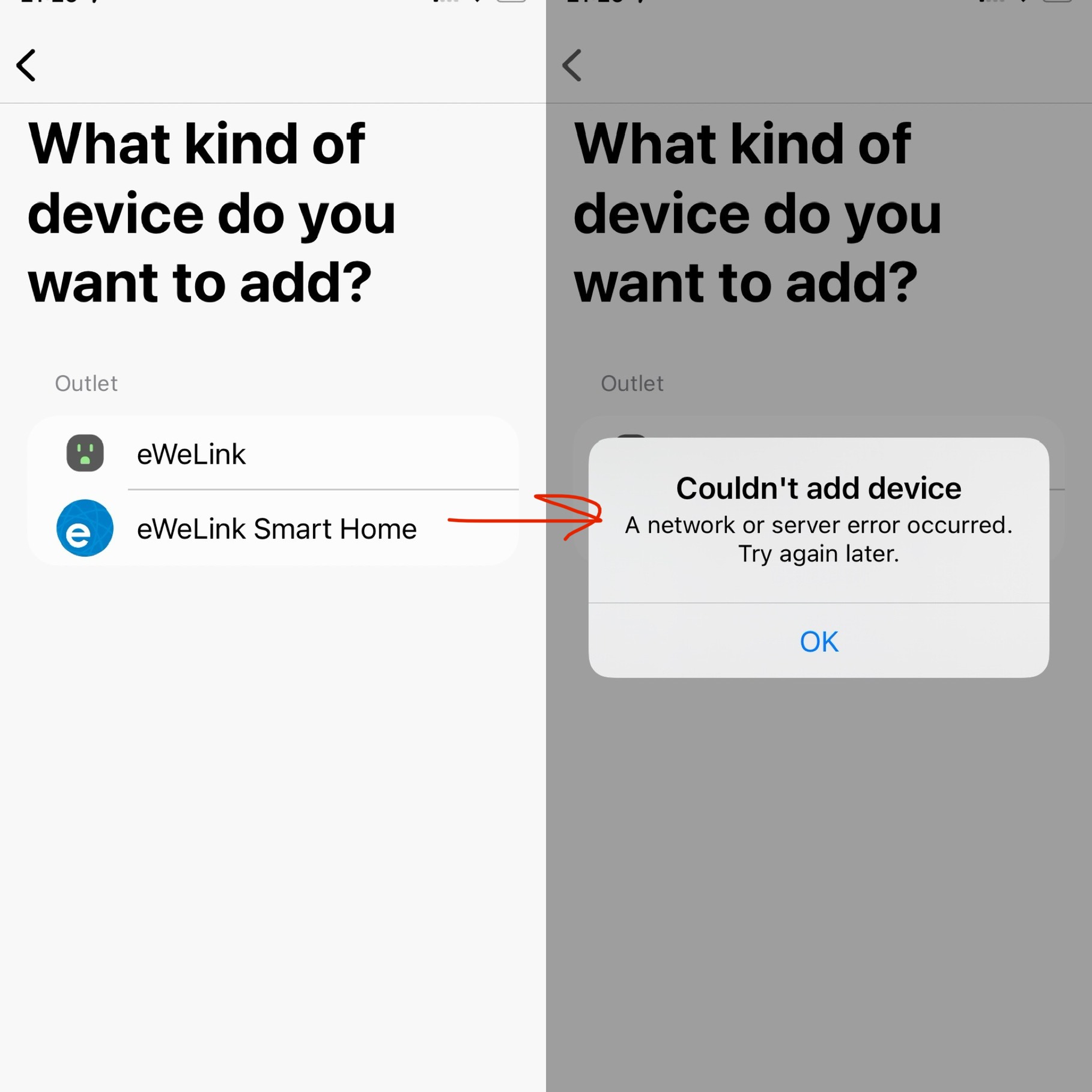
Hi there, I’m having issues linking smarthings to external platforms like Tuya or Ewelink smart home. It says “couldn’t add device, a network or server error occured”.
Do you have the same?
(existing linked platforms are fine)
Try using a different browser on your phone.
Browser? I’m using the app on iphone.
At what point did you get the error message? Were you able to successfully authenticate (login) to Tuya/Ewelink? If you were not able to authenticate… you should switch the default browser on your mobile device (as noted earlier) and try to authenticate again when trying to add the integration. The ST app is dependent on the browser on your mobile device to login to 3rd party services. So if the current one does not authenicate… switching to a different one may succeed. You can always switch back to your old default browser back when done adding the integration.
if you were able to authenticate, then switching the browser is mute and not necessary.
Hi @Kikos
Welcome to the community. 
I have eWeLink synced already with ST and just went to refresh the connection and worked just fine, so I may say there is not issues with that integration as I can control de Devices just fine
Try to clear the browser cache, cookies and history and then try again
Also choose another connection or lastly reboot your phone
Hope that helps
Yes, like @jkp mentioned, mayority of the 3rd party integration use the web based authentication with Smartthings, so in this particular case, when you look for eWeLink under the Add device —> Partner device and search for eWeLink and click next it will pop up an web-based authentication page so you can enter the credential, that Web portion is part (managed) of your default browser (Safari, Chrome, Firefox) in your phone.
So that is the reason for the suggestions
1-Try another browser and set it as default for your phone
2-Delete cache, cookies, history
3-Try another connection (either Cellular or WIFI
4-Reboot the phone
If that still an issue, open a case with eWeLink so they can check out that web-based authentication portion of the integration
Hey all! thanks @h0ckeysk8er @jkp @ascernas77
The issue happens before I have an authentication screen (so I can’t enter any credentials).
see the screenshot attached.
I have the integration with TAPO and all work fine, I just can’t add new integrations. So it sounds to me an issue with ST itself.
Report the issue to ST and Ewelink support. Ewelink maintains the integration so it could be with either side.
It must be an iOS problem. I just linked eWeLink and SmartLife using an Android 13 Tablet.


I am using an iOS device and it’s working for for me
And your screen shots look just like what I am seeing in Android. I am not seeing anything like the screen shots @Kikos posted.
Thanks again, if it works for you, it must be an issue on my end. I ve done the latest update so don’t know if it s related, I try on an android.
No problem!
It may sounds ilogic but try to reinstall the ST App and reboot the ST hub. Sometimes that clear things out if there is something.
Also logoff from eWeLink app and log back in to verify the authentication process is working fine for them
I removed the ST app and reinstalled it… sounds like it solve the issue of “network error”!
But now I have a “failed to link account” with Ewelink ahah.
That’s an ewelink issue for sure, try to logout, uninstall, login in one browser or the other.
I’d say I will stay away from Ewelink with wifi and stick to Zigbee device from Sonoff.

Ohh! Well, try to reach eWeLink support. I bet they can help you. I have been using eWeLink for about 3 years and haven’t get any issue at all, so it may be something related with your account, or they are having sporadic issues with that type of integrations, so I encourage to contact them.
I own also Sonoff products (switches) and they are really good. slight_smile:
It’s possible that some linked services may be affected by the global tech outage caused by a failed update to the crowdstrike security service. This is affecting everything from Starbucks to airlines right now. 
(Some people are calling this a “Microsoft outage” even though it isn’t. Crowdstrike is a security company that runs its programs in the Microsoft cloud, which is why the bug can show up as a Microsoft error screen.)
And actually it isn’t an “Internet outage” either 
Good point! I’ve corrected my post above. 
Hi all! Looks like it’s an issue with the iphone app (not sure if it’s smartthings or ewelink).
I’ve tried from android and all works as expected. I opened ST on the iphone and it picked all devices from ewelink.
Sorted for now.
thanks all!