Unifying Thread networks and Hub groups

Is the unify thread networks supposed to break the ST “Hub Groups” up? I had my Hubv3 & Smarthings Station join another network (Since I couldn’t move all the border routers to the ST-Hub Group network) and doing it this way seems to reset the hubs name, channels, ST-Hub group etc etc

I was just thinking if it’s possible to keep the grouped hubs linked together when joining other border routers to them (no matter the brand) then surely it’s not a stretch to expect them to keep that group connection when unifying in the opposite direction? (Getting the group to move into a thread network from another brand, like HomeAssistant)

Could be a beta bug or a design oversight, but thought i’d ask to make sure

Edit: Question about potential bug/glitch initially made in response to an update announced in the following post - 59.X Customer Beta Release Notes - V2/V3/Aeotec Hubs

Hi,

Thanks for reporting this, we’d like to investigate this further with our engineering team.

To help us understand what’s happening, could you please share the following:

  1. Could you provide more details? Please describe step by step.
  2. The name of the ecosystem
  3. Date and approximate time when the unification or network changes were made.
  4. The hub logs you can follow the steps here to submit them.
    Provide the Hub logs through the my.smartthings.com:
  1. In the my.smartthings, enter “your hubs”
  2. Enter the corresponding Hub
  3. Click on “Dump Hub Logs”
  4. Change the reason for requesting hub logs if needed
  5. Click on “Dump Hub Logs”
  6. Confirm that the request is submitted
    Note: If you have more than one Hub, the name of the one involved in the issue.

If the logs are no longer available due to time passed, please try reproducing the issue so you can send fresh logs.

Also, please make sure you still have access to your SmartThings account.

  1. Confirm the email account registered in the forum is the same one you use for SmartThings. If not, please share it with me over DM.
  2. Enable support access to your account:
  1. Go to the SmartThings Web (my.smartthings.com)
  2. Log in to your Samsung Account
  3. Select Menu (⋮) and choose Settings
  4. Toggle on Account Data Access
  5. Select the time period and confirm - In this step, please select “Until turned off”, once the team finishes, we’ll let you know so you can disable it again.

More info about this access here: https://support.smartthings.com/hc/en-us/articles/36170233944852-Enabling-Account-Data-Access-for-Support

Let us know once you’ve collected the info, we appreciate your help!

1 Like

It’ll be interesting to hear what they say about this. I find the thread network handling in hub groups quite quirky at the best of times. For example, I found that if I removed secondaries from new hub groups the secondaries would revert to their original thread networks. However when I removed the secondaries from a long active hub group where each hub had been acting as the primary at some time I found they all retained the same thread network they used in the group.

I think if I were doing it I would remove the hub group first and reform it once the thread network on the primary was merged.

Maybe if there is a bug it is that they let you mess with the thread network of hubs while they are in groups.

1 Like

Oh yeah like I can throw everything into the changed thread network that’s there after merging hub v3 & smart station into a hub group

…Everything except for the ST Dongle that is, so I tried to move everything to the network made by that (Dongle) except then I ran into this issue of the hub group getting reset and unable to reform without it starting back at square one (or I end up with multiple separate networks that have the same name if I have everything else added to the hub group and then the hub-grouped ST-Hubs break off and reset)

Same email on both I think

And as for the steps:

1- Create a Hub Group of two hubs

2- Try to unify the Hub Groups thread network with a third party network

3- The hub group resets. (Secondary hub breaks away from primary to regain its default network name, as the primary hub v3 moves into the intended thread network. No longer in previously set Hub Group/Bridge. Regrouping forces disconnect)

Or:

1- Unify the network from the start (by adding all the third party hubs with sr-dongle network and then unify Aeotec hub & Station with that)

2- After everything is in the one shared network, create a Hub Group with the groupable hubs that support it. And check status from your phone/tablet app.

3- you will see that they leave the network and the primary hub in the group regains its default name instead of having the intended shared name that was set earlier. (All set as ST-Tizen in my case but changed to hub number after it fragmented) Even if I put everything into the hub groups network (minus unchangeable dongle that can’t be in a group, nor can it move to another name using the apps unify menu) before sorting from there, I just end up with two networks with the same name.

As you can tell I’ve been trying this multiple ways with different hubs. The three sets are the other brands of BR (third-party), my ST Dongle, and then the unifying hub grouped ones (Aeotec + Station)

If I could make the dongle join a hub group, or a thread network, or otherwise change its own network, then I can side-step this issue myself. But since it’s the only one that forces me to move everything else around, then I run into this issue here.

I used to be able to have my hub groups thread network and then add everything else from third parties in my own way. Which kept hub group intact. But moving the hub group via unifying (or forming the hub group once it’s all in one network) just reverts everything and sets me back.

I hope this description is enough though since replicating this issue would be a massive headache in breaking my network with how much goes into it. So if I do all that for the staff to end up saying that’s how it’s supposed to be then… It would be extremely frustrating to say the least.

  • 1x Home Assistant Hub with the new ZBT-2, (also older ZBT-1 but that’s unused till I can get everything sorted) Thread 1.3.0 with (Nat64/)TREL

  • 1x Apple Hub with ethernet (TBR), Thread 1.4 with TREL

  • 2x Google Border Routers (via Nest Hub and then TV streamer) Thread 1.3.0 with TREL for the Nest Hub, (Non-Trel for the TV Streamer)

  • 3x Samsung Border Routers (Thread Dongle for my Samsung TV, Original Aeotec Hub, and SmartThings Station the last two used to be in a group that I merged every other hub into except the dongle which can’t be moved or grouped. That exposed the reset issue when I tried hub grouping after unifying or unifying before grouping) SmartThings Station is Thread 1.4 with TREL (Non-Trel for Aeotec Hub)

But I know it was somepoint before I made the posts asking about Dongle. Not sure if logs were enabled to catch it then, but I usually leave them on more often than not.

Hi, @Adpocalyptic
I’m following up on this since Itati is off today.
The engineering team mentioned we need more details on the steps performed for #2:

This is because there are two ways of achieving this, the official way and the indirect way:

  • The official way is:

Setting one of the hubs in the hub group to enter “sharing” mode, and then using another ecosystem to join a 3rd party BR to the hub group’s network

So, this is to be able to know the reproduction steps so the team can test it directly.

Also, for this part:

  • What information/page are you looking at to determine the group was reset?
  • Are you using the ST app on the TV or the app in a mobile client (specify if it’s iOS or Android)?
  • Or, maybe some other mechanism exposed by a 3rd-party ecosystem?

The engineering team tested a similar scenario, and the hub group didn’t reset (they checked through the ST app)
They also looked at your account, and all of your ST hubs are on a thread network with the same name but they are all set as Primary, not as part of a group

About this second set of steps, the engineering team mentioned the following:

  1. If you set up a unified thread network with any number of BRs (both ST and 3rd party)
  2. Then, you elect to put the ST hubs into a group where the primary ST hub of that group was not already part of the original unified thread network (e.g. it has its own thread network)
  3. The ST hubs will leave the unified thread network and join the primary hub’s thread network.
  4. Checking your account, they noticed your environment seems to have many third-party BRs that are on Thread 1.3.0 (or are from vendors that do not implement credentials’ sharing).
  5. The only direction this could work with Hubs in a hub group would be for one of them to share their credentials out to the 3rd party
  6. Unifying the Thread network with all the other 3rd party BRs is not possible because in a hub group the only thing you can do is share “out” and none of the 3rd parties listed don’t seem to have support for accepting the credentials to apply to their own BRs.
1 Like

Unifying by joining in the app, but I also used an indirect way of getting it on the same network (using the help of a smart device that I add to the samsung BR) and then from there I can get Home Assistants Hub into it which is followed by everything else. So I basically have to do a mix of methods, and currently everything is on the ST-Dongles network,

the Hub Group sharing credentials would still leave the same issue with the dongle unfortunately :confused: which is why i was hoping it’d be possible to either be able to add the dongle to the group, as a secondary BR or relay booster or whatever… and then I move the rest into that group using my indirect way…Or to move the Hub Group into another network while keeping the connection between the two hubs active, just the rest of the stuff lines up with the main network instead of the primary hubs network
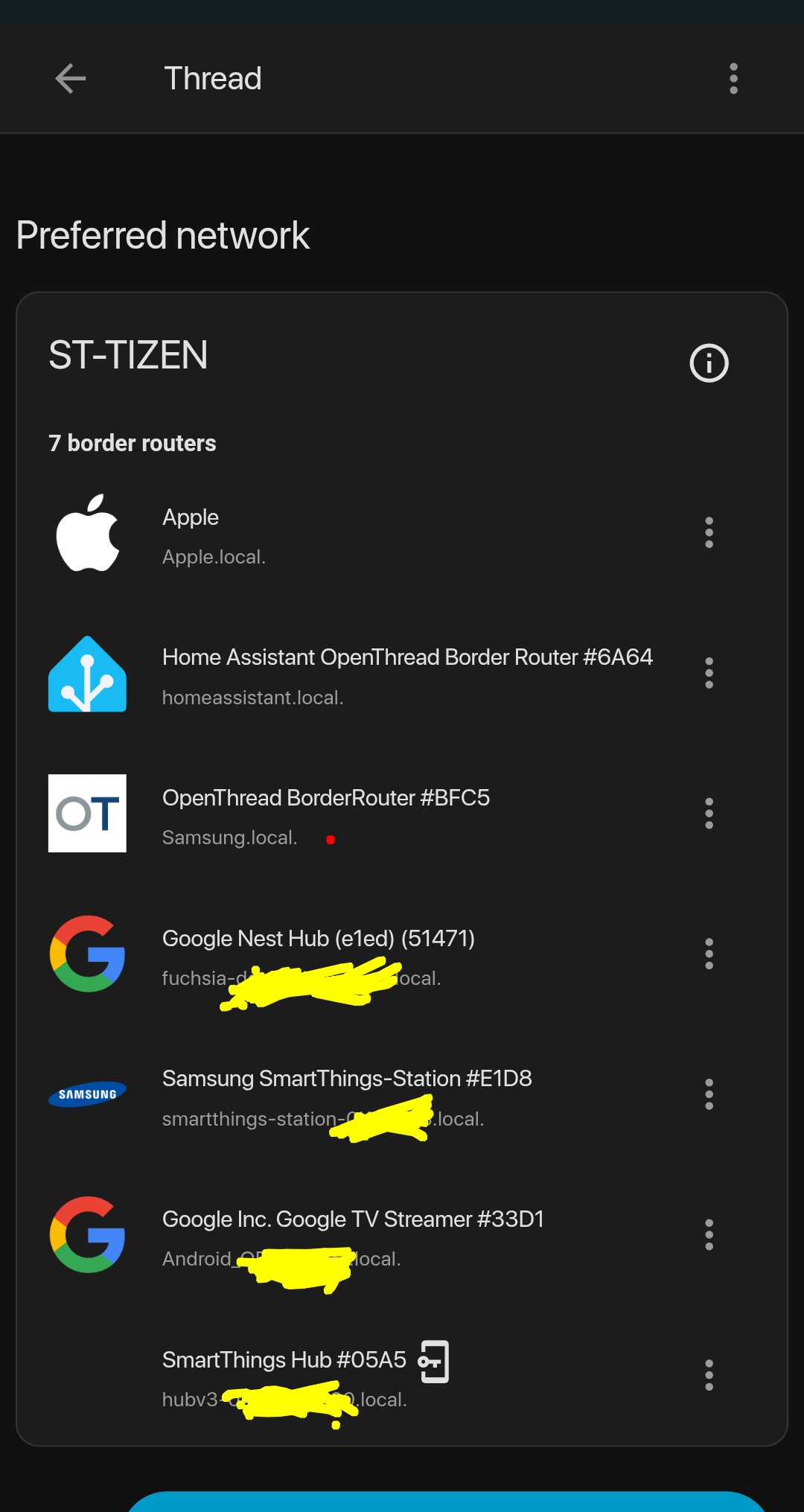
I used to have the station and Hubv3 in a hub group and then put everything into that Hub Groups network using the same indirect method. Except that way doesn’t allow me to move the ST-Dongle BR into it, as the dongle doesn’t allow for changes to it.

I dont see any hub that accepts shared credentials, nor can I get dongle to share or accept any

Unifying the Thread network with all the other 3rd party BRs is not possible because in a hub group the only thing you can do is share “out” and none of the 3rd parties listed don’t seem to have support for accepting the credentials to apply to their own BRs.

So is there no way to do anything with the dongle after I get the other hubs into the one created by the hub group? Sounds like by design the hub group is not allowed to move into a third network without the two hubs splitting apart. Does that mean the dongle just wasted/destined for the trashcan then?

https://community.smartthings.com/t/role-of-a-st-dongle-if-it-cannot-be-part-of-a-hub-group/ - For further context

Also by reset I meant the linked thread network that comes out of the grouping ends up reverting to the old name (that was default for the primary hub of that group) rather than newly set name from the network that they were both already in prior to grouping.

Apologies for sort of highjacking this thread. Still mostly on topic.

I currently have a V2/2015 hub that’s been in operation since 2018. I also have an Amazon Echo 4th Generation purchased for future Thread devices.

I recently purchased an Aeotec Hub (original, V3) but have not yet unboxed it.

I’d like to get the V3 hub up and running, transition all my devices from the V2 to the V3, possibly decommission the V2. I have Zigbee, Z-wave, Matter-over-Wi-Fi, and Matter-over-Bridge devices.

I don’t yet have any Thread devices. Can I unify the Echo with the V3 hub without any Thread devices?

Can someone help me out with the recommended steps to

  1. bring up the V3,
  2. migrate existing devices from the V2 to the V3, and
  3. Unify the Thread networks

yes

  1. Plug in the V3 hub and onboard it to the app.
  2. Once the hub is connected to your account. The Hub Replace option will become available to use. It only takes a minute or so to migrate everything from the old hub to the new one. One thing you may want to do to prepare - if you are using custom Edge drivers - go to the Advanced Web App and copy any Driver channels that you may have set up for the old hub as they will be removed and need to be manually added back. Note: Custom Edge Drivers will be migrated and continue to receive updates without the channels. The old hub is removed from your account after the migration is completed.
  3. The Unify utility will be available in the Hub Settings under Manage Thread Network.
1 Like

Thank you, @jkp !

(post deleted by author)

@nayelyz @Itati

For reference:

This is my network atm, and in response to the previous question, both Android & iOS on the latest versions but I primarily use SmartThings app through the iPhone. My end devices like from Eve etc don’t show on this list

…But the point is I made them all go into the the ST-Dongle’s OpenThread Network (named ST-Tizen) I used to have them merged into the Hub Group’s network (but the dongle can’t be moved into another network nor can it join ST-Hub Groups as a secondary device.) so forcing it once it leaves doesn’t work, even with the same named credentials stored.

Update: Ok looks like 10th times the charm… (unless it breaks the network later) I managed to get the group and every border router in the same network as the Dongle. (I still wished the TV Hub with Dongle could have the Unify and Secondary Hub in Hub Group feature though)

2 Likes