Can you tell me how you’re controlling it with Alexa? I also have a split king but the only option with Alexa is on or off and it just deflated my bed when I chose on. I have routines set up in Smart Things but have no options in Alexa. Can you share your steps?
Got it! Thanks so much. I’m still figuring it out but your work is amazing and we are so fortunate to benefit from it. All the best to you.
1 Like
@rosswrld I use it with Google Home, and I described how I have set up various ST routines that are then triggered as scenes from Google Home per this post SleepNumber Integration - #29 by smrtdrmmr.
If you have ST integrated with Alexa, I would hope you could see both the bed devices (which won’t have any capabilties) AND the ST routines (which you would basically just trigger via a voice command). Here is an example of a simple Google Home routine that I set up to flatten my side of the bed by running the ST scene “Jasons Bed Flat Mode” based on some voice triggers.
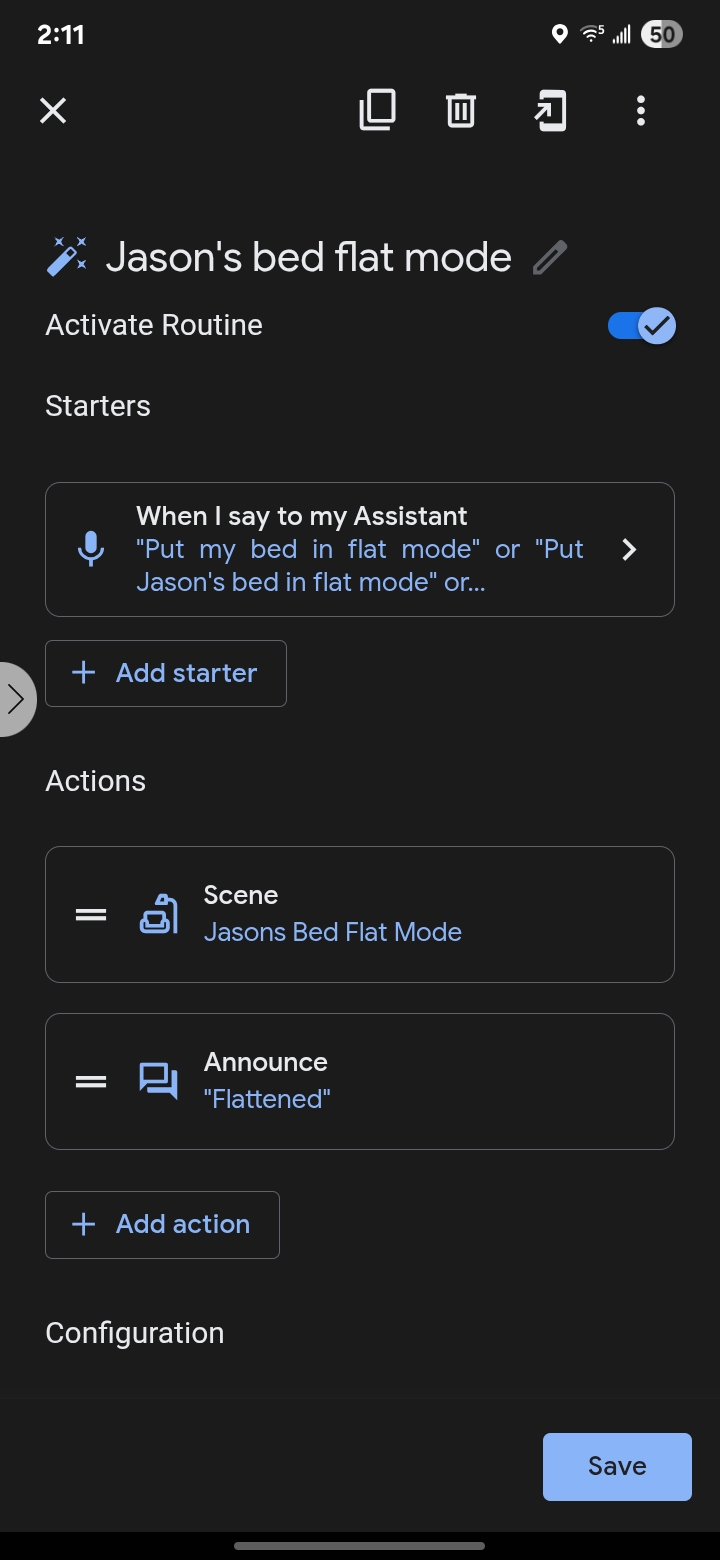
Here is the associated ST routine that is run that actually does the multi-capability coordination with the device

Does this help? If you don’t have the routines/scenes in Alexa, then you might need to ask other folks in this thread if they have Alexa and have had better luck with examples that they can show.
1 Like
Hey Jason! Thank you so much for the work you’ve put into this and supporting the project. I’d love to get an invite if it’s still possible.
My bed’s adjustable base is the early type that connects over Bluetooth (which might or might not be considered Fuzion).
Would love an invite
@Greg_Grande and @jvonallmen invites sent via DM.
omigosh! Just stumbled on this and it seems amazing. Thanks @smrtdrmmr !
I have a 2nd hand SN bed and thus no way to register for the official app. Does your integration let folx bypass that? If so, can I play too?
Hey @John_Martin . Unfortunately, if you can’t register an account with SleepNumber, then this integration won’t work since it uses those credentials to control your bed (but through SmartThings). I’m sorry.
1 Like
Alas… (Cool that you’re doing this anyway!)
1 Like
Hello folks,
I am in the final stages of testing the recent updates that now shows presence in bed, sleep score, and the various underbed lighting settings.


Before I roll it out broadly, anyone interested in beta testing?
@smrtdrmmr I’d like an invitation if you are still sending them. Much appreciated!!!
I will send you a DM @Raymond_Fitch
Ok, the updates are rolling out to everyone. If you want your presence pushed to smartthings on regular intervals, shoot me a DM with:
- Your timezone
- What time of day you want your presence updates beginning (i.e. when you go to sleep)
- What time of day you can stop presence updates (i.e. when you get up)
- The email you use to sign in to sleepnumber
I’d love an invite to help test - this looks awesome. Thanks in advance
I’ll DM you an invite @pokepokepoke3
1 Like
How do I get the updates?
If you go to the Menu tab of SmartThings and click the gear  icon, then go to
 Linked Servicesand select SleepNumber Bed Integration, then Refresh, that should force the updates. Otherwise, I think they may just happen at some point when SmartThings triggers a specific call to get updates.
Hmmm I did try that. Just tried again and no dice. Maybe SmartThings can only push whenever it wants?
Hey @Anthony_A_Torchia . I checked the logs and was seeing an error about being able to access the new profile. I believe it was because I had not published the new device profile. If you get a second, please try again now that the profile is published.
Works now! Thanks! It shows the lights but they are blacked out. Do I have to enable that somehow?