It seems pretty clear that this is a SmartThings issue. I suggest you both log a ticket with SmartThings Support.
PS. This is the primary reason so many SmartThings users have switched to Hubitat - With Hubitat, you get to choose when updates are applied, AND you can roll back to the previous version if things like this break.
Thanks Barry. Couldn’t agree more … it is indeed a slow death spiral and I’m getting tired of rewriting and doing work arounds - starting with the transition from Classic app. I’ll submit a ticket.
I agree. I am planning on making the switch I’m just dreading moving all my devices and automation over. And lets be honest it is not the first or the last time Samsung will break location services so it will be a welcome switch.
I have the same issue on webCoRE smart app.
And submitted a ticket to the support…
No one here from SmartThings to help?
They should understand that smarthome it’s not a game…
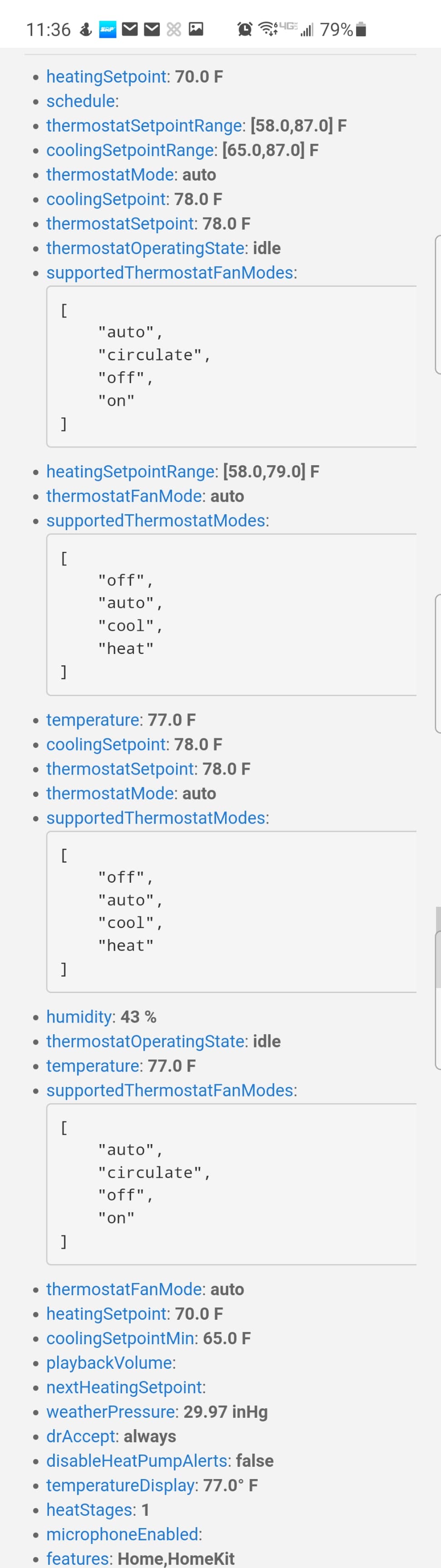
I just did a fresh install and still don’t have the option for Auto in automations. I’ll look at live logging again and report back. Below are the settings available on the thermostat. Maybe I am missing something? This is the Ecobee with Alexa Voice.
I am at a loss for why the SmartThings device doesn’t show “Auto” in the list of available Modes. At this point, I suggest opening a ticket with SmartThings support…
That said, if you could send me a screen shot like above, but for the thermostat running the “stock” SmartThings Ecobee device driver, perhaps I’ll see something different. My own SmartThings environment was retired this summer when my hub failed…
I do not see any information for the stock ecobee device in the IDE since it is a placeholder. If someone can tell me where to find it I’d be happy to send it.
I did a bit of testing on this, as I am having the same issue.
My Location Mode in ST is changing (i.e to Home or Away) with no problem based on the presence of my device. But, once Away is activated, Ecobee Suite Manager is not changing the thermostat mode to Away. @storageanarchy, I am unsure of how your (awesome) smart app gets notified from a Location Mode change in ST. But, I just wanted to check and see if you are sure this is a ST issue? If you are, is there any information you might be able to give me to relay to the ST Tech Support that could help them understand the issue in a bit more technical detail?
Unfortunately, the first thing that ST Support is going to say is that they don’t support 3rd party Smart Apps, as I have run into this anytime I have had an issue with them. As far as they are concerned the presence and location mode functions are working as they should and they will likely point the finger at the Smart App.
Other users have reported Mode Change issues using standard SmartThings automations
my code has worked fine for more than 4 years - it uses the standard (and ONLY) means of tracking mode changes (it subscribes to the location.mode changes).
the only code that changed recently was the SmartThings hub firmware
the issue has occurred only for users who have recently upgraded their SmartThings firmware.
the SAME EXACT CODE works fine on Hubitat, using the same exact methodology
Thanks for your insights on this. I hope my question wasn’t taken as a question to the integrity of your code, as your Smart App has been rock solid since I started using it a couple years ago. I was merely asking if there was any chance that changes they make to the ST App (with regards to how their app is designed) could possibly require changes on how a Smart App connects to it.
Yup - I understood your question and didn’t take it as a criticism; I merely wanted to give you sufficient context to understand why this is most likely a SmartThings problem.
Like I said, there is only 1 way to get location mode changes, and SmartThings can’t change this unless they want to break EVERY application that uses location.mode. And if SmartThings automations are breaking in addition to Ecobee Suite, the suspect is SmartThings…especially since they have broken this multiple times in the past…