Great; thanks for the speedy reply; I’m using 1880 as the local port and https:/…:xxxx/smartthings/webhook as the url and forwarding my router’s port xxxx to local nodered address with port 1880 no luck; I’ll keep investigating.
Thanks again!
For whatever reason, it only works for me if I use http://publicaddress… it does not work with https://publicaddress don’t know why, but I’m in business for now.
Are you using this palette in Node Red because I didn’t have to do anything with my router or port forwarding to get it to work?
node-red-contrib-smartthings
I’m running Node Red on a RPi.
When getting a token for smartthings the page has change and now you need to pick what you need and it list devices, location etc. so has anyone install this lately and what did you chose and is it working. Thanks
Can someone point me in the right direction? I have a Eco Smart Remote control that I use in Smart-things and I added it to Node Red along with a Contact and A Smart-things light bulb all is working except for the Eco-smart remote? I look at the logs in node red and it show what buttons I pushed but it don’t show up in the flow? Can anyone point me in the right direction? Thanks
I’m in the same boat. I see data in the system logs coming in to the node-red pi device, but nothing happens in node-red. I was hoping to get this to set a gpio, as omni-thing doesn’t work on the new app.
With the death of Echo Speaks, I came across in another area the mention of Node Red. That led me to this area.
My story - I have used Node Red before on other projects so I dug around and found this https://flows.nodered.org/node/node-red-contrib-alexa-remote2 and https://flows.nodered.org/node/node-red-contrib-smartthings
Building with them using an RPi I have running some other Node Red flows I was able to make simple door is open/close announcements on my Echo devices.
I seem to get a lot of “No JSON” errors in the Alexa nodes. When it works, it works good, but then when it doesn’t…
BTW, my other Node Red flow project does use (successfully) the MQTT bridge method mentioned above.
Node red came up when the Alexa Voicemonkey skill was taken down as an alternative for Alexa integration and Announcements. I’m using Home Assistant with Alexa Media Player and Node Red, but from @dlindval post above it looks like there is an easier way.
Would be curious for anyone to share new updates on how they’re using Node Red with Smartthings, especially for Alexa integration.
My current setup:

Linked post of alternative:
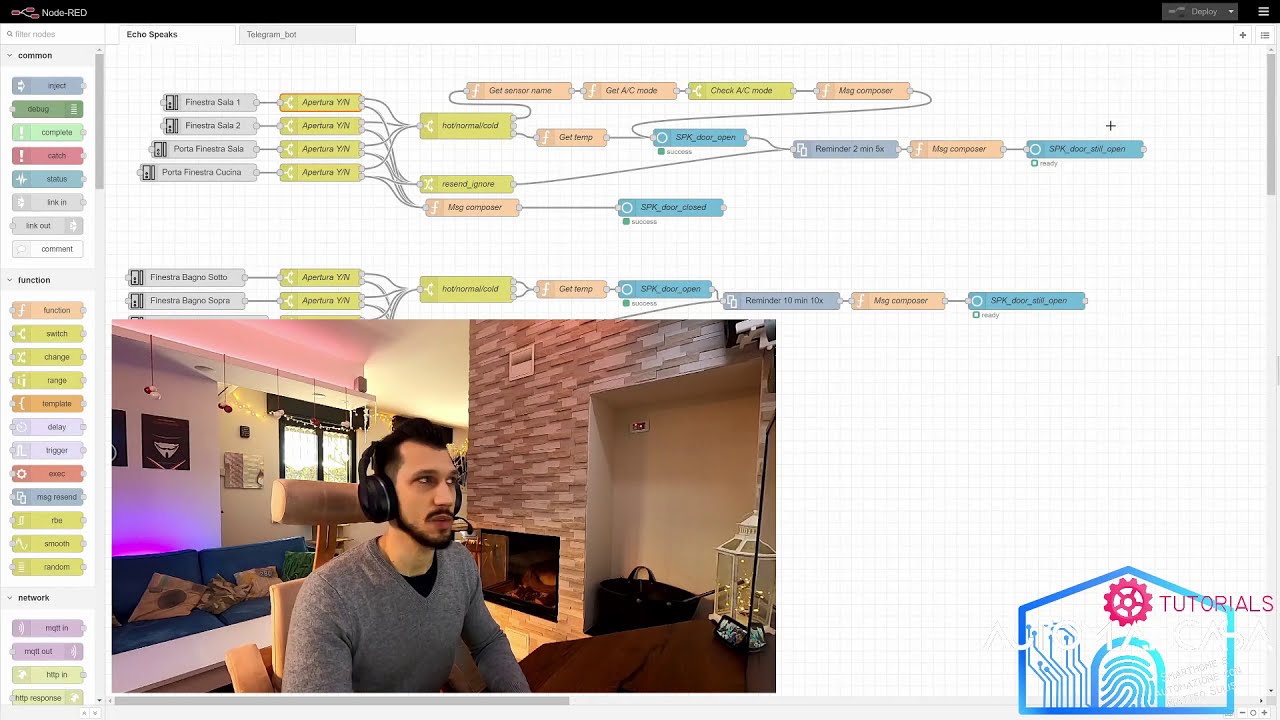
I believe @sulisenator is using the SmartThings palete of NodeRed to send text to speech to Alexa. Here’s one of his videos (in Italian. Use CC or follow the visuals)
1 Like
Yes I managed too to recreate Echo-Speaks like features, without having to use WebCoRe.
I’m using node-red-contrib-alexa-remote2 and node-redcontrib-smartthings. The only issue I’m facing is that about once a week the Alexa authentication throws a json error and I have to paste a new cookie. The other authentication methos fails more often.
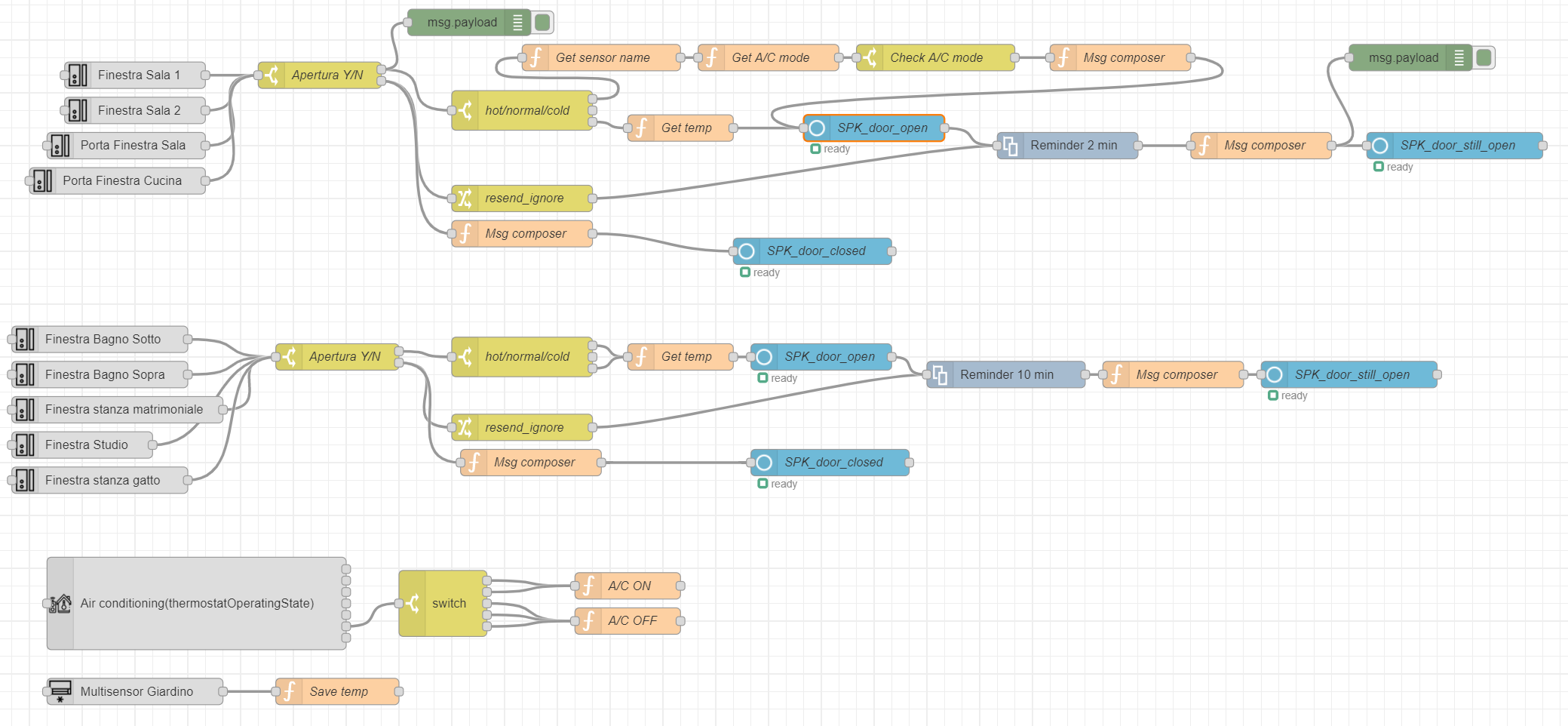
Aside that it’s very powerful, in the attached flow I setup a reminder system for windows left open, which tells me that a windows has been opened when outside is less than 12°C (it gets that from a sensor outside) OR it’s more than 29°C and AirConditioning (Integrated in ST via Tado°).
Then it starts remiding to close that window every x minutes.
In the TTS reminder it says the name of the specific windows, the outside temperature, and it process every single windows independently, so if a window is open, another gets open and closed, the remindinr goes on for the 1st window. This is made with the the node-red-contri-msg-resend, which is perfect for that, and can be interrupted by a resend_ignore package.
EchoSpeaks + webcore couldn’t do that.
I have a flow like this from the tb window but I needed to use the samsung automation studio node because I couldn’t get the .tpic update. But open your first node and send a print to see how it is getting the current status of the windows?
Sure. I had too some issues when starting with ST palette, but I simply hadn’t configured correctly the smartapp. IN particular, I din’t put “Http://” before the IP address of the node-red server.
I prefer to use this palette so the ST hub and Node-Red can talk at LAN level, without relying on the cloud.


mine is with http in smartapp and I can’t get the status … I’m having to do that there. And how do you use the topic update?

There were issues around logging in that came up with Alexa Media Player in home assistant. Enabling two factor Authorization on the Amazon account seems to fix it. Do you have two factor authorization on?
ALL custom code, SmartApps and DTHs, runs in the ST cloud. There is no avoiding the ST cloud at this time.
2 Likes
yes, that’s active. But I see on the node red palette forum page many people are complaining about it. Don’t you ever get that error?
No, I only have to re-authenticate my Alexa login in Home Assistant maybe about once a month, if that. But I’m using Home Assistant and a HACS add-on called Alexa Media player- GitHub - custom-components/alexa_media_player: This is a custom component to allow control of Amazon Alexa devices in Home Assistant using the unofficial Alexa API.. With that setup, the Alexa devices all are entities in Home Assistant. With the Home Assistant Smartthings integration - SmartThings - Home Assistant all my Smartthings devices are also entities in Home Assistant. So after all that is setup (which was quite the process), node red controls the Home Assistant devices using this palette node-red-contrib-home-assistant-websocket (node) - Node-RED and can do announcements with a properly formatted JSON.
It works well and reliably, but took a lot of steps to setup. Your method is fewer steps to get going but if the login has to be re-validated every week that would be a deal breaker for me. Here’s an example in the Alexa Media player WIKI Examples: NodeRed · custom-components/alexa_media_player Wiki · GitHub
Understood, thanks. For now I prefer to update the cookie than have to maintain a HA installation, they just forked the palette so let’s hope the find a fix.
1 Like
Yeah probably not worth putting up Home Assistant just for this. Hopefully they fix the palette since it would be a great solution for people to get Alexa control and do other Automations.
If you’re going to use it for other things, Home-assistant is powerful but still hard to use. I’m running Home Assistant in Docker and most setup instructions are using the supervised Home-assistant hassio, so it makes it even harder to figure things out. On the plus side with the container version I can use the same machine for node red, an NVR for security cameras, SSL server, and more.
Node red looks easy to use at first but getting things to work is harder then it looks. I still find I’m slowly moving more automations to node red from webcore, since the reliability is way better and faster with local automation processing vs multiple back and forth to the cloud. My webcore piston to turn lights on in the morning didn’t work today, and now this Voicemonkey outage is dragging on.
I know all the device controls for Smartthings and link to Alexa still rely on a cloud connection, but at least the automation on node red itself is local vs webcore. I’d say that makes it a huge plus.
2 Likes
With it looking less likely Voicemonkey is coming back, I found a nice workaround to actually trigger node red flows easily from Webcore, and actually pass a string to the msg.payload from Webcore to Node red. This can be nice to take advantage of using both Webcore and Node red, or gradually switch to Nodered without doing everything at once.
First step is to setup Node red of course, then use the Http in node. Create any random URL endpoint you want with method POST.
Then use Webcore to make a web request using your internal node red IP address adding on the URL endpoint you put in the HTTP node. The expression you put in the plain text of the POST request in Webcore will be in the message.payload in Node Red. You can then use this to make announcements to Alexa of whatever the expression was from Webcore. Or trigger whatever other flow you want in Node Rd. You just need a template node and HTTP response node so Webcore knows the web request was successful.


1 Like