I’m confused and the steps at wiki don’t seem to help. I have gone into the IDE page, My devices, selected the MyEcobee device that has been created, clicked on edit preferences. The Trace is Blank and the Logging is set to 1.
I am using the SmartThings New App and do the following steps.
Click on the upper left 3 bars.
Click on SmartApps
Select the “MyEcobeeInit”
Click “next” to get to the last page
Click off “Detailed Logging & Notifications”
Set Log Filtering to 1.
Click Done.
I then get “Processing” and the screen goes to all the SmartApps I have.
I go back into the MyEcobeeInit and Detailed Logging is Turned back on and Filtering is set to 5.
What am I doing wrong? I did have issues November 25th as the Ecobee Connection was erratic when I was trying to update the code you published. You issued MyEcobeeDevice code 6.2.2 that day to get me going. Is there something in the updated code that I am not doing correctly?
Hi, please download MyEcobeeInit (v5.1) at my store using the same sellfy download link.
I’ve realized that I left some debugging trace from my last changes.
Just want to inform my contributors and all ecobee users that a new major version of MyEcobeeDevice(v6.2.1) & MyEcobeeInit (v5.1) can be downloaded at my e-commerce solution provider (sellfy) using the original download link.
You’d probably need to refresh the Samsung connect app’s cache in order to see the UI changes. There are some instructions to do so in the release notes.
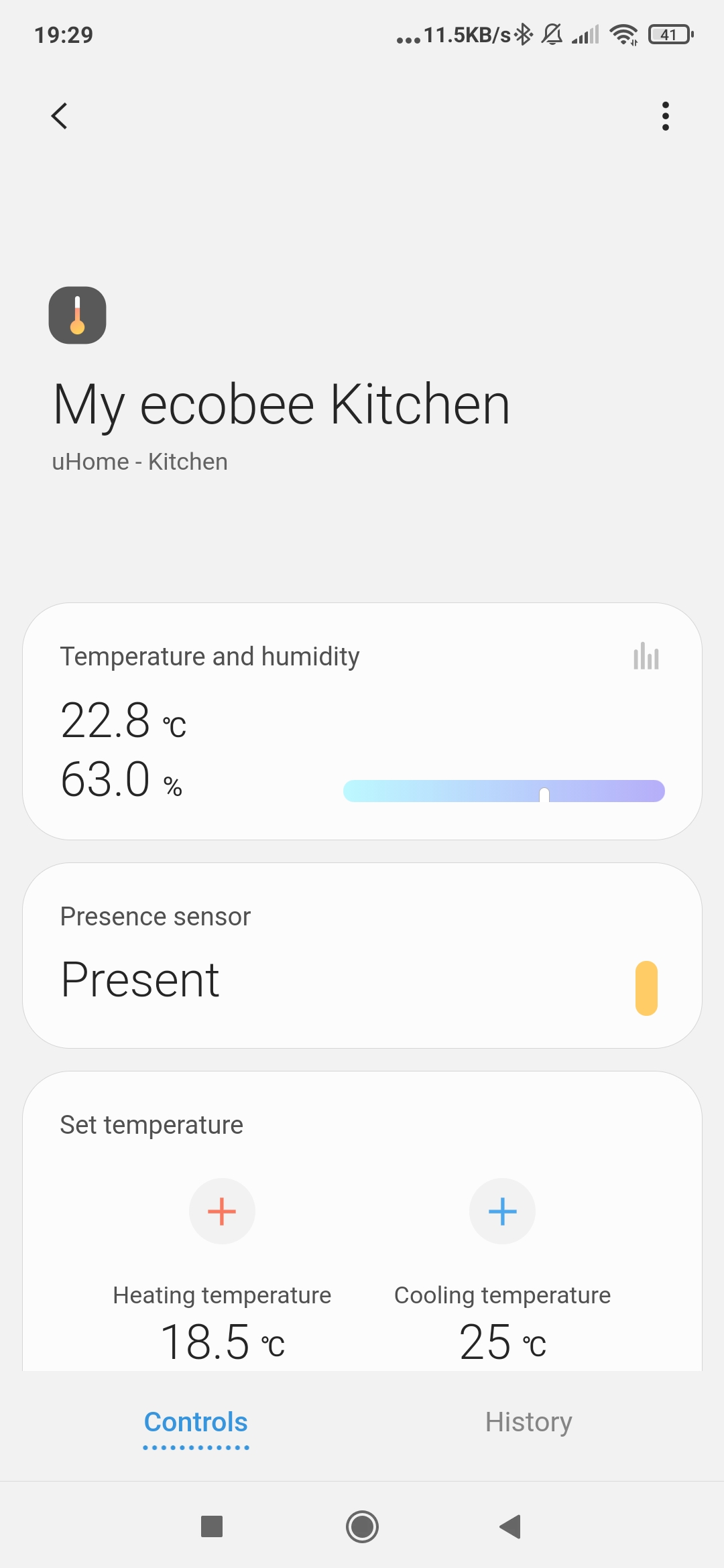
Since MyEcobeeDevice V6.1 , the new presentation (UI) adds a custom capability (set Target Humidity** for controlling humidity via the dehumidifiers/humidifiers connected to your ecobee tstat(s) , see image below).
The new major version of MyEcobeeInit (v5.1.1) improves performances & logging for locations with multiples tstats and switches by using a global cache.
On top of it, there are many complimentary smartapps designed for My ecobee DTH and are located at my github. All ecobee smartapps are explained at the ST community wiki (all ecobee* smartapps):
Just want to inform my contributors and all ecobee users that a new major version of MyEcobeeInit (v5.2) can be downloaded at my e-commerce solution provider (sellfy) using the original download link.
Since MyEcobeeDevice V6.1 , the new presentation (UI) adds a custom capability (set Target Humidity** for controlling humidity via the dehumidifiers/humidifiers connected to your ecobee tstat(s) , see image below).
You’d probably need to refresh the Samsung connect app’s cache in order to see the UI changes. There are some instructions to do so in the release notes.
The new version of MyEcobeeInit (v5.2) corrects some duplicate issues when renaming the devices.
On top of it, there are many complimentary smartapps designed for My ecobee DTH and are located at my github. All ecobee smartapps are explained at the ST community wiki (all ecobee* smartapps):
Thank you. I was able to get it to work. Should I be able to create automation based off of the mode? For example, I don’t want to turn on a space heater if ecobee is in sleep mode.
Hi, not for the moment; I’ve created all the required schema definition to do so, but the ST platform is not ready yet to accept it. As soon as Samsung releases this capability, my code is ready for it.
I have been using the Ecobee device handler since 2015, and it has been on of the most stable and and feature rich device handlers by far for controlling your Ecobee Thermostat. I am looking forward to updating to V6.
Since 2018 I’ve been using MyEcobeeInit + ecobeeStateTriggerHA + Pollster to turn my ceiling fan on when the HVAC system’s fans go on. It’s worked great!
It stopped working maybe a couple of weeks ago – not sure when – so I was delighted to see that you have a new release.
I’ve followed the installation instructions, and can verify that I’ve got v6.2.2 of My Ecobee Device and v5.2 of MyEcobeeInit in my smartthings.com account and can see they’re published. In the Smartthings app on my iPhone though, when I select MyEcobeeInit from the “Custom” section of the AddSmartApp page, the version is still only 4.1b. From your docs, you said there was some way of clearing the app cache. I wasn’t sure how – and figured maybe that’s an Android thing anyway – so I just deleted the Smartthings app and downloaded it again. Still no luck.
So close, but so far. How can I get the new version on my phone?
Your problem is strange. Honestly, it sounds like you are not saving and then publishing the updated Smartapp and Device Handlers.
You should not have to go into + portion of Smartapps to have the updated code begin working. However, if you have deleted everything, then you would need to do this, then authorize your Ecobee account and select your Thermostats. You should make sure you delete your previous Thermostat devices before doing this.
I’m also using the TS State to turn on Ceiling Fans when my HVAC Fan is running and it works great.
Thanks for your reply. It is strange, huh? To illustrate what I’m seeing, I’m attaching some screenshots from smartthings.com and from the Smartthings app on my phone. These are from smartthings.com:
You may want to wait on a response from Yves. However, I would do the following.
Delete all Thermostat Devices that you plan to use MyEcobeeInit from SmartThings using the App.
Review the IDE Page to ensure that the Thermostat devices are gone.
Remove all of the MyEcobee apps and device handlers from the IDE Page. Note that the devices will need to be deleted before doing this.
Follow the full instructions to re-add the needed Smartapps and Device Handlers and create the needed Devices and Instances of the Smartapp.
I just looked at the “about” portion of the installed MyEcobeeInit and it indeed states Version 5.2. I actually have two instances of the smartapp as I have two Thermostats and prefer to have two separate instances.
I do not use the ecobeeStateTriggersHA and use WebCore for the function of creating rules for automation of my Ceiling Fans. I much prefer WebCore as it allows me to add some logic that will not stop a Ceiling Fan when the HVAC Fan stops (if it was already running when the Automation went to start the ceiling fan). I’ve also created a method than allow any person in the home to stop an automatically started Ceiling Fan and it disables the automation for 2 hours. Finally, I have methods that set the Fan Speed based on the Temperature of the room.
After doing some research it turns out that I was being pointed to an old shard, so what I was seeing on the IDE wasn’t what my phone was seeing. The README in the GitHub repository should be updated. Instead of directing folks to click https://graph.api.smartthings.com/ide/devices, you can now (since 2017) click https://account.smartthings.com/ and it’ll take you to the right shard automatically.
Now I’m just rigging up my triggers again. Your setup sounds very cool and intriguing but I’m sapped for the day and just want to get the air flowing again.
I have a few questions that I’m hoping others can help answer. I just started on all the myecobee devices and trying to wrap my head around the ecobeeSetZoneWithSchedule app. I’m finding that sometimes too many options is just as bad as not enough options
I’m trying to start simple and learn as a I go. While I have 2 ecobee thermostats, I only need rooms/zones/schedules on the upstairs one. Since my husband and I both work from home (and like different temp setpoints), we have a lot of different schedules. We also have smart vents in 3 out of the 4 rooms we monitor. The room without smartvents is my husband’s office. it’s the coldest in the house so I use the thermostat setpoint for that room as it’s the last to heat up. (I’ll most likely install some by summer)
My goal over all is this:
Work schedule: M-F 8-5:
My office - set to 72, Server room 68, Husband office 71, guestroom 68
Home M-F 5pm - 10pm S,S 8am-10pm
My office - set to 70, Server Room set to 68, Husband office 70, guestroom 68
Sleep S-S 10pm - 8am
All rooms set to 65. - nobody sleeps upstairs at night so I don’t want to use a lot of heat.
So here are my questions.
1.) Is there a way to to use 1 instance of the scheduler app with 3 different schedules (work,home,sleep) and have the correct setpoints listed?
2.) I have selected the option to create devices for each virtual zone so that the setpoint could be adjusted. If I make a change to the setpoint with the virtual zone, are the changes perm. or will they revert back after the schedule ends as the next one starts?
3.) If I have multiple instances of the app (separate ones for work, home, sleep) will I have to generate virtual zones for each instance, or will the same virtual zone work across all instances (assuming the rooms and zone name are the same.
4.) Has anyone attempted to add the virtual zones to sharptools? I can add the virtual zones to sharptools and all attributes report correctly, but I can not adjust the setpoints from sharptools. I am assuming this is because it’s something custom and not a typical switch/level.
Any help would be greatly appreciated. Hopefully getting questions 1-3 answered should help me move forward making sure I have the best setup.