Monitoring Solar Panels with SmartThings?

Hello,

I have some solar panels in the house, and I can monitor their production and the house’s consumptions in the vendors App. However, I’m looking for ways to monitor these indicators on Smartthings so that I can integrate with other Scenes.

I was looking for devices and I stumbled accross the Aeotec Home Energy Meter Gen5 - https://amzn.eu/d/epKuDMl. I was wondering if anyone in this community has this setup and can share some feedback/screenshots to see what can you do on Smartthings with this device and the type of things I can check for during scenes.

If you use any other device for this effect and you’re satisfied with it, feel free to recommend it.

Thank you.

Cheers

I don’t think that device is what you think it is. It just measures the energy draw on a specific circuit branch. So the total use of the devices you have plugged in. It doesn’t measure energy production or anything like that. It’s a popular device for measuring energy consumption over time, but I haven’t heard of anybody using it with a solar system. :thinking:

What brand is your solar energy system? At our house, we have Tesla and both companies just announced a couple of months ago that they are going to add more integration between SmartThings and Tesla, which will be nice. But it’s not a general purpose feature, it’s going to be specific to that brand.

There are quite a few people in the community who do have solar energy systems, so hopefully some of them will chime in with what they’re using for SmartThings integration, if anything. :sun_with_face:

1 Like

Hi @JDRoberts,

As far as I know the clamps measure electricity flow. I looked at that device because the clamps are similar to the device I have at home provided by the solar panel vendor. I’m based in Europe so I don’t think the brand would ring any bells.

The one the vendors installed have two clamps. One installed on the wires that come into the house, and this measures how much I’m receiving from the network, and the other installed on the wires that the panels are using to inject electricity on the house.

Also, here Aeotec mentions that this device can also be used for Solar energy measuring purposes.

1 Like

For the specific purpose of measuring when you are feeding power out to the grid, but that’s only one of several measurements that most solar systems give you.

For example, mine shows me how much the panels are generating, how much the house is using, how much we are feeding back to the grid, How much we are drawing from the storage battery, and how much we are using to charge the battery.

It also shows the total amount generated for the day and what percentage of total use was self generated.

So five measurements and two calculations.

If all you’re looking for is something To tell you when you have more solar power coming in then you are using right at the moment so that you can turn something else on, like maybe a washer you’ve had waiting, yes, you could use the aeotec for that. Setting up the automation might be a little tricky, since as soon as you turn on an additional something in your house, the amount of energy going out is going to drop. But if you specify the range, you could certainly trigger something to start when it hit a certain point. :thinking:

1 Like

You might be surprised: we have quite a few European members in the community and I’m one of those engineers who spends my spare time reading technical manuals, and I tend to remember most of what I read. :sunglasses:

Anyway, the first rule of Home Automation always applies: “the model number matters.“

Different systems will offer different integration possibilities, so it’s always good to be specific when you’re asking the community for ideas. :sun_with_face:

1 Like

I didn’t mean it like that :slight_smile:

The solar panels are of some local brand, not a multi national corporation. What I can see at the moment is the device that they setup for monitoring which is an “Enphase IQ Gateway Metered”. I don’t have logical access to this device, I can only monitor the production/consumption on the App of the brand that sold me the panels and they are a Utility company.

Regarding your previous message, the measurements that you’ve mentioned make sense, and I believe that a 2 phase monitoring device would be able to do the trick, except monitoring what is being used to charge the batteries, but since I dont have any, it isn’t important to me.

1 Like

I am also interested in the question, if there are any more Smartthings users who managed to show/measure their solar production into Smartthings (Energy Dashboard).

At this moment, April 2025, Smartthings does promote the Solar production “energy measuring” with (and within) their own Energy Dashboard, but it only partners a service called Qcells in my localization area, Germany.

Having only a few solar panels right now, I am using an outdoor outlet from AVM (“Fritz”) for instant measuring and a Hoymiles Inverter with its own App.

1 Like

Hello @stillerson,

I measure the output of a Hoymiles HM 800 inverter at the connection to the power circuit using a Shelly PM Mini Gen 3. Compared to the consumption from the grid, this Shelly delivers directly negative values.

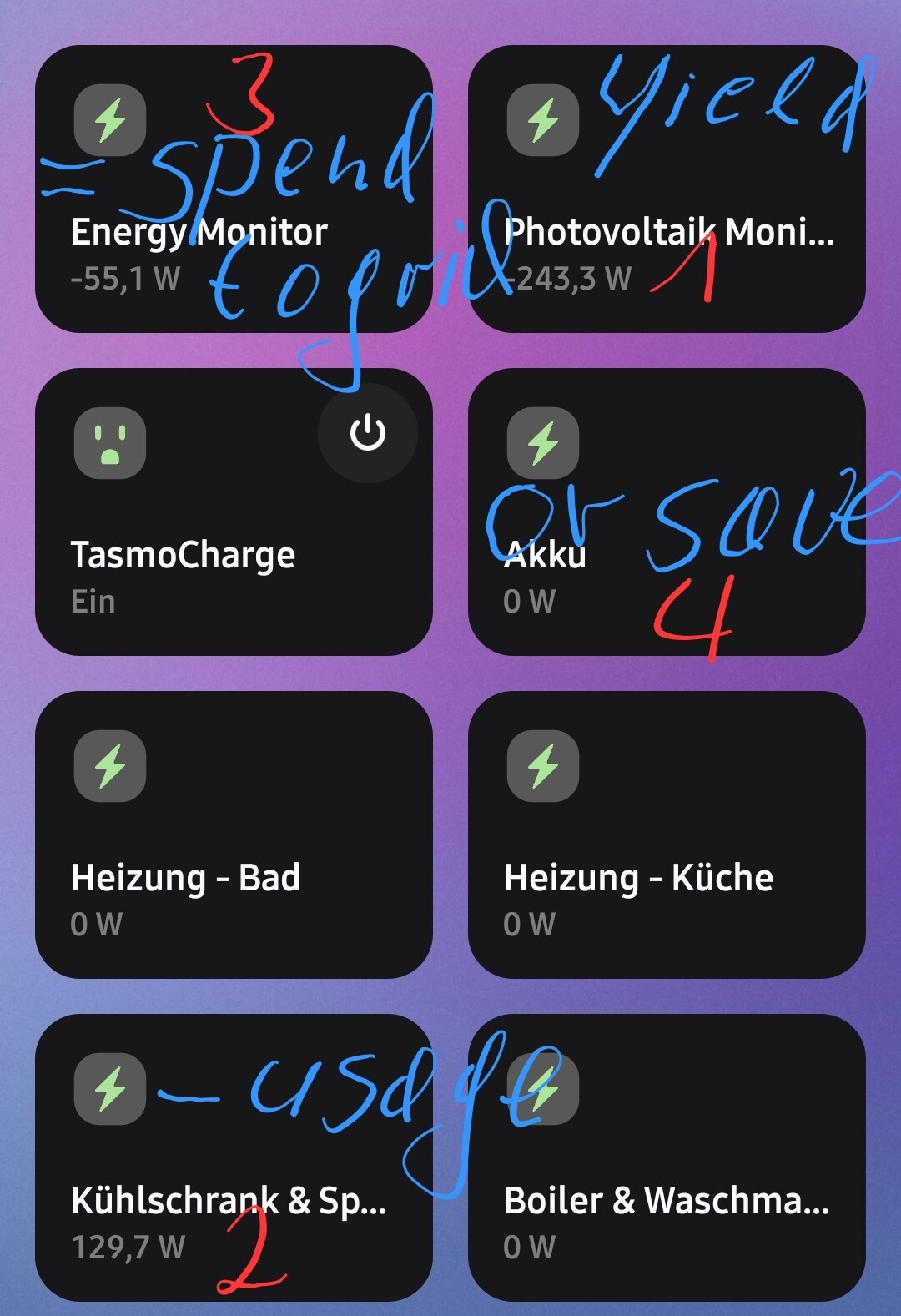
The measured values can be displayed in SmartThings using @TAustin’s driver. (pic. 2, upper right - Photovoltaik Monitor)

Previously, I also pursued the goal of controlling simple processes based on surpluses.

For this, the remaining power consumption must necessarily be known and available in SmartThings. The HEM Gen5 from Aeotec seemed inexpensive and suitable for displaying total consumption, and can also display negative values. (pic.2, upper left - Energy Monitor)

Since space is very limited in my electrical sub-distribution board, I purchased the version with only one clamp, even though my electrical system has three phases. Unfortunately, the result was less than satisfactory. Mariano Colmenarejo’s driver was the first to make the Aotec HEM Gen5 usable for my purposes: simple routines can be switched on or off, or paused depending on excess power generation.

However, since I realized that, despite my best efforts, I was still feeding around 45% of the electricity I generated into the public grid without receiving any compensation, I’m now planning to integrate a battery. To avoid having to dismantle the installed PV system, I opted for an AC-coupled storage unit. This is simply connected between the inverter and the power circuit. In order for the inverter’s excess energy to be stored in the battery with the lowest possible losses, and for the storage unit to recognize how much power it should feed into the grid, the storage unit needs constantly updated consumption values.

For this, the battery of my choice supports various interfaces. My favorite here would be the Shelly Pro 3EM power meter with 3 clamps. And there again is my space problem in the control cabinet and the limitations of SmartThings are becoming clear. Home Assistant can work with this Shelly, but also with the HEM Gen5.

The battery control unit works with WiFi and Bluetooth, but not with Zwave. And then there’s also a shelly em emulator that could fool the battery into thinking, for example, that the HEM Gen5 data is coming from a Shelly Pro 3EM.
According to corresponding forum posts, the emulator is accepted by the battery and its data is used for targeted storage and discharge. Unfortunately, I lack knowledge in this area and if no one here in the community can help, my only option is to change power meters.

But I’m not in the mood to replace a functioning device just because another can do two more things or is a few seconds faster.
And then there is the problem of space in my distribution box.

1 Like

I have successfully installed an Aeotec HomeEnergy Meter Gen5 to measure the electricity production of my “balcony power plant” and have successfully integrated it into Smartthings.

I use the dedicated EdgeDriver from Aeotec to set the measurement parameters. Under 2., I have selected ‘Sum of readings’ or, alternatively, ‘Always positive’.

Important: I selected the device as a solar production meter in the Smarthings Energy App settings, therefore the device has been producing positive readings for power and energy measurement, among other things, at regular intervals for an hour now.

–> However, no values for solar production have appeared in the Energy App so far. Is this normal (and I am just impatient), even though there is an hourly evaluation for solar production in the app?

Does anyone have any experience with solar production readings WITHIN the SmartThings Energy app?

The ST Energy app only supports certain approved devices. Not every device that can report energy readings is going to show up in ST Energy.

As far as the energy readings the device is reporting, I’d contact Aeotec.

The Aeotec HomeEnergy Meter Gen5 is supported in Smartthings Energy as a power measurement device. Although I cannot be sure, if this counts as a solarpower measurement device as well;-) It shows the Energy App ‘Badge’ in the device tile info.

I was able to choose this device for solar production measurement under “Energy App / settings / measurement method”.

Home Assistant has an official Enphase integration that will auto discover your gateway if you want to explore that option. You can also integrate to SmartThings in Home Assistant if you want to do some automations based on your Solar production

Enphase Envoy - Home Assistant.

Hey @stillerson,

You got that image out of the internet or is your Smartthings like that? I also ended up buying a Aeotec HomeEnergy Meter Gen5, and it has been working great for over a year, however, it never worked with Smartthings Energy App.

The only consumption I have there are from devices that feed data to it like plugs, or home appliances.

As per the comment from @Francois_Venter, the controller from my micro inverters is indeed an Enphase Envoy, but I don’t use Home Assistant… its a shame it doesn’t work on Smartthings

Cheers

Hi @nf098,

sorry for the late reply!

Those are 2 screenshots I made from within my ST Energy App/Service. Not sure at what moment or app-version the illustration with the house & solar panels appeared there. I got the Energy App Version 6.13.11.

The Aeotec HomeGen5 does work with the Energy Service, that’s for sure. I bought the EU Version with one clamp.

It may depend on the driver you use and choose. There are several out there, two from Aeotec itself and at least one from MC. Depending on the driver-settings you then choose and which may be a bit tricky to adapt for your needs.