They are still working on the FanMode. I can create a driver with the latest changes for you to test later today, if you want.
From the logs you provided, I can see that the supported modes are still wrong, but you are using the stock driver that doesn’t include any changes regarding your issue.
Correct, but @nayelyz wanted me to generate the logs during instantiation specifically regarding the temp change bug. That is what the above logs were for.
Thanks, @Wajo357
Then, you haven’t tested the driver that @Andreas_Roedl linked above to see if the behavior improves?
In the meantime, I’ll take a look at those logs.
Following up, @Wajo357
I created a report for the engineering team. This issue seems to be related to the unit handled between events, which is why it’s considering the range in Celsius instead of Fahrenheit.
Once I have more info, I’ll let you know.
The engineering team mentioned they checked this issue with the temperature setpoints. It was due to the unit as I mentioned before and they released a fix for it.
So, could you help us confirm that you can now set the cooling temperature from the SmartThings app, please?
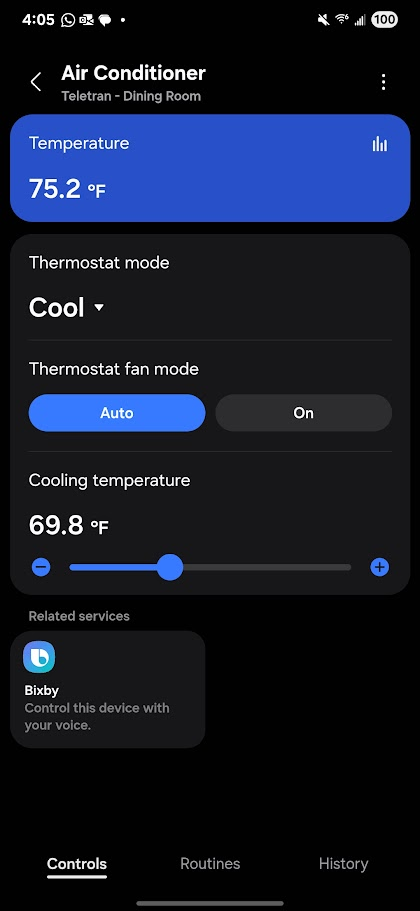
It works now! Although it doesn’t let me put in any decimal value. For instance, I can’t simply set it to 72 degrees! Can this be fixed? The air conditioner doesn’t even show decimals, so most people will try to put in round numbers, but it won’t work. Below are the values it lets.
It’s probably an issue with the temperature in the app being Fahrenheit instead of Celsius which is the unit used by Matter and the driver.
This is a related discussion:
Apparently SmartThings app internally creates the list of possible temperatures in Celsius by 0.1 ºC steps and then converts the values to Fahrenheit. The temperatures you see in the screenshot, if converted to Celsius, are spaced more or less 0.1 ºC so in Celsius it would look good with round numbers. Or they just used 0.2 ºF steps as an approximation to convert 0.1 ºC steps…
The step is 0.2, so that’s why you see the use of decimals. However, it would be useful to know:
What happens if you send the value 72 through the API, does it change to another value with decimals?
What happens if you select the option for example of 71.3 from the app? Does the device receive the value of 71?
For this case, it would be useful to get the driver logs again. We added the other post to a report about a similar issue reported, but we haven’t received more information for a while. Therefore, I want to get fresh logs to ask the team to take a look again.
Sorry for the delay. When you send a command through the Advanced Users App, you’re using the API, so you can enter this tool, look for the device, and send the command from there.
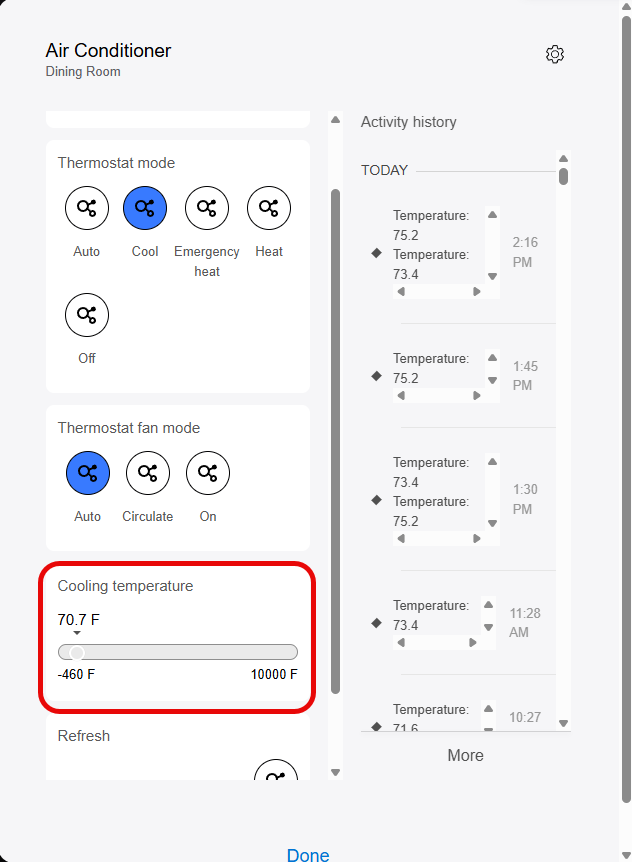
@nayelyz, am I missing it? This is what I see. I can’t seem to type in a value, only drag the dragger. When I do that, it jumps to really high or low numbers, due to the crazy range.
What she means is this advanced interface. Click on the device, go to the commands section.
Also: in the SmartThings app, go on the device details page/card → upper right corner → three dots → take screenshots from information and driver and post them here.
I believe SmartThings works in Celsius like most of the world. So what you are are seeing is the conversation from °F to °C and back to °F again. 0.2°F is nothing to be concerned about.