Level Lock Pro

Somewhat surprisingly, I do not see a thread dedicated to this product yet: Level Lock Pro.

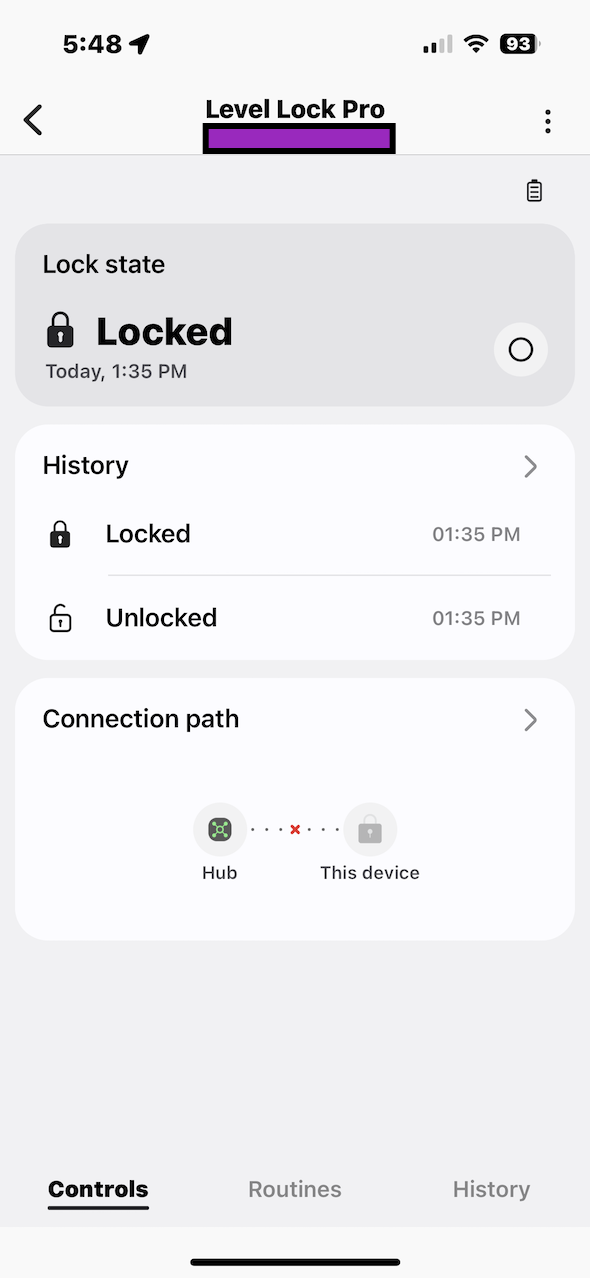
I got one at the Apple Store and got around to installing it a couple of days ago. It pairs with SmartThings just fine. I can see: battery life, lock state (locked, unlocked, “not fully locked”), and connection path.

However, I cannot see Open/Closed Door Status, which is a feature specific to the Level Lock Pro. The deadbolt strike plate appears to be magnetized or magnetic-sensitive [ferrous] in some way, so the electronics in the deadbolt can determine if the door is in open or closed position.

Is there any way to see if this status information is exposed via Matter, and to get a custom driver that exposes the open/closed status so that it can be used for automations?

Level’s advertising says that open/closed status can be seen in the Level app and also in Apple HomeKit. The fact that HomeKit can see the open/closed status implies that the information is probably exposed via Matter in some way.

It would also be great if there was a way (over Matter) to see who is locking or unlocking the lock, i.e., what user ID or access credential is doing it. The default SmartThings driver does not show this information, but it could be there somehow.

Screenshots below.
Not necessarily. Level provided a native HomeKit integration before they ever supported matter. In fact, that’s the one I use with level locks. You do get more features exposed that way.

Okay. So is it fair to say that if I want to see credentialed access events (meaning: who is locking or unlocking the lock), in SmartThings, such as an Smart Lock Guest Access, I won’t get that information from this device?

What device or class of devices reliably expose this kind of information to SmartThings? (I have a Kwikset SmartCode 912 with a Zigbee module added onto it, and it seems to transmit user-level information, i.e., it can differentiate between which codes are input into the lock when locked/unlocked.)

No, you won’t get any credentialed access events with the current driver. Additionally, that particular lock does not have built-in user PIN codes and requires a keypad that is sold separately and requires the Level app for programming. Door state could be added to the current driver, but ST hasn’t done that yet.

There are many Matter enabled locks that support credentialed access events either via the lockCodes capability and SLGA or via the new lockUsers and lockCredentials capabilities where the credentials are managed on the device card itself. These locks are defined to use the new capabilities in the driver:

local NEW_MATTER_LOCK_PRODUCTS = {
  {0x115f, 0x2802}, -- AQARA, U200
  {0x115f, 0x2801}, -- AQARA, U300
  {0x115f, 0x2807}, -- AQARA, U200 Lite
  {0x147F, 0x0001}, -- U-tec
  {0x147F, 0x0008}, -- Ultraloq, Bolt Smart Matter Door Lock
  {0x144F, 0x4002}, -- Yale, Linus Smart Lock L2
  {0x101D, 0x8110}, -- Yale, New Lock
  {0x1533, 0x0001}, -- eufy, E31
  {0x1533, 0x0002}, -- eufy, E30
  {0x1533, 0x0003}, -- eufy, C34
  {0x1533, 0x000F}, -- eufy, FamiLock S3 Max
  {0x1533, 0x0010}, -- eufy, FamiLock S3
  {0x1533, 0x0011}, -- eufy, FamiLock E34
  {0x1533, 0x0012}, -- eufy, FamiLock E35
  {0x1533, 0x0016}, -- eufy, FamiLock E32
  {0x135D, 0x00B1}, -- Nuki, Smart Lock Pro
  {0x135D, 0x00B2}, -- Nuki, Smart Lock
  {0x135D, 0x00C1}, -- Nuki, Smart Lock
  {0x135D, 0x00A1}, -- Nuki, Smart Lock
  {0x135D, 0x00B0}, -- Nuki, Smart Lock
  {0x15F2, 0x0001}, -- Viomi, AiSafety Smart Lock E100
  {0x158B, 0x0001}, -- Deasino, DS-MT01
  {0x10E1, 0x2002}, -- VDA
  {0x1421, 0x0042}, -- Kwikset Halo Select Plus
2 Likes

You could try this driver and if it doesn’t work with your lock, I can add the fingerprint.

According to the CSA compliance document, it does:

2 Likes