Do you see the one thing that stands out with all these SmartApps in the following screenshots?


Referring to the kill switch?
Yep and the only custom SmartApp that doesn’t have it and is inaccessible.
The SHM is OOTB so that makes sense.
I want to know why i have bounding boxs around selections and you dont ?
Hehe.
Can you do me a favor and on your Dashboard click on upper right and Manage Dashboard.
I want to see what it shows for your Service. Think this might be why Mode isn’t showing up. My Hub is accessible and correct and connected when I edit it, but this showing unknown might be the reason:

FYI I have the round boxes around Devices, just not Automations if that’s what you are talking about.
At the bottom
DASHBOARD
DEVICES
AUTOMATIONS
mine have always had boundery boxs which really should not show ?? Yours dont ?
Here is the screenshot you wanted

Not figured out how to change Unknown or why its there
This could be something to do with how our devices render things. I didn’t change any options for those 3 buttons/tabs or whatever they actually are. 

Wow! 
Also just discovered it’s no longer possible to remove SHM.
I actually deleted cache and data and completely uninstalled SC, the reinstalled it. Still no Modes.
Another thing I noticed is that Smart Locks doesn’t appear in my Automations (active in Classic) and it doesn’t show as an option under Add Automations (like SHM does). Do you see it?
As for removing SHM, go into Automations and hold your finger down on the Smart Home Monitor:

I didn’t actually delete mine, but I’m going to do it now and see if it affects ST Classic / IDE.
Post Deletion: As expected, removing SHM from SC had no negative side affects on Classic and current IDE as we both would expect. After deleting, SHM shows up as available under Recommended in Add Automations to select again.
No long press function like this in iOS. It uses a separate 3 dot menu in the upper right with the option to delete or re-name. Choosing delete used to populate a list of SHM and your custom automations. Now its just custom automations.
Further developments on the SHM in custom rules issue. It’s available as an action, but only if your condition is time  Hopefully this is a bug.
SHM is now fixed and Classic scenes now show up in the rule creator in the new app.
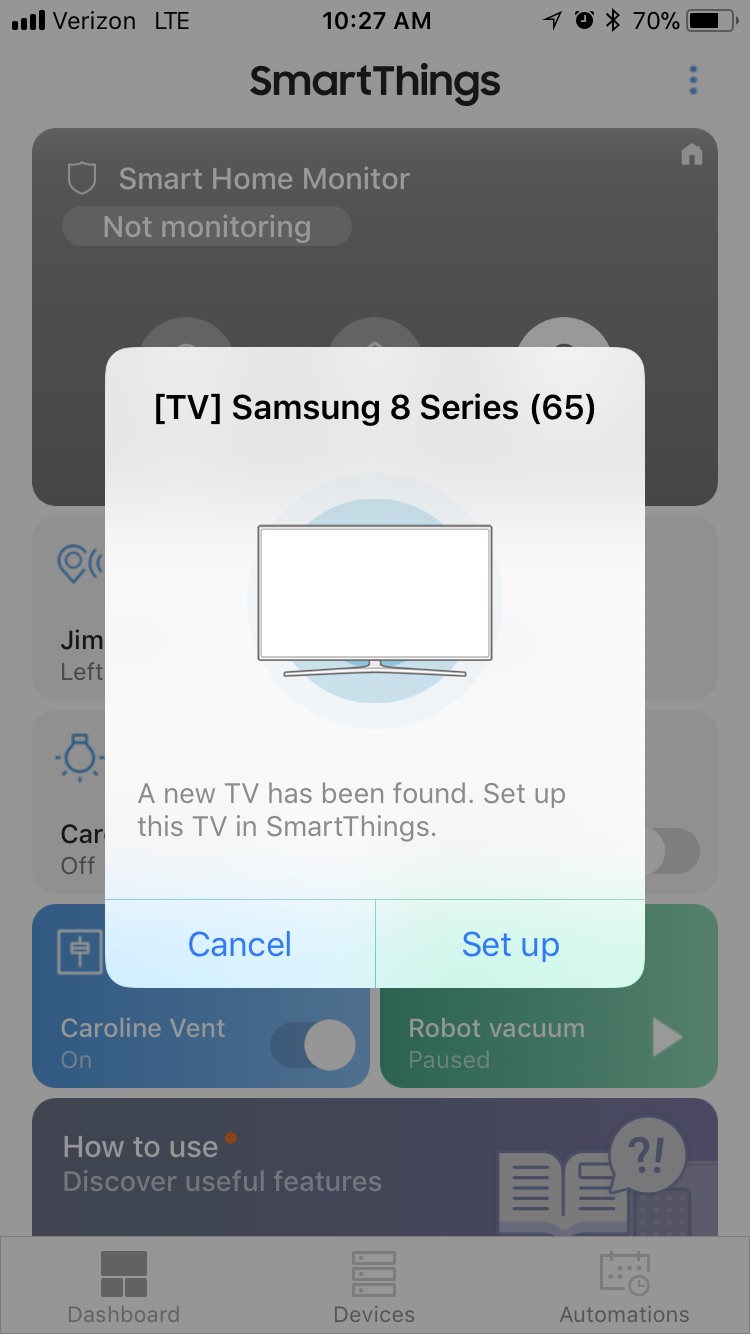
I’ve noticed when I open the app, it prompts me to add a Samsung TV that it found, problem is, I don’t own a Samsung TV, and there isn’t one located on my wifi. I haven’t gone thru with inclusion but it worries me this shows when it’s not even mine.
Yup. I get random Samsung devices too. 90% sure they are my neighbors. They need to add the ignore option to the TVs like they have for the sound bar.

1 Like
Apparently, a neighbor tried to add mine… I got a notification on my TV asking if I wanted to allow some device to… control my tv or connect to it or something. I don’t remember the exact message. I checked my network three times to make sure someone hadn’t gotten on my WiFi, but I could account for every device listed. All I can figure is bluetooth carried better than I thought from my neighbor’s yard/house.
They might also broadcast their own WiFi network for setup.
1 Like
Hi, the earlier version was companionable with GameGuardian application but the current version is having serious issues when it comes to connection and compatibility issues, can you please check at your end.
Application link: https://www.gameguardianapk.com
If you are looking for Samsung smartthings support, they don’t officially monitor this forum, which is for peer to peer discussions.
Instead, contact them directly: