Hola @Mariano_Colmenarejo (back to English)
I’ve bought 2 Tuya Lux+Presence sensors labelled ZG-204ZL. I’ve seen that you have included support to these sensors back in November 2022. I installed the driver “Zigbee motion sensor Mc” in the hub. I ran the scan for nearby devices and detected it properly. So far so good.
However now that I want to check the devices in the App, it seems not to work:
It shows the details page full empty with a “Waiting Zigbee Message” in Signal Metrics and a warning message from the App “This device has not updated all of the status information. Check out later”.
I’ve forced some motion detection events and I see the red light blinking when some motion is happening.
Why this device includes Temperature and Occupancy in the detailed page when this device only supports brightness and presence? I guess this is because other sensors include more parameters, but just checking for your opinion.
What is going wrong here?
Fernando
Hola @Fernando_Garcia
Install driver Zigbee Thing Mc in your hub
Hello @Mariano_Colmenarejo
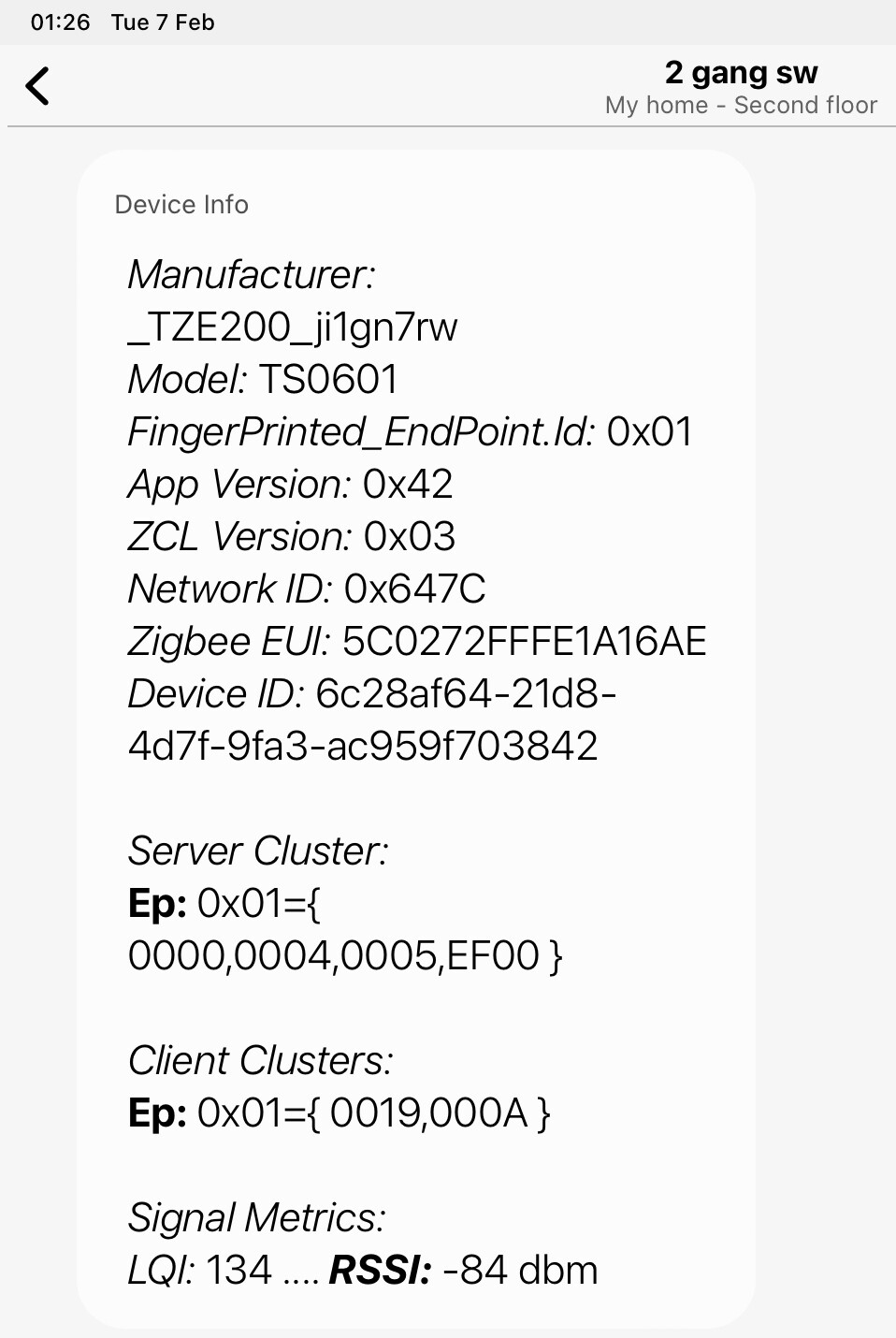
Thanks for you kind help. Can help to add my wall 2 wall switchs?
2 gang Moes wall switch
Thanks a lot.
These devices use cluster EF00 and do not work with my driver or driver stock
There is a specific thread for cluster EF00 devices
Since June 24th 2023, I am not able to maintain the driver as I used to because my mother was really interested in automating her house and I think there isn’t any better hub to unexperienced users other than SmartThings, so I gave mine to her.
It was ok to me as I have been using another platform exclusivelly for the last 2 years or so.
I will try to keep some minor changes, but don’t expect to much.
I will work more on documenting and merging than developing things.
So, be welcome to fork the repository and support new devices.
Just to let people know that I just published in my public channel a very simple and generic way to integrate devices that works with 0xEF00 tuya cluster.
It requires a little intuitive skills because the driver exposes a way to control tuya datapoints dir…
@Mariano_Colmenarejo , @orenasher
@dotan_shai
Sorry, This log has many broken and incomplete lines in the capture and I can’t analyze it
mlchelp
February 7, 2023, 11:58pm
3273
@Mariano_Colmenarejo
@philh30 can you explain how you fixed the problem in the Zwave lock driver so maybe Mariano can fix the Zigbee driver as well?
Thanks
@Mariano_Colmenarejo , @orenasher
Hi @dotan_shai
I don’t see the answers to the power and energy settings, maybe the log capture is too short, only 1 minute.
In any case, I have seen that this model and manufacturer, both in Hubitat and in DTH smartthings, is used without power and energy, only double switch, it must be for a reason
As I told you, I also have a device that has clusters for power and energy, but they cannot be used.
@Mariano_Colmenarejo , @orenasher
      zigbeeModel: ['TS0112'],
        model: 'ZK-EU-2U',
        vendor: 'Moes',
        description: 'Zigbee 3.0 dual USB wireless socket plug',
        extend: extend.switch(),
        exposes: [e.switch().withEndpoint('l1'), e.switch().withEndpoint('l2')],
        meta: {multiEndpoint: true},
        endpoint: (device) => {
            const hasEndpoint2 = !!device.getEndpoint(2);
            return {l1: 1, l2: hasEndpoint2 ? 2 : 7};
        },
        configure: async (device, coordinatorEndpoint, logger) => {
            await reporting.bind(device.getEndpoint(1), coordinatorEndpoint, ['genOnOff']);
            await reporting.bind(device.getEndpoint(2), coordinatorEndpoint, ['genOnOff']);
In addition to that someone , ask MOES if this device support Electrical Measurements. This is what he received:
I contacted Moes to confirm whether the device supports power monitoring and they responded saying no. Not sure why they have all the clusters for it. Will just disable those entities for now. Will report back when I get the replacement if USB on/off works as expected. Definitely not getting any power out of the USB ports on the one I got…
Closing this as I got the replacement and the USB ports work on it, and are controllable by the second endpoint’s on_off.
opened 07:26PM - 06 Jul 20 UTC
closed 07:25PM - 07 Jul 20 UTC
**Is your feature request related to a problem? Please describe.**
reports elec… trical measurement clusters but does not get any data.
Second endpoint on/off for USB power does not work. (Have not been able to get any USB power, ordered a replacement in case this is a lemon).
**Describe the solution you'd like**
Is Electrical Monitoring possible?
USB power (assuming I don't have a 🍋 - will update once replacement received).
**Device signature - this can be acquired by removing the device from ZHA and pairing it again from the add devices screen. Be sure to add the entire content of the log panel after pairing the device to a code block below this line.**
```
Device 0xee36 (ec:1b:bd:ff:fe:66:b6:5a) joined the network
[0xee36:zdo] ZDO request ZDOCmd.Device_annce: [0xee36, ec:1b:bd:ff:fe:66:b6:5a, 142]
[0xee36] Requesting 'Node Descriptor'
Tries remaining: 2
[0xee36] Extending timeout for 0xa3 request
[0xee36] Node Descriptor: <Optional byte1=1 byte2=64 mac_capability_flags=142 manufacturer_code=0 maximum_buffer_size=82 maximum_incoming_transfer_size=82 server_mask=11264 maximum_outgoing_transfer_size=82 descriptor_capability_field=0>
[0xee36] Discovering endpoints
Tries remaining: 3
[0xee36] Discovered endpoints: [1, 2]
[0xee36:1] Discovering endpoint information
Tries remaining: 3
[0x633b:1:0x0300] ZCL deserialize: <ZCLHeader frame_control=<FrameControl frame_type=GLOBAL_COMMAND manufacturer_specific=False is_reply=True disable_default_response=False> manufacturer=None tsn=20 command_id=Command.Report_Attributes>
[0x633b:1:0x0300] ZCL request 0x000a: [[<Attribute attrid=3 value=<TypeValue type=uint16_t, value=21626>>]]
[0x633b:1:0x0300] Attribute report received: current_x=21626
[0xee36:1] Discovered endpoint information: <Optional endpoint=1 profile=260 device_type=81 device_version=0 input_clusters=[0, 3, 4, 5, 6, 1794, 2820] output_clusters=[25]>
[0xee36:1:0x0000] ZCL deserialize: <ZCLHeader frame_control=<FrameControl frame_type=GLOBAL_COMMAND manufacturer_specific=False is_reply=True disable_default_response=True> manufacturer=None tsn=170 command_id=Command.Read_Attributes_rsp>
[0xee36:1] Manufacturer: _TYZB01_b1ngbmlm
[0xee36:1] Model: TS0112
[0xee36:2] Discovering endpoint information
Tries remaining: 3
[0xee36:2] Discovered endpoint information: <Optional endpoint=2 profile=260 device_type=81 device_version=0 input_clusters=[0, 3, 4, 5, 6, 1794, 2820] output_clusters=[25]>
Checking quirks for _TYZB01_b1ngbmlm TS0112 (ec:1b:bd:ff:fe:66:b6:5a)
Considering <class 'bellows.zigbee.application.EZSPCoordinator'>
Fail because endpoint list mismatch: {1} {1, 2}
Considering <class 'zhaquirks.gledopto.soposhgu10.SoposhGU10'>
Fail because endpoint list mismatch: {11, 13} {1, 2}
Considering <class 'zhaquirks.lutron.lzl4bwhl01remote.LutronLZL4BWHL01Remote2'>
Fail because endpoint list mismatch: {1} {1, 2}
Considering <class 'zhaquirks.netvox.z308e3ed.Z308E3ED'>
Fail because endpoint list mismatch: {1} {1, 2}
Considering <class 'zhaquirks.osram.a19twhite.A19TunableWhite'>
Fail because endpoint list mismatch: {3} {1, 2}
Considering <class 'zhaquirks.philips.rom001.PhilipsROM001'>
Fail because endpoint list mismatch: {1} {1, 2}
Considering <class 'zhaquirks.philips.rwl020.PhilipsRWL020'>
Fail because profile_id mismatch on at least one endpoint
Considering <class 'zhaquirks.philips.rwl021.PhilipsRWL021'>
Fail because profile_id mismatch on at least one endpoint
Considering <class 'zhaquirks.smartthings.multi.SmartthingsMultiPurposeSensor'>
Fail because endpoint list mismatch: {1} {1, 2}
Considering <class 'zhaquirks.smartthings.tag_v4.SmartThingsTagV4'>
Fail because endpoint list mismatch: {1} {1, 2}
Considering <class 'zhaquirks.xbee.xbee3_io.XBee3Sensor'>
Fail because endpoint list mismatch: {232, 230} {1, 2}
Considering <class 'zhaquirks.xbee.xbee_io.XBeeSensor'>
Fail because endpoint list mismatch: {232, 230} {1, 2}
Considering <class 'zhaquirks.xiaomi.mija.smoke.MijiaHoneywellSmokeDetectorSensor'>
Fail because endpoint list mismatch: {1} {1, 2}
device - 0xee36:ec:1b:bd:ff:fe:66:b6:5a entering async_device_initialized - is_new_join: True
device - 0xee36:ec:1b:bd:ff:fe:66:b6:5a has joined the ZHA zigbee network
[0xee36](TS0112): started configuration
[0xee36:ZDO](TS0112): 'async_configure' stage succeeded
[0x633b:1:0x0300] ZCL deserialize: <ZCLHeader frame_control=<FrameControl frame_type=GLOBAL_COMMAND manufacturer_specific=False is_reply=True disable_default_response=False> manufacturer=None tsn=21 command_id=Command.Report_Attributes>
[0x633b:1:0x0300] ZCL request 0x000a: [[<Attribute attrid=4 value=<TypeValue type=uint16_t, value=21626>>, <Attribute attrid=7 value=<TypeValue type=uint16_t, value=185>>]]
[0x633b:1:0x0300] Attribute report received: current_y=21626, color_temperature=185
[0xee36:1:0x0006]: bound 'on_off' cluster: Status.SUCCESS
[0xee36:1:0x0702] ZCL deserialize: <ZCLHeader frame_control=<FrameControl frame_type=GLOBAL_COMMAND manufacturer_specific=False is_reply=True disable_default_response=True> manufacturer=None tsn=176 command_id=Command.Read_Attributes_rsp>
[0xee36:1:0x0000]: bound 'basic' cluster: Status.SUCCESS
[0xee36:1:0x0000]: finished channel configuration
[0xee36:1:0x0702]: bound 'smartenergy_metering' cluster: Status.SUCCESS
[0xee36:1:0x0000] ZCL deserialize: <ZCLHeader frame_control=<FrameControl frame_type=GLOBAL_COMMAND manufacturer_specific=False is_reply=True disable_default_response=True> manufacturer=None tsn=185 command_id=Command.Read_Attributes_rsp>
[0xee36:1:0x0000]: initializing channel: from_cache: False
[0xee36:1:0x0006] ZCL deserialize: <ZCLHeader frame_control=<FrameControl frame_type=GLOBAL_COMMAND manufacturer_specific=False is_reply=True disable_default_response=False> manufacturer=None tsn=181 command_id=Command.Default_Response>
[0xee36:1:0x0006]: reporting 'on_off' attr on 'on_off' cluster: 0/900/1: Result: '[6, <Status.UNSUP_GENERAL_COMMAND: 130>]'
[0xee36:1:0x0006]: finished channel configuration
[0xee36:1:0x0702] ZCL deserialize: <ZCLHeader frame_control=<FrameControl frame_type=GLOBAL_COMMAND manufacturer_specific=False is_reply=True disable_default_response=False> manufacturer=None tsn=187 command_id=Command.Default_Response>
[0xee36:1:0x0702]: reporting 'instantaneous_demand' attr on 'smartenergy_metering' cluster: 30/900/1: Result: '[6, <Status.UNSUP_GENERAL_COMMAND: 130>]'
[0xee36:1:0x0702]: finished channel configuration
[0xee36:1:0x0b04]: bound 'electrical_measurement' cluster: Status.SUCCESS
[0xee36:1:0x0019]: bound 'ota' cluster: Status.SUCCESS
[0xee36:1:0x0019]: finished channel configuration
[0xee36:2:0x0006]: bound 'on_off' cluster: Status.SUCCESS
[0xee36:2:0x0702] ZCL deserialize: <ZCLHeader frame_control=<FrameControl frame_type=GLOBAL_COMMAND manufacturer_specific=False is_reply=True disable_default_response=True> manufacturer=None tsn=197 command_id=Command.Read_Attributes_rsp>
[0xee36:2:0x0006] ZCL deserialize: <ZCLHeader frame_control=<FrameControl frame_type=GLOBAL_COMMAND manufacturer_specific=False is_reply=True disable_default_response=False> manufacturer=None tsn=199 command_id=Command.Default_Response>
[0xee36:2:0x0006]: reporting 'on_off' attr on 'on_off' cluster: 0/900/1: Result: '[6, <Status.UNSUP_GENERAL_COMMAND: 130>]'
[0xee36:2:0x0006]: finished channel configuration
[0xee36:1:0x0b04] ZCL deserialize: <ZCLHeader frame_control=<FrameControl frame_type=GLOBAL_COMMAND manufacturer_specific=False is_reply=True disable_default_response=False> manufacturer=None tsn=195 command_id=Command.Default_Response>
[0xee36:1:0x0b04]: reporting 'active_power' attr on 'electrical_measurement' cluster: 30/900/1: Result: '[6, <Status.UNSUP_GENERAL_COMMAND: 130>]'
[0xee36:1:0x0b04]: finished channel configuration
[0xee36:1:0x0006]: 'async_configure' stage succeeded
[0xee36:1:0x0702]: 'async_configure' stage succeeded
[0xee36:1:0x0000]: 'async_configure' stage succeeded
[0xee36:1:0x0b04]: 'async_configure' stage succeeded
[0xee36:1:0x0019]: 'async_configure' stage succeeded
[0xee36:2:0x0702]: bound 'smartenergy_metering' cluster: Status.SUCCESS
[0xee36:2:0x0b04]: bound 'electrical_measurement' cluster: Status.SUCCESS
[0xee36:2:0x0000]: bound 'basic' cluster: Status.SUCCESS
[0xee36:2:0x0000]: finished channel configuration
[0xee36:2:0x0702] ZCL deserialize: <ZCLHeader frame_control=<FrameControl frame_type=GLOBAL_COMMAND manufacturer_specific=False is_reply=True disable_default_response=False> manufacturer=None tsn=207 command_id=Command.Default_Response>
[0xee36:2:0x0b04] ZCL deserialize: <ZCLHeader frame_control=<FrameControl frame_type=GLOBAL_COMMAND manufacturer_specific=False is_reply=True disable_default_response=False> manufacturer=None tsn=209 command_id=Command.Default_Response>
[0xee36:2:0x0000] ZCL deserialize: <ZCLHeader frame_control=<FrameControl frame_type=GLOBAL_COMMAND manufacturer_specific=False is_reply=True disable_default_response=True> manufacturer=None tsn=211 command_id=Command.Read_Attributes_rsp>
[0xee36:2:0x0702]: reporting 'instantaneous_demand' attr on 'smartenergy_metering' cluster: 30/900/1: Result: '[6, <Status.UNSUP_GENERAL_COMMAND: 130>]'
[0xee36:2:0x0702]: finished channel configuration
[0xee36:2:0x0b04]: reporting 'active_power' attr on 'electrical_measurement' cluster: 30/900/1: Result: '[6, <Status.UNSUP_GENERAL_COMMAND: 130>]'
[0xee36:2:0x0b04]: finished channel configuration
[0xee36:2:0x0000]: initializing channel: from_cache: False
[0xee36:2:0x0019]: bound 'ota' cluster: Status.SUCCESS
[0xee36:2:0x0019]: finished channel configuration
[0xee36:2:0x0006]: 'async_configure' stage succeeded
[0xee36:2:0x0702]: 'async_configure' stage succeeded
[0xee36:2:0x0000]: 'async_configure' stage succeeded
[0xee36:2:0x0b04]: 'async_configure' stage succeeded
[0xee36:2:0x0019]: 'async_configure' stage succeeded
[0xee36](TS0112): completed configuration
[0xee36](TS0112): stored in registry: ZhaDeviceEntry(name='_TYZB01_b1ngbmlm TS0112', ieee='ec:1b:bd:ff:fe:66:b6:5a', last_seen=1593825743.9003074)
[0xee36:1:0x0003] ZCL deserialize: <ZCLHeader frame_control=<FrameControl frame_type=GLOBAL_COMMAND manufacturer_specific=False is_reply=True disable_default_response=False> manufacturer=None tsn=215 command_id=Command.Default_Response>
[0xee36:1:0x0003]: executed 'trigger_effect' command with args: '(2, 0)' kwargs: '{}' result: [64, <Status.UNSUP_CLUSTER_COMMAND: 129>]
[0xee36](TS0112): started initialization
[0xee36:ZDO](TS0112): 'async_initialize' stage succeeded
[0xee36:1:0x0702]: initializing channel: from_cache: False
[0xee36:1:0x0006] ZCL deserialize: <ZCLHeader frame_control=<FrameControl frame_type=GLOBAL_COMMAND manufacturer_specific=False is_reply=True disable_default_response=True> manufacturer=None tsn=217 command_id=Command.Read_Attributes_rsp>
[0xee36:1:0x0006]: initializing channel: from_cache: False
[0xee36:1:0x0702] ZCL deserialize: <ZCLHeader frame_control=<FrameControl frame_type=GLOBAL_COMMAND manufacturer_specific=False is_reply=True disable_default_response=True> manufacturer=None tsn=219 command_id=Command.Read_Attributes_rsp>
[0xee36:1:0x0b04]: initializing channel: from_cache: False
[0xee36:1:0x0000] ZCL deserialize: <ZCLHeader frame_control=<FrameControl frame_type=GLOBAL_COMMAND manufacturer_specific=False is_reply=True disable_default_response=True> manufacturer=None tsn=221 command_id=Command.Read_Attributes_rsp>
[0xee36:1:0x0000]: initializing channel: from_cache: False
[0xee36:1:0x0019]: initializing channel: from_cache: False
[0xee36:1:0x0006] ZCL deserialize: <ZCLHeader frame_control=<FrameControl frame_type=GLOBAL_COMMAND manufacturer_specific=False is_reply=True disable_default_response=True> manufacturer=None tsn=223 command_id=Command.Read_Attributes_rsp>
[0xee36:2:0x0702]: initializing channel: from_cache: False
[0xee36:1:0x0b04] ZCL deserialize: <ZCLHeader frame_control=<FrameControl frame_type=GLOBAL_COMMAND manufacturer_specific=False is_reply=True disable_default_response=True> manufacturer=None tsn=225 command_id=Command.Read_Attributes_rsp>
[0xee36:1:0x0006]: 'async_initialize' stage succeeded
[0xee36:1:0x0702]: 'async_initialize' stage succeeded
[0xee36:1:0x0000]: 'async_initialize' stage succeeded
[0xee36:1:0x0b04]: 'async_initialize' stage succeeded
[0xee36:1:0x0019]: 'async_initialize' stage succeeded
[0xee36:2:0x0006] ZCL deserialize: <ZCLHeader frame_control=<FrameControl frame_type=GLOBAL_COMMAND manufacturer_specific=False is_reply=True disable_default_response=True> manufacturer=None tsn=227 command_id=Command.Read_Attributes_rsp>
[0xee36:2:0x0006]: initializing channel: from_cache: False
[0xee36:2:0x0702] ZCL deserialize: <ZCLHeader frame_control=<FrameControl frame_type=GLOBAL_COMMAND manufacturer_specific=False is_reply=True disable_default_response=True> manufacturer=None tsn=229 command_id=Command.Read_Attributes_rsp>
[0xee36:2:0x0000] ZCL deserialize: <ZCLHeader frame_control=<FrameControl frame_type=GLOBAL_COMMAND manufacturer_specific=False is_reply=True disable_default_response=True> manufacturer=None tsn=231 command_id=Command.Read_Attributes_rsp>
[0xee36:2:0x0000]: initializing channel: from_cache: False
[0xee36:2:0x0b04]: initializing channel: from_cache: False
[0xee36:2:0x0019]: initializing channel: from_cache: False
[0xee36:2:0x0006] ZCL deserialize: <ZCLHeader frame_control=<FrameControl frame_type=GLOBAL_COMMAND manufacturer_specific=False is_reply=True disable_default_response=True> manufacturer=None tsn=233 command_id=Command.Read_Attributes_rsp>
[0xee36:2:0x0b04] ZCL deserialize: <ZCLHeader frame_control=<FrameControl frame_type=GLOBAL_COMMAND manufacturer_specific=False is_reply=True disable_default_response=True> manufacturer=None tsn=235 command_id=Command.Read_Attributes_rsp>
[0xee36:2:0x0006]: 'async_initialize' stage succeeded
[0xee36:2:0x0702]: 'async_initialize' stage succeeded
[0xee36:2:0x0000]: 'async_initialize' stage succeeded
[0xee36:2:0x0b04]: 'async_initialize' stage succeeded
[0xee36:2:0x0019]: 'async_initialize' stage succeeded
[0xee36](TS0112): power source: Mains
[0xee36](TS0112): completed initialization
[0xee36:1:0x0006]: attempting to update onoff state - from cache: False
[0xee36:2:0x0006]: attempting to update onoff state - from cache: False
[0xee36:1:0x0b04]: async_update
[0xee36:2:0x0b04]: async_update
[0xee36:1:0x0006] ZCL deserialize: <ZCLHeader frame_control=<FrameControl frame_type=GLOBAL_COMMAND manufacturer_specific=False is_reply=True disable_default_response=True> manufacturer=None tsn=237 command_id=Command.Read_Attributes_rsp>
[0xee36:2:0x0006] ZCL deserialize: <ZCLHeader frame_control=<FrameControl frame_type=GLOBAL_COMMAND manufacturer_specific=False is_reply=True disable_default_response=True> manufacturer=None tsn=239 command_id=Command.Read_Attributes_rsp>
[0xee36:1:0x0b04] ZCL deserialize: <ZCLHeader frame_control=<FrameControl frame_type=GLOBAL_COMMAND manufacturer_specific=False is_reply=True disable_default_response=True> manufacturer=None tsn=241 command_id=Command.Read_Attributes_rsp>
[0xee36:2:0x0b04] ZCL deserialize: <ZCLHeader frame_control=<FrameControl frame_type=GLOBAL_COMMAND manufacturer_specific=False is_reply=True disable_default_response=True> manufacturer=None tsn=243 command_id=Command.Read_Attributes_rsp>
```
Some logs of looking at the the ElectricalMeasurment Cluster... (Note the Nwk is different after re-pairing after accidentally removing) get this ~every 30 seconds.
```
2020-07-06 15:08:20 DEBUG (MainThread) [zigpy.zcl] [0x8bbb:1:0x0b04] ZCL deserialize: <ZCLHeader frame_control=<FrameControl frame_type=GLOBAL_COMMAND manufacturer_specific=False is_reply=True disable_default_response=True> manufacturer=None tsn=196 command_id=Command.Read_Attributes_rsp>
2020-07-06 15:08:51 DEBUG (MainThread) [zigpy.zcl] [0x8bbb:1:0x0b04] ZCL deserialize: <ZCLHeader frame_control=<FrameControl frame_type=GLOBAL_COMMAND manufacturer_specific=False is_reply=True disable_default_response=True> manufacturer=None tsn=204 command_id=Command.Read_Attributes_rsp>
2020-07-06 15:09:22 DEBUG (MainThread) [zigpy.zcl] [0x8bbb:1:0x0b04] ZCL deserialize: <ZCLHeader frame_control=<FrameControl frame_type=GLOBAL_COMMAND manufacturer_specific=False is_reply=True disable_default_response=True> manufacturer=None tsn=217 command_id=Command.Read_Attributes_rsp>
2020-07-06 15:09:53 DEBUG (MainThread) [zigpy.zcl] [0x8bbb:1:0x0b04] ZCL deserialize: <ZCLHeader frame_control=<FrameControl frame_type=GLOBAL_COMMAND manufacturer_specific=False is_reply=True disable_default_response=True> manufacturer=None tsn=232 command_id=Command.Read_Attributes_rsp>
2020-07-06 15:10:24 DEBUG (MainThread) [zigpy.zcl] [0x8bbb:1:0x0b04] ZCL deserialize: <ZCLHeader frame_control=<FrameControl frame_type=GLOBAL_COMMAND manufacturer_specific=False is_reply=True disable_default_response=True> manufacturer=None tsn=3 command_id=Command.Read_Attributes_rsp>
```
**Additional context**
AMZ link: https://www.amazon.com/gp/product/B07XT1C9N5
@dotan_shai
Tomorrow I will change it to the double plug profile
@Mariano_Colmenarejo
I found your drivers while trying to integrate Mercator ikuu branded smart switches. I added a device ID and manually updated the hub. Drivers seem to work but when mains are turned off the switches seem to freeze and no inputs are registered. The only way to free the switch is remove the driver, remove the switch from SmartThings and turn the power back on. I’m using your standard “four-switch” profile.
I have a mix of two, three and four gang switches.
Are you able to help me solve this problem?
DeviceInfo:
Hi @Douglas_Dusanovski
Added to this driver version
───────────────────────────────────────────────────
 Name         Zigbee Multi Switch and Child Mc
 Version      2023-02-10T09:45:16.47851612
───────────────────────────────────────────────────
- id: "_TZ3000_fxjdcikv/TS0014"
    deviceLabel: TS0014 Switch
    manufacturer: _TZ3000_fxjdcikv
    model: TS0014
    deviceProfileName: four-switch
@dotan_shai
Modified to two-outlet profile
───────────────────────────────────────────────────
 Name         Zigbee Multi Switch and Child Mc
 Version      2023-02-10T09:45:16.47851612
───────────────────────────────────────────────────
gobio
February 11, 2023, 8:18am
3281
@Mariano_Colmenarejo
Carl_A_N
February 12, 2023, 5:42pm
3282
I need help. I have enrolled into the drivers, but when I try and find the driver in my app, I cant find it.
Am I doing something wrong? Also. Does the drivers work with Ikea 5 button switch?
Hi @Carl_A_N
When you install a driver in your hub from a channel, you can see it by entering the app, hub, menu 3 points on the top right, driver option.
In my csnal there is no driver that works with ikea buttons.
For Ikea button there may be in the Zigbee Button driver of this smartthings beta channel
https://api.smartthings.com/invitation-web/accept?id=450930c1-02a6-43d8-adaa-4cbc51027956
Carl_A_N
February 12, 2023, 6:10pm
3284
Forgive me, I forgot to be more precise in what I was after. I do indeed have IKEA Buttons and lights working, but the major drawback I have is the complete lack of traditional dimming with incremental increase or decrease of light. At this moment I can only hold a button and dim from 1% or to 100% I am completely new to this, so I am literally trying things out as I go.
If anyone could answer yay or nay on this, it would probably be you.
Sorry, I can’t help you on this.