As far as I remember, it only applies to the first button. I will check to see what I can do about it.
Hi.
one question, the Aqara Plug work on smartthings energy monitor e o Mi smart plug dont, with same driver, Xiaomi Plug.
Anyway to solve?
can you please send me a screenshot of the energy monitor in PM. there are some features available only to Samsung certified devices
tir. 3. okt. 2023 kl. 12:50 skrev Filipe Carvalho via SmartThings Community <notifications@smartthings.discoursemail.com>:
First, thanks @veonua for your work.
I’am from Brazil and not really english fluently, which means it’s a little difficult to read all the forum topic.
I have a QBKG12LM running your driver, in ST interface the 2 switchs work properly, i can turn on/off the two switches.
The issue is that I can’t control the 2 switchs as a group, even when I create a light group, this device just turn on/off the switch 1.
I also have other brand 5 switches running a driver from Mariano, that driver allow me to set on device configuration to create a separated device for each child switch, as the print bellow.

Is possible to do this with your driver or has any other solution to turn on/off switch 1 and 2 together?
Thanks for help.
You can create a virtual switch and control the two switches from a simple automation.
For virtual switch use this:
Virtual Things Edge Driver [YG]
More info. here :
I have developed an experimental code for the Edge child devices that can be activated on a per-model basis to prevent errors for existing users.
If you are interested in becoming a tester, I can attempt to enable it for your devices.
Disclaimer: Please note that I am currently on a long business trip and away from my home system, so publishing and implementing new code may result in unpredictable outcomes.
try to re-initialize the device: remove and add a device, or switch a driver to the default Zigbee driver and back to the Aqara v 23.
Thanks, your tip was helpfull, worked fine.
Hi @veonua
Thanks for your reply and help.
I was using the virtual switches like @dotan_shai suggested above and was working ok.
To test you newer driver version I changed to driver v23, now I can’t control the right button as the print bellow, and also I don’t know how to get back v22.
Now wainting your instructions. Thx.
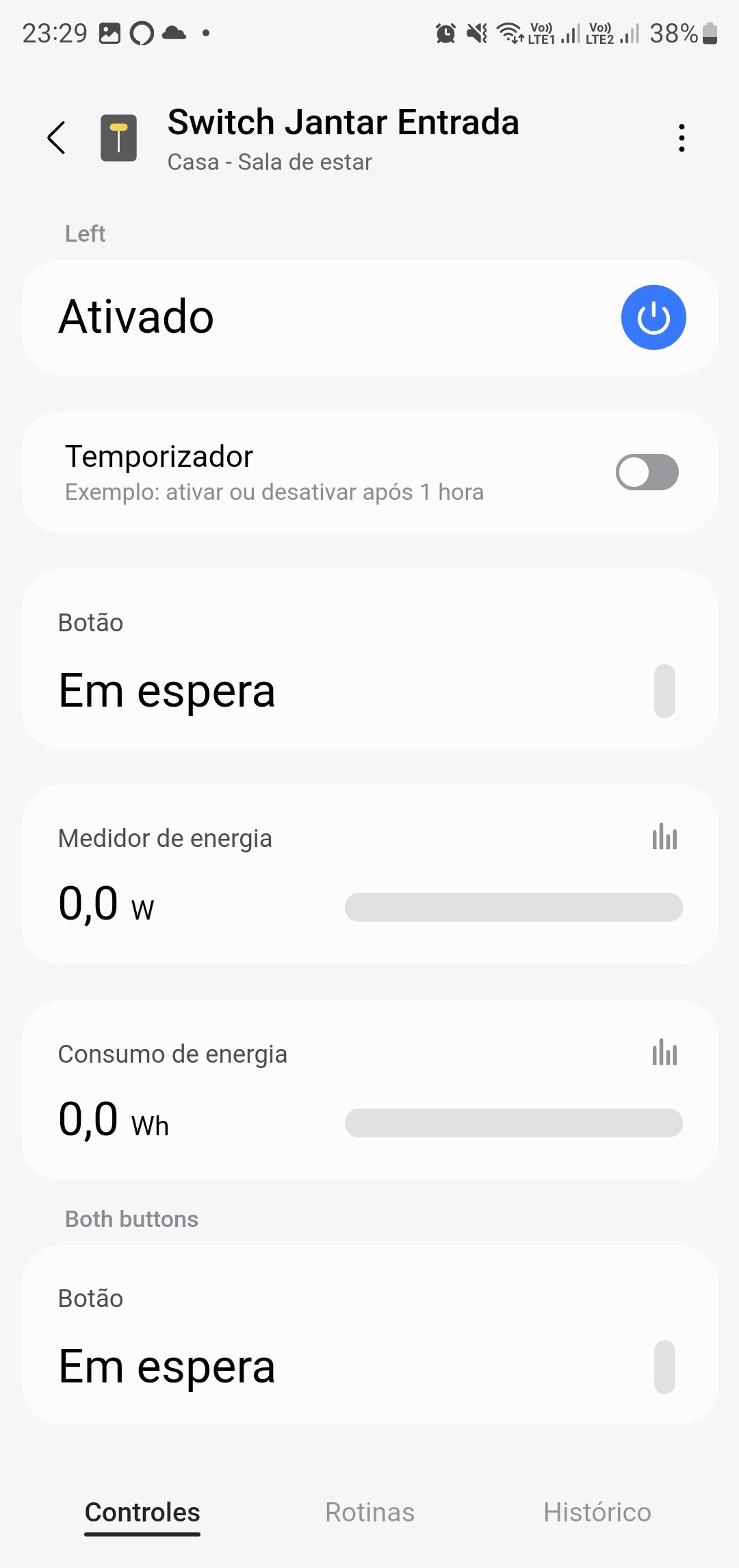
Have you removed and added your device back? The new child device should be added to the default room.
Yesterday I have removed an added again the device, and none chlid device was added.
Right now I restarted the hub, switch the driver to the default Zigbee driver and back to yours driver, and worked, now I have the child device.
Unfortunately, I’m not at home to say if is working properly, but I think this will work. I let u know later. Thx.
Hi, may I ask if we are able to add smart wifi/bluetooth door locks (e.g. Xiaomi) to Smartthings?
AFAIk the BT module is disabled on the ST hub.
Well maybe it’s possible to add WiFi devices , and
@blueyetisoftware started to investigate Wi-Fi authentication and it seems like major security concerns on the device pairing procedure.
Major security concerns on the device pairing procedure? May I know what does this means?
Does it need any edge drivers to add wifi door locks onto smartthings?
As far as I know, there is currently no available Edge driver for Xiaomi Wi-Fi devices. Your best chance would be to wait for Matter bridge to support locks or perhaps order a custom driver.
However, at the moment, it is not possible to use BT or Wi-Fi Xiaomi devices with SmartThings.
I have a Xiaomi Button that I use to control a light switch. Today I noticed it is not working. I think it was working at least a week ago. But SmartThings App’s device history is empty. Tried changing battery and still not signs of life.
I noticed that the Edge driver I am using has a date of 2023-10-23. Which means the driver auto updates?
I am kind of nervous about removing the device and re-add. Does anyone have similar experience recently?
Yes, the driver auto-updates and the last time it updated was a month ago. You can see the change description on this thread.
You don’t have to remove the device to re-add it.
The Smartthings hub will find the existing device and just update the Zigbee network keys and route.
To ensure a stable Zigbee network, wireless devices to initiate network reconstruction in cases where routes become unavailable.
However, Aqara devices tend to maintain strong connections with the nearest wired device. Consequently, if any Zigbee outlets or lamps become disconnected, several nearby Aqara devices may lose their connection to the network.
Come to think of it. There was a very brief power outage about 2 weeks ago. Not sure if it is the cause of the problem. Not sure how I can make the Xiaomi button to initiate connection again. The wired light switch which it controls is also a Zigbee device and it is working fine. So is my other battery Zigbee sensors at home.
probably the outage drop the device out of ZigBee network, just re-pair the button and it will be good.