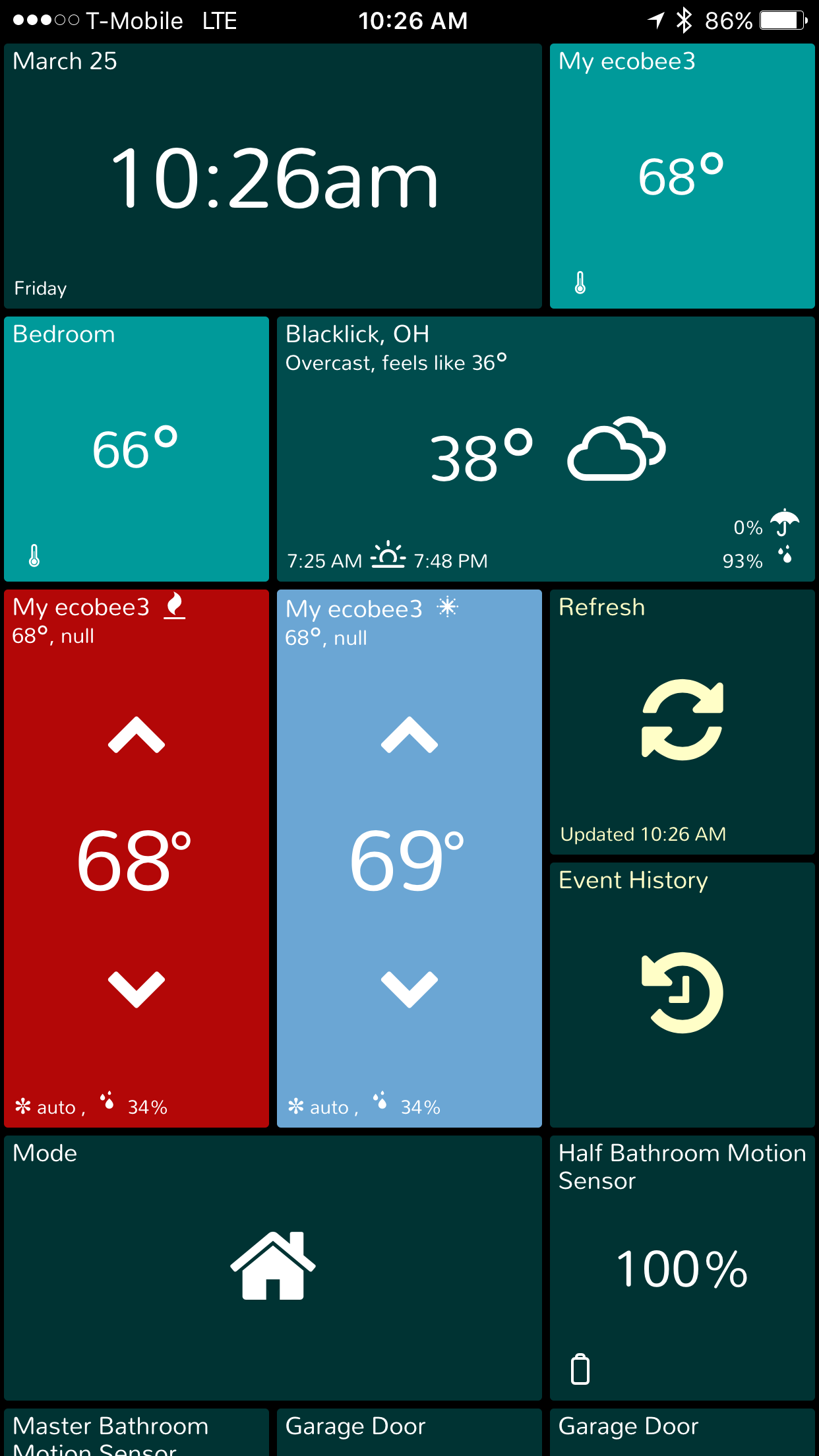
Look at the information in this post from May 11, 2015.
@tgauchat, I see better ways to point to other messages but can’t figure out the syntax. Can you help?
Is anyone adding these changes to a FAQ or the unofficial ST Wiki? Following what’s going on is very hard with all the code updates and attempts.
Or I’m being extra lazy, yeah that’s probably it…
.fa will change the small icons in the corners (for a power tile - the bolt; for weather - the umbrella, sunset/sunrise, whether it’s raining, etc)
I believe .spinner will change the small refresh icon in the bottom right corner of certain tiles once clicked (clock, switches, lights, etc)
A little brute-force, but finally got it working right! Thanks for all the suggestions, they ultimately led to the solution.
/*
.power.inactive {background-color:#ffa500}
.power.inactive .fa {color: #3b384a}
.power.inactive .icon {color: #3b384a}
.power.inactive .title {color: #3b384a}
.power.inactive .title2 {color: #3b384a}
.power.inactive .spinner {color: #3b384a}
.power[data-value=‘0W’] {background-color:#3b384a}
.power[data-value=‘0W’] .fa {color: #ffa500}
.power[data-value=‘0W’] .icon {color: #ffa500}
.power[data-value=‘0W’] .title {color: #ffa500}
.power[data-value=‘0W’] .title2 {color: #ffa500}
.power[data-value=‘0W’] .spinner {color: #ffa500}
Nah… it’s sorta my job to figure out how to get all this summarized and posted on our own website, http://SmartTiles.click ; but with 945 messages here, it’s pretty hard to summarize without a lot of backtracking.
We are focused mostly on Version 6 (the mysterious complete overhaul…), and we are closely watching these CSS modification ideas. @625alex and I very aware of how valuable the ability to customize is. There will be some improvements in this regard right out of the gate, but it’s not a core “MVP” feature and we can’t let this delay the launch any further.
If one or more of you guys want to help summarize v5 CSS tricks; I assure you that your work will be appreciated and find a good visible home on our website. In the meantime, we send folks directly here to this Topic.
Any chance we could have a separate thread for physical, hardware choices, hardware mounting ideas, etc AND one for CSS mods, and/or other coding ideas, or is that not worth the effort?
Yes … that’s a great idea; though there’s no easy way to distribute all the existing posts between the two Topics. Only moderators have the ability to do that, and it would be a lot of manual effort.
However… we can give it a try by renaming this Topic and then starting a new one. Should this Topic be called “CSS Theme Editing” (or similar), or is this more about hardware mounting (or vice versa)…?
Or we could create two brand new Topics, but that means users have to search  in two places…
I like the idea of a new CSS thread that way you can start the process of everyone posting their working CSS customizations (hopefully with comments) so it would have the most current version of everything.
A FAQ would be good too with the core tips, such as how to edit CSS from a PC/mac (I just stumbled upon it and WOW that’s a game changer vs doing it on a mobile device), how to use the browser to find the css info you’re looking for, how to load new pics, etc. At least the things that aren’t changing in V6 
One thing I burned 3 hours on the other night was TextEdit on Mac was replacing all my single quotes with a different version of single quote that broke my css (visually looked very similar)… came to find out I had working code all along!
The SmartTiles website is based on WordPress, so we could consider open up the blogging area for limited approved users to post and edit entries in certain categories…
Might get more or less exposure than here, but easier for us to curate.
It’s somewhat up to you guys if you think we should add yet another place to redirect people to find information. EDIT: We’re going to figure out how to put CSS examples on SmartTiles.click’s own website.
Would have to be limited to specific subjects like “Working Custom CSS”, “Hardware Gallery”, “Dashboard Gallery” and others to be determined.
I think we want a lot of it here at ST unless SmartTiles starts supporting some other platforms somehow. It makes it easier on you guys as well since all you might have to do is update a link to a thread rather than verifying content in posts on your site.
From elsewhere on the forum, it looks like there is talk of possibly adding a few community moderators which could help with all the new topics so they get appropriately merged (I see new SmartTiles topics pop up every few days when they should just be a reply to an existing one).
There are already multiple places to search with the various version threads as well as the modification threads.  I thing at one time there was a CSS thread wasn’t there???
I thing having dedicated CSS, Display Hardware/Devices, Camera, and SmartTiles (version) threads will help going forward. (Someone/everyone will have to redirect new questions to the correct thread at that point.) But, there are already hundreds, if not thousands, of messages containing tweaks and changes already listed. I don’t think anyone could be reasonably expected to redirect all of those.
One thing I personally do is put cool CSS tricks in my custom CSS and then comment them out if I don’t want to use them. That way I have them handy if someone posts the same request again. I also search on here and cut and paste others suggestions and then tweak it until it meets my/their needs.
I would like to assist with maintaining a separate wiki or FAQ if someone wants to setup/manage it. Right now I have time to play on here because I am home on disability, but that will end next week and I’ll be going back to work so I won’t have time to be the point person on the project. I’m also not that knowledgeable of the actual CSS and how to change things. So I am not really qualified to be the ‘CSS guy’.
OK, so we have a render. This one shows the location of the built in humidity and temperature sensors at the bottom. In the back is the mains control box with 2 switches and 2 dimmer light circuit controllers. Project link: https://igg.me/at/ZeeSmart/x/13530958

I gotta speak up and say; I really find renderings in crowdfunding campaigns to be misleading to the potential Backer – in fact, Kickstarter banned renderings, because they are so realistic they convince too many Backers that the object already exists physically and fully functional.
Please take care to emphasize the photographs and functionality of the real existing prototypes and highlight the risks to your delivery timeline. Thanks.
Well… nothing to worry about, since there’s no way this Campaign is getting off the ground. Nothing personal, @smittg, but there’s nothing compelling about the product that makes it worth the risk of funding. The failure of the Wink Relay showed that ain’t nobody interested in paying $200 to $300 for a single lightswitch, regardless of how nice of a screen it has. (Yes, I know it’s not just a lightswitch, but not the average consumer).

I couldn’t agree more.
This is one of the biggest reasons why I stopped visiting IGG. I could create an IGG campaign for a product that only exists in a sketch on a cocktail napkin.
Good afternoon @tgauchat & @625alex,
I am trying to resize the video stream tile (I can only go to medium in the preferences & I would like large). I have tried:
div.video-container img {
height: 360px;
width: 480px;
}
The problem is that the rest of the tiles are not resizing around the newly sized video feed. The other tiles are sitting on top of it now.
Did you try to change the preference for video tile size? The bigger tile is 2x3, which seems to be what you want.
Preferences only gives me 2 options, small and medium. Medium is too small, it is 240 H x 360 W based on the element info when I view the CSS.
All Tile sizes are based upon a multiple of the “base” Tile size; so you could make your base tile size larger, but that would fit fewer Things on your dashboard.
I don’t think this can be changed in any practical with with just CSS. We need to add more size options for Video (such as “Large 4x3”; etc.) … but might even allow or need to allow you to input the number of Tile units you wish (since a HD wide-screen camera feed may not look very good in a large 4x3 overall ratio, you might prefer 5x3, for example.).
We’ll add this to our Feature Request List.
Thanks for the suggestion!
Thanks @tgauchat ! I really appreciate it! You and Alex are doing amazing things here!