@adrian97c
Go to the fan device in the app go, go to settings, and change “what should the dimmer control” to “fan”.
Now Alexa will be able to control the fan AND the light - “alexa, set bedroom fan to 50%” or “alexa, set bedroom fan light to 50%”.
@adrian97c
Go to the fan device in the app go, go to settings, and change “what should the dimmer control” to “fan”.
Now Alexa will be able to control the fan AND the light - “alexa, set bedroom fan to 50%” or “alexa, set bedroom fan light to 50%”.
Thanks, that was the first thing I did after installing the new handler. ‘Alexa turn on fan to 75%’, then she makes that ‘ding’ sound, letting me know she accepted the command… but nothing happens lol. I have to open up Alexa or ST app on phone & actually turn it on that way.
If you can control the dimmer slider in the Smartthings app and the fan responds, that should really show it’s not a problem with the DTH. Also, it sounds like you can control it with the Alexa app but not a voice command? If the device can be controlled with the Alexa app it shows it is making the connection with Alexa, but its really weird you can’t control by voice then. Maybe she doesn’t like the name of the device? Possibly renaming it might help- you can try doing that on the Alexa side first. Did you have the old Alexa skill and have to upgrade to the new one? If so something might have went wrong in that process. What if you delete the device in Alexa and then run a discovery again? I just can’t imagine what else could be wrong, I’m sure it must be frustrating.
Hello!
I’ve been using the KOF DTH for a while now on the Samsung Classic app and it’s been great. I’ve integrated it with my Ecobee remote sensors to automate the fan speed based off temperature in each room as well as motion. If the temp goes up above a predefined temp (that I input in the GUI for the KOF automation) the fan speed increases. If no motion detected for “x” minutes, the fan turns off.
With Samsung forcing our hand to transition to the new SmartThings app - does this new DTH version support the temp/motion automation like it did in the Classic app?
Or just fan speed control “manually” without it being automated?
Thank you!
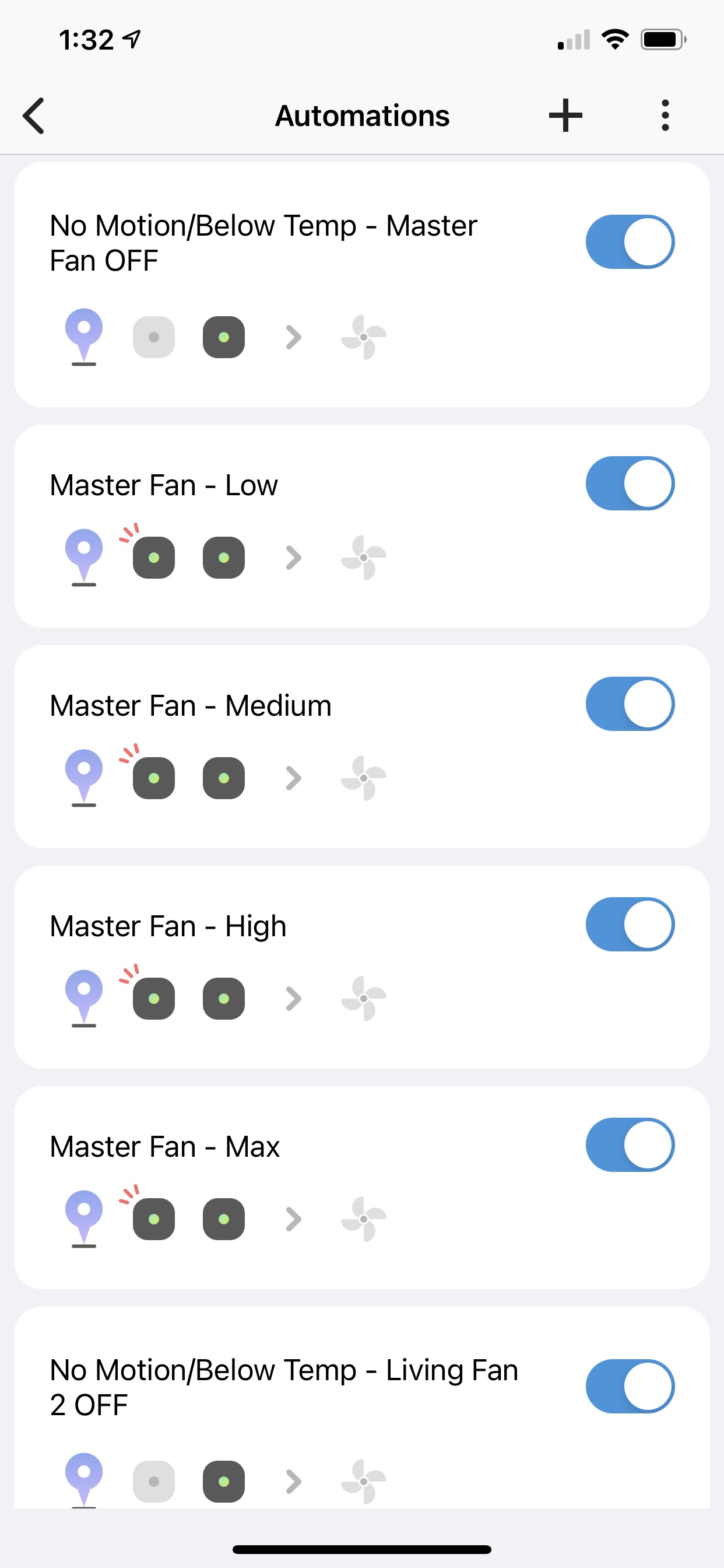
In the SmartThings Classic version, there was this automation tool which was basically a way to run everything all in one. I just tried to replicate this using the automations feature of the new SmartThings app and it took about 6 separate automations to do so.
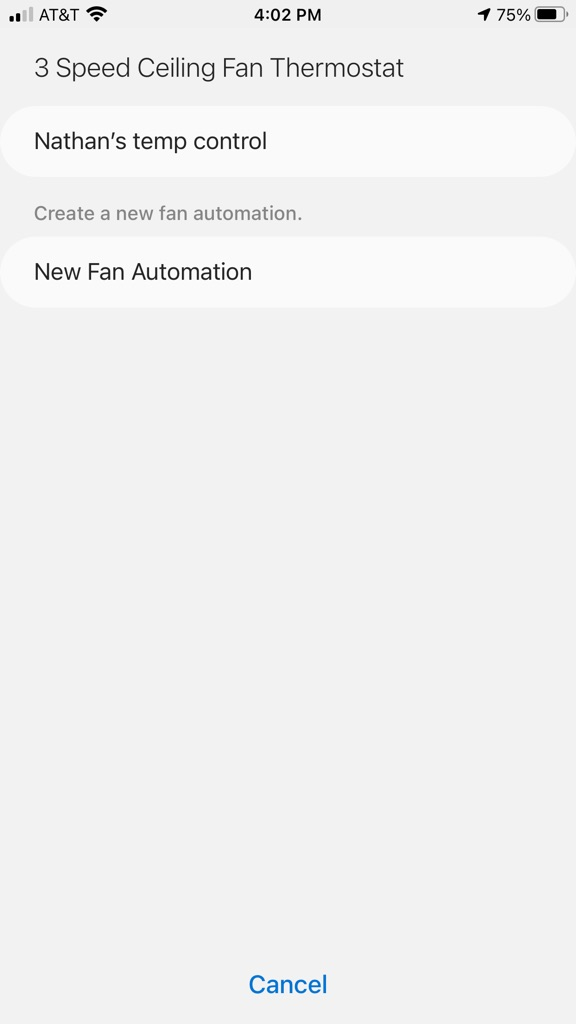
In the SmartThings Classic app, I could program a set point of 77 degrees where the fan will turn off. If it was 78 degrees, fan would go on low. 79 degrees, fan would go on high. 80 degrees, fan would go on max. The fan would only turn on if there was also motion detected in that room by my Ecobee sensor AND if the ST location mode was “home”. This was done all in the same automation “app” (image below)
I saw the same automation pop up in the “Smart App” section of the new app but it does not work.
Do you know if there’s a way to make it work again in the new app? I’ve attached an image of what it pops up as under “Smart Apps”
I’ve never used that app before, but it likely would need updating to work in the new app with the new handler. It was written by dcoffing which was the person that wrote the original DTH for this fan. He is no longer around, and Rafael Borjas was kinda enough to write the new handler that works, but I’m unaware of any plans to update that particular smartapp.
It didn’t work great, but probably being associated with wink did it in. The Inovelli fan light is a much better alternative.
I can see that being an option, especially if you want a remote. The bond fan is a WiFi device though, so one more thing on your router vs zigbee/zwave. There’s a lot of people that go with zigbee/zwave to avoid wifi devices in the first place. I don’t want to kick that hornets nest of a debate though. Either way it’s good there are alternatives.
I have 1 of these im not using if your interested
I ran into the same thing. I figured out a work around for it that works the same as the automation did on the previous app. It just involves 5 separate automations per fan.
Automation 1 - put conditions as “temperature” from your temp sensor. I put “temp sensor 1 > 81 then fan speed max
Automation 2 - temp sensor > 80 then fan speed high
Automation 3 - temp sensor > 79 then fan speed medium
Automation 4 - temp sensor > 78 then fan speed low
Automation 5 - temp sensor <77 OR motion not detected for 15 min then turn fan off
I have 3 of the Hampton Bay fan controllers and I have an Ecobee Room sensor in each room that detects temp/motion. I use this set up with 5 automations per fan to control the speed according to the room temp as well as turn the fan off if the room isn’t occupied. Takes longer to set up then the automation on the old app where it was all built in but this works the same.
Hope this helps!!
Here’s an example for one of my fans:
So I purchased 2 new Hampton Bay controllers a couple months ago, because my old ones failed. I have previously warranty replaced them through Hampton Bay, but now apparently Home Depot owns Hampton Bay and has since discontinued the controller and “cannot warranty replace it” because it’s no longer available. Any suggestions? I used to use this controller then got fed up with the connectivity issues, switched to bond, but it sucks for determining the state and was always out of sync with my routines, saw the sale on the Hampton bay controllers and bought 2 new ones so all 4 of my fans have them. Still had issues with connectivity, so this thread pointed me to the IKEA repeaters, which greatly improved their connectivity and reliability, and then one burns out again. Does anyone make a good reliable fan controller with a light controls that works with smartthings and alexa? This is the only part of my Smart home I have issues with.
This thread should be very helpful to point your towards some alternatives FAQ: 2020 Ceiling Fan and Dimmer light wall mount control compatible with SmartThings and Alexa?
I have three of these - one I got warranty replaced after it stopped responding on the highest speed, and two that are currently installed. I’m thinking about replacing them with Inovelli switches in the near-ish future (depending whether I decide to wait for their eventual fan switch or just use a Jasco switch) and would sell them cheap if you want to have a couple of backups.
What is the most updated device fan controller for the Hampton Bay? I’m using Rafael Borja but it is missing a few functions: Reverse fan mode, Breeze mode, and the dimmer in the fan smartapp doesn’t go to zero, you have to exit and use the fan light to turn it off.
The one from Rafael is the most current. He accepted a pull request I did in September to support Breeze mode by setting the fan level to 1%, that latest DTH is here https://github.com/rafaelborja/SmartthingsKingOfFansZigbee/tree/master/devicetypes/rafaelborja
I don’t believe reverse works though, and I don’t believe I ever used the fan smartapp so can’t really help there.
This is a great alternative…fully integrates with Smartthings , Google Home, and Alexa. It is wifi and much more reliable than the Zigbee unit.