I do have the smart life skill enable and linked to Alexa but the plug is not available in the list of devices that can be used as a trigger
Thought so as this has happened to me as well for some other device. This means the model is not compatible in which case you have to go through IFTTT to trigger Alexa announcement so the flow will be SL > IFTTT > Alexa and ST will be out of picture. IFTTT provides 2 free portlets which you can use if you have not used them already but if you have I wouldn’t pay for this as the service is not reliable.
The other option I can think of is to sell your current smart plug and buy something that is natively compatible with ST as there are lots of cheaper options out there.
I see, so the IFTTT route bypasses ST. I tried to use SL as a trigger in IFTTT but again when it comes to the section of picking the SL device they are all greyed out (the IF section) however, they are available as scenes in the (THEN section) but this is useless for me - think its easier to get a Smartplug that is visible in ST.
1 Like
How many amps is your washing machine?
Yup make sense and the first rule in any home automation is to choose the correct model. Use wifi plugs like KP115 or something else if you need energy monitoring as Zigbee plugs are not recommended for energy usage as it may mess up your Zigbee network.
1 Like
All true.
Matter over Thread turns out to also be a good option for energy reporting, so that adds some additional candidates. Including the new Eve in wall outlet. (At the time of this posting, very few manufacturers have support for energy reporting via matter right now, but Eve does, and it also happens to work with the SmartThings energy dashboard.)
That said, many people who have tried these kind of devices to monitor washers and dryers have found that the laundry units have “idle points” in their cycles where the energy draw drops so low it will trigger their “laundry done” routines before the laundry is actually done. The washers and dryers are designed this way to reduce their own total energy usage, but it can make monitoring them quite difficult. 
Basically you need to set your alert for “low draw and has stayed low for 15 minutes” or something like that. (It will vary by machine.) So I did just want to mention that as another factor to consider. 
1 Like
Could we not use a vibration sensor for this?I read somewhere when someone stuck a vibration sensor in the washing machine and used this to trigger routines when it is active and when is it not.
I dont need energy monitoring as such just power draw so that I can trigger a routine
i think not many allow “no vibration” as a trigger… the majority use “vibration” as the trigger…could be wrong though and would be interested to see if there is a vibration sensor hat can do this
I have a Tapo 110 smartplug with energy monitoring but this is useless to trigger automation as it doesnt allow you to control the switch based on energy draw just on a timed routine
1 Like
The energy monitoring plug I was referring will give you the power draw and energy consumption.
In this case, you can go with KP115 or Matter over thread plugs like JD mentioned
I use a Third Reality vibration sensor to monitor my dryer. No Vibration is a trigger in ST. I don’t know how well it would work with a washing machine as its movement is not as consistent and at times it will have no movement, such as when draining.
1 Like
The Eve Energy Matter over Thread outlets support both Energy Consumption and Power Metering as triggers in ST.

3 Likes
SmartThings polls the data every 60 seconds so for this use case it’s fine, the maximum delay to trigger a routine would be one minute. For other use cases it would be nice if the smart plug notified SmartThings instead of having to periodically poll it, maybe with Matter 1.3, Eve is supposed to be working in the update to use the standard instead of their private cluster.
Unfortunately, at least in Europe, Eve Energy smart plugs only allow 11A instead of the usual 16A that standard wiring allows. While I guess modern washing machines don’t have high current peaks, it would be better if it was 16A as others, it’s not that they’re cheap and had to save on the relay.
Ah yes just googled it - fab. So on Amazon it says a hub is required, I assume the ST hub will see this directly and Alexa will see this as a device that can trigger a routine?
The vibration sensor connects to ST hub directly. However, it is not seen by Alexa. If you want to use the vibration sensor to trigger Alexa routines you will need to use a virtual device.
this is where I am confused. So I create the virtual device in the ST app To act as a proxy for the actual sensor and then Alexa will see the virtual device after a scan? In the Vedge creator driver I have there is an option of an Alexa swtich - is it this I need?
Exactly. Make a routine linking the virtual switch with the vibration sensor, then it will be usable in Alexa routines.
2 Likes
Alexa only recognizes certain devices (sensors, locks) as triggers in its routines. If you create a virtual Alexa switch, you need to enable the separate contact sensor in the settings.
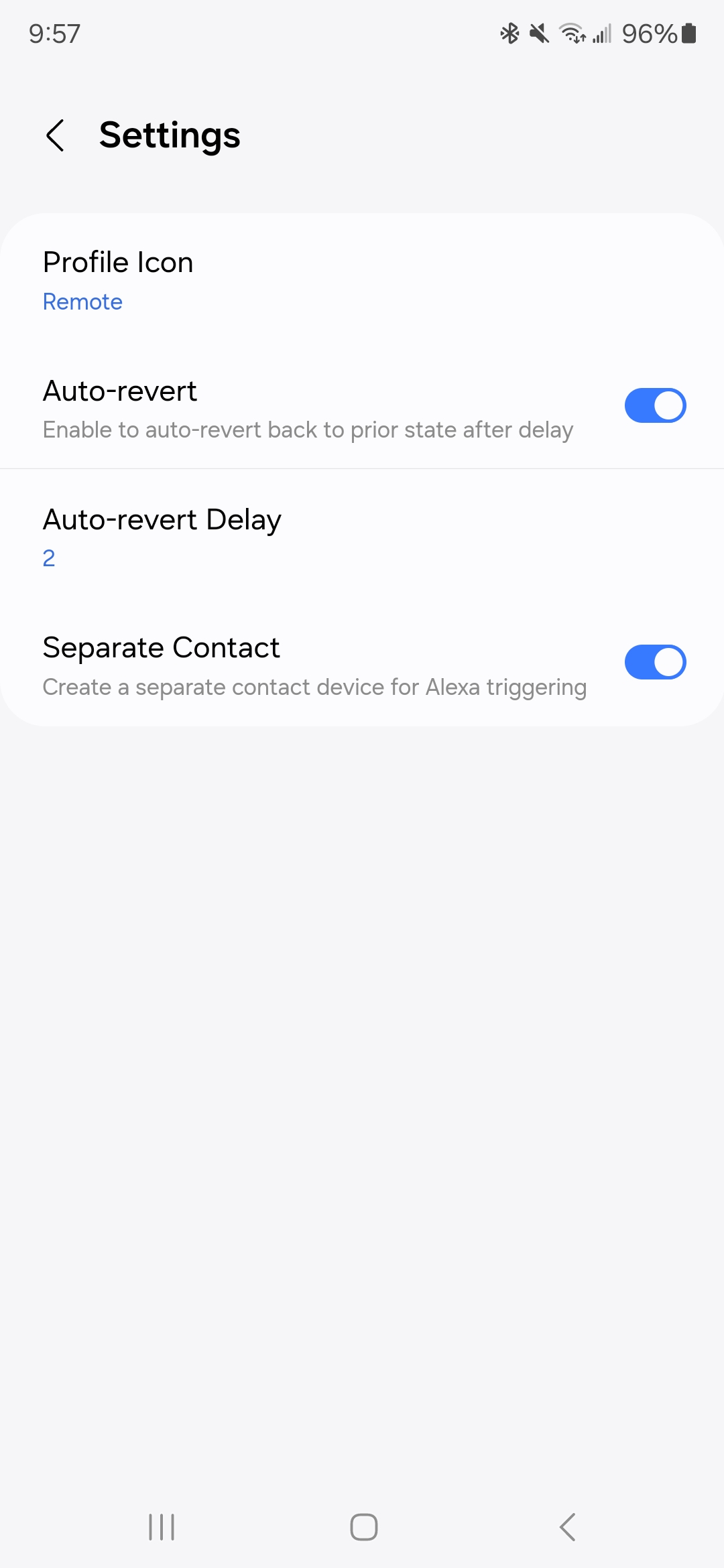
This topic discusses Alexa integration in detail. FAQ: Can I trigger an Echo Action without Speaking to It?
3 Likes