Just pushed out a driver update, version 2022-05-08T14:05:41.026138
Changes:
added camera-type metadata to see if we can address the issue with camera group spontaneously changing to a lighting group. This probably won’t have any effect until you recreate your devices.
additional logging output to help debug discovery issues
attempt at addressing authentication method from TP Link cameras (@milandjurovic71)
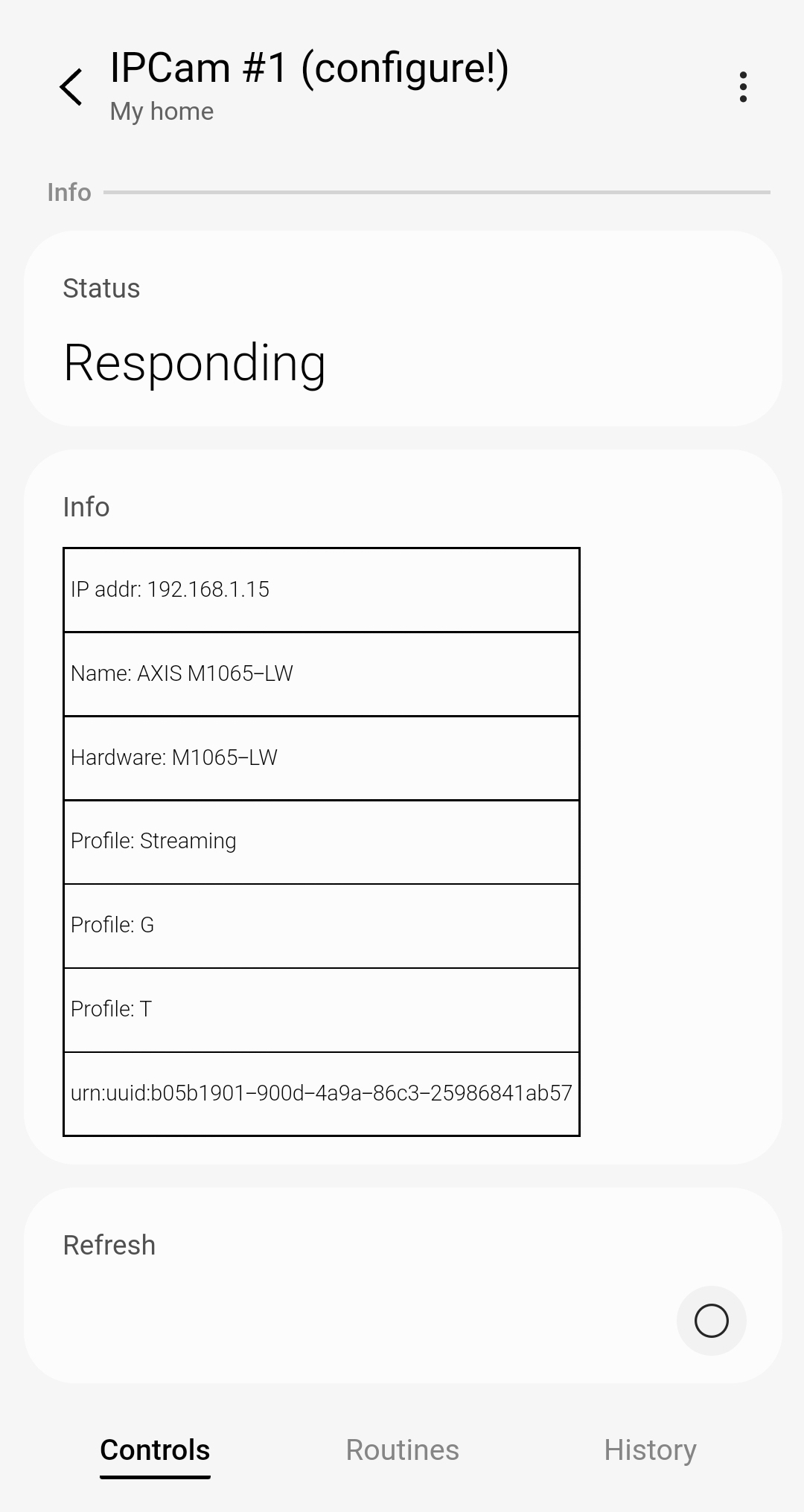
The Info part is blank, screenshot below/ I just sent over the logs, sorry it took a while, I am on Mac OS but eventually figured out to capture the logs!
Is that a change from prior behavior? My driver isn’t involved in the camera group display other than to provide the streaming URL, so this is more of a mobile app issue, I’m afraid.
Issue resolved, appears to have been a possible Os bug
I tested a Bixby routine that included screen rotation, removing the routine failed to return the device to auto rotate, issue found and fixed, rotation working
Yet another driver update! Version 2022-05-08T17:38:22.778661
This includes 2 updates:
change to discovery routine to better handle any expected, but missing, data in the discovery response from the camera (@skinnypope and any others having discovery or Refresh issues)
added handling for alternative authentication response we’re seeing from TAPO cameras (@Sakari)
Hi @TAustin
Thanks for your reply
I have deleted all my discovered cameras and try to scan near by again and none of previuosely discovered cameras were discovered again!
Have you changed anything in driver?
only one IpCam #1 was discovered but looking to logs, it seems belong to my Synology network (192.168.1.9/AminNEWDS)
Logs
Summary
PS C:\users\aminhsm\documents\cli> .\smartthings edge:drivers:logcat
? Enter hub IP address with optionally appended port number: 192.168.1.58
┌────┬──────────────────────────────────────┬──────────────────────────────────────┐
│ # │ Driver Id │ Name │
├────┼──────────────────────────────────────┼──────────────────────────────────────┤
│ 1 │ 1d68e5c3-03c0-4229-985d-14e225550049 │ ONVIF Video Camera V1 │
│ 2 │ c411db9e-a042-459a-a145-f005c65412ee │ ST Zigbee Button Mc │
│ 3 │ 86d761b1-e962-4756-a9b2-edab02b8567d │ Tasmota Edge │
│ 4 │ 981aab30-6f78-4b31-bf0b-b422bef161ec │ Yeelight.Color │
│ 5 │ 71915c2a-8604-4cd5-aaba-22988490bcbb │ Z-Wave Switch Mc │
│ 6 │ ad9f537d-e2d9-4354-8673-471a5306fad8 │ Zigbee Button Groups │
│ 7 │ 1e45a851-8f07-48d1-bcbf-932fb377e95e │ Zigbee Dimmer Remote │
│ 8 │ ccea734e-e56e-4d2c-a259-3b2e1fdebd82 │ Zigbee Humidity Sensor │
│ 9 │ 6b86005f-95b4-49cb-a3d5-d3a17fd94177 │ Zigbee Light Multifunction Mc │
│ 10 │ d620900d-f7bc-4ab5-a171-6dd159872f7d │ Zigbee Motion Sensor │
│ 11 │ 00425c55-0932-416f-a1ba-78fae98ab614 │ Zigbee Motion Sensor Mc │
│ 12 │ 91a22a50-31a2-4177-9999-8ed3770bfee6 │ Zigbee Multi Switch Mc │
│ 13 │ fe12554c-d40f-439c-a57c-cbc0f27b11dd │ Zigbee Multi Switch Test │
│ 14 │ 580a4441-7d16-437e-8cdc-97c03f59e2df │ Zigbee Switch Mc │
│ 15 │ f732925a-9ae3-462a-9641-f03f474c661e │ Zigbee Switch Power Mc │
│ 16 │ 026385b3-dfa9-43e5-b443-cfc42123f042 │ Zigbee Temp Humidity Sensor Mc │
│ 17 │ bd79913f-0309-4256-b669-74c489b81140 │ Zigbee Temp Humidity Sensor Mc-(OLD) │
└────┴──────────────────────────────────────┴──────────────────────────────────────┘
? Select a driver. 1
connecting… connected
2022-05-08T19:04:06.820044096+00:00 TRACE ONVIF Video Camera V1 Setup driver onvifDriver with lifecycle handlers:
DeviceLifecycleDispatcher: onvifDriver
default_handlers:
doConfigure:
removed:
driverSwitched:
infoChanged:
deleted:
added:
init:
child_dispatchers:
2022-05-08T19:04:06.828443430+00:00 TRACE ONVIF Video Camera V1 Setup driver onvifDriver with Capability handlers:
CapabilityCommandDispatcher: onvifDriver
default_handlers:
partyvoice23922.refresh:
push
videoStream:
startStream
stopStream
partyvoice23922.motionevents:
setSwitch
child_dispatchers:
2022-05-08T19:04:06.833938430+00:00 DEBUG ONVIF Video Camera V1 **** ONVIF Driver V1 Start ****
2022-05-08T19:04:06.852276763+00:00 TRACE ONVIF Video Camera V1 Received event with handler environment_info
2022-05-08T19:04:06.859564096+00:00 TRACE ONVIF Video Camera V1 Received event with handler environment_info
2022-05-08T19:04:06.864961763+00:00 DEBUG ONVIF Video Camera V1 Z-Wave hub node ID environment changed.
2022-05-08T19:04:06.872650763+00:00 TRACE ONVIF Video Camera V1 Received event with handler driver_lifecycle
2022-05-08T19:04:06.879436763+00:00 TRACE ONVIF Video Camera V1 Received event with handler driver_lifecycle
2022-05-08T19:04:06.886430763+00:00 TRACE ONVIF Video Camera V1 Received event with handler discovery
2022-05-08T19:04:06.896530430+00:00 DEBUG ONVIF Video Camera V1 Starting discovery
2022-05-08T19:04:06.908580096+00:00 DEBUG ONVIF Video Camera V1 Making WS discovery request
2022-05-08T19:04:06.948697096+00:00 DEBUG ONVIF Video Camera V1 Discovery response from: 192.168.1.9
2022-05-08T19:04:06.974351763+00:00 DEBUG ONVIF Video Camera V1 ProbeMatch table: 0x17e4b40
2022-05-08T19:04:06.979963763+00:00 DEBUG ONVIF Video Camera V1 Types wsdp:Device pub:Computer
2022-05-08T19:04:06.985135430+00:00 DEBUG ONVIF Video Camera V1 XAddrs http://AminDSNEW:5357/a0d7119e-8b35-42a2-8db9-d7a26ab0b761
2022-05-08T19:04:06.990605096+00:00 DEBUG ONVIF Video Camera V1 EndpointReference table: 0x17e4bb8
2022-05-08T19:04:06.995813430+00:00 DEBUG ONVIF Video Camera V1 Address urn:uuid:a0d7119e-8b35-42a2-8db9-d7a26ab0b761
2022-05-08T19:04:07.004142430+00:00 DEBUG ONVIF Video Camera V1 MetadataVersion 2
2022-05-08T19:04:07.011258096+00:00 WARN ONVIF Video Camera V1 No Scopes found in discovery response
2022-05-08T19:04:07.018078096+00:00 WARN ONVIF Video Camera V1 No Streaming profile identified by discovered device
2022-05-08T19:04:07.023915096+00:00 INFO ONVIF Video Camera V1 Creating discovered IP Camera found at 192.168.1.9
2022-05-08T19:04:07.029829096+00:00 INFO ONVIF Video Camera V1 device_network_id = urn:uuid:a0d7119e-8b35-42a2-8db9-d7a26ab0b761
2022-05-08T19:04:08.546940097+00:00 TRACE ONVIF Video Camera V1 Received event with handler device_lifecycle
2022-05-08T19:04:08.665429431+00:00 INFO ONVIF Video Camera V1 <Device: 3988acbe-edca-4525-a6fa-1b6e234420cf (IPCam #1 (configure!))> received lifecycle event: added
2022-05-08T19:04:08.838017097+00:00 TRACE ONVIF Video Camera V1 Received event with handler device_lifecycle
2022-05-08T19:04:08.889970431+00:00 INFO ONVIF Video Camera V1 <Device: 3988acbe-edca-4525-a6fa-1b6e234420cf (IPCam #1 (configure!))> received lifecycle event: doConfigure
2022-05-08T19:04:09.015495097+00:00 TRACE ONVIF Video Camera V1 Found DeviceLifecycleDispatcher handler in onvifDriver
2022-05-08T19:04:09.076454764+00:00 INFO ONVIF Video Camera V1 ADDED handler: <3988acbe-edca-4525-a6fa-1b6e234420cf (IPCam #1 (configure!))> successfully added; device_network_id = urn:uuid:a0d7119e-8b35-42a2-8db9-d7a26ab0b761
2022-05-08T19:04:09.186355764+00:00 INFO ONVIF Video Camera V1 <Device: 3988acbe-edca-4525-a6fa-1b6e234420cf (IPCam #1 (configure!))> emitting event: {“attribute_id”:“motion”,“capability_id”:“motionSensor”,“component_id”:“main”,“state”:{“value”:“inactive”}}
2022-05-08T19:04:09.231624431+00:00 INFO ONVIF Video Camera V1 <Device: 3988acbe-edca-4525-a6fa-1b6e234420cf (IPCam #1 (configure!))> emitting event: {“attribute_id”:“switch”,“capability_id”:“partyvoice23922.motionevents”,“component_id”:“main”,“state”:{“value”:“Off”}}
2022-05-08T19:04:09.290870431+00:00 INFO ONVIF Video Camera V1 <Device: 3988acbe-edca-4525-a6fa-1b6e234420cf (IPCam #1 (configure!))> emitting event: {“attribute_id”:“status”,“capability_id”:“partyvoice23922.onvifstatus”,“component_id”:“info”,“state”:{“value”:“Not configured”}}
2022-05-08T19:04:09.328950431+00:00 DEBUG ONVIF Video Camera V1 ADDED handler exiting for IPCam #1 (configure!)
2022-05-08T19:04:09.345782764+00:00 DEBUG ONVIF Video Camera V1 IPCam #1 (configure!) device thread event handled
2022-05-08T19:04:09.356698098+00:00 TRACE ONVIF Video Camera V1 Found DeviceLifecycleDispatcher handler in onvifDriver
2022-05-08T19:04:09.368742431+00:00 DEBUG ONVIF Video Camera V1 INIT handler for: <urn:uuid:a0d7119e-8b35-42a2-8db9-d7a26ab0b761 (IPCam #1 (configure!))>
2022-05-08T19:04:09.376905431+00:00 INFO ONVIF Video Camera V1 Starting Device Initialization routine for IPCam #1 (configure!)
2022-05-08T19:04:09.386772098+00:00 INFO ONVIF Video Camera V1 <Device: 3988acbe-edca-4525-a6fa-1b6e234420cf (IPCam #1 (configure!))> emitting event: {“attribute_id”:“info”,“capability_id”:“partyvoice23922.onvifinfo”,“component_id”:“info”,“state”:{“value”:"\n\n\n\ntable, td {\n border: 1px solid black;\n border-collapse: collapse;\n font-size: 11px;\n padding: 3px;\n}\n\n\n\n\n\n\n\n\n\n
IP addr: 192.168.1.9
Name:
Hardware:
Location:
urn:uuid:a0d7119e-8b35-42a2-8db9-d7a26ab0b761
\n\n\n"}}
2022-05-08T19:04:09.427158764+00:00 DEBUG ONVIF Video Camera V1 Sending GetSystemDateAndTime request to http://AminDSNEW:5357/a0d7119e-8b35-42a2-8db9-d7a26ab0b761
2022-05-08T19:04:09.552550764+00:00 DEBUG ONVIF Video Camera V1 HTTP Response Header:
2022-05-08T19:04:09.563161764+00:00 WARN ONVIF Video Camera V1 Not an XML response
2022-05-08T19:04:09.575101431+00:00 ERROR ONVIF Video Camera V1 Unexpected date/time request response; HTTP code=[string “socket”]:1527: could not parse host AminDSNEW as IP address, data=
2022-05-08T19:04:09.585327098+00:00 ERROR ONVIF Video Camera V1 Failed to get date/time from http://AminDSNEW:5357/a0d7119e-8b35-42a2-8db9-d7a26ab0b761 (IPCam #1 (configure!))
2022-05-08T19:04:09.594833764+00:00 INFO ONVIF Video Camera V1 <Device: 3988acbe-edca-4525-a6fa-1b6e234420cf (IPCam #1 (configure!))> emitting event: {“attribute_id”:“status”,“capability_id”:“partyvoice23922.onvifstatus”,“component_id”:“info”,“state”:{“value”:“Not responding”}}
2022-05-08T19:04:09.623459431+00:00 ERROR ONVIF Video Camera V1 Failed to initialize device IPCam #1 (configure!)
2022-05-08T19:04:09.635098431+00:00 DEBUG ONVIF Video Camera V1 IPCam #1 (configure!) device thread event handled
2022-05-08T19:04:09.648709098+00:00 TRACE ONVIF Video Camera V1 Found DeviceLifecycleDispatcher handler in onvifDriver
2022-05-08T19:04:09.657445431+00:00 DEBUG ONVIF Video Camera V1 IPCam #1 (configure!) device thread event handled
2022-05-08T19:04:09.681427431+00:00 DEBUG ONVIF Video Camera V1 IPCam #1 (configure!) device thread event handled
2022-05-08T19:04:27.454859439+00:00 DEBUG ONVIF Video Camera V1 Making WS discovery request
2022-05-08T19:04:27.493865106+00:00 DEBUG ONVIF Video Camera V1 Discovery response from: 192.168.1.9
2022-05-08T19:04:27.519084773+00:00 DEBUG ONVIF Video Camera V1 ProbeMatch table: 0x18cd0d8
2022-05-08T19:04:27.524615106+00:00 DEBUG ONVIF Video Camera V1 Types wsdp:Device pub:Computer
2022-05-08T19:04:27.530822440+00:00 DEBUG ONVIF Video Camera V1 XAddrs http://AminDSNEW:5357/a0d7119e-8b35-42a2-8db9-d7a26ab0b761
2022-05-08T19:04:27.537514773+00:00 DEBUG ONVIF Video Camera V1 EndpointReference table: 0x18cd150
2022-05-08T19:04:27.542888106+00:00 DEBUG ONVIF Video Camera V1 Address urn:uuid:a0d7119e-8b35-42a2-8db9-d7a26ab0b761
2022-05-08T19:04:27.548228440+00:00 DEBUG ONVIF Video Camera V1 MetadataVersion 2
2022-05-08T19:04:27.553656440+00:00 WARN ONVIF Video Camera V1 No Scopes found in discovery response
2022-05-08T19:04:27.559418106+00:00 WARN ONVIF Video Camera V1 No Streaming profile identified by discovered device
2022-05-08T19:04:27.565472440+00:00 DEBUG ONVIF Video Camera V1 Discovered device was already known
2022-05-08T19:04:47.992387301+00:00 DEBUG ONVIF Video Camera V1 Making WS discovery request
2022-05-08T19:04:48.038197968+00:00 DEBUG ONVIF Video Camera V1 Discovery response from: 192.168.1.9
2022-05-08T19:04:48.062485968+00:00 DEBUG ONVIF Video Camera V1 ProbeMatch table: 0x1792168
2022-05-08T19:04:48.068222634+00:00 DEBUG ONVIF Video Camera V1 Types wsdp:Device pub:Computer
2022-05-08T19:04:48.073515634+00:00 DEBUG ONVIF Video Camera V1 XAddrs http://AminDSNEW:5357/a0d7119e-8b35-42a2-8db9-d7a26ab0b761
2022-05-08T19:04:48.078821968+00:00 DEBUG ONVIF Video Camera V1 EndpointReference table: 0x17921e0
2022-05-08T19:04:48.084094634+00:00 DEBUG ONVIF Video Camera V1 Address urn:uuid:a0d7119e-8b35-42a2-8db9-d7a26ab0b761
2022-05-08T19:04:48.090081301+00:00 DEBUG ONVIF Video Camera V1 MetadataVersion 2
2022-05-08T19:04:48.095702968+00:00 WARN ONVIF Video Camera V1 No Scopes found in discovery response
2022-05-08T19:04:48.101668634+00:00 WARN ONVIF Video Camera V1 No Streaming profile identified by discovered device
2022-05-08T19:04:48.107580634+00:00 DEBUG ONVIF Video Camera V1 Discovered device was already known
2022-05-08T19:05:08.642986977+00:00 DEBUG ONVIF Video Camera V1 Making WS discovery request
2022-05-08T19:05:08.875455644+00:00 DEBUG ONVIF Video Camera V1 Discovery response from: 192.168.1.9
2022-05-08T19:05:09.226969311+00:00 DEBUG ONVIF Video Camera V1 ProbeMatch table: 0x18447a8
2022-05-08T19:05:09.248572978+00:00 DEBUG ONVIF Video Camera V1 Types wsdp:Device pub:Computer
2022-05-08T19:05:09.266701311+00:00 DEBUG ONVIF Video Camera V1 XAddrs http://AminDSNEW:5357/a0d7119e-8b35-42a2-8db9-d7a26ab0b761
2022-05-08T19:05:09.272215311+00:00 DEBUG ONVIF Video Camera V1 EndpointReference table: 0x1844820
2022-05-08T19:05:09.289722311+00:00 DEBUG ONVIF Video Camera V1 Address urn:uuid:a0d7119e-8b35-42a2-8db9-d7a26ab0b761
2022-05-08T19:05:09.306989311+00:00 DEBUG ONVIF Video Camera V1 MetadataVersion 2
2022-05-08T19:05:09.316340978+00:00 WARN ONVIF Video Camera V1 No Scopes found in discovery response
2022-05-08T19:05:09.328307978+00:00 WARN ONVIF Video Camera V1 No Streaming profile identified by discovered device
2022-05-08T19:05:09.346914311+00:00 DEBUG ONVIF Video Camera V1 Discovered device was already known
2022-05-08T19:05:29.616617321+00:00 DEBUG ONVIF Video Camera V1 Making WS discovery request
2022-05-08T19:05:29.956774654+00:00 DEBUG ONVIF Video Camera V1 Discovery response from: 192.168.1.9
2022-05-08T19:05:30.066620654+00:00 DEBUG ONVIF Video Camera V1 ProbeMatch table: 0x17d7718
2022-05-08T19:05:30.073370988+00:00 DEBUG ONVIF Video Camera V1 Types wsdp:Device pub:Computer
2022-05-08T19:05:30.098418654+00:00 DEBUG ONVIF Video Camera V1 XAddrs http://AminDSNEW:5357/a0d7119e-8b35-42a2-8db9-d7a26ab0b761
2022-05-08T19:05:30.122115988+00:00 DEBUG ONVIF Video Camera V1 EndpointReference table: 0x17d7790
2022-05-08T19:05:30.144510988+00:00 DEBUG ONVIF Video Camera V1 Address urn:uuid:a0d7119e-8b35-42a2-8db9-d7a26ab0b761
2022-05-08T19:05:30.185786654+00:00 DEBUG ONVIF Video Camera V1 MetadataVersion 2
2022-05-08T19:05:30.203762321+00:00 WARN ONVIF Video Camera V1 No Scopes found in discovery response
2022-05-08T19:05:30.237193988+00:00 WARN ONVIF Video Camera V1 No Streaming profile identified by discovered device
2022-05-08T19:05:30.280665654+00:00 DEBUG ONVIF Video Camera V1 Discovered device was already known
2022-05-08T19:05:36.073012990+00:00 TRACE ONVIF Video Camera V1 Received event with handler discovery
Hi again
This time i switched my Synology server OFF
No camera were discovered again. I think the new driver update has caused this issue for me at least
Logs
Summary
PS C:\users\aminhsm\documents\cli> .\smartthings edge:drivers:logcat
? Enter hub IP address with optionally appended port number: 192.168.1.58
┌────┬──────────────────────────────────────┬──────────────────────────────────────┐
│ # │ Driver Id │ Name │
├────┼──────────────────────────────────────┼──────────────────────────────────────┤
│ 1 │ 1d68e5c3-03c0-4229-985d-14e225550049 │ ONVIF Video Camera V1 │
│ 2 │ c411db9e-a042-459a-a145-f005c65412ee │ ST Zigbee Button Mc │
│ 3 │ 86d761b1-e962-4756-a9b2-edab02b8567d │ Tasmota Edge │
│ 4 │ 981aab30-6f78-4b31-bf0b-b422bef161ec │ Yeelight.Color │
│ 5 │ 71915c2a-8604-4cd5-aaba-22988490bcbb │ Z-Wave Switch Mc │
│ 6 │ ad9f537d-e2d9-4354-8673-471a5306fad8 │ Zigbee Button Groups │
│ 7 │ 1e45a851-8f07-48d1-bcbf-932fb377e95e │ Zigbee Dimmer Remote │
│ 8 │ ccea734e-e56e-4d2c-a259-3b2e1fdebd82 │ Zigbee Humidity Sensor │
│ 9 │ 6b86005f-95b4-49cb-a3d5-d3a17fd94177 │ Zigbee Light Multifunction Mc │
│ 10 │ d620900d-f7bc-4ab5-a171-6dd159872f7d │ Zigbee Motion Sensor │
│ 11 │ 00425c55-0932-416f-a1ba-78fae98ab614 │ Zigbee Motion Sensor Mc │
│ 12 │ 91a22a50-31a2-4177-9999-8ed3770bfee6 │ Zigbee Multi Switch Mc │
│ 13 │ fe12554c-d40f-439c-a57c-cbc0f27b11dd │ Zigbee Multi Switch Test │
│ 14 │ 580a4441-7d16-437e-8cdc-97c03f59e2df │ Zigbee Switch Mc │
│ 15 │ f732925a-9ae3-462a-9641-f03f474c661e │ Zigbee Switch Power Mc │
│ 16 │ 026385b3-dfa9-43e5-b443-cfc42123f042 │ Zigbee Temp Humidity Sensor Mc │
│ 17 │ bd79913f-0309-4256-b669-74c489b81140 │ Zigbee Temp Humidity Sensor Mc-(OLD) │
└────┴──────────────────────────────────────┴──────────────────────────────────────┘
? Select a driver. 1
connecting… connected
2022-05-08T19:25:36.897115309+00:00 TRACE ONVIF Video Camera V1 Setup driver onvifDriver with lifecycle handlers:
DeviceLifecycleDispatcher: onvifDriver
default_handlers:
removed:
driverSwitched:
init:
infoChanged:
deleted:
doConfigure:
added:
child_dispatchers:
2022-05-08T19:25:36.905464309+00:00 TRACE ONVIF Video Camera V1 Setup driver onvifDriver with Capability handlers:
CapabilityCommandDispatcher: onvifDriver
default_handlers:
videoStream:
stopStream
startStream
partyvoice23922.motionevents:
setSwitch
partyvoice23922.refresh:
push
child_dispatchers:
2022-05-08T19:25:36.910904642+00:00 DEBUG ONVIF Video Camera V1 **** ONVIF Driver V1 Start ****
2022-05-08T19:25:36.928448642+00:00 TRACE ONVIF Video Camera V1 Received event with handler environment_info
2022-05-08T19:25:36.935522642+00:00 TRACE ONVIF Video Camera V1 Received event with handler environment_info
2022-05-08T19:25:36.941213309+00:00 DEBUG ONVIF Video Camera V1 Z-Wave hub node ID environment changed.
2022-05-08T19:25:36.951548976+00:00 TRACE ONVIF Video Camera V1 Received event with handler discovery
2022-05-08T19:25:36.960411309+00:00 DEBUG ONVIF Video Camera V1 Starting discovery
2022-05-08T19:25:36.970258642+00:00 DEBUG ONVIF Video Camera V1 Making WS discovery request
2022-05-08T19:25:57.511923985+00:00 DEBUG ONVIF Video Camera V1 Making WS discovery request
2022-05-08T19:26:05.036653989+00:00 TRACE ONVIF Video Camera V1 Received event with handler discovery
2022-05-08T19:26:05.143962656+00:00 TRACE ONVIF Video Camera V1 Received event with handler driver_lifecycle
2022-05-08T19:26:27.122409333+00:00 TRACE ONVIF Video Camera V1 Setup driver onvifDriver with lifecycle handlers:
DeviceLifecycleDispatcher: onvifDriver
default_handlers:
deleted:
added:
driverSwitched:
infoChanged:
init:
doConfigure:
removed:
child_dispatchers:
2022-05-08T19:26:27.130813333+00:00 TRACE ONVIF Video Camera V1 Setup driver onvifDriver with Capability handlers:
CapabilityCommandDispatcher: onvifDriver
default_handlers:
partyvoice23922.motionevents:
setSwitch
videoStream:
startStream
stopStream
partyvoice23922.refresh:
push
child_dispatchers:
2022-05-08T19:26:27.136329666+00:00 DEBUG ONVIF Video Camera V1 **** ONVIF Driver V1 Start ****
2022-05-08T19:26:27.153988666+00:00 TRACE ONVIF Video Camera V1 Received event with handler environment_info
2022-05-08T19:26:27.161176999+00:00 TRACE ONVIF Video Camera V1 Received event with handler environment_info
2022-05-08T19:26:27.166536333+00:00 DEBUG ONVIF Video Camera V1 Z-Wave hub node ID environment changed.
2022-05-08T19:26:27.175907666+00:00 TRACE ONVIF Video Camera V1 Received event with handler discovery
2022-05-08T19:26:27.186687333+00:00 DEBUG ONVIF Video Camera V1 Starting discovery
2022-05-08T19:26:27.196854999+00:00 DEBUG ONVIF Video Camera V1 Making WS discovery request
2022-05-08T19:26:47.737614343+00:00 DEBUG ONVIF Video Camera V1 Making WS discovery request
2022-05-08T19:27:08.284104686+00:00 DEBUG ONVIF Video Camera V1 Making WS discovery request
I’ve been making updates, but I can’t think of any reason why your devices would no longer be responding to discovery.
I am about to push out a driver change that I’d like you try again with. I’m trying to handle various conditions of discovery return data, so this might help, however in your last log the devices weren’t even responding to the discovery! Let’s see how this works for you:
For anyone having problems getting their cameras to stream with this driver:
As I outlined in the documentation, there is one instance where your userid & password is sent ‘in the clear’, and that is when SmartThings requests the stream URL. The userid & password are pre-pended to the stream URL by the driver and then provided to SmartThings. @Menz83 and I discovered that if your password contains an ‘@’ character, then this can cause the video streaming to fail. So please check that and change it if you happen to use one in your password!
This time with this driver all cameras were discovered
and for the first time i changed the username & password and tapped refresh and i can see camera info in info part
What I did this time, i restarted all cameras, then i restarted my router then i installed your driver and finally i started to add device by scanning near by devices
all cameras were discovered
I added the cameras in groups but no streaming
Logs part 1
Summary
PS C:\users\aminhsm\documents\cli> .\smartthings edge:drivers:logcat
? Enter hub IP address with optionally appended port number: 192.168.1.58
┌────┬──────────────────────────────────────┬──────────────────────────────────────┐
│ # │ Driver Id │ Name │
├────┼──────────────────────────────────────┼──────────────────────────────────────┤
│ 1 │ 1d68e5c3-03c0-4229-985d-14e225550049 │ ONVIF Video Camera V1 │
│ 2 │ c411db9e-a042-459a-a145-f005c65412ee │ ST Zigbee Button Mc │
│ 3 │ 86d761b1-e962-4756-a9b2-edab02b8567d │ Tasmota Edge │
│ 4 │ 981aab30-6f78-4b31-bf0b-b422bef161ec │ Yeelight.Color │
│ 5 │ 71915c2a-8604-4cd5-aaba-22988490bcbb │ Z-Wave Switch Mc │
│ 6 │ ad9f537d-e2d9-4354-8673-471a5306fad8 │ Zigbee Button Groups │
│ 7 │ 1e45a851-8f07-48d1-bcbf-932fb377e95e │ Zigbee Dimmer Remote │
│ 8 │ ccea734e-e56e-4d2c-a259-3b2e1fdebd82 │ Zigbee Humidity Sensor │
│ 9 │ 6b86005f-95b4-49cb-a3d5-d3a17fd94177 │ Zigbee Light Multifunction Mc │
│ 10 │ d620900d-f7bc-4ab5-a171-6dd159872f7d │ Zigbee Motion Sensor │
│ 11 │ 00425c55-0932-416f-a1ba-78fae98ab614 │ Zigbee Motion Sensor Mc │
│ 12 │ 91a22a50-31a2-4177-9999-8ed3770bfee6 │ Zigbee Multi Switch Mc │
│ 13 │ fe12554c-d40f-439c-a57c-cbc0f27b11dd │ Zigbee Multi Switch Test │
│ 14 │ 580a4441-7d16-437e-8cdc-97c03f59e2df │ Zigbee Switch Mc │
│ 15 │ f732925a-9ae3-462a-9641-f03f474c661e │ Zigbee Switch Power Mc │
│ 16 │ 026385b3-dfa9-43e5-b443-cfc42123f042 │ Zigbee Temp Humidity Sensor Mc │
│ 17 │ bd79913f-0309-4256-b669-74c489b81140 │ Zigbee Temp Humidity Sensor Mc-(OLD) │
└────┴──────────────────────────────────────┴──────────────────────────────────────┘
? Select a driver. 1
connecting… connected
2022-05-08T20:04:01.765589047+00:00 TRACE ONVIF Video Camera V1 Setup driver onvifDriver with lifecycle handlers:
DeviceLifecycleDispatcher: onvifDriver
default_handlers:
deleted:
init:
added:
driverSwitched:
doConfigure:
infoChanged:
removed:
child_dispatchers:
2022-05-08T20:04:01.774098381+00:00 TRACE ONVIF Video Camera V1 Setup driver onvifDriver with Capability handlers:
CapabilityCommandDispatcher: onvifDriver
default_handlers:
partyvoice23922.refresh:
push
videoStream:
startStream
stopStream
partyvoice23922.motionevents:
setSwitch
child_dispatchers:
2022-05-08T20:04:01.779901047+00:00 DEBUG ONVIF Video Camera V1 **** ONVIF Driver V1 Start ****
2022-05-08T20:04:01.847921047+00:00 TRACE ONVIF Video Camera V1 Received event with handler environment_info
2022-05-08T20:04:01.855421047+00:00 TRACE ONVIF Video Camera V1 Received event with handler environment_info
2022-05-08T20:04:01.861167714+00:00 DEBUG ONVIF Video Camera V1 Z-Wave hub node ID environment changed.
2022-05-08T20:04:01.870350714+00:00 TRACE ONVIF Video Camera V1 Received event with handler discovery
2022-05-08T20:04:01.880752381+00:00 DEBUG ONVIF Video Camera V1 Starting discovery
2022-05-08T20:04:01.891610047+00:00 DEBUG ONVIF Video Camera V1 Making WS discovery request
2022-05-08T20:04:02.116888381+00:00 DEBUG ONVIF Video Camera V1 Discovery response from: 192.168.1.15
2022-05-08T20:04:02.146538714+00:00 DEBUG ONVIF Video Camera V1 ProbeMatch table: 0x15ae6c0
2022-05-08T20:04:02.153348381+00:00 DEBUG ONVIF Video Camera V1 EndpointReference table: 0x15ae710
2022-05-08T20:04:02.159321381+00:00 DEBUG ONVIF Video Camera V1 Address urn:uuid:b05b1901-900d-4a9a-86c3-25986841ab57
2022-05-08T20:04:02.165671714+00:00 DEBUG ONVIF Video Camera V1 Scopes onvif://www.onvif.org/Profile/Streaming onvif://www.onvif.org/Profile/G onvif://www.onvif.org/Profile/T onvif://www.onvif.org/hardware/M1065-LW onvif://www.onvif.org/name/AXIS%20M1065-LW onvif://www.onvif.org/location/
2022-05-08T20:04:02.172721714+00:00 DEBUG ONVIF Video Camera V1 Types tds:Device dn:NetworkVideoTransmitter
2022-05-08T20:04:02.180289714+00:00 DEBUG ONVIF Video Camera V1 XAddrs http://[fe80::aecc:8eff:fed1:422c]/onvif/device_service https://[fe80::aecc:8eff:fed1:422c]/onvif/device_service http://192.168.1.15/onvif/device_servicehttps://192.168.1.15/onvif/device_service
2022-05-08T20:04:02.188571048+00:00 DEBUG ONVIF Video Camera V1 MetadataVersion 1
2022-05-08T20:04:02.194952714+00:00 INFO ONVIF Video Camera V1 Creating discovered IP Camera found at 192.168.1.15
2022-05-08T20:04:02.202579381+00:00 INFO ONVIF Video Camera V1 device_network_id = urn:uuid:b05b1901-900d-4a9a-86c3-25986841ab57
2022-05-08T20:04:02.218744381+00:00 DEBUG ONVIF Video Camera V1 Discovery response from: 192.168.1.19
2022-05-08T20:04:02.251253381+00:00 DEBUG ONVIF Video Camera V1 ProbeMatch table: 0x161f7f0
2022-05-08T20:04:02.257410048+00:00 DEBUG ONVIF Video Camera V1 EndpointReference table: 0x161f840
2022-05-08T20:04:02.263093381+00:00 DEBUG ONVIF Video Camera V1 Address urn:uuid:f18acdd1-8409-4605-874a-6244b8cff93a
2022-05-08T20:04:02.268800048+00:00 DEBUG ONVIF Video Camera V1 Scopes onvif://www.onvif.org/Profile/Streaming onvif://www.onvif.org/Profile/G onvif://www.onvif.org/Profile/T onvif://www.onvif.org/hardware/M1045-LW onvif://www.onvif.org/name/AXIS%20M1045-LW onvif://www.onvif.org/location/
2022-05-08T20:04:02.274547381+00:00 DEBUG ONVIF Video Camera V1 Types tds:Device dn:NetworkVideoTransmitter
2022-05-08T20:04:02.280345381+00:00 DEBUG ONVIF Video Camera V1 XAddrs http://[fe80::aecc:8eff:fe68:8297]/onvif/device_service https://[fe80::aecc:8eff:fe68:8297]/onvif/device_service http://192.168.1.19/onvif/device_servicehttps://192.168.1.19/onvif/device_service
2022-05-08T20:04:02.288733714+00:00 DEBUG ONVIF Video Camera V1 MetadataVersion 1
2022-05-08T20:04:02.296975714+00:00 DEBUG ONVIF Video Camera V1 Discovery response from: 192.168.1.21
2022-05-08T20:04:02.324398048+00:00 DEBUG ONVIF Video Camera V1 ProbeMatch table: 0x1629718
2022-05-08T20:04:02.330313048+00:00 DEBUG ONVIF Video Camera V1 EndpointReference table: 0x1629768
2022-05-08T20:04:02.336020381+00:00 DEBUG ONVIF Video Camera V1 Address urn:uuid:a0903172-b64b-436c-94aa-1afe6062af86
2022-05-08T20:04:02.342783714+00:00 DEBUG ONVIF Video Camera V1 Scopes onvif://www.onvif.org/Profile/Streaming onvif://www.onvif.org/Profile/G onvif://www.onvif.org/Profile/T onvif://www.onvif.org/hardware/M3045-WV onvif://www.onvif.org/name/AXIS%20M3045-WV onvif://www.onvif.org/location/
2022-05-08T20:04:02.348621714+00:00 DEBUG ONVIF Video Camera V1 Types tds:Device dn:NetworkVideoTransmitter
2022-05-08T20:04:02.354641048+00:00 DEBUG ONVIF Video Camera V1 XAddrs http://[fe80::aecc:8eff:fe6d:dc59]/onvif/device_service https://[fe80::aecc:8eff:fe6d:dc59]/onvif/device_service http://192.168.1.21/onvif/device_servicehttps://192.168.1.21/onvif/device_service
2022-05-08T20:04:02.360538048+00:00 DEBUG ONVIF Video Camera V1 MetadataVersion 1
2022-05-08T20:04:02.368444714+00:00 DEBUG ONVIF Video Camera V1 Discovery response from: 192.168.1.15
2022-05-08T20:04:02.399502714+00:00 DEBUG ONVIF Video Camera V1 ProbeMatch table: 0x1635208
2022-05-08T20:04:02.405952381+00:00 DEBUG ONVIF Video Camera V1 EndpointReference table: 0x1635258
2022-05-08T20:04:02.414311714+00:00 DEBUG ONVIF Video Camera V1 Address urn:uuid:b05b1901-900d-4a9a-86c3-25986841ab57
2022-05-08T20:04:02.419993381+00:00 DEBUG ONVIF Video Camera V1 Scopes onvif://www.onvif.org/Profile/Streaming onvif://www.onvif.org/Profile/G onvif://www.onvif.org/Profile/T onvif://www.onvif.org/hardware/M1065-LW onvif://www.onvif.org/name/AXIS%20M1065-LW onvif://www.onvif.org/location/
2022-05-08T20:04:02.425730048+00:00 DEBUG ONVIF Video Camera V1 Types tds:Device dn:NetworkVideoTransmitter
2022-05-08T20:04:02.432458381+00:00 DEBUG ONVIF Video Camera V1 XAddrs http://[fe80::aecc:8eff:fed1:422c]/onvif/device_service https://[fe80::aecc:8eff:fed1:422c]/onvif/device_service http://192.168.1.15/onvif/device_servicehttps://192.168.1.15/onvif/device_service
2022-05-08T20:04:02.438441048+00:00 DEBUG ONVIF Video Camera V1 MetadataVersion 1
2022-05-08T20:04:02.444809714+00:00 DEBUG ONVIF Video Camera V1 Discovered device was already known
2022-05-08T20:04:02.451425381+00:00 DEBUG ONVIF Video Camera V1 Discovery response from: 192.168.1.16
2022-05-08T20:04:02.478007381+00:00 DEBUG ONVIF Video Camera V1 ProbeMatch table: 0x16424c8
2022-05-08T20:04:02.484686714+00:00 DEBUG ONVIF Video Camera V1 EndpointReference table: 0x1642518
2022-05-08T20:04:02.492353048+00:00 DEBUG ONVIF Video Camera V1 Address urn:uuid:3bc633e8-35d3-4015-8340-2b773978d524
2022-05-08T20:04:02.498511381+00:00 DEBUG ONVIF Video Camera V1 Scopes onvif://www.onvif.org/type/video_encoder onvif://www.onvif.org/Profile/Streaming onvif://www.onvif.org/hardware/M1004-W onvif://www.onvif.org/name/AXIS%20M1004-W onvif://www.onvif.org/location/
2022-05-08T20:04:02.504316048+00:00 DEBUG ONVIF Video Camera V1 Types dn:NetworkVideoTransmitter
2022-05-08T20:04:02.510445381+00:00 DEBUG ONVIF Video Camera V1 XAddrs http://192.168.1.16/onvif/device_service
2022-05-08T20:04:02.516078381+00:00 DEBUG ONVIF Video Camera V1 MetadataVersion 1
2022-05-08T20:04:02.523214048+00:00 DEBUG ONVIF Video Camera V1 Discovery response from: 192.168.1.18
2022-05-08T20:04:02.551544048+00:00 DEBUG ONVIF Video Camera V1 ProbeMatch table: 0x164d920
2022-05-08T20:04:02.559202381+00:00 DEBUG ONVIF Video Camera V1 EndpointReference table: 0x164d970
2022-05-08T20:04:02.566280381+00:00 DEBUG ONVIF Video Camera V1 Address urn:uuid:f5a80e28-ceaa-4143-9cd9-b47712b6b2da
2022-05-08T20:04:02.572186714+00:00 DEBUG ONVIF Video Camera V1 Scopes onvif://www.onvif.org/Profile/Streaming onvif://www.onvif.org/Profile/G onvif://www.onvif.org/Profile/T onvif://www.onvif.org/hardware/M1065-LW onvif://www.onvif.org/name/AXIS%20M1065-LW onvif://www.onvif.org/location/
2022-05-08T20:04:02.578022381+00:00 DEBUG ONVIF Video Camera V1 Types tds:Device dn:NetworkVideoTransmitter
2022-05-08T20:04:02.583801714+00:00 DEBUG ONVIF Video Camera V1 XAddrs http://192.168.1.18/onvif/device_servicehttps://192.168.1.18/onvif/device_service
2022-05-08T20:04:02.591035381+00:00 DEBUG ONVIF Video Camera V1 MetadataVersion 1
2022-05-08T20:04:02.598219381+00:00 DEBUG ONVIF Video Camera V1 Discovery response from: 192.168.1.21
2022-05-08T20:04:02.626118048+00:00 DEBUG ONVIF Video Camera V1 ProbeMatch table: 0x16591d0
2022-05-08T20:04:02.631951714+00:00 DEBUG ONVIF Video Camera V1 EndpointReference table: 0x1659220
2022-05-08T20:04:02.638141048+00:00 DEBUG ONVIF Video Camera V1 Address urn:uuid:a0903172-b64b-436c-94aa-1afe6062af86
2022-05-08T20:04:02.643845381+00:00 DEBUG ONVIF Video Camera V1 Scopes onvif://www.onvif.org/Profile/Streaming onvif://www.onvif.org/Profile/G onvif://www.onvif.org/Profile/T onvif://www.onvif.org/hardware/M3045-WV onvif://www.onvif.org/name/AXIS%20M3045-WV onvif://www.onvif.org/location/
2022-05-08T20:04:02.651197714+00:00 DEBUG ONVIF Video Camera V1 Types tds:Device dn:NetworkVideoTransmitter
2022-05-08T20:04:02.658139714+00:00 DEBUG ONVIF Video Camera V1 XAddrs http://[fe80::aecc:8eff:fe6d:dc59]/onvif/device_service https://[fe80::aecc:8eff:fe6d:dc59]/onvif/device_service http://192.168.1.21/onvif/device_servicehttps://192.168.1.21/onvif/device_service
2022-05-08T20:04:02.664307048+00:00 DEBUG ONVIF Video Camera V1 MetadataVersion 1
2022-05-08T20:04:02.670757048+00:00 DEBUG ONVIF Video Camera V1 Discovered device was already known
2022-05-08T20:04:02.677813048+00:00 DEBUG ONVIF Video Camera V1 Discovery response from: 192.168.1.19
2022-05-08T20:04:02.704870048+00:00 DEBUG ONVIF Video Camera V1 ProbeMatch table: 0x1664b08
2022-05-08T20:04:02.710973048+00:00 DEBUG ONVIF Video Camera V1 EndpointReference table: 0x1664b58
2022-05-08T20:04:02.718537714+00:00 DEBUG ONVIF Video Camera V1 Address urn:uuid:f18acdd1-8409-4605-874a-6244b8cff93a
2022-05-08T20:04:02.724530048+00:00 DEBUG ONVIF Video Camera V1 Scopes onvif://www.onvif.org/Profile/Streaming onvif://www.onvif.org/Profile/G onvif://www.onvif.org/Profile/T onvif://www.onvif.org/hardware/M1045-LW onvif://www.onvif.org/name/AXIS%20M1045-LW onvif://www.onvif.org/location/
2022-05-08T20:04:02.730353381+00:00 DEBUG ONVIF Video Camera V1 Types tds:Device dn:NetworkVideoTransmitter
2022-05-08T20:04:02.736072048+00:00 DEBUG ONVIF Video Camera V1 XAddrs http://[fe80::aecc:8eff:fe68:8297]/onvif/device_service https://[fe80::aecc:8eff:fe68:8297]/onvif/device_service http://192.168.1.19/onvif/device_servicehttps://192.168.1.19/onvif/device_service
2022-05-08T20:04:02.741953714+00:00 DEBUG ONVIF Video Camera V1 MetadataVersion 1
2022-05-08T20:04:02.749862381+00:00 DEBUG ONVIF Video Camera V1 Discovered device was already known
2022-05-08T20:04:02.756580714+00:00 DEBUG ONVIF Video Camera V1 Discovery response from: 192.168.1.18
2022-05-08T20:04:02.782855048+00:00 DEBUG ONVIF Video Camera V1 ProbeMatch table: 0x166df68
2022-05-08T20:04:02.788688048+00:00 DEBUG ONVIF Video Camera V1 EndpointReference table: 0x166dfb8
2022-05-08T20:04:02.795564048+00:00 DEBUG ONVIF Video Camera V1 Address urn:uuid:f5a80e28-ceaa-4143-9cd9-b47712b6b2da
2022-05-08T20:04:02.801647714+00:00 DEBUG ONVIF Video Camera V1 Scopes onvif://www.onvif.org/Profile/Streaming onvif://www.onvif.org/Profile/G onvif://www.onvif.org/Profile/T onvif://www.onvif.org/hardware/M1065-LW onvif://www.onvif.org/name/AXIS%20M1065-LW onvif://www.onvif.org/location/
2022-05-08T20:04:02.807584381+00:00 DEBUG ONVIF Video Camera V1 Types tds:Device dn:NetworkVideoTransmitter
2022-05-08T20:04:02.813697048+00:00 DEBUG ONVIF Video Camera V1 XAddrs http://192.168.1.18/onvif/device_servicehttps://192.168.1.18/onvif/device_service
2022-05-08T20:04:02.819482381+00:00 DEBUG ONVIF Video Camera V1 MetadataVersion 1
2022-05-08T20:04:02.827142381+00:00 DEBUG ONVIF Video Camera V1 Discovered device was already known
2022-05-08T20:04:02.834677715+00:00 DEBUG ONVIF Video Camera V1 Discovery response from: 192.168.1.16
2022-05-08T20:04:02.860245381+00:00 DEBUG ONVIF Video Camera V1 ProbeMatch table: 0x1678ae0
2022-05-08T20:04:02.867159381+00:00 DEBUG ONVIF Video Camera V1 EndpointReference table: 0x1678b30
2022-05-08T20:04:02.872815048+00:00 DEBUG ONVIF Video Camera V1 Address urn:uuid:3bc633e8-35d3-4015-8340-2b773978d524
2022-05-08T20:04:02.878499715+00:00 DEBUG ONVIF Video Camera V1 Scopes onvif://www.onvif.org/type/video_encoder onvif://www.onvif.org/Profile/Streaming onvif://www.onvif.org/hardware/M1004-W onvif://www.onvif.org/name/AXIS%20M1004-W onvif://www.onvif.org/location/
2022-05-08T20:04:02.886100048+00:00 DEBUG ONVIF Video Camera V1 Types dn:NetworkVideoTransmitter
2022-05-08T20:04:02.892201048+00:00 DEBUG ONVIF Video Camera V1 XAddrs http://192.168.1.16/onvif/device_service
2022-05-08T20:04:02.898051381+00:00 DEBUG ONVIF Video Camera V1 MetadataVersion 1
2022-05-08T20:04:02.904399715+00:00 DEBUG ONVIF Video Camera V1 Discovered device was already known
2022-05-08T20:04:03.550949048+00:00 TRACE ONVIF Video Camera V1 Received event with handler device_lifecycle
2022-05-08T20:04:03.566606382+00:00 INFO ONVIF Video Camera V1 <Device: 7eb7bf85-64d6-4355-9951-3b9f18ca27c9 (IPCam #1 (configure!))> received lifecycle event: added
2022-05-08T20:04:03.580704715+00:00 TRACE ONVIF Video Camera V1 Received event with handler device_lifecycle
2022-05-08T20:04:03.586865048+00:00 INFO ONVIF Video Camera V1 <Device: 7eb7bf85-64d6-4355-9951-3b9f18ca27c9 (IPCam #1 (configure!))> received lifecycle event: doConfigure
2022-05-08T20:04:03.595534048+00:00 TRACE ONVIF Video Camera V1 Found DeviceLifecycleDispatcher handler in onvifDriver
2022-05-08T20:04:03.601485048+00:00 INFO ONVIF Video Camera V1 ADDED handler: <7eb7bf85-64d6-4355-9951-3b9f18ca27c9 (IPCam #1 (configure!))> successfully added; device_network_id = urn:uuid:b05b1901-900d-4a9a-86c3-25986841ab57
2022-05-08T20:04:03.615417048+00:00 INFO ONVIF Video Camera V1 <Device: 7eb7bf85-64d6-4355-9951-3b9f18ca27c9 (IPCam #1 (configure!))> emitting event: {“attribute_id”:“motion”,“capability_id”:“motionSensor”,“component_id”:“main”,“state”:{“value”:“inactive”}}
2022-05-08T20:04:03.635313715+00:00 INFO ONVIF Video Camera V1 <Device: 7eb7bf85-64d6-4355-9951-3b9f18ca27c9 (IPCam #1 (configure!))> emitting event: {“attribute_id”:“switch”,“capability_id”:“partyvoice23922.motionevents”,“component_id”:“main”,“state”:{“value”:“Off”}}
2022-05-08T20:04:03.656003048+00:00 INFO ONVIF Video Camera V1 <Device: 7eb7bf85-64d6-4355-9951-3b9f18ca27c9 (IPCam #1 (configure!))> emitting event: {“attribute_id”:“status”,“capability_id”:“partyvoice23922.onvifstatus”,“component_id”:“info”,“state”:{“value”:“Not configured”}}
2022-05-08T20:04:03.676497715+00:00 DEBUG ONVIF Video Camera V1 ADDED handler exiting for IPCam #1 (configure!)
2022-05-08T20:04:03.683385048+00:00 INFO ONVIF Video Camera V1 Creating discovered IP Camera found at 192.168.1.19
2022-05-08T20:04:03.691687048+00:00 INFO ONVIF Video Camera V1 device_network_id = urn:uuid:f18acdd1-8409-4605-874a-6244b8cff93a
2022-05-08T20:04:03.755754048+00:00 DEBUG ONVIF Video Camera V1 IPCam #1 (configure!) device thread event handled
2022-05-08T20:04:03.764475048+00:00 TRACE ONVIF Video Camera V1 Found DeviceLifecycleDispatcher handler in onvifDriver
2022-05-08T20:04:03.771123382+00:00 DEBUG ONVIF Video Camera V1 INIT handler for: <urn:uuid:b05b1901-900d-4a9a-86c3-25986841ab57 (IPCam #1 (configure!))>
2022-05-08T20:04:03.777137382+00:00 INFO ONVIF Video Camera V1 Starting Device Initialization routine for IPCam #1 (configure!)
2022-05-08T20:04:03.786173048+00:00 INFO ONVIF Video Camera V1 <Device: 7eb7bf85-64d6-4355-9951-3b9f18ca27c9 (IPCam #1 (configure!))> emitting event: {“attribute_id”:“info”,“capability_id”:“partyvoice23922.onvifinfo”,“component_id”:“info”,“state”:{“value”:"\n\n\n\ntable, td {\n border: 1px solid black;\n border-collapse: collapse;\n font-size: 11px;\n padding: 3px;\n}\n\n\n\n\n\n\n\n\n\n\n\n
IP addr: 192.168.1.15
Name: AXIS%20M1065-LW
Hardware: M1065-LW
Profile: Streaming
Profile: G
Profile: T
urn:uuid:b05b1901-900d-4a9a-86c3-25986841ab57
\n\n\n"}}
2022-05-08T20:04:03.812440715+00:00 DEBUG ONVIF Video Camera V1 Sending GetSystemDateAndTime request to http://192.168.1.15/onvif/device_service
2022-05-08T20:04:04.765957049+00:00 DEBUG ONVIF Video Camera V1 HTTP Response Header: HTTP/1.1 200 OK
2022-05-08T20:04:05.009533382+00:00 INFO ONVIF Video Camera V1 Hub UTC datetime: 5/8/2022 20:04:05
2022-05-08T20:04:05.024215049+00:00 INFO ONVIF Video Camera V1 IP cam UTC datetime: 5/8/2022 20:04:04
2022-05-08T20:04:05.031078382+00:00 INFO ONVIF Video Camera V1 <Device: 7eb7bf85-64d6-4355-9951-3b9f18ca27c9 (IPCam #1 (configure!))> emitting event: {“attribute_id”:“status”,“capability_id”:“partyvoice23922.onvifstatus”,“component_id”:“info”,“state”:{“value”:“Responding”}}
2022-05-08T20:04:05.124960049+00:00 WARN ONVIF Video Camera V1 Userid/Password not configured: IPCam #1 (configure!)
2022-05-08T20:04:05.133644716+00:00 ERROR ONVIF Video Camera V1 Failed to initialize device IPCam #1 (configure!)
2022-05-08T20:04:05.143921382+00:00 DEBUG ONVIF Video Camera V1 IPCam #1 (configure!) device thread event handled
2022-05-08T20:04:05.152821049+00:00 TRACE ONVIF Video Camera V1 Found DeviceLifecycleDispatcher handler in onvifDriver
2022-05-08T20:04:05.163771049+00:00 DEBUG ONVIF Video Camera V1 IPCam #1 (configure!) device thread event handled
2022-05-08T20:04:05.190058716+00:00 DEBUG ONVIF Video Camera V1 IPCam #1 (configure!) device thread event handled
2022-05-08T20:04:05.300321382+00:00 TRACE ONVIF Video Camera V1 Received event with handler device_lifecycle
2022-05-08T20:04:05.338251382+00:00 INFO ONVIF Video Camera V1 <Device: b66ef7d9-551b-4a35-bc5d-72528bd1977e (IPCam #2 (configure!))> received lifecycle event: added
2022-05-08T20:04:05.368986716+00:00 TRACE ONVIF Video Camera V1 Received event with handler device_lifecycle
2022-05-08T20:04:05.381500716+00:00 INFO ONVIF Video Camera V1 <Device: b66ef7d9-551b-4a35-bc5d-72528bd1977e (IPCam #2 (configure!))> received lifecycle event: doConfigure
2022-05-08T20:04:05.390633716+00:00 TRACE ONVIF Video Camera V1 Found DeviceLifecycleDispatcher handler in onvifDriver
2022-05-08T20:04:05.409665716+00:00 INFO ONVIF Video Camera V1 ADDED handler: <b66ef7d9-551b-4a35-bc5d-72528bd1977e (IPCam #2 (configure!))> successfully added; device_network_id = urn:uuid:f18acdd1-8409-4605-874a-6244b8cff93a
2022-05-08T20:04:05.417411716+00:00 INFO ONVIF Video Camera V1 <Device: b66ef7d9-551b-4a35-bc5d-72528bd1977e (IPCam #2 (configure!))> emitting event: {“attribute_id”:“motion”,“capability_id”:“motionSensor”,“component_id”:“main”,“state”:{“value”:“inactive”}}
2022-05-08T20:04:05.453418382+00:00 INFO ONVIF Video Camera V1 <Device: b66ef7d9-551b-4a35-bc5d-72528bd1977e (IPCam #2 (configure!))> emitting event: {“attribute_id”:“switch”,“capability_id”:“partyvoice23922.motionevents”,“component_id”:“main”,“state”:{“value”:“Off”}}
2022-05-08T20:04:05.485340049+00:00 INFO ONVIF Video Camera V1 <Device: b66ef7d9-551b-4a35-bc5d-72528bd1977e (IPCam #2 (configure!))> emitting event: {“attribute_id”:“status”,“capability_id”:“partyvoice23922.onvifstatus”,“component_id”:“info”,“state”:{“value”:“Not configured”}}
2022-05-08T20:04:05.517961382+00:00 DEBUG ONVIF Video Camera V1 ADDED handler exiting for IPCam #2 (configure!)
2022-05-08T20:04:05.525966716+00:00 INFO ONVIF Video Camera V1 Creating discovered IP Camera found at 192.168.1.21
2022-05-08T20:04:05.541615716+00:00 INFO ONVIF Video Camera V1 device_network_id = urn:uuid:a0903172-b64b-436c-94aa-1afe6062af86
2022-05-08T20:04:05.566416382+00:00 DEBUG ONVIF Video Camera V1 IPCam #2 (configure!) device thread event handled
2022-05-08T20:04:05.577807716+00:00 TRACE ONVIF Video Camera V1 Found DeviceLifecycleDispatcher handler in onvifDriver
2022-05-08T20:04:05.583494049+00:00 DEBUG ONVIF Video Camera V1 INIT handler for: <urn:uuid:f18acdd1-8409-4605-874a-6244b8cff93a (IPCam #2 (configure!))>
2022-05-08T20:04:05.589089382+00:00 INFO ONVIF Video Camera V1 Starting Device Initialization routine for IPCam #2 (configure!)
2022-05-08T20:04:05.596343049+00:00 INFO ONVIF Video Camera V1 <Device: b66ef7d9-551b-4a35-bc5d-72528bd1977e (IPCam #2 (configure!))> emitting event: {“attribute_id”:“info”,“capability_id”:“partyvoice23922.onvifinfo”,“component_id”:“info”,“state”:{“value”:"\n\n\n\ntable, td {\n border: 1px solid black;\n border-collapse: collapse;\n font-size: 11px;\n padding: 3px;\n}\n\n\n\n\n\n\n\n\n\n\n\n
IP addr: 192.168.1.19
Name: AXIS%20M1045-LW
Hardware: M1045-LW
Profile: Streaming
Profile: G
Profile: T
urn:uuid:f18acdd1-8409-4605-874a-6244b8cff93a
\n\n\n"}}
2022-05-08T20:04:05.620680382+00:00 DEBUG ONVIF Video Camera V1 Sending GetSystemDateAndTime request to http://192.168.1.19/onvif/device_service
2022-05-08T20:04:06.100603049+00:00 DEBUG ONVIF Video Camera V1 HTTP Response Header: HTTP/1.1 200 OK
2022-05-08T20:04:06.161174049+00:00 INFO ONVIF Video Camera V1 Hub UTC datetime: 5/8/2022 20:04:06
2022-05-08T20:04:06.168137383+00:00 INFO ONVIF Video Camera V1 IP cam UTC datetime: 5/8/2022 20:04:05
2022-05-08T20:04:06.175810049+00:00 INFO ONVIF Video Camera V1 <Device: b66ef7d9-551b-4a35-bc5d-72528bd1977e (IPCam #2 (configure!))> emitting event: {“attribute_id”:“status”,“capability_id”:“partyvoice23922.onvifstatus”,“component_id”:“info”,“state”:{“value”:“Responding”}}
2022-05-08T20:04:06.207314049+00:00 WARN ONVIF Video Camera V1 Userid/Password not configured: IPCam #2 (configure!)
2022-05-08T20:04:06.214600716+00:00 ERROR ONVIF Video Camera V1 Failed to initialize device IPCam #2 (configure!)
2022-05-08T20:04:06.220909716+00:00 DEBUG ONVIF Video Camera V1 IPCam #2 (configure!) device thread event handled
2022-05-08T20:04:06.231247049+00:00 TRACE ONVIF Video Camera V1 Found DeviceLifecycleDispatcher handler in onvifDriver
2022-05-08T20:04:06.237567383+00:00 DEBUG ONVIF Video Camera V1 IPCam #2 (configure!) device thread event handled
2022-05-08T20:04:06.256277383+00:00 DEBUG ONVIF Video Camera V1 IPCam #2 (configure!) device thread event handled
2022-05-08T20:04:06.964940716+00:00 TRACE ONVIF Video Camera V1 Received event with handler device_lifecycle
2022-05-08T20:04:06.986184050+00:00 INFO ONVIF Video Camera V1 <Device: 6da601ad-d3fd-4a88-8dfe-64b36384908a (IPCam #3 (configure!))> received lifecycle event: added
2022-05-08T20:04:07.006386383+00:00 TRACE ONVIF Video Camera V1 Received event with handler device_lifecycle
2022-05-08T20:04:07.012591050+00:00 INFO ONVIF Video Camera V1 <Device: 6da601ad-d3fd-4a88-8dfe-64b36384908a (IPCam #3 (configure!))> received lifecycle event: doConfigure
2022-05-08T20:04:07.021571050+00:00 TRACE ONVIF Video Camera V1 Found DeviceLifecycleDispatcher handler in onvifDriver
2022-05-08T20:04:07.027487050+00:00 INFO ONVIF Video Camera V1 ADDED handler: <6da601ad-d3fd-4a88-8dfe-64b36384908a (IPCam #3 (configure!))> successfully added; device_network_id = urn:uuid:a0903172-b64b-436c-94aa-1afe6062af86
2022-05-08T20:04:07.035843050+00:00 INFO ONVIF Video Camera V1 <Device: 6da601ad-d3fd-4a88-8dfe-64b36384908a (IPCam #3 (configure!))> emitting event: {“attribute_id”:“motion”,“capability_id”:“motionSensor”,“component_id”:“main”,“state”:{“value”:“inactive”}}
2022-05-08T20:04:07.054118717+00:00 INFO ONVIF Video Camera V1 <Device: 6da601ad-d3fd-4a88-8dfe-64b36384908a (IPCam #3 (configure!))> emitting event: {“attribute_id”:“switch”,“capability_id”:“partyvoice23922.motionevents”,“component_id”:“main”,“state”:{“value”:“Off”}}
2022-05-08T20:04:07.074645050+00:00 INFO ONVIF Video Camera V1 <Device: 6da601ad-d3fd-4a88-8dfe-64b36384908a (IPCam #3 (configure!))> emitting event: {“attribute_id”:“status”,“capability_id”:“partyvoice23922.onvifstatus”,“component_id”:“info”,“state”:{“value”:“Not configured”}}
2022-05-08T20:04:07.094146383+00:00 DEBUG ONVIF Video Camera V1 ADDED handler exiting for IPCam #3 (configure!)
2022-05-08T20:04:07.100957050+00:00 INFO ONVIF Video Camera V1 Creating discovered IP Camera found at 192.168.1.16
2022-05-08T20:04:07.109558383+00:00 INFO ONVIF Video Camera V1 device_network_id = urn:uuid:3bc633e8-35d3-4015-8340-2b773978d524
2022-05-08T20:04:07.126071050+00:00 DEBUG ONVIF Video Camera V1 IPCam #3 (configure!) device thread event handled
2022-05-08T20:04:07.134173383+00:00 TRACE ONVIF Video Camera V1 Found DeviceLifecycleDispatcher handler in onvifDriver
2022-05-08T20:04:07.141210383+00:00 DEBUG ONVIF Video Camera V1 INIT handler for: <urn:uuid:a0903172-b64b-436c-94aa-1afe6062af86 (IPCam #3 (configure!))>
2022-05-08T20:04:07.147066717+00:00 INFO ONVIF Video Camera V1 Starting Device Initialization routine for IPCam #3 (configure!)
2022-05-08T20:04:07.155103383+00:00 INFO ONVIF Video Camera V1 <Device: 6da601ad-d3fd-4a88-8dfe-64b36384908a (IPCam #3 (configure!))> emitting event: {“attribute_id”:“info”,“capability_id”:“partyvoice23922.onvifinfo”,“component_id”:“info”,“state”:{“value”:"\n\n\n\ntable, td {\n border: 1px solid black;\n border-collapse: collapse;\n font-size: 11px;\n padding: 3px;\n}\n\n\n\n\n\n\n\n\n\n\n\n
IP addr: 192.168.1.21
Name: AXIS%20M3045-WV
Hardware: M3045-WV
Profile: Streaming
Profile: G
Profile: T
urn:uuid:a0903172-b64b-436c-94aa-1afe6062af86
\n\n\n"}}
2022-05-08T20:04:07.180602050+00:00 DEBUG ONVIF Video Camera V1 Sending GetSystemDateAndTime request to http://192.168.1.21/onvif/device_service
2022-05-08T20:04:07.687105717+00:00 DEBUG ONVIF Video Camera V1 HTTP Response Header: HTTP/1.1 200 OK
2022-05-08T20:04:07.745495384+00:00 INFO ONVIF Video Camera V1 Hub UTC datetime: 5/8/2022 20:04:07
2022-05-08T20:04:07.751656717+00:00 INFO ONVIF Video Camera V1 IP cam UTC datetime: 5/8/2022 20:04:07
2022-05-08T20:04:07.758379717+00:00 INFO ONVIF Video Camera V1 <Device: 6da601ad-d3fd-4a88-8dfe-64b36384908a (IPCam #3 (configure!))> emitting event: {“attribute_id”:“status”,“capability_id”:“partyvoice23922.onvifstatus”,“component_id”:“info”,“state”:{“value”:“Responding”}}
2022-05-08T20:04:07.782827384+00:00 WARN ONVIF Video Camera V1 Userid/Password not configured: IPCam #3 (configure!)
2022-05-08T20:04:07.792448050+00:00 ERROR ONVIF Video Camera V1 Failed to initialize device IPCam #3 (configure!)
2022-05-08T20:04:07.798506050+00:00 DEBUG ONVIF Video Camera V1 IPCam #3 (configure!) device thread event handled
2022-05-08T20:04:07.809202384+00:00 TRACE ONVIF Video Camera V1 Found DeviceLifecycleDispatcher handler in onvifDriver
2022-05-08T20:04:07.814827384+00:00 DEBUG ONVIF Video Camera V1 IPCam #3 (configure!) device thread event handled
2022-05-08T20:04:07.830465384+00:00 DEBUG ONVIF Video Camera V1 IPCam #3 (configure!) device thread event handled
One thing i have noticed that in camera info, it shows only streaming profile G & T and no S profile while my camera manual it shows that profile s is supported
2022-05-08T20:04:08.483568051+00:00 TRACE ONVIF Video Camera V1 Received event with handler device_lifecycle
2022-05-08T20:04:08.508097384+00:00 INFO ONVIF Video Camera V1 <Device: f1fa0d4c-37aa-4d77-a320-4b7bcb52465a (IPCam #4 (configure!))> received lifecycle event: added
2022-05-08T20:04:08.525897717+00:00 TRACE ONVIF Video Camera V1 Received event with handler device_lifecycle
2022-05-08T20:04:08.531838051+00:00 INFO ONVIF Video Camera V1 <Device: f1fa0d4c-37aa-4d77-a320-4b7bcb52465a (IPCam #4 (configure!))> received lifecycle event: doConfigure
2022-05-08T20:04:08.540718051+00:00 TRACE ONVIF Video Camera V1 Found DeviceLifecycleDispatcher handler in onvifDriver
2022-05-08T20:04:08.547239384+00:00 INFO ONVIF Video Camera V1 ADDED handler: <f1fa0d4c-37aa-4d77-a320-4b7bcb52465a (IPCam #4 (configure!))> successfully added; device_network_id = urn:uuid:3bc633e8-35d3-4015-8340-2b773978d524
2022-05-08T20:04:08.556754051+00:00 INFO ONVIF Video Camera V1 <Device: f1fa0d4c-37aa-4d77-a320-4b7bcb52465a (IPCam #4 (configure!))> emitting event: {“attribute_id”:“motion”,“capability_id”:“motionSensor”,“component_id”:“main”,“state”:{“value”:“inactive”}}
2022-05-08T20:04:08.576044717+00:00 INFO ONVIF Video Camera V1 <Device: f1fa0d4c-37aa-4d77-a320-4b7bcb52465a (IPCam #4 (configure!))> emitting event: {“attribute_id”:“switch”,“capability_id”:“partyvoice23922.motionevents”,“component_id”:“main”,“state”:{“value”:“Off”}}
2022-05-08T20:04:08.596413384+00:00 INFO ONVIF Video Camera V1 <Device: f1fa0d4c-37aa-4d77-a320-4b7bcb52465a (IPCam #4 (configure!))> emitting event: {“attribute_id”:“status”,“capability_id”:“partyvoice23922.onvifstatus”,“component_id”:“info”,“state”:{“value”:“Not configured”}}
2022-05-08T20:04:08.615905384+00:00 DEBUG ONVIF Video Camera V1 ADDED handler exiting for IPCam #4 (configure!)
2022-05-08T20:04:08.621593717+00:00 INFO ONVIF Video Camera V1 Creating discovered IP Camera found at 192.168.1.18
2022-05-08T20:04:08.631380384+00:00 INFO ONVIF Video Camera V1 device_network_id = urn:uuid:f5a80e28-ceaa-4143-9cd9-b47712b6b2da
2022-05-08T20:04:08.648001384+00:00 DEBUG ONVIF Video Camera V1 IPCam #4 (configure!) device thread event handled
2022-05-08T20:04:08.656186384+00:00 TRACE ONVIF Video Camera V1 Found DeviceLifecycleDispatcher handler in onvifDriver
2022-05-08T20:04:08.661644051+00:00 DEBUG ONVIF Video Camera V1 INIT handler for: <urn:uuid:3bc633e8-35d3-4015-8340-2b773978d524 (IPCam #4 (configure!))>
2022-05-08T20:04:08.668678384+00:00 INFO ONVIF Video Camera V1 Starting Device Initialization routine for IPCam #4 (configure!)
2022-05-08T20:04:08.676333051+00:00 INFO ONVIF Video Camera V1 <Device: f1fa0d4c-37aa-4d77-a320-4b7bcb52465a (IPCam #4 (configure!))> emitting event: {“attribute_id”:“info”,“capability_id”:“partyvoice23922.onvifinfo”,“component_id”:“info”,“state”:{“value”:"\n\n\n\ntable, td {\n border: 1px solid black;\n border-collapse: collapse;\n font-size: 11px;\n padding: 3px;\n}\n\n\n\n\n\n\n\n\n\n
IP addr: 192.168.1.16
Name: AXIS%20M1004-W
Hardware: M1004-W
Profile: Streaming
urn:uuid:3bc633e8-35d3-4015-8340-2b773978d524
\n\n\n"}}
2022-05-08T20:04:08.703706717+00:00 DEBUG ONVIF Video Camera V1 Sending GetSystemDateAndTime request to http://192.168.1.16/onvif/device_service
2022-05-08T20:04:09.336098718+00:00 DEBUG ONVIF Video Camera V1 HTTP Response Header: HTTP/1.1 200 OK
2022-05-08T20:04:09.892025385+00:00 INFO ONVIF Video Camera V1 Hub UTC datetime: 5/8/2022 20:04:09
2022-05-08T20:04:09.913008051+00:00 INFO ONVIF Video Camera V1 IP cam UTC datetime: 4/13/2022 3:06:23
2022-05-08T20:04:09.925830051+00:00 WARN ONVIF Video Camera V1 Date not synchronized http://192.168.1.16/onvif/device_service
2022-05-08T20:04:09.965408385+00:00 INFO ONVIF Video Camera V1 <Device: f1fa0d4c-37aa-4d77-a320-4b7bcb52465a (IPCam #4 (configure!))> emitting event: {“attribute_id”:“status”,“capability_id”:“partyvoice23922.onvifstatus”,“component_id”:“info”,“state”:{“value”:“Responding”}}
2022-05-08T20:04:10.099134385+00:00 WARN ONVIF Video Camera V1 Userid/Password not configured: IPCam #4 (configure!)
2022-05-08T20:04:10.121531718+00:00 ERROR ONVIF Video Camera V1 Failed to initialize device IPCam #4 (configure!)
2022-05-08T20:04:10.127927718+00:00 DEBUG ONVIF Video Camera V1 IPCam #4 (configure!) device thread event handled
2022-05-08T20:04:10.135877385+00:00 TRACE ONVIF Video Camera V1 Found DeviceLifecycleDispatcher handler in onvifDriver
2022-05-08T20:04:10.146553718+00:00 DEBUG ONVIF Video Camera V1 IPCam #4 (configure!) device thread event handled
2022-05-08T20:04:10.175878385+00:00 DEBUG ONVIF Video Camera V1 IPCam #4 (configure!) device thread event handled
2022-05-08T20:04:10.312571385+00:00 TRACE ONVIF Video Camera V1 Received event with handler device_lifecycle
2022-05-08T20:04:10.372562718+00:00 INFO ONVIF Video Camera V1 <Device: c6e79389-00ae-4c96-8ec8-509e3743fb29 (IPCam #5 (configure!))> received lifecycle event: added
2022-05-08T20:04:10.405183385+00:00 TRACE ONVIF Video Camera V1 Received event with handler device_lifecycle
2022-05-08T20:04:10.419079051+00:00 INFO ONVIF Video Camera V1 <Device: c6e79389-00ae-4c96-8ec8-509e3743fb29 (IPCam #5 (configure!))> received lifecycle event: doConfigure
2022-05-08T20:04:10.435226051+00:00 TRACE ONVIF Video Camera V1 Found DeviceLifecycleDispatcher handler in onvifDriver
2022-05-08T20:04:10.444756385+00:00 INFO ONVIF Video Camera V1 ADDED handler: <c6e79389-00ae-4c96-8ec8-509e3743fb29 (IPCam #5 (configure!))> successfully added; device_network_id = urn:uuid:f5a80e28-ceaa-4143-9cd9-b47712b6b2da
2022-05-08T20:04:10.460059051+00:00 INFO ONVIF Video Camera V1 <Device: c6e79389-00ae-4c96-8ec8-509e3743fb29 (IPCam #5 (configure!))> emitting event: {“attribute_id”:“motion”,“capability_id”:“motionSensor”,“component_id”:“main”,“state”:{“value”:“inactive”}}
2022-05-08T20:04:10.479448051+00:00 INFO ONVIF Video Camera V1 <Device: c6e79389-00ae-4c96-8ec8-509e3743fb29 (IPCam #5 (configure!))> emitting event: {“attribute_id”:“switch”,“capability_id”:“partyvoice23922.motionevents”,“component_id”:“main”,“state”:{“value”:“Off”}}
2022-05-08T20:04:10.499789385+00:00 INFO ONVIF Video Camera V1 <Device: c6e79389-00ae-4c96-8ec8-509e3743fb29 (IPCam #5 (configure!))> emitting event: {“attribute_id”:“status”,“capability_id”:“partyvoice23922.onvifstatus”,“component_id”:“info”,“state”:{“value”:“Not configured”}}
2022-05-08T20:04:10.520155385+00:00 DEBUG ONVIF Video Camera V1 ADDED handler exiting for IPCam #5 (configure!)
2022-05-08T20:04:10.525968385+00:00 DEBUG ONVIF Video Camera V1 IPCam #5 (configure!) device thread event handled
2022-05-08T20:04:10.540516052+00:00 TRACE ONVIF Video Camera V1 Found DeviceLifecycleDispatcher handler in onvifDriver
2022-05-08T20:04:10.548355718+00:00 DEBUG ONVIF Video Camera V1 INIT handler for: <urn:uuid:f5a80e28-ceaa-4143-9cd9-b47712b6b2da (IPCam #5 (configure!))>
2022-05-08T20:04:10.557168052+00:00 INFO ONVIF Video Camera V1 Starting Device Initialization routine for IPCam #5 (configure!)
2022-05-08T20:04:10.565019052+00:00 INFO ONVIF Video Camera V1 <Device: c6e79389-00ae-4c96-8ec8-509e3743fb29 (IPCam #5 (configure!))> emitting event: {“attribute_id”:“info”,“capability_id”:“partyvoice23922.onvifinfo”,“component_id”:“info”,“state”:{“value”:"\n\n\n\ntable, td {\n border: 1px solid black;\n border-collapse: collapse;\n font-size: 11px;\n padding: 3px;\n}\n\n\n\n\n\n\n\n\n\n\n\n
IP addr: 192.168.1.18
Name: AXIS%20M1065-LW
Hardware: M1065-LW
Profile: Streaming
Profile: G
Profile: T
urn:uuid:f5a80e28-ceaa-4143-9cd9-b47712b6b2da
\n\n\n"}}
2022-05-08T20:04:10.586031052+00:00 DEBUG ONVIF Video Camera V1 Sending GetSystemDateAndTime request to http://192.168.1.18/onvif/device_service
2022-05-08T20:04:11.075016052+00:00 DEBUG ONVIF Video Camera V1 HTTP Response Header: HTTP/1.1 200 OK
2022-05-08T20:04:11.130849718+00:00 INFO ONVIF Video Camera V1 Hub UTC datetime: 5/8/2022 20:04:11
2022-05-08T20:04:11.137293052+00:00 INFO ONVIF Video Camera V1 IP cam UTC datetime: 5/8/2022 20:04:10
2022-05-08T20:04:11.144556385+00:00 INFO ONVIF Video Camera V1 <Device: c6e79389-00ae-4c96-8ec8-509e3743fb29 (IPCam #5 (configure!))> emitting event: {“attribute_id”:“status”,“capability_id”:“partyvoice23922.onvifstatus”,“component_id”:“info”,“state”:{“value”:“Responding”}}
2022-05-08T20:04:11.169525052+00:00 WARN ONVIF Video Camera V1 Userid/Password not configured: IPCam #5 (configure!)
2022-05-08T20:04:11.178385385+00:00 ERROR ONVIF Video Camera V1 Failed to initialize device IPCam #5 (configure!)
2022-05-08T20:04:11.184868052+00:00 DEBUG ONVIF Video Camera V1 IPCam #5 (configure!) device thread event handled
2022-05-08T20:04:11.194800052+00:00 TRACE ONVIF Video Camera V1 Found DeviceLifecycleDispatcher handler in onvifDriver
2022-05-08T20:04:11.200637052+00:00 DEBUG ONVIF Video Camera V1 IPCam #5 (configure!) device thread event handled
2022-05-08T20:04:11.215269052+00:00 DEBUG ONVIF Video Camera V1 IPCam #5 (configure!) device thread event handled
2022-05-08T20:04:17.438471388+00:00 DEBUG ONVIF Video Camera V1 Making WS discovery request
2022-05-08T20:04:31.084367395+00:00 TRACE ONVIF Video Camera V1 Received event with handler discovery
2022-05-08T20:04:32.993681729+00:00 INFO ONVIF Video Camera V1 Driver is exiting discovery
2022-05-08T20:04:33.000738396+00:00 DEBUG ONVIF Video Camera V1 discovery device thread event handled
2022-05-08T20:05:06.905038078+00:00 TRACE ONVIF Video Camera V1 Received event with handler discovery
2022-05-08T20:05:07.130580412+00:00 DEBUG ONVIF Video Camera V1 Starting discovery
2022-05-08T20:05:07.203451079+00:00 DEBUG ONVIF Video Camera V1 Making WS discovery request
2022-05-08T20:05:12.724380748+00:00 TRACE ONVIF Video Camera V1 Received event with handler discovery
2022-05-08T20:05:22.759614753+00:00 INFO ONVIF Video Camera V1 Driver is exiting discovery
2022-05-08T20:05:22.772879753+00:00 DEBUG ONVIF Video Camera V1 discovery device thread event handled
2022-05-08T20:05:57.194714102+00:00 TRACE ONVIF Video Camera V1 Received event with handler device_lifecycle
2022-05-08T20:05:57.208358436+00:00 INFO ONVIF Video Camera V1 <Device: 7eb7bf85-64d6-4355-9951-3b9f18ca27c9 (IPCam #1 (configure!))> received lifecycle event: infoChanged
2022-05-08T20:05:57.223693102+00:00 TRACE ONVIF Video Camera V1 Found DeviceLifecycleDispatcher handler in onvifDriver
2022-05-08T20:05:57.230357769+00:00 DEBUG ONVIF Video Camera V1 INFOCHANGED handler; event= infoChanged
2022-05-08T20:05:57.236148769+00:00 INFO ONVIF Video Camera V1 UserID updated to root
2022-05-08T20:05:57.243149102+00:00 INFO ONVIF Video Camera V1 <Device: 7eb7bf85-64d6-4355-9951-3b9f18ca27c9 (IPCam #1 (configure!))> emitting event: {“attribute_id”:“status”,“capability_id”:“partyvoice23922.onvifstatus”,“component_id”:“info”,“state”:{“value”:“Tap Refresh to connect”}}
2022-05-08T20:05:57.262397769+00:00 DEBUG ONVIF Video Camera V1 IPCam #1 (configure!) device thread event handled
2022-05-08T20:06:03.644776772+00:00 TRACE ONVIF Video Camera V1 Received event with handler device_lifecycle
2022-05-08T20:06:03.659747439+00:00 INFO ONVIF Video Camera V1 <Device: 7eb7bf85-64d6-4355-9951-3b9f18ca27c9 (IPCam #1 (configure!))> received lifecycle event: infoChanged
2022-05-08T20:06:03.687369105+00:00 TRACE ONVIF Video Camera V1 Found DeviceLifecycleDispatcher handler in onvifDriver
2022-05-08T20:06:03.693776439+00:00 DEBUG ONVIF Video Camera V1 INFOCHANGED handler; event= infoChanged
2022-05-08T20:06:03.703730439+00:00 INFO ONVIF Video Camera V1 Password updated
2022-05-08T20:06:03.712634439+00:00 INFO ONVIF Video Camera V1 <Device: 7eb7bf85-64d6-4355-9951-3b9f18ca27c9 (IPCam #1 (configure!))> emitting event: {“attribute_id”:“status”,“capability_id”:“partyvoice23922.onvifstatus”,“component_id”:“info”,“state”:{“value”:“Tap Refresh to connect”}}
2022-05-08T20:06:03.743968439+00:00 DEBUG ONVIF Video Camera V1 IPCam #1 (configure!) device thread event handled
2022-05-08T20:06:13.133834443+00:00 TRACE ONVIF Video Camera V1 Received event with handler capability
2022-05-08T20:06:13.161612443+00:00 INFO ONVIF Video Camera V1 <Device: 7eb7bf85-64d6-4355-9951-3b9f18ca27c9 (IPCam #1 (configure!))> received command: {“args”:{},“capability”:“partyvoice23922.refresh”,“command”:“push”,“component”:“info”,“positional_args”:{}}
2022-05-08T20:06:13.168044110+00:00 TRACE ONVIF Video Camera V1 Found CapabilityCommandDispatcher handler in onvifDriver
2022-05-08T20:06:13.173578110+00:00 INFO ONVIF Video Camera V1 Refresh requested
2022-05-08T20:06:13.179620443+00:00 INFO ONVIF Video Camera V1 Starting Device Initialization routine for IPCam #1 (configure!)
2022-05-08T20:06:13.186815443+00:00 INFO ONVIF Video Camera V1 <Device: 7eb7bf85-64d6-4355-9951-3b9f18ca27c9 (IPCam #1 (configure!))> emitting event: {“attribute_id”:“info”,“capability_id”:“partyvoice23922.onvifinfo”,“component_id”:“info”,“state”:{“value”:"\n\n\n\ntable, td {\n border: 1px solid black;\n border-collapse: collapse;\n font-size: 11px;\n padding: 3px;\n}\n\n\n\n\n\n\n\n\n\n\n\n
IP addr: 192.168.1.15
Name: AXIS%20M1065-LW
Hardware: M1065-LW
Profile: Streaming
Profile: G
Profile: T
urn:uuid:b05b1901-900d-4a9a-86c3-25986841ab57
\n\n\n"}}
2022-05-08T20:06:13.211284110+00:00 DEBUG ONVIF Video Camera V1 Sending GetSystemDateAndTime request to http://192.168.1.15/onvif/device_service
2022-05-08T20:06:14.052401444+00:00 DEBUG ONVIF Video Camera V1 HTTP Response Header: HTTP/1.1 200 OK
2022-05-08T20:06:14.106630777+00:00 INFO ONVIF Video Camera V1 Hub UTC datetime: 5/8/2022 20:06:14
2022-05-08T20:06:14.113542444+00:00 INFO ONVIF Video Camera V1 IP cam UTC datetime: 5/8/2022 20:06:13
2022-05-08T20:06:14.120230444+00:00 INFO ONVIF Video Camera V1 <Device: 7eb7bf85-64d6-4355-9951-3b9f18ca27c9 (IPCam #1 (configure!))> emitting event: {“attribute_id”:“status”,“capability_id”:“partyvoice23922.onvifstatus”,“component_id”:“info”,“state”:{“value”:“Responding”}}
2022-05-08T20:06:14.145933444+00:00 DEBUG ONVIF Video Camera V1 Sending GetScopes request to http://192.168.1.15/onvif/device_service
2022-05-08T20:06:14.323800777+00:00 DEBUG ONVIF Video Camera V1 HTTP Response Header: HTTP/1.1 401 Unauthorized
2022-05-08T20:06:14.347090111+00:00 WARN ONVIF Video Camera V1 Not an XML response
2022-05-08T20:06:14.371986111+00:00 DEBUG ONVIF Video Camera V1 Searching Headers for authentication:
2022-05-08T20:06:14.421445777+00:00 DEBUG ONVIF Video Camera V1 www-authenticate Digest realm=“AXIS_WS_ACCC8ED1422C”, nonce=“pNann4XeBQA=308201b85139d86ccb168dca84a943687a6ee45d”, algorithm=MD5, qop=“auth”
2022-05-08T20:06:14.447580111+00:00 DEBUG ONVIF Video Camera V1 Authorization record:
2022-05-08T20:06:14.477473444+00:00 DEBUG ONVIF Video Camera V1 Digest realm=“AXIS_WS_ACCC8ED1422C”, nonce=“pNann4XeBQA=308201b85139d86ccb168dca84a943687a6ee45d”, algorithm=MD5, qop=“auth”
2022-05-08T20:06:20.591422114+00:00 DEBUG ONVIF Video Camera V1 Sending GetScopes request to http://192.168.1.15/onvif/device_service
2022-05-08T20:06:21.421795781+00:00 DEBUG ONVIF Video Camera V1 HTTP Response Header: HTTP/1.1 200 OK
2022-05-08T20:06:21.473725447+00:00 DEBUG ONVIF Video Camera V1 Found scopes for IPCam #1 (configure!):
2022-05-08T20:06:21.479540447+00:00 DEBUG ONVIF Video Camera V1 onvif://www.onvif.org/Profile/Streaming
2022-05-08T20:06:21.485140114+00:00 DEBUG ONVIF Video Camera V1 onvif://www.onvif.org/Profile/G
2022-05-08T20:06:21.490720447+00:00 DEBUG ONVIF Video Camera V1 onvif://www.onvif.org/Profile/T
2022-05-08T20:06:21.496451447+00:00 DEBUG ONVIF Video Camera V1 onvif://www.onvif.org/hardware/M1065-LW
2022-05-08T20:06:21.502020447+00:00 DEBUG ONVIF Video Camera V1 onvif://www.onvif.org/name/AXIS%20M1065-LW
2022-05-08T20:06:21.507701781+00:00 DEBUG ONVIF Video Camera V1 onvif://www.onvif.org/location/
2022-05-08T20:06:23.175422448+00:00 ERROR ONVIF Video Camera V1 IPCam #1 (configure!) thread encountered error: [string “st/dispatcher.lua”]:229: Error encountered while processing event for <Device: 7eb7bf85-64d6-4355-9951-3b9f18ca27c9 (IPCam #1 (configure!))>:
arg1: table: 0x14f8f50
[string “auth.lua”]:170: attempt to concatenate a nil value (field ‘nonce’)
2022-05-08T20:06:37.133789499+00:00 TRACE ONVIF Video Camera V1 Received event with handler device_lifecycle
2022-05-08T20:06:37.147118831+00:00 INFO ONVIF Video Camera V1 <Device: b66ef7d9-551b-4a35-bc5d-72528bd1977e (IPCam #2 (configure!))> received lifecycle event: infoChanged
2022-05-08T20:06:37.182955237+00:00 TRACE ONVIF Video Camera V1 Found DeviceLifecycleDispatcher handler in onvifDriver
2022-05-08T20:06:37.188883272+00:00 DEBUG ONVIF Video Camera V1 INFOCHANGED handler; event= infoChanged
2022-05-08T20:06:37.194630730+00:00 INFO ONVIF Video Camera V1 UserID updated to root
2022-05-08T20:06:37.201360697+00:00 INFO ONVIF Video Camera V1 <Device: b66ef7d9-551b-4a35-bc5d-72528bd1977e (IPCam #2 (configure!))> emitting event: {“attribute_id”:“status”,“capability_id”:“partyvoice23922.onvifstatus”,“component_id”:“info”,“state”:{“value”:“Tap Refresh to connect”}}
2022-05-08T20:06:37.220843284+00:00 DEBUG ONVIF Video Camera V1 IPCam #2 (configure!) device thread event handled
2022-05-08T20:06:43.884812967+00:00 TRACE ONVIF Video Camera V1 Received event with handler device_lifecycle
2022-05-08T20:06:43.899619560+00:00 INFO ONVIF Video Camera V1 <Device: b66ef7d9-551b-4a35-bc5d-72528bd1977e (IPCam #2 (configure!))> received lifecycle event: infoChanged
2022-05-08T20:06:43.921295716+00:00 TRACE ONVIF Video Camera V1 Found DeviceLifecycleDispatcher handler in onvifDriver
2022-05-08T20:06:43.927785137+00:00 DEBUG ONVIF Video Camera V1 INFOCHANGED handler; event= infoChanged
2022-05-08T20:06:43.933844106+00:00 INFO ONVIF Video Camera V1 Password updated
2022-05-08T20:06:43.943748484+00:00 INFO ONVIF Video Camera V1 <Device: b66ef7d9-551b-4a35-bc5d-72528bd1977e (IPCam #2 (configure!))> emitting event: {“attribute_id”:“status”,“capability_id”:“partyvoice23922.onvifstatus”,“component_id”:“info”,“state”:{“value”:“Tap Refresh to connect”}}
2022-05-08T20:06:43.974200917+00:00 DEBUG ONVIF Video Camera V1 IPCam #2 (configure!) device thread event handled
2022-05-08T20:06:47.696543816+00:00 TRACE ONVIF Video Camera V1 Received event with handler capability
2022-05-08T20:06:47.720335247+00:00 INFO ONVIF Video Camera V1 <Device: b66ef7d9-551b-4a35-bc5d-72528bd1977e (IPCam #2 (configure!))> received command: {“args”:{},“capability”:“partyvoice23922.refresh”,“command”:“push”,“component”:“info”,“positional_args”:{}}
2022-05-08T20:06:47.726806677+00:00 TRACE ONVIF Video Camera V1 Found CapabilityCommandDispatcher handler in onvifDriver
2022-05-08T20:06:47.732914288+00:00 INFO ONVIF Video Camera V1 Refresh requested
2022-05-08T20:06:47.738968926+00:00 INFO ONVIF Video Camera V1 Starting Device Initialization routine for IPCam #2 (configure!)
2022-05-08T20:06:47.746135341+00:00 INFO ONVIF Video Camera V1 <Device: b66ef7d9-551b-4a35-bc5d-72528bd1977e (IPCam #2 (configure!))> emitting event: {“attribute_id”:“info”,“capability_id”:“partyvoice23922.onvifinfo”,“component_id”:“info”,“state”:{“value”:"\n\n\n\ntable, td {\n border: 1px solid black;\n border-collapse: collapse;\n font-size: 11px;\n padding: 3px;\n}\n\n\n\n\n\n\n\n\n\n\n\n
IP addr: 192.168.1.19
Name: AXIS%20M1045-LW
Hardware: M1045-LW
Profile: Streaming
Profile: G
Profile: T
urn:uuid:f18acdd1-8409-4605-874a-6244b8cff93a
\n\n\n"}}
2022-05-08T20:06:47.770593772+00:00 DEBUG ONVIF Video Camera V1 Sending GetSystemDateAndTime request to http://192.168.1.19/onvif/device_service
2022-05-08T20:06:48.331132363+00:00 DEBUG ONVIF Video Camera V1 HTTP Response Header: HTTP/1.1 200 OK
2022-05-08T20:06:48.386529984+00:00 INFO ONVIF Video Camera V1 Hub UTC datetime: 5/8/2022 20:06:48
2022-05-08T20:06:48.393218971+00:00 INFO ONVIF Video Camera V1 IP cam UTC datetime: 5/8/2022 20:06:47
2022-05-08T20:06:48.400290100+00:00 INFO ONVIF Video Camera V1 <Device: b66ef7d9-551b-4a35-bc5d-72528bd1977e (IPCam #2 (configure!))> emitting event: {“attribute_id”:“status”,“capability_id”:“partyvoice23922.onvifstatus”,“component_id”:“info”,“state”:{“value”:“Responding”}}
2022-05-08T20:06:48.425397207+00:00 DEBUG ONVIF Video Camera V1 Sending GetScopes request to http://192.168.1.19/onvif/device_service
2022-05-08T20:06:48.593617055+00:00 DEBUG ONVIF Video Camera V1 HTTP Response Header: HTTP/1.1 401 Unauthorized
2022-05-08T20:06:48.600273392+00:00 WARN ONVIF Video Camera V1 Not an XML response
2022-05-08T20:06:48.606874090+00:00 DEBUG ONVIF Video Camera V1 Searching Headers for authentication:
2022-05-08T20:06:48.612575238+00:00 DEBUG ONVIF Video Camera V1 www-authenticate Digest realm=“AXIS_WS_ACCC8E688297”, nonce=“93SzoYXeBQA=f839fcafab03d52319bd353ce698b9b85f40b00a”, algorithm=MD5, qop=“auth”
2022-05-08T20:06:48.618244069+00:00 DEBUG ONVIF Video Camera V1 Authorization record:
2022-05-08T20:06:48.625010017+00:00 DEBUG ONVIF Video Camera V1 Digest realm=“AXIS_WS_ACCC8E688297”, nonce=“93SzoYXeBQA=f839fcafab03d52319bd353ce698b9b85f40b00a”, algorithm=MD5, qop=“auth”
2022-05-08T20:06:54.542351534+00:00 DEBUG ONVIF Video Camera V1 Sending GetScopes request to http://192.168.1.19/onvif/device_service
2022-05-08T20:06:56.735929198+00:00 DEBUG ONVIF Video Camera V1 HTTP Response Header: HTTP/1.1 200 OK
2022-05-08T20:06:56.790409944+00:00 DEBUG ONVIF Video Camera V1 Found scopes for IPCam #2 (configure!):
2022-05-08T20:06:56.796392951+00:00 DEBUG ONVIF Video Camera V1 onvif://www.onvif.org/Profile/Streaming
2022-05-08T20:06:56.802024800+00:00 DEBUG ONVIF Video Camera V1 onvif://www.onvif.org/Profile/G
2022-05-08T20:06:56.807772924+00:00 DEBUG ONVIF Video Camera V1 onvif://www.onvif.org/Profile/T
2022-05-08T20:06:56.813406106+00:00 DEBUG ONVIF Video Camera V1 onvif://www.onvif.org/hardware/M1045-LW
2022-05-08T20:06:56.819159895+00:00 DEBUG ONVIF Video Camera V1 onvif://www.onvif.org/name/AXIS%20M1045-LW
2022-05-08T20:06:56.824948666+00:00 DEBUG ONVIF Video Camera V1 onvif://www.onvif.org/location/
2022-05-08T20:06:59.002708242+00:00 ERROR ONVIF Video Camera V1 IPCam #2 (configure!) thread encountered error: [string “st/dispatcher.lua”]:229: Error encountered while processing event for <Device: b66ef7d9-551b-4a35-bc5d-72528bd1977e (IPCam #2 (configure!))>:
arg1: table: 0x163f1c8
[string “auth.lua”]:170: attempt to concatenate a nil value (field ‘nonce’)
2022-05-08T20:07:05.684792196+00:00 TRACE ONVIF Video Camera V1 Received event with handler device_lifecycle
2022-05-08T20:07:05.700932456+00:00 INFO ONVIF Video Camera V1 <Device: 6da601ad-d3fd-4a88-8dfe-64b36384908a (IPCam #3 (configure!))> received lifecycle event: infoChanged
2022-05-08T20:07:05.740646255+00:00 TRACE ONVIF Video Camera V1 Found DeviceLifecycleDispatcher handler in onvifDriver
2022-05-08T20:07:05.746860147+00:00 DEBUG ONVIF Video Camera V1 INFOCHANGED handler; event= infoChanged
2022-05-08T20:07:05.753655081+00:00 INFO ONVIF Video Camera V1 UserID updated to root
2022-05-08T20:07:05.763668405+00:00 INFO ONVIF Video Camera V1 <Device: 6da601ad-d3fd-4a88-8dfe-64b36384908a (IPCam #3 (configure!))> emitting event: {“attribute_id”:“status”,“capability_id”:“partyvoice23922.onvifstatus”,“component_id”:“info”,“state”:{“value”:“Tap Refresh to connect”}}
2022-05-08T20:07:05.791386206+00:00 DEBUG ONVIF Video Camera V1 IPCam #3 (configure!) device thread event handled
2022-05-08T20:07:15.049027406+00:00 TRACE ONVIF Video Camera V1 Received event with handler device_lifecycle
2022-05-08T20:07:15.098828493+00:00 INFO ONVIF Video Camera V1 <Device: 6da601ad-d3fd-4a88-8dfe-64b36384908a (IPCam #3 (configure!))> received lifecycle event: infoChanged
2022-05-08T20:07:15.144177473+00:00 TRACE ONVIF Video Camera V1 Found DeviceLifecycleDispatcher handler in onvifDriver
2022-05-08T20:07:15.173099339+00:00 DEBUG ONVIF Video Camera V1 INFOCHANGED handler; event= infoChanged
2022-05-08T20:07:15.183718027+00:00 INFO ONVIF Video Camera V1 Password updated
2022-05-08T20:07:15.218117152+00:00 INFO ONVIF Video Camera V1 <Device: 6da601ad-d3fd-4a88-8dfe-64b36384908a (IPCam #3 (configure!))> emitting event: {“attribute_id”:“status”,“capability_id”:“partyvoice23922.onvifstatus”,“component_id”:“info”,“state”:{“value”:“Tap Refresh to connect”}}
2022-05-08T20:07:15.255040348+00:00 DEBUG ONVIF Video Camera V1 IPCam #3 (configure!) device thread event handled
2022-05-08T20:07:20.080382138+00:00 TRACE ONVIF Video Camera V1 Received event with handler capability
2022-05-08T20:07:20.125899368+00:00 INFO ONVIF Video Camera V1 <Device: 6da601ad-d3fd-4a88-8dfe-64b36384908a (IPCam #3 (configure!))> received command: {“args”:{},“capability”:“partyvoice23922.refresh”,“command”:“push”,“component”:“info”,“positional_args”:{}}
2022-05-08T20:07:20.144386453+00:00 TRACE ONVIF Video Camera V1 Found CapabilityCommandDispatcher handler in onvifDriver
2022-05-08T20:07:20.158676304+00:00 INFO ONVIF Video Camera V1 Refresh requested
2022-05-08T20:07:20.167939670+00:00 INFO ONVIF Video Camera V1 Starting Device Initialization routine for IPCam #3 (configure!)
2022-05-08T20:07:20.180020294+00:00 INFO ONVIF Video Camera V1 <Device: 6da601ad-d3fd-4a88-8dfe-64b36384908a (IPCam #3 (configure!))> emitting event: {“attribute_id”:“info”,“capability_id”:“partyvoice23922.onvifinfo”,“component_id”:“info”,“state”:{“value”:"\n\n\n\ntable, td {\n border: 1px solid black;\n border-collapse: collapse;\n font-size: 11px;\n padding: 3px;\n}\n\n\n\n\n\n\n\n\n\n\n\n
IP addr: 192.168.1.21
Name: AXIS%20M3045-WV
Hardware: M3045-WV
Profile: Streaming
Profile: G
Profile: T
urn:uuid:a0903172-b64b-436c-94aa-1afe6062af86
\n\n\n"}}
2022-05-08T20:07:20.229192029+00:00 DEBUG ONVIF Video Camera V1 Sending GetSystemDateAndTime request to http://192.168.1.21/onvif/device_service
2022-05-08T20:07:21.026450867+00:00 DEBUG ONVIF Video Camera V1 HTTP Response Header: HTTP/1.1 200 OK
2022-05-08T20:07:21.084204642+00:00 INFO ONVIF Video Camera V1 Hub UTC datetime: 5/8/2022 20:07:21
2022-05-08T20:07:21.091126846+00:00 INFO ONVIF Video Camera V1 IP cam UTC datetime: 5/8/2022 20:07:20
2022-05-08T20:07:21.098003073+00:00 INFO ONVIF Video Camera V1 <Device: 6da601ad-d3fd-4a88-8dfe-64b36384908a (IPCam #3 (configure!))> emitting event: {“attribute_id”:“status”,“capability_id”:“partyvoice23922.onvifstatus”,“component_id”:“info”,“state”:{“value”:“Responding”}}
2022-05-08T20:07:21.123442014+00:00 DEBUG ONVIF Video Camera V1 Sending GetScopes request to http://192.168.1.21/onvif/device_service
2022-05-08T20:07:21.341465281+00:00 DEBUG ONVIF Video Camera V1 HTTP Response Header: HTTP/1.1 401 Unauthorized
2022-05-08T20:07:21.348260215+00:00 WARN ONVIF Video Camera V1 Not an XML response
2022-05-08T20:07:21.354352834+00:00 DEBUG ONVIF Video Camera V1 Searching Headers for authentication:
2022-05-08T20:07:21.360033992+00:00 DEBUG ONVIF Video Camera V1 www-authenticate Digest realm=“AXIS_WS_ACCC8E6DDC59”, nonce=“iR2no4XeBQA=1dc8bd0cb8a0a7860c68a183887761c19b6fb9ac”, algorithm=MD5, qop=“auth”
2022-05-08T20:07:21.365748133+00:00 DEBUG ONVIF Video Camera V1 Authorization record:
2022-05-08T20:07:21.371425627+00:00 DEBUG ONVIF Video Camera V1 Digest realm=“AXIS_WS_ACCC8E6DDC59”, nonce=“iR2no4XeBQA=1dc8bd0cb8a0a7860c68a183887761c19b6fb9ac”, algorithm=MD5, qop=“auth”
2022-05-08T20:07:27.108934438+00:00 DEBUG ONVIF Video Camera V1 Sending GetScopes request to http://192.168.1.21/onvif/device_service
2022-05-08T20:07:27.583951478+00:00 DEBUG ONVIF Video Camera V1 HTTP Response Header: HTTP/1.1 200 OK
2022-05-08T20:07:27.642411233+00:00 DEBUG ONVIF Video Camera V1 Found scopes for IPCam #3 (configure!):
2022-05-08T20:07:27.649272468+00:00 DEBUG ONVIF Video Camera V1 onvif://www.onvif.org/Profile/Streaming
2022-05-08T20:07:27.655078230+00:00 DEBUG ONVIF Video Camera V1 onvif://www.onvif.org/Profile/G
2022-05-08T20:07:27.660803033+00:00 DEBUG ONVIF Video Camera V1 onvif://www.onvif.org/Profile/T
2022-05-08T20:07:27.666724737+00:00 DEBUG ONVIF Video Camera V1 onvif://www.onvif.org/hardware/M3045-WV
2022-05-08T20:07:27.672518506+00:00 DEBUG ONVIF Video Camera V1 onvif://www.onvif.org/name/AXIS%20M3045-WV
2022-05-08T20:07:27.678176342+00:00 DEBUG ONVIF Video Camera V1 onvif://www.onvif.org/location/
2022-05-08T20:07:30.230447320+00:00 ERROR ONVIF Video Camera V1 IPCam #3 (configure!) thread encountered error: [string “st/dispatcher.lua”]:229: Error encountered while processing event for <Device: 6da601ad-d3fd-4a88-8dfe-64b36384908a (IPCam #3 (configure!))>:
arg1: table: 0x1561ef8
[string “auth.lua”]:170: attempt to concatenate a nil value (field ‘nonce’)
2022-05-08T20:07:38.544915946+00:00 TRACE ONVIF Video Camera V1 Received event with handler device_lifecycle
2022-05-08T20:07:38.561141946+00:00 INFO ONVIF Video Camera V1 <Device: f1fa0d4c-37aa-4d77-a320-4b7bcb52465a (IPCam #4 (configure!))> received lifecycle event: infoChanged
2022-05-08T20:07:38.600353279+00:00 TRACE ONVIF Video Camera V1 Found DeviceLifecycleDispatcher handler in onvifDriver
2022-05-08T20:07:38.607687279+00:00 DEBUG ONVIF Video Camera V1 INFOCHANGED handler; event= infoChanged
2022-05-08T20:07:38.621739279+00:00 INFO ONVIF Video Camera V1 UserID updated to root
2022-05-08T20:07:38.630167946+00:00 INFO ONVIF Video Camera V1 <Device: f1fa0d4c-37aa-4d77-a320-4b7bcb52465a (IPCam #4 (configure!))> emitting event: {“attribute_id”:“status”,“capability_id”:“partyvoice23922.onvifstatus”,“component_id”:“info”,“state”:{“value”:“Tap Refresh to connect”}}
2022-05-08T20:07:38.648993279+00:00 DEBUG ONVIF Video Camera V1 IPCam #4 (configure!) device thread event handled
2022-05-08T20:07:44.072392282+00:00 TRACE ONVIF Video Camera V1 Received event with handler device_lifecycle
2022-05-08T20:07:44.086346282+00:00 INFO ONVIF Video Camera V1 <Device: f1fa0d4c-37aa-4d77-a320-4b7bcb52465a (IPCam #4 (configure!))> received lifecycle event: infoChanged
2022-05-08T20:07:44.111470949+00:00 TRACE ONVIF Video Camera V1 Found DeviceLifecycleDispatcher handler in onvifDriver
2022-05-08T20:07:44.118448949+00:00 DEBUG ONVIF Video Camera V1 INFOCHANGED handler; event= infoChanged
2022-05-08T20:07:44.124513949+00:00 INFO ONVIF Video Camera V1 Password updated
2022-05-08T20:07:44.131194949+00:00 INFO ONVIF Video Camera V1 <Device: f1fa0d4c-37aa-4d77-a320-4b7bcb52465a (IPCam #4 (configure!))> emitting event: {“attribute_id”:“status”,“capability_id”:“partyvoice23922.onvifstatus”,“component_id”:“info”,“state”:{“value”:“Tap Refresh to connect”}}
2022-05-08T20:07:44.152052282+00:00 DEBUG ONVIF Video Camera V1 IPCam #4 (configure!) device thread event handled
2022-05-08T20:07:47.423597617+00:00 TRACE ONVIF Video Camera V1 Received event with handler capability
2022-05-08T20:07:47.478753617+00:00 INFO ONVIF Video Camera V1 <Device: f1fa0d4c-37aa-4d77-a320-4b7bcb52465a (IPCam #4 (configure!))> received command: {“args”:{},“capability”:“partyvoice23922.refresh”,“command”:“push”,“component”:“info”,“positional_args”:{}}
2022-05-08T20:07:47.491461284+00:00 TRACE ONVIF Video Camera V1 Found CapabilityCommandDispatcher handler in onvifDriver
2022-05-08T20:07:47.497913617+00:00 INFO ONVIF Video Camera V1 Refresh requested
2022-05-08T20:07:47.504388617+00:00 INFO ONVIF Video Camera V1 Starting Device Initialization routine for IPCam #4 (configure!)
2022-05-08T20:07:47.511330617+00:00 INFO ONVIF Video Camera V1 <Device: f1fa0d4c-37aa-4d77-a320-4b7bcb52465a (IPCam #4 (configure!))> emitting event: {“attribute_id”:“info”,“capability_id”:“partyvoice23922.onvifinfo”,“component_id”:“info”,“state”:{“value”:"\n\n\n\ntable, td {\n border: 1px solid black;\n border-collapse: collapse;\n font-size: 11px;\n padding: 3px;\n}\n\n\n\n\n\n\n\n\n\n
IP addr: 192.168.1.16
Name: AXIS%20M1004-W
Hardware: M1004-W
Profile: Streaming
urn:uuid:3bc633e8-35d3-4015-8340-2b773978d524
\n\n\n"}}
2022-05-08T20:07:47.534444950+00:00 DEBUG ONVIF Video Camera V1 Sending GetSystemDateAndTime request to http://192.168.1.16/onvif/device_service
2022-05-08T20:07:47.653165617+00:00 DEBUG ONVIF Video Camera V1 HTTP Response Header: HTTP/1.1 200 OK
2022-05-08T20:07:47.704253284+00:00 INFO ONVIF Video Camera V1 Hub UTC datetime: 5/8/2022 20:07:47
2022-05-08T20:07:47.714686950+00:00 INFO ONVIF Video Camera V1 IP cam UTC datetime: 4/13/2022 3:10:01
2022-05-08T20:07:47.720973950+00:00 WARN ONVIF Video Camera V1 Date not synchronized http://192.168.1.16/onvif/device_service
2022-05-08T20:07:47.727618284+00:00 INFO ONVIF Video Camera V1 <Device: f1fa0d4c-37aa-4d77-a320-4b7bcb52465a (IPCam #4 (configure!))> emitting event: {“attribute_id”:“status”,“capability_id”:“partyvoice23922.onvifstatus”,“component_id”:“info”,“state”:{“value”:“Responding”}}
2022-05-08T20:07:47.753257950+00:00 DEBUG ONVIF Video Camera V1 Sending GetScopes request to http://192.168.1.16/onvif/device_service
2022-05-08T20:07:47.896184950+00:00 DEBUG ONVIF Video Camera V1 HTTP Response Header: HTTP/1.1 400 Bad Request
2022-05-08T20:07:47.939419617+00:00 WARN ONVIF Video Camera V1 SOAP ERROR: Sender not authorized
2022-05-08T20:07:47.956132284+00:00 DEBUG ONVIF Video Camera V1 Sending GetScopes request to http://192.168.1.16/onvif/device_service
2022-05-08T20:07:48.110104951+00:00 DEBUG ONVIF Video Camera V1 HTTP Response Header: HTTP/1.1 200 OK
2022-05-08T20:07:48.156424284+00:00 DEBUG ONVIF Video Camera V1 Found scopes for IPCam #4 (configure!):
2022-05-08T20:07:48.162091951+00:00 DEBUG ONVIF Video Camera V1 onvif://www.onvif.org/type/video_encoder
2022-05-08T20:07:48.168733284+00:00 DEBUG ONVIF Video Camera V1 onvif://www.onvif.org/Profile/Streaming
2022-05-08T20:07:48.174663617+00:00 DEBUG ONVIF Video Camera V1 onvif://www.onvif.org/hardware/M1004-W
2022-05-08T20:07:48.180758284+00:00 DEBUG ONVIF Video Camera V1 onvif://www.onvif.org/name/AXIS%20M1004-W
2022-05-08T20:07:48.186660284+00:00 DEBUG ONVIF Video Camera V1 onvif://www.onvif.org/location/
2022-05-08T20:07:48.204892284+00:00 DEBUG ONVIF Video Camera V1 Sending GetDeviceInformation request to http://192.168.1.16/onvif/device_service
2022-05-08T20:07:48.372771617+00:00 DEBUG ONVIF Video Camera V1 HTTP Response Header: HTTP/1.1 200 OK
2022-05-08T20:07:48.414854284+00:00 DEBUG ONVIF Video Camera V1 Model AXIS M1004-W
2022-05-08T20:07:48.420990951+00:00 DEBUG ONVIF Video Camera V1 Manufacturer AXIS
2022-05-08T20:07:48.426788617+00:00 DEBUG ONVIF Video Camera V1 FirmwareVersion 5.51.7.1
2022-05-08T20:07:48.432867951+00:00 DEBUG ONVIF Video Camera V1 HardwareId 1C1
2022-05-08T20:07:48.438443617+00:00 DEBUG ONVIF Video Camera V1 SerialNumber 00408CE28A66
2022-05-08T20:07:48.445160284+00:00 INFO ONVIF Video Camera V1 <Device: f1fa0d4c-37aa-4d77-a320-4b7bcb52465a (IPCam #4 (configure!))> emitting event: {“attribute_id”:“info”,“capability_id”:“partyvoice23922.onvifinfo”,“component_id”:“info”,“state”:{“value”:"\n\n\n\ntable, td {\n border: 1px solid black;\n border-collapse: collapse;\n font-size: 11px;\n padding: 3px;\n}\n\n\n\n\n\n\n\n\n\n\n\n\n\n\n
IP addr: 192.168.1.16
Name: AXIS%20M1004-W
Hardware: M1004-W
Profile: Streaming
urn:uuid:3bc633e8-35d3-4015-8340-2b773978d524
Model: AXIS M1004-W
Manufacturer: AXIS
FirmwareVersion: 5.51.7.1
HardwareId: 1C1
SerialNumber: 00408CE28A66
\n\n\n"}}
2022-05-08T20:07:48.491880617+00:00 DEBUG ONVIF Video Camera V1 Sending GetCapabilities request to http://192.168.1.16/onvif/device_service
2022-05-08T20:07:48.690668618+00:00 DEBUG ONVIF Video Camera V1 HTTP Response Header: HTTP/1.1 200 OK
2022-05-08T20:07:48.785708951+00:00 DEBUG ONVIF Video Camera V1 Sending GetVideoSources request to http://192.168.1.16/onvif/services
2022-05-08T20:07:49.261710284+00:00 DEBUG ONVIF Video Camera V1 HTTP Response Header: HTTP/1.1 200 OK
2022-05-08T20:07:49.304156951+00:00 DEBUG ONVIF Video Camera V1 Video source token: 0
2022-05-08T20:07:49.318876951+00:00 DEBUG ONVIF Video Camera V1 Sending GetProfiles request to http://192.168.1.16/onvif/services
2022-05-08T20:07:49.676081951+00:00 DEBUG ONVIF Video Camera V1 HTTP Response Header: HTTP/1.1 200 OK
2022-05-08T20:07:50.271074618+00:00 DEBUG ONVIF Video Camera V1 Found profile profile_1 h264
2022-05-08T20:07:50.280976952+00:00 DEBUG ONVIF Video Camera V1 Found profile profile_1 jpeg
2022-05-08T20:07:50.291290952+00:00 ERROR ONVIF Video Camera V1 Could not find substream profile; Streaming disabled
2022-05-08T20:07:50.317884952+00:00 DEBUG ONVIF Video Camera V1 Sending GetEventProperties request to http://192.168.1.16/onvif/services
2022-05-08T20:07:51.169451619+00:00 DEBUG ONVIF Video Camera V1 HTTP Response Header: HTTP/1.1 200 OK
2022-05-08T20:07:51.395449952+00:00 ERROR ONVIF Video Camera V1 Missing rule engine section in event properties response
2022-05-08T20:07:51.402661619+00:00 ERROR ONVIF Video Camera V1 Failed to initialize device IPCam #4 (configure!)
2022-05-08T20:07:51.408904952+00:00 DEBUG ONVIF Video Camera V1 IPCam #4 (configure!) device thread event handled
2022-05-08T20:08:07.114732960+00:00 TRACE ONVIF Video Camera V1 Received event with handler device_lifecycle
2022-05-08T20:08:07.127196293+00:00 INFO ONVIF Video Camera V1 <Device: c6e79389-00ae-4c96-8ec8-509e3743fb29 (IPCam #5 (configure!))> received lifecycle event: infoChanged
2022-05-08T20:08:07.200417626+00:00 TRACE ONVIF Video Camera V1 Found DeviceLifecycleDispatcher handler in onvifDriver
2022-05-08T20:08:07.211552960+00:00 DEBUG ONVIF Video Camera V1 INFOCHANGED handler; event= infoChanged
2022-05-08T20:08:07.217996293+00:00 INFO ONVIF Video Camera V1 UserID updated to root
2022-05-08T20:08:07.230047960+00:00 INFO ONVIF Video Camera V1 <Device: c6e79389-00ae-4c96-8ec8-509e3743fb29 (IPCam #5 (configure!))> emitting event: {“attribute_id”:“status”,“capability_id”:“partyvoice23922.onvifstatus”,“component_id”:“info”,“state”:{“value”:“Tap Refresh to connect”}}
2022-05-08T20:08:07.249454626+00:00 DEBUG ONVIF Video Camera V1 IPCam #5 (configure!) device thread event handled
2022-05-08T20:08:13.864756296+00:00 TRACE ONVIF Video Camera V1 Received event with handler device_lifecycle
2022-05-08T20:08:13.877733630+00:00 INFO ONVIF Video Camera V1 <Device: c6e79389-00ae-4c96-8ec8-509e3743fb29 (IPCam #5 (configure!))> received lifecycle event: infoChanged
2022-05-08T20:08:13.903776963+00:00 TRACE ONVIF Video Camera V1 Found DeviceLifecycleDispatcher handler in onvifDriver
2022-05-08T20:08:13.909818963+00:00 DEBUG ONVIF Video Camera V1 INFOCHANGED handler; event= infoChanged
2022-05-08T20:08:13.922744963+00:00 INFO ONVIF Video Camera V1 Password updated
2022-05-08T20:08:13.929577630+00:00 INFO ONVIF Video Camera V1 <Device: c6e79389-00ae-4c96-8ec8-509e3743fb29 (IPCam #5 (configure!))> emitting event: {“attribute_id”:“status”,“capability_id”:“partyvoice23922.onvifstatus”,“component_id”:“info”,“state”:{“value”:“Tap Refresh to connect”}}
2022-05-08T20:08:13.949901963+00:00 DEBUG ONVIF Video Camera V1 IPCam #5 (configure!) device thread event handled
2022-05-08T20:08:16.587790964+00:00 TRACE ONVIF Video Camera V1 Received event with handler capability
2022-05-08T20:08:16.609557297+00:00 INFO ONVIF Video Camera V1 <Device: c6e79389-00ae-4c96-8ec8-509e3743fb29 (IPCam #5 (configure!))> received command: {“args”:{},“capability”:“partyvoice23922.refresh”,“command”:“push”,“component”:“info”,“positional_args”:{}}
2022-05-08T20:08:16.616078297+00:00 TRACE ONVIF Video Camera V1 Found CapabilityCommandDispatcher handler in onvifDriver
2022-05-08T20:08:16.622987297+00:00 INFO ONVIF Video Camera V1 Refresh requested
2022-05-08T20:08:16.628941631+00:00 INFO ONVIF Video Camera V1 Starting Device Initialization routine for IPCam #5 (configure!)
2022-05-08T20:08:16.636112631+00:00 INFO ONVIF Video Camera V1 <Device: c6e79389-00ae-4c96-8ec8-509e3743fb29 (IPCam #5 (configure!))> emitting event: {“attribute_id”:“info”,“capability_id”:“partyvoice23922.onvifinfo”,“component_id”:“info”,“state”:{“value”:"\n\n\n\ntable, td {\n border: 1px solid black;\n border-collapse: collapse;\n font-size: 11px;\n padding: 3px;\n}\n\n\n\n\n\n\n\n\n\n\n\n
IP addr: 192.168.1.18
Name: AXIS%20M1065-LW
Hardware: M1065-LW
Profile: Streaming
Profile: G
Profile: T
urn:uuid:f5a80e28-ceaa-4143-9cd9-b47712b6b2da
\n\n\n"}}
2022-05-08T20:08:16.660921631+00:00 DEBUG ONVIF Video Camera V1 Sending GetSystemDateAndTime request to http://192.168.1.18/onvif/device_service
2022-05-08T20:08:17.510865631+00:00 DEBUG ONVIF Video Camera V1 HTTP Response Header: HTTP/1.1 200 OK
2022-05-08T20:08:17.566452298+00:00 INFO ONVIF Video Camera V1 Hub UTC datetime: 5/8/2022 20:08:17
2022-05-08T20:08:17.573264631+00:00 INFO ONVIF Video Camera V1 IP cam UTC datetime: 5/8/2022 20:08:16
2022-05-08T20:08:17.580558298+00:00 INFO ONVIF Video Camera V1 <Device: c6e79389-00ae-4c96-8ec8-509e3743fb29 (IPCam #5 (configure!))> emitting event: {“attribute_id”:“status”,“capability_id”:“partyvoice23922.onvifstatus”,“component_id”:“info”,“state”:{“value”:“Responding”}}
2022-05-08T20:08:17.606331298+00:00 DEBUG ONVIF Video Camera V1 Sending GetScopes request to http://192.168.1.18/onvif/device_service
2022-05-08T20:08:17.828793965+00:00 DEBUG ONVIF Video Camera V1 HTTP Response Header: HTTP/1.1 401 Unauthorized
2022-05-08T20:08:17.835482965+00:00 WARN ONVIF Video Camera V1 Not an XML response
2022-05-08T20:08:17.841591631+00:00 DEBUG ONVIF Video Camera V1 Searching Headers for authentication:
2022-05-08T20:08:17.847417298+00:00 DEBUG ONVIF Video Camera V1 www-authenticate Digest realm=“AXIS_WS_ACCC8ED14304”, nonce=“5SsEp4XeBQA=31bf45fec3c26320e699b7cc78067802836eb699”, algorithm=MD5, qop=“auth”
2022-05-08T20:08:17.853167965+00:00 DEBUG ONVIF Video Camera V1 Authorization record:
2022-05-08T20:08:17.858713298+00:00 DEBUG ONVIF Video Camera V1 Digest realm=“AXIS_WS_ACCC8ED14304”, nonce=“5SsEp4XeBQA=31bf45fec3c26320e699b7cc78067802836eb699”, algorithm=MD5, qop=“auth”
2022-05-08T20:08:23.191915301+00:00 DEBUG ONVIF Video Camera V1 Sending GetScopes request to http://192.168.1.18/onvif/device_service
2022-05-08T20:08:23.962526634+00:00 DEBUG ONVIF Video Camera V1 HTTP Response Header: HTTP/1.1 200 OK
2022-05-08T20:08:24.014348634+00:00 DEBUG ONVIF Video Camera V1 Found scopes for IPCam #5 (configure!):
2022-05-08T20:08:24.020216634+00:00 DEBUG ONVIF Video Camera V1 onvif://www.onvif.org/Profile/Streaming
2022-05-08T20:08:24.025990634+00:00 DEBUG ONVIF Video Camera V1 onvif://www.onvif.org/Profile/G
2022-05-08T20:08:24.031668301+00:00 DEBUG ONVIF Video Camera V1 onvif://www.onvif.org/Profile/T
2022-05-08T20:08:24.037474968+00:00 DEBUG ONVIF Video Camera V1 onvif://www.onvif.org/hardware/M1065-LW
2022-05-08T20:08:24.043225968+00:00 DEBUG ONVIF Video Camera V1 onvif://www.onvif.org/name/AXIS%20M1065-LW
2022-05-08T20:08:24.049435968+00:00 DEBUG ONVIF Video Camera V1 onvif://www.onvif.org/location/
2022-05-08T20:08:26.289604302+00:00 ERROR ONVIF Video Camera V1 IPCam #5 (configure!) thread encountered error: [string “st/dispatcher.lua”]:229: Error encountered while processing event for <Device: c6e79389-00ae-4c96-8ec8-509e3743fb29 (IPCam #5 (configure!))>:
arg1: table: 0x15301f0
[string “auth.lua”]:170: attempt to concatenate a nil value (field ‘nonce’)
2022-05-08T20:08:43.313889644+00:00 TRACE ONVIF Video Camera V1 Received event with handler capability
2022-05-08T20:08:43.370797310+00:00 INFO ONVIF Video Camera V1 <Device: b66ef7d9-551b-4a35-bc5d-72528bd1977e (IPCam #2 (configure!))> received command: {“args”:{},“capability”:“videoStream”,“command”:“startStream”,“component”:“main”,“positional_args”:{}}
2022-05-08T20:08:43.379578977+00:00 TRACE ONVIF Video Camera V1 Found CapabilityCommandDispatcher handler in onvifDriver
2022-05-08T20:08:43.385945310+00:00 DEBUG ONVIF Video Camera V1 Streaming handler invoked with command startStream
2022-05-08T20:08:43.391697644+00:00 DEBUG ONVIF Video Camera V1 IPCam #2 (configure!) device thread event handled
2022-05-08T20:08:43.453177977+00:00 TRACE ONVIF Video Camera V1 Received event with handler capability
2022-05-08T20:08:43.462423644+00:00 INFO ONVIF Video Camera V1 <Device: f1fa0d4c-37aa-4d77-a320-4b7bcb52465a (IPCam #4 (configure!))> received command: {“args”:{},“capability”:“videoStream”,“command”:“startStream”,“component”:“main”,“positional_args”:{}}
2022-05-08T20:08:43.468836310+00:00 TRACE ONVIF Video Camera V1 Found CapabilityCommandDispatcher handler in onvifDriver
2022-05-08T20:08:43.474700644+00:00 DEBUG ONVIF Video Camera V1 Streaming handler invoked with command startStream
2022-05-08T20:08:43.481549644+00:00 INFO ONVIF Video Camera V1 <Device: f1fa0d4c-37aa-4d77-a320-4b7bcb52465a (IPCam #4 (configure!))> emitting event: {“attribute_id”:“stream”,“capability_id”:“videoStream”,“component_id”:“main”,“state”:{“value”:{“InHomeURL”:"",“OutHomeURL”:""}},“visibility”:{“displayed”:false}}
2022-05-08T20:08:43.501193310+00:00 DEBUG ONVIF Video Camera V1 IPCam #4 (configure!) device thread event handled
2022-05-08T20:08:43.591442644+00:00 TRACE ONVIF Video Camera V1 Received event with handler capability
2022-05-08T20:08:43.613320977+00:00 INFO ONVIF Video Camera V1 <Device: 7eb7bf85-64d6-4355-9951-3b9f18ca27c9 (IPCam #1 (configure!))> received command: {“args”:{},“capability”:“videoStream”,“command”:“startStream”,“component”:“main”,“positional_args”:{}}
2022-05-08T20:08:43.620757977+00:00 TRACE ONVIF Video Camera V1 Found CapabilityCommandDispatcher handler in onvifDriver
2022-05-08T20:08:43.626463310+00:00 DEBUG ONVIF Video Camera V1 Streaming handler invoked with command startStream
2022-05-08T20:08:43.632125644+00:00 DEBUG ONVIF Video Camera V1 IPCam #1 (configure!) device thread event handled
2022-05-08T20:08:43.875717977+00:00 TRACE ONVIF Video Camera V1 Received event with handler capability
2022-05-08T20:08:43.891863644+00:00 INFO ONVIF Video Camera V1 <Device: 6da601ad-d3fd-4a88-8dfe-64b36384908a (IPCam #3 (configure!))> received command: {“args”:{},“capability”:“videoStream”,“command”:“startStream”,“component”:“main”,“positional_args”:{}}
2022-05-08T20:08:43.898399644+00:00 TRACE ONVIF Video Camera V1 Found CapabilityCommandDispatcher handler in onvifDriver
2022-05-08T20:08:43.903983644+00:00 DEBUG ONVIF Video Camera V1 Streaming handler invoked with command startStream
2022-05-08T20:08:43.909622977+00:00 DEBUG ONVIF Video Camera V1 IPCam #3 (configure!) device thread event handled
2022-05-08T20:09:06.053857654+00:00 TRACE ONVIF Video Camera V1 Received event with handler capability
2022-05-08T20:09:06.063851654+00:00 INFO ONVIF Video Camera V1 <Device: f1fa0d4c-37aa-4d77-a320-4b7bcb52465a (IPCam #4 (configure!))> received command: {“args”:{},“capability”:“videoStream”,“command”:“stopStream”,“component”:“main”,“positional_args”:{}}
2022-05-08T20:09:06.073764321+00:00 TRACE ONVIF Video Camera V1 Found CapabilityCommandDispatcher handler in onvifDriver
2022-05-08T20:09:06.081604988+00:00 DEBUG ONVIF Video Camera V1 Streaming handler invoked with command stopStream
2022-05-08T20:09:06.088779321+00:00 INFO ONVIF Video Camera V1 <Device: f1fa0d4c-37aa-4d77-a320-4b7bcb52465a (IPCam #4 (configure!))> emitting event: {“attribute_id”:“stream”,“capability_id”:“videoStream”,“component_id”:“main”,“state”:{“value”:{“InHomeURL”:"",“OutHomeURL”:""}},“visibility”:{“displayed”:false}}
2022-05-08T20:09:06.108388988+00:00 DEBUG ONVIF Video Camera V1 IPCam #4 (configure!) device thread event handled
2022-05-08T20:09:06.301736988+00:00 TRACE ONVIF Video Camera V1 Received event with handler capability
2022-05-08T20:09:06.324683321+00:00 INFO ONVIF Video Camera V1 <Device: b66ef7d9-551b-4a35-bc5d-72528bd1977e (IPCam #2 (configure!))> received command: {“args”:{},“capability”:“videoStream”,“command”:“stopStream”,“component”:“main”,“positional_args”:{}}
2022-05-08T20:09:06.331042321+00:00 TRACE ONVIF Video Camera V1 Found CapabilityCommandDispatcher handler in onvifDriver
2022-05-08T20:09:06.337337321+00:00 DEBUG ONVIF Video Camera V1 Streaming handler invoked with command stopStream
2022-05-08T20:09:06.343231988+00:00 DEBUG ONVIF Video Camera V1 IPCam #2 (configure!) device thread event handled
2022-05-08T20:09:06.491690655+00:00 TRACE ONVIF Video Camera V1 Received event with handler capability
2022-05-08T20:09:06.500050655+00:00 INFO ONVIF Video Camera V1 <Device: 6da601ad-d3fd-4a88-8dfe-64b36384908a (IPCam #3 (configure!))> received command: {“args”:{},“capability”:“videoStream”,“command”:“stopStream”,“component”:“main”,“positional_args”:{}}
2022-05-08T20:09:06.506580321+00:00 TRACE ONVIF Video Camera V1 Found CapabilityCommandDispatcher handler in onvifDriver
2022-05-08T20:09:06.512044321+00:00 DEBUG ONVIF Video Camera V1 Streaming handler invoked with command stopStream
2022-05-08T20:09:06.517920988+00:00 DEBUG ONVIF Video Camera V1 IPCam #3 (configure!) device thread event handled
2022-05-08T20:09:06.629882988+00:00 TRACE ONVIF Video Camera V1 Received event with handler capability
2022-05-08T20:09:06.639379655+00:00 INFO ONVIF Video Camera V1 <Device: 7eb7bf85-64d6-4355-9951-3b9f18ca27c9 (IPCam #1 (configure!))> received command: {“args”:{},“capability”:“videoStream”,“command”:“stopStream”,“component”:“main”,“positional_args”:{}}
2022-05-08T20:09:06.645915988+00:00 TRACE ONVIF Video Camera V1 Found CapabilityCommandDispatcher handler in onvifDriver
2022-05-08T20:09:06.651819655+00:00 DEBUG ONVIF Video Camera V1 Streaming handler invoked with command stopStream
2022-05-08T20:09:06.657722321+00:00 DEBUG ONVIF Video Camera V1 IPCam #1 (configure!) device thread event handled
2022-05-08T20:09:09.763440323+00:00 TRACE ONVIF Video Camera V1 Received event with handler capability
2022-05-08T20:09:09.803697323+00:00 INFO ONVIF Video Camera V1 <Device: f1fa0d4c-37aa-4d77-a320-4b7bcb52465a (IPCam #4 (configure!))> received command: {“args”:{},“capability”:“videoStream”,“command”:“startStream”,“component”:“main”,“positional_args”:{}}
2022-05-08T20:09:09.823671656+00:00 TRACE ONVIF Video Camera V1 Found CapabilityCommandDispatcher handler in onvifDriver
2022-05-08T20:09:09.853826990+00:00 DEBUG ONVIF Video Camera V1 Streaming handler invoked with command startStream
2022-05-08T20:09:09.886240656+00:00 INFO ONVIF Video Camera V1 <Device: f1fa0d4c-37aa-4d77-a320-4b7bcb52465a (IPCam #4 (configure!))> emitting event: {“attribute_id”:“stream”,“capability_id”:“videoStream”,“component_id”:“main”,“state”:{“value”:{“InHomeURL”:"",“OutHomeURL”:""}},“visibility”:{“displayed”:false}}
2022-05-08T20:09:10.010850990+00:00 DEBUG ONVIF Video Camera V1 IPCam #4 (configure!) device thread event handled
2022-05-08T20:09:46.903635341+00:00 TRACE ONVIF Video Camera V1 Received event with handler capability
2022-05-08T20:09:46.934186341+00:00 INFO ONVIF Video Camera V1 <Device: f1fa0d4c-37aa-4d77-a320-4b7bcb52465a (IPCam #4 (configure!))> received command: {“args”:{},“capability”:“videoStream”,“command”:“stopStream”,“component”:“main”,“positional_args”:{}}
2022-05-08T20:09:46.943710674+00:00 TRACE ONVIF Video Camera V1 Found CapabilityCommandDispatcher handler in onvifDriver
2022-05-08T20:09:46.951815341+00:00 DEBUG ONVIF Video Camera V1 Streaming handler invoked with command stopStream
2022-05-08T20:09:46.959008341+00:00 INFO ONVIF Video Camera V1 <Device: f1fa0d4c-37aa-4d77-a320-4b7bcb52465a (IPCam #4 (configure!))> emitting event: {“attribute_id”:“stream”,“capability_id”:“videoStream”,“component_id”:“main”,“state”:{“value”:{“InHomeURL”:"",“OutHomeURL”:""}},“visibility”:{“displayed”:false}}
2022-05-08T20:09:46.978652341+00:00 DEBUG ONVIF Video Camera V1 IPCam #4 (configure!) device thread event handled