SmartThings Edge Driver for the NAMRON Panel Heater 540139X Series
I have created a dedicated SmartThings Edge driver for the NAMRON AS 540139X Zigbee panel heater series, including the commonly used NAMRON 5401399 Panel Heater 1000 W.
This driver is intended for the Namron panel heaters sold in 400 W, 600 W, 800 W and 1000 W versions, in both white and black variants. These heaters are Zigbee thermostatic panel heaters with integrated temperature control, local display/buttons, electrical measurement and cumulative energy metering.
Out of the box, the device may be detected by SmartThings as a generic Zigbee meter, a Zigbee switch, Zigbee thing or only partially as a thermostat-like device. That is enough to prove that something Zigbee-ish is alive, but it is not enough to make the heater properly useful in SmartThings. A heater is not just a plug.
This driver adds proper SmartThings support for the thermostat, heating control, power monitoring and the Namron/Sunricher-specific configuration attributes.
Supported devices
The driver supports the NAMRON AS 540139X family:


| Model | Variant |
|---|---|
5401392 |
400 W white |
5401396 |
400 W black |
5401393 |
600 W white |
5401397 |
600 W black |
5401394 |
800 W white |
5401398 |
800 W black |
5401395 |
1000 W white |
5401399 |
1000 W black |
The main tested device is the NAMRON AS 5401399, but the full 540139X family uses the same Zigbee implementation and is included in the driver fingerprints.
Manufacturer/model matching is done explicitly for:
Manufacturer: NAMRON AS
Models:       5401392, 5401393, 5401394, 5401395,
              5401396, 5401397, 5401398, 5401399
The driver also includes fallback fingerprints for the manufacturer spelling Namron, in case the device reports a slightly different manufacturer string.
Main features
The driver exposes the panel heater as a proper SmartThings thermostat/heater device with metering.
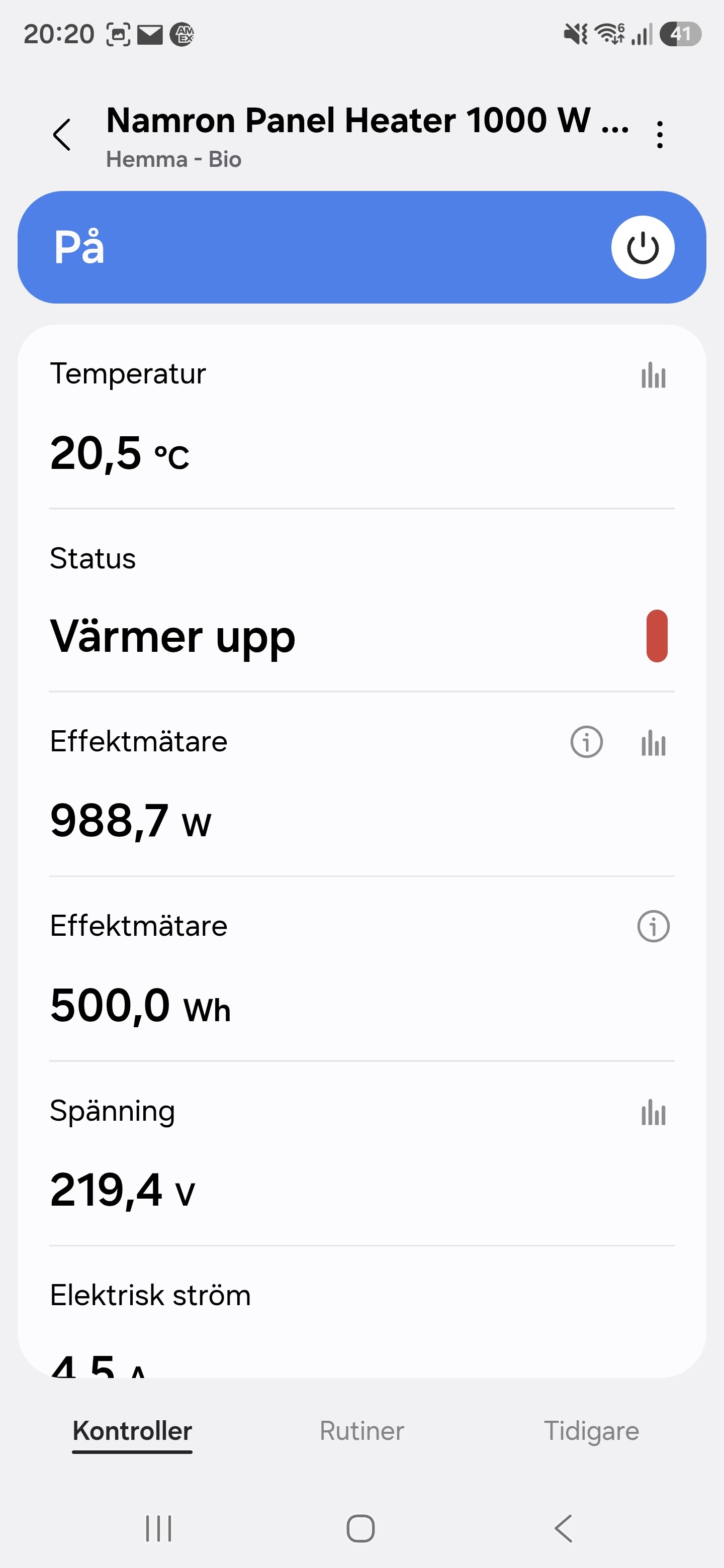

Thermostat and heating control
Supported:
- Current room temperature
- Heating setpoint
- Thermostat mode:
off/heat - Thermostat operating state: idle / heating
- Switch-style on/off control mapped to thermostat mode
- Refresh
- Local temperature calibration
The switch tile is intentionally mapped to the thermostat mode:
On→ heat modeOff→ off mode
This makes the heater easier to use in routines and automations, while the thermostat controls remain available as the more precise interface.
Temperature setpoint
The heater supports a heating setpoint range of:
5 °C to 35 °C
The driver exposes the setpoint with a normal thermostat-style UI and uses 0.5 °C steps.
Internally, Zigbee thermostat temperatures are handled in centi-degrees Celsius. For example:
19.0 °C = 1900
21.5 °C = 2150
The driver keeps that scaling explicit instead of pretending thermostats are simple switches wearing a nice plastic front panel.
Power and energy monitoring
The heater includes electrical measurement and energy metering. The driver supports:
- Instantaneous power in watts
- Voltage
- Current
- Cumulative energy in kWh
The device exposes these through standard Zigbee clusters:
| Function | Zigbee cluster |
|---|---|
| Energy metering | Simple Metering 0x0702 |
| Voltage/current/power | Electrical Measurement 0x0B04 |
The driver reads and stores the device’s multiplier/divisor values and applies the correct scaling when reporting values to SmartThings.
This is important because raw Zigbee electrical values are not always already in user-facing units. The device may report something like “2301” and expect the driver to know that the divisor is 10. Without correct scaling, you either get a useful voltage reading or something that looks like the heater is powered by a small thunderstorm.
Namron/Sunricher-specific settings
The interesting part of this device is that several useful settings are not standard Zigbee thermostat attributes. They are manufacturer-specific attributes on the Thermostat cluster.
The driver supports the confirmed proprietary attributes used by the 540139X series.
Manufacturer code:
0x1224
Cluster:
Thermostat cluster 0x0201
Supported manufacturer-specific attributes:
| Feature | Attribute | Description |
|---|---|---|
| Display brightness | 0x1000 |
Local display brightness, 1–7 |
| Display auto-off | 0x1001 |
Whether the display turns off automatically |
| Power-up status | 0x1004 |
Manual/default behaviour or restore last state |
| Window detection | 0x1009 |
Enables/disables open-window detection |
| Hysteresis | 0x100A |
Heating hysteresis, 0.5–2.0 °C |
| Window-open state | 0x100B |
Read-only internal open-window state |
These attributes require the correct manufacturer code on read, write and configure-reporting commands. Without that, the device will either ignore the request or treat the driver with the kind of silent contempt only Zigbee devices can truly master.
Device settings

The following settings are available through the SmartThings device settings/preferences:
- Local temperature calibration
- Child lock
- Hysteresis
- Display brightness
- Display auto-off
- Power-up behaviour
- Window detection
The first release intentionally keeps these as device preferences instead of custom capabilities. That makes the driver simpler, more reliable and easier to test across the full 540139X family.
The goal was not to create a decorative capability museum. The goal was to make the heater work properly.
Child lock
The child lock is implemented through the standard Zigbee Thermostat User Interface Configuration cluster:
Cluster:   0x0204
Attribute: 0x0001 keypadLockout
This controls the physical button lock on the heater.
Hysteresis
The heater exposes hysteresis as a manufacturer-specific value.
The important detail is the scaling:
Raw value 5  = 0.5 °C
Raw value 10 = 1.0 °C
Raw value 20 = 2.0 °C
The SmartThings driver exposes this as normal user-facing values from 0.5 °C to 2.0 °C and handles the raw conversion internally.
Open-window detection
The heater has an internal open-window detection feature. When enabled, the heater can detect a sudden temperature drop and react accordingly.
The driver exposes:
- A preference to enable/disable window detection
- A read-only window-open state
The read-only window-open state is also mapped to a contact-style state in SmartThings so it can be used in routines.
Important: this does not mean the heater contains a physical contact sensor. It is a virtual representation of the heater’s own internal open-window detection state.
Zigbee technical details
The device uses endpoint 1 for its main functionality.
Known endpoint/cluster layout:
Endpoint 1
Profile:
Home Automation profile 0x0104
Device type:
Thermostat 0x0301
Input clusters include:
| Cluster | Name |
|---|---|
0x0000 |
Basic |
0x0003 |
Identify |
0x0004 |
Groups |
0x0005 |
Scenes |
0x0009 |
Alarms |
0x000A |
Time |
0x0201 |
Thermostat |
0x0204 |
Thermostat User Interface Configuration |
0x0702 |
Simple Metering |
0x0B04 |
Electrical Measurement |
Output clusters include:
| Cluster | Name |
|---|---|
0x0019 |
OTA Upgrade |
The device may also expose the usual Zigbee Green Power proxy endpoint 242. The driver does not need to do anything special with that endpoint.
Reporting and configuration
On configuration, the driver binds and configures reporting for the important standard clusters and attributes:
- Thermostat mode
- Local temperature
- Heating setpoint
- Running state
- Child lock
- Energy metering
- Voltage
- Current
- Active power
- Namron/Sunricher-specific configuration attributes
The driver also reduces local temperature report spam by configuring a reportable change of 0.5 °C.
That is especially useful because some thermostatic devices like to report every tiny temperature movement. Technically impressive, practically annoying.
What is intentionally not implemented
A few things are deliberately not included in this release.
Local weekly schedule / program mode
The heater has local manual/auto concepts on the device itself, but the exact schedule/program implementation is not exposed cleanly enough through the confirmed public Zigbee implementation to justify guessing.
So the driver currently supports:
off
heat
It does not attempt to manage local weekly schedules.
That may be investigated later if reliable device logs or raw Zigbee traces confirm the exact behaviour.
Experimental Sunricher thermostat attributes
Only the confirmed attributes used by this Namron 540139X panel heater family are implemented.
There are related Sunricher/Namron thermostats with additional attributes for other hardware types, including floor-heating thermostats and PRO models. Those are intentionally not included here, because this driver is for the 540139X panel heater family.
Installation notes
Install the Namron Panel Heater driver through this channel, then pair or re-pair the heater with SmartThings.
If the heater was previously paired as a generic meter or generic Zigbee device, it may need to be removed and paired again so the new fingerprint can be applied.
After pairing, use Refresh once and wait a little while for the first attribute reports to arrive.
For best testing, check the following:
- Device pairs with the Namron Panel Heater driver
- Current temperature is shown
- Setpoint can be changed
- Heat/off works
- Power increases when the heater is actively heating
- Voltage/current/power/energy values are shown
- Child lock preference works
- Display brightness preference works
- Hysteresis preference writes correctly
- Window detection can be enabled/disabled
Why a dedicated driver?
Because this device is more than a generic Zigbee meter.
A generic handler may see the power metering part. A generic thermostat handler may see part of the thermostat. But this device combines:
- Thermostat control
- Electrical measurement
- Energy metering
- Local display behaviour
- Child lock
- Hysteresis
- Power-up behaviour
- Open-window detection
Some of that is standard Zigbee. Some of it is manufacturer-specific. A complete integration needs both.
That is exactly what this driver does.
It keeps the standard parts standard, handles the proprietary Namron/Sunricher parts explicitly, and avoids guessing where the device behaviour is not yet proven.
Current status
The driver has been tested with an external tester and the reported result is:
So this is no longer just a “maybe the clusters look right on paper” driver. It has been confirmed on real hardware.
As always with heating devices: test carefully, verify the displayed state against the physical device, and do not rely on untested automations for anything safety-critical.
A smart heater is still a heater. The “smart” part should make it more convenient, not more exciting.
Sources and references
The driver was developed and cross-checked against the following sources:
-
SmartThings Community thread: Add Fingerprint for Namron Panel Heater (NAMRON AS)
Add Fingerprint for Namron Panel Heater (NAMRON AS) - #7 by Alexander_Rodriguez1 -
Zigbee2MQTT device page: Namron 540139X – Panel heater 400/600/800/1000 W
Namron 540139X control via MQTT | Zigbee2MQTT -
zigbee-herdsman-converters source: Koenkk / zigbee-herdsman-converters –
src/devices/namron.ts
Pinned development reference used for the 540139X definition, exposes, converters, manufacturer-specific attributes and reporting behaviour.
zigbee-herdsman-converters/src/devices/namron.ts at 46f7eee6ad38312843500a3c807cfbf3b727945e · Koenkk/zigbee-herdsman-converters · GitHub -
zigpy / ZHA device handler issue: Device Support Request – Namron Panelovn / electric radiator Zigbee
Used for endpoint/cluster signature, model/manufacturer details and raw ZHA diagnostic information.
[Device Support Request] Namron Panelovn (electric radiator) Zigbee · Issue #2285 · zigpy/zha-device-handlers · GitHub -
Namron / Elektroimportøren manual PDF: PANELOVN ZIGBEE 400W/600W/800W/1000W
Used for device behaviour, local controls, setpoint range, manual/auto/program mode notes and open-window behaviour.
https://www.elektroimportoren.no/docs/lib/5401395-Brukerveiledning-5.pdf -
Blakadder Zigbee device database: HVAC compatibility list / Namron 540139X variants
Used to cross-check model numbers and variant naming.
Database of Zigbee devices compatible with ZHA, Tasmota, Zigbee2MQTT, deCONZ, ZiGate and ioBroker -
Zigbee2MQTT issue: New device support – Namron Heater, model 5401395
Background reference for initial Zigbee2MQTT support and relation to existing Namron thermostat converters.
[New device support]: Namron Heater - Model 5401395 (Panelovn) · Issue #14412 · Koenkk/zigbee2mqtt · GitHub -
Zigbee2MQTT issue: Namron Heater 5401395 hysteresis bug
Used to confirm the hysteresis scaling issue: raw values are tenths of a degree, so raw5means0.5 °C, not5 °C.
Namron Heater - Model 5401395 hysteresis bug · Issue #15266 · Koenkk/zigbee2mqtt · GitHub -
Zigbee2MQTT issue: Namron 540139X mode and temperature settings stopped working
Background reference for mode/setpoint command behaviour and converter evolution.
Namron 540139X mode and temperature settings stopped working · Issue #15941 · Koenkk/zigbee2mqtt · GitHub -
Hubitat community / driver reference: Namron Zigbee Thermostat (Sunricher) custom driver
Used only as an additional comparison point for Namron/Sunricher thermostat conventions. The SmartThings driver intentionally implements only the confirmed 540139X panel-heater attributes.
[RELEASE] Namron Zigbee Thermostat (Sunricher) w/ healthStatus - Custom Drivers - Hubitat -
Hubitat driver source: Namron Zigbee Thermostat driver by kkossev
Used as an additional comparison source for Sunricher/Namron manufacturer code and proprietary thermostat attribute handling.
https://raw.githubusercontent.com/kkossev/Hubitat/development/Drivers/Zigbee%20TRV/Namron_Zigbee_Thermostat_lib_included.groovy
