i have a bit of unrelated question that maybe someone could answer me.
Do webcore automation work slower than smarthings direct automation?
Like if i say on motion turn on x lights in webcore or directly in smartthings, will the webcore automation have a small delay?
does webcore automation go through 2 clouds instead of just 1 like smartthings?
I do notice a slightly longer delay when using WebCore. When motion is detected, the smart lighting automation is noticably faster for me. Not enough that it caused a problem when I used webCore.
I am not running anything local and all of my Automations go through the cloud. I am not sure how webCore pistons are processed so I can’t answer that question. @rontalley is a heavy webcore user so he probably knows the answer.
SmartLighting when all devices run locally is slightly faster. Not enough for me to complain about. I have about 4 motion activated switches (no smarts) that are pretty instant. These compared to ST makes you realize how fast things could actually be.
I believe that webCoRE runs on ST’s sever and rules are going to the cloud and back just one time.
I still use SmartLighting for a handful of automations. I still have 5 instances of the original CoRE which I still have many rules tied to. CoRE, IMHO, is faster than webCoRE.
Given all the benefits of webCoRE, I tend to use it for mostly everything going forward. However, it’s a good idea to try and use SmartLighting and the new rules engine in the New App as much as possible since webCoRE WILL be obsolete once they move everything to the new API. I don’t think there will be a migration tool for the “new” webCoRE but there will be a new webCoRE! All rules will have to be rebuilt.  For me, that’s at least 100+ over two instances.
Each webCoRE piston is implemented as an individual SmartApp running in the SmartThings cloud, in the same way each Smart Lighting automation is. Smart Lighting is likely to have some processing speed advantages because of it’s small ruleset and narrow focus, but the real gain would be where the Smart Lighting automation can run locally on the hub.
that’s good to know, ill probably leave only the “turn off” automation in webcore and keep the “turn on” in smartthings directly.
I still have 2 things unclear tho.
Is there anyway i can check if my automation is running locally or in the cloud because i’m not sure if any of my device runs in the cloud.
For example, i have in smartthings, if motion is detected and if a virtual switch is off and if location is night then turn on a light
The virtual switch is shown as local in ide but i’m not sure if home location is local too.
Also if for example i have a local device that triggers 1 local device + 1 cloud device, will the automation run locally for the local device and ignore the cloud device or it wont run at all because one of them is cloud?
If you go to the Locations page in the IDE, there is a link in the table that will show you the installed SmartApps. That should tell you where things will run.
for example home monitor shows as cloud even tho all i have only local devices but i think is messing it with the one from classic app
and still doesnt answer my questions
if i put a condition like “if location mode home” does it run locally or in the cloud?
if one of my action device is in cloud, does the automatil still work locally with the local devices or is completely crippled by the cloud one?
If you’re executing an automation during a specific mode, it will remain local (in Smart Lighting if everything else is local). Only when a mode is changed in the automation does it become cloud based.
i am not using smart lighting , does it still runs locally if i do something based on location mode?
Only automations created with Smart Lighting, using only local devices, well execute locally. Everything else will be cloud based.
are you sure?that doesn’t seem right
you are talling me that even if if i have local devices only automations, if i’m not using smart lighting it won’t run locally? samsung website doesn’t say is mandatory to use smart lighting
Unfortunately, that is correct. SmartThings is a predominately cloud based platform. Even the app needs to communicate with the cloud to control any devices, regardless if you’re connected to the same WiFi network that your hub is. There are other hubs out there that execute completely locally, but SmartThings isn’t one. If you login to IDE https://account.smartthings.com/ and go under SmartApps, you’ll see that everything will show it’s cloud based, besides automations in Smart Lighting meeting the local execution criteria.
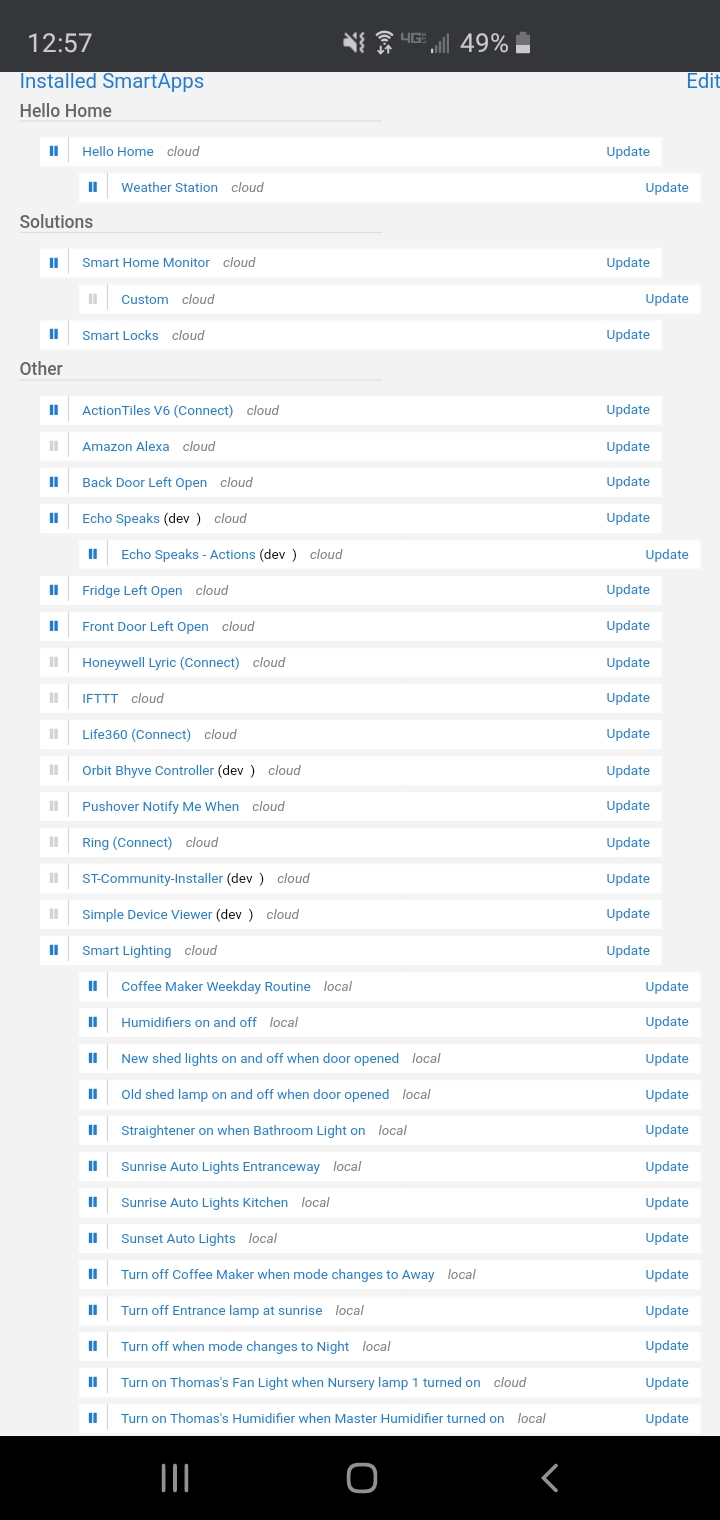
you keep talking about smartapps , i am not using any smart app, i am simple using the normal automation option from smartthings, and if my automation there is with local devices i dont see why it wouldnt run locally
I’ll try this one more time… only automations created with the Smart Lighting SmartApp, that meet the local execution criteria, will run locally. EVERYTHING else will run in the cloud. That’s just how SmartThings is designed.
that’s awful if is true, tomorrow ill be at my smart house and ill test this and come back hopefully proving you wrong
No need to confirm. It is what it is. They are working on more rules being able to run locally but for now, only SmartLighting rules run locally if all devices also having stock local device handlers. If anything is added that is cloud based, then it goes all to the cloud.
If you have solid internet then it’s really not an issue. Hubitat offers local processing. I have it and use it for those things that just must happen in case of loss of internet and/or ST cloud issues.
the internet will never go down since ill have a router with backup 3g connection , the reason why i want local processing is because i feel that sometimes the time between motion is sensed and light goes on is a bit laggy so i want to improve that with local processing, any other automation can run in cloud it doesnt matter. Is true that right now i’m using a temporary internet connection via a 3g internet stick and when my house is finished ill move my 1Gbps fiber connection there but until then i wanna see how fast it works with local processing and ill do my tests tomorrow.
Just be mindful that it’s not just about your internet, but the SmartThings cloud having issues and outages. I have personally only had a few hiccups here and there effect automations because of the ST cloud, but for a ton of users, it is a deal breaker. https://status.smartthings.com/
I don’t know why you’re avoiding using Smart Lighting. I’m using it for all my lighting routines and using the same scenario you’re trying to implement. All runs local and no issues.
It’s not wrong. That’s how it is - at least currently.
I personally use webCoRE for everything due to the flexibility and power it provides, so nothing runs locally anyway - and I’m fine with that. My automations are not laggy and I’m on a whole home generator so the power is always on. Also, I have a separate dedicated, monitored security system - so no danger there either. On the pretty rare and short occasions when the internet or ST falters, I do the remaining less important things manually for a little bit.