I wasn’t very happy with the dimming using the wheel so I’ve added some advanced features. Updated comment for version 2026-01-29 using new stock capabilities and the new app features introduced mid-April.
There are three ways to set up dimming with the BILRESA scroll. SmartThings stock drivers and the app have included official support so first check if you can use it:
Official SmartThings support
SmartThings added a official user interface to link the scroll to certain lights. It’s not compatible with every light at the moment so your lights may not be available for the new user interface. But, if they are, it’s a couple clicks and you’re done! With Matter Playground you can also assign actions to Control devices by pressing and rotating, useful to control colour temperature.

Mind, if you use Matter Playground lights, the default transition time is 0 seconds, you can change it in the settings of the light so it is a bit smoother. Stock drivers have a hardcoded 0.3 seconds.
Basic dimming with BILRESA scroll wheel
If the official way was not available for your lights, the easiest generic way to dim is assigning a fixed brightness step to the left and right actions.
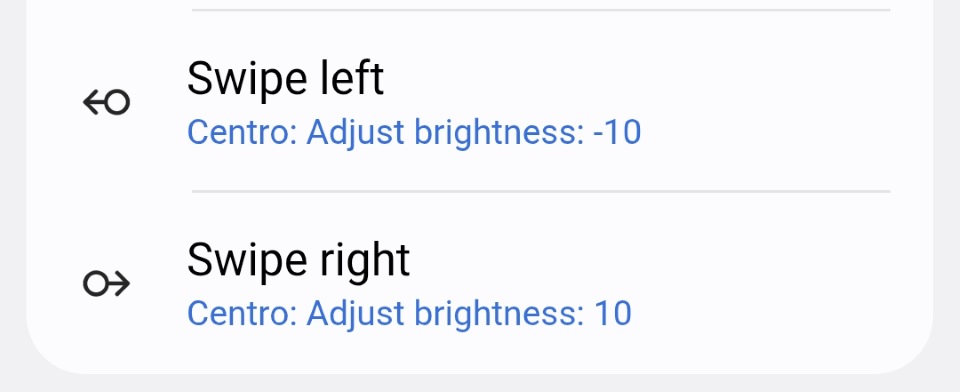
Step or Adjust actions depend on the driver you use for the lights:
- For Matter lights, stock drivers support them and you’ll see the Adjust brightness action. Alternatively, for Matter bulbs you can also use Matter Playground driver which supports customizing the transition times and On/Off behaviour.
- For Zigbee bulbs you can use Lights Multifunction Mc, SmartThings is adding them to stock drivers too but it’s not yet in production.
- For any light you can use Virtual Dimmer with Steps. Mind there are two Virtual Dimmer drivers in the channel, both work but the new one called Virtual Dimmer StatelessSwitchLevelStep Tx has better integration with the scroll so install that one.
The wheel more or less repeats the events while scrolling, many if you go slow, not so many if you go fast to avoid flooding the hub. You’ll get multiple steps and kind of works. You could say it’s fine, but not great. Lacks precision and speed.
Advanced dimming with BILRESA scroll wheel
(This is the option with more control but, since official way is so easy, there’s no point in using it unless your driver for lights does not support the new statelessSwitchLevelStep capability)
Using the Rules API, the button can feed the step size required to the light driver, changing it depending on how much you scroll and matching the native experience inside IKEA ecosystem. Gives both precision and speed, you can go slowly by small increments or quickly scroll the wheel a large amount for a large step.
The attribute rotateAmount in capability knob of BILRESA is the step level value you have to pass to the step level command of the lights driver.
The Rule, although verbose, is quite simple and would look like this for lights supporting the official statelessSwitchLevelStep capability, like this Matter Playground , stock Matter drivers, Virtual Dimmer StatelessSwitchLevelStep Tx and soon Zigbee stock drivers:
[
  {
    "if": {
      "greaterThanOrEquals": {
        "left": {
          "device": {
            "devices": [
              "BILRESA-SCROLL-DEVICE-ID"
            ],
            "component": "main",
            "capability": "knob",
            "attribute": "rotateAmount",
            "trigger": "Always"
          }
        },
        "right": {
          "integer": -100
        },
        "changesOnly": false
      },
      "then": [
        {
          "command": {
            "devices": [
              "LIGHT-DEVICE-ID",
              "ANOTHER-LIGHT-DEVICE-ID"
            ],
            "commands": [
              {
                "component": "main",
                "capability": "statelessSwitchLevelStep",
                "command": "stepLevel",
                "arguments": [
                  {
                    "device": {
                      "devices": [
                        "BILRESA-SCROLL-DEVICE-ID"
                      ],
                      "component": "main",
                      "capability": "knob",
                      "attribute": "rotateAmount"
                    }
                  }
                ]
              }
            ]
          }
        }
      ]
    }
  }
]
The component names for the knob are main for first group, group2 and group3.
You can create the Rule using the advanced website (Rules → Add Rule) and would look like this:

Adapting the Rule for other custom drivers
There are settings to change the default behaviour but that’s only needed for specific cases mentioned below.

- First check if your driver for lights has included the official
statelessSwitchLevelStepcapability, in that case no action is needed. Keep the Max step size at 100 and just copy the rule above changing the IDs. - For Virtual Dimmer , if you installed the new driver with
statelessSwitchLevelStepsupport no action is needed, keep the max at 100 and copy the rule. If you are using the original driver and don’t want to switch yet, use capabilityislandtheme02751.stepLevel, commandsetStepLeveland change the Max step size to 25 or won’t work as expected since the driver sends steps up to 100% by default if you fully scroll the wheel. - For Lights Multifunction would be capability
legendabsolute60149.levelStepsand commandsetLevelSteps, with Max step size being 30.
Improving the smoothness
When using Matter Playground, you can improve the smoothness of the steps by adding a transition time.
An option is changing the step level transition in the settings of the light. It’s in seconds, I recommend 0.3 for IKEA KAJPLATS, 0.1 for Nanoleaf and 0 for WiZ since they already add their own smoothness.

Alternatively, if you use panelorange55982.stepLevel capability you can add the second and third optional stepLevel parameters to the rule which are an integer for the transition time in tenths of a second and a boolean for the WithOnOff behaviour.
Stock drivers that implement steps have a hardcoded transition time of 0.3 seconds and you can’t change it.
Recent changes
 Feb 13th, 2026 note. SmartThings is officially adding support for dimming by scrolling and hopefully the app will provide a user interface so the Rules API is not needed
  . It is not there yet but SmartThings has created a new
 knob capability to communicate the level steps that my driver already uses and so will stock drivers. A previous version of the instructions used the Scrolled sectors as step options but they are no longer needed. If you were using scrolledSectors for the steps feel free to migrate to knob using attribute rotateAmount instead of scrolledSectors , integer instead of decimal and capability knob instead of panelorange55982.scrolledSectors.
There are also new official capabilities for the steps so I’ve changed the screenshots to use them instead. The Adjust brightness action is the English translation but in your language may be Ajustar brillo or other text. You can still use the Step dimmer level action too, it’s exactly the same internally except using my custom capability. I’ve also updated the Rule to use the official statelessSwitchLevelStep that more drivers will use in the near future.
Feb 24th, 2026. Stock drivers now include the Adjust brightness and temperature as well as the knob capability in the BILRESA scroll.
April 16th, 2026. Updated comment since the app already has a user interface so the Rules API are not needed.