Thanks. Things are working again.
1 Like
I should have checked this thread earlier, instead I spent a hour messing about deleting and re-pairing my candeo zigbee dimmer. I think it is the most reliable device in my entire setup, never given any bother or gone offline. Aw well, no harm done, back working again.
So if I do nothing, they should fix themselves eventually with the update? Mine are showing Version 2025-11-08T10:30:53.176888032
They are not responding
Reboot your hub.

Try to delete the driver. The deletion fails because you have connected devices, but in the process it will update the driver.
1 Like
Can someone please tell me how to re-enroll in MC’s channel? Somehow, it’s not at the Callaway Smartthings website or whatever. It’s been about two years since I’ve had to go in and change/delete/add edge drivers.
Channel is
1 Like
Thank you. It’s been a few years
Could you please add this device to your Zigbee Light Multifunction Mc driver?
Manufacturer: _TZ3210_fovydm9k
Model: TS0501B
It is a single dimmer(not cct, not RGB, only can dim). Thank you for your work.
I wanted to give a huge shot out to MC. I use a lot of his drivers. I thought I should be able to get more use out of my Sylvania zigbees for the holidays. Came across this and installed the driver. Excited to see what it looks like tonight.
Is there any instructions on the meaning of the settings anywhere?
Anyone know how a color change of just green to red and back? Assuming just presets. Probable not worth the effort though.
Anyways! Thank you thank you thank you!
Hi,
You can do this creating a virtual device with “5 text fields” using the “Aplicaciones Virtuales MC” driver.

In text field 1, type: Stop.
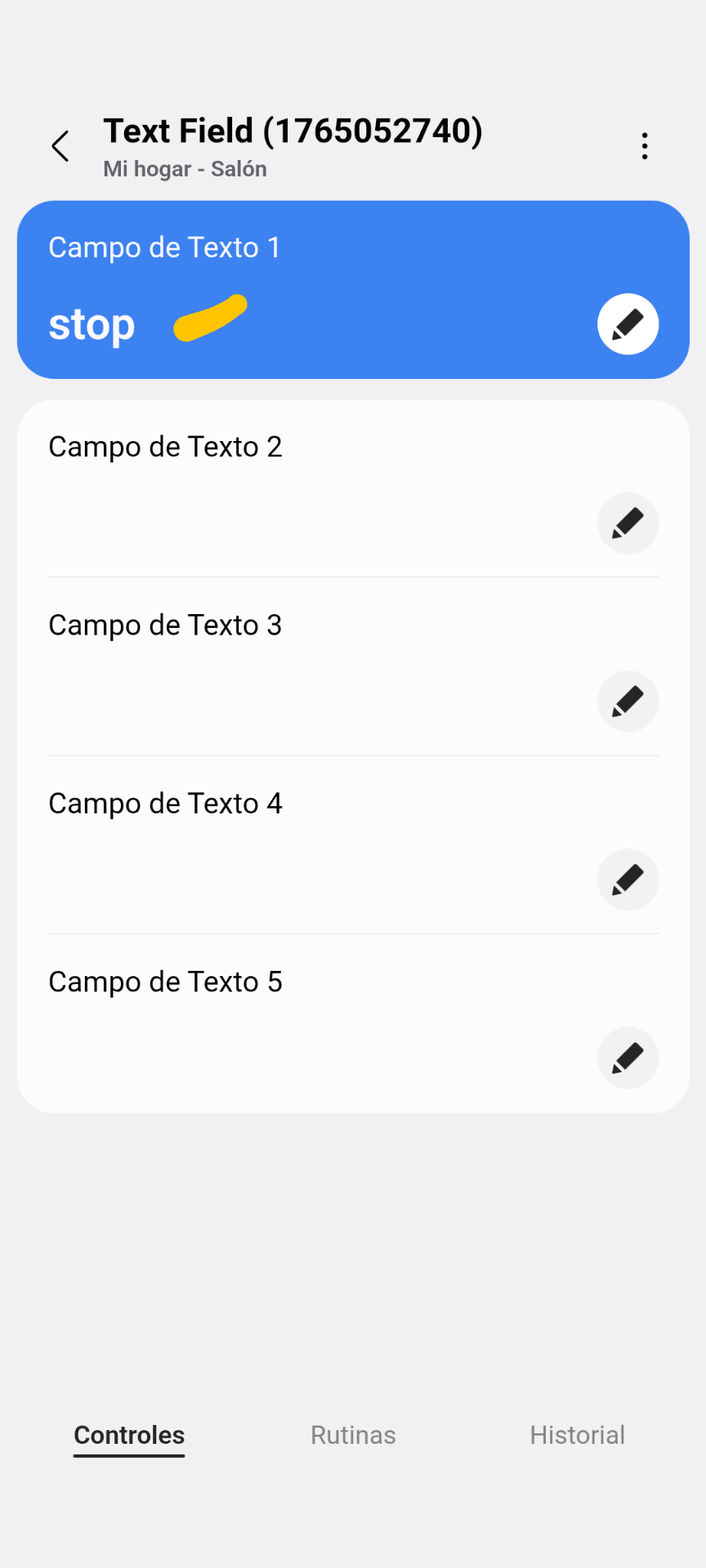
Create three routines and two manual routines to start and stop sequence:
**1. To change from red to green after x seconds (3 sec in example)

2. To change from green to red after x seconds.

3. To stop the sequence and turn it off.

4. Manual execution routine to start the sequence.

5. Manual execution routine to trigger the routine that stops the sequence.

You could include several bulbs in the routines
1 Like
@Mariano_Colmenarejo thanks so much for your work. It is so much appreciated. you are such a wonderful help to the community.
1 Like
The lights look great last night. Thank you for this!
An issue I ran into, all the lights are set for dimmer at 1% after a while one light goes to 98% without any modifications.
I also created routine that at a certain hour all my lights go to a certain color and stay at that. For some reason the change color continues. If I turn the change color option off manually in the device the routine works. Any thoughts on that?
I installed the aplicacion. One stupid question. I looked all over the app and can’t find for the life of me where to create the virtual device?
Again thank you for this and no rush! It is the holiday season and everyone is busy! Thank you!
Found it Install the driver on your Hub from the channel
-
In the App add a new device and Search nearby.
-
The “MAIN Virtual Mirror” device will appear on devices without an assigned room. It will indicate “Total Devices: 0”.
-
This device allows you to create virtual devices and have control of those that have been created so far. When one is uninstalled, making a refresh of this device, the total number that remain installed is updated.
In the routine’s actions, you need to add the action: Write: Stop in text field 1, this will make the sequence stop.
Hi @Mariano_Colmenarejo
Could you please add this new LED Controller to your “Zigbee Light Multifunction Mc” driver?
It is a Gledopto SPI Pixel Controller (Tuya Version).
Device info:
Model: TS0601
Manufacturer: _TZE284_gt5al3bl
Fingerprint:
(Device ID: TS0601, Manufacturer: _TZE284_gt5al3bl)
Thanks!
I have an IKEA TRADFRI bulb E14 WS candle 470lm (LED2107C4, tunable white only).
In your repo I see this fingerprint:
-
id: "IKEA/Bulb E14 WS" -
manufacturer: IKEA of Sweden -
model: TRADFRI bulb E14 WS 470lm -
**
deviceProfileName: level-colortemp-2200-4000**
So the mapping seems correct, but on my hub the device is always created with the wrong profile rgbw-level-colortemp-2700-6500 (RGBW) instead of level-colortemp-2200-4000.
I tried removing the device, factory‑resetting the bulb (6x power cycle) and re‑pairing it several times, always selecting your driver, but the profile remains rgbw-level-colortemp-2700-6500.
Fingerprint and clusters from Zigbee Thing Mc:
-
Manufacturer:
IKEA of Sweden -
Model:
TRADFRI bulb E14 WS candle 470lm -
FingerPrinted_EndPoint.Id:
0x01 -
Server clusters Ep 0x01:
{0000,0003,0004,0005,0006,0008,0300,1000,FC7C} -
Client clusters Ep 0x01:
{0019}
Could you please check why this model is still getting the **rgbw-level-colortemp-2700-6500**profile and, if possible, force it to use level-colortemp-2200-4000 (switch + level + colorTemperature only)?
At the moment the RGBW profile causes color controls to appear and some issues with level percentage on this bulb, which is tunable white only.
Thanks in advance!
That’s interesting, the new white-only Matter lights from IKEA also have color clusters and they will display the colour picker. Of course, they don’t reproduce colours but if you pick a blue they’ll go cool white and if you pick a red they’ll go warm white for instance. I find it a smart approach.
Hi,
Added to this driver version
───────────────────────────────────────────────────
 Driver Id    bb1b3fd4-dcba-4d55-8d85-58ed7f1979fb
 Name         Zigbee Light Multifunction Mc
 Package Key  Zigbee_Light_Multifunction_v6.2
 Version      2025-12-18T17:09:22.998408321
───────────────────────────────────────────────────
#added dec-25
  - id: "IKEA/Bulb E14 WS candle"
    deviceLabel: IKEA Bulb
    manufacturer: IKEA of Sweden
    model: TRADFRI bulb E14 WS candle 470lm
    deviceProfileName: level-colortemp-2200-4000
1 Like