Expert Mode enabled?
2 Likes
I still think this should be enabled by default 
I agree, sometimes I forget and the person you’re helping doesn’t see the menu(s) you’re talking about lol.
1 Like
Omg thanks. I was going crazy wondering why everyone had different looking pistons than mine. Now I can make the piston work compared to before 
I was about to mention that it (expert mode enabled by default) would go far in lessening the confusion the new folks see for some of the pistons being displayed, LOL.
Total ST n00b here, but reasonably technically minded.
I’ve set up a couple of pistons to control my Honeywell thermostat. The idea is that if the 'stat is in Heat mode, flip it to Emergency Heat mode at 10 p.m., and then flip it back to Heat mode at 7 a.m.
The flip from Heat to EmHeat works well enough, but not the reverse. Some basic investigation makes me think that the issue is because the 'stat reports EmHeat mode as emergencyheat (no space), but the piston is set to trigger when the mode is emergency heat (with space). So the condition never evaluates as true in CoRE.
I’m guessing the thermostat device is to blame here - exposing a mode that is essentially a spelling mistake? Or am I barking up the wrong tree?
(see screenshots for clarity)

Maybe this will work now that I understand a little better about the limitations of was…
Basic Expert Mode
Under If add a Group
In the Group add the following conditions
If Motion Blah Blah “Is” Active
Under "When True"
Using Location
Set Variable–You can name it whatever {hall}<—the brackets will be added for you
Boolean—>True
Under "When False"
Using Location
Set Variable—Name it the exact same as the one above
Boolean—>False
Now add another condition and use the same steps as above for each motion
Use an “Or” separator
Now back to root level and Add another Group
This is where you will add your "Conditions"
Your conditions will be Variables (the ones you made above)
If Variable (select boolean), then name of 1st variable you named above -->False
And
Variable (select boolean), then name of 2nd variable you named above -->False
And
Variable (select boolean), then name of 3rd variable you named above -->False
etc…
Under the When True of Group
Perform your Action
This way the active/inactive states are stored regardless what the other motions are doing.
Thanks for these detailed instructions! I have to admit this is way above my level of understanding!. I have tried the following…but it doesn’t work 
I wonder whether I’ve got the levels/groups wrong
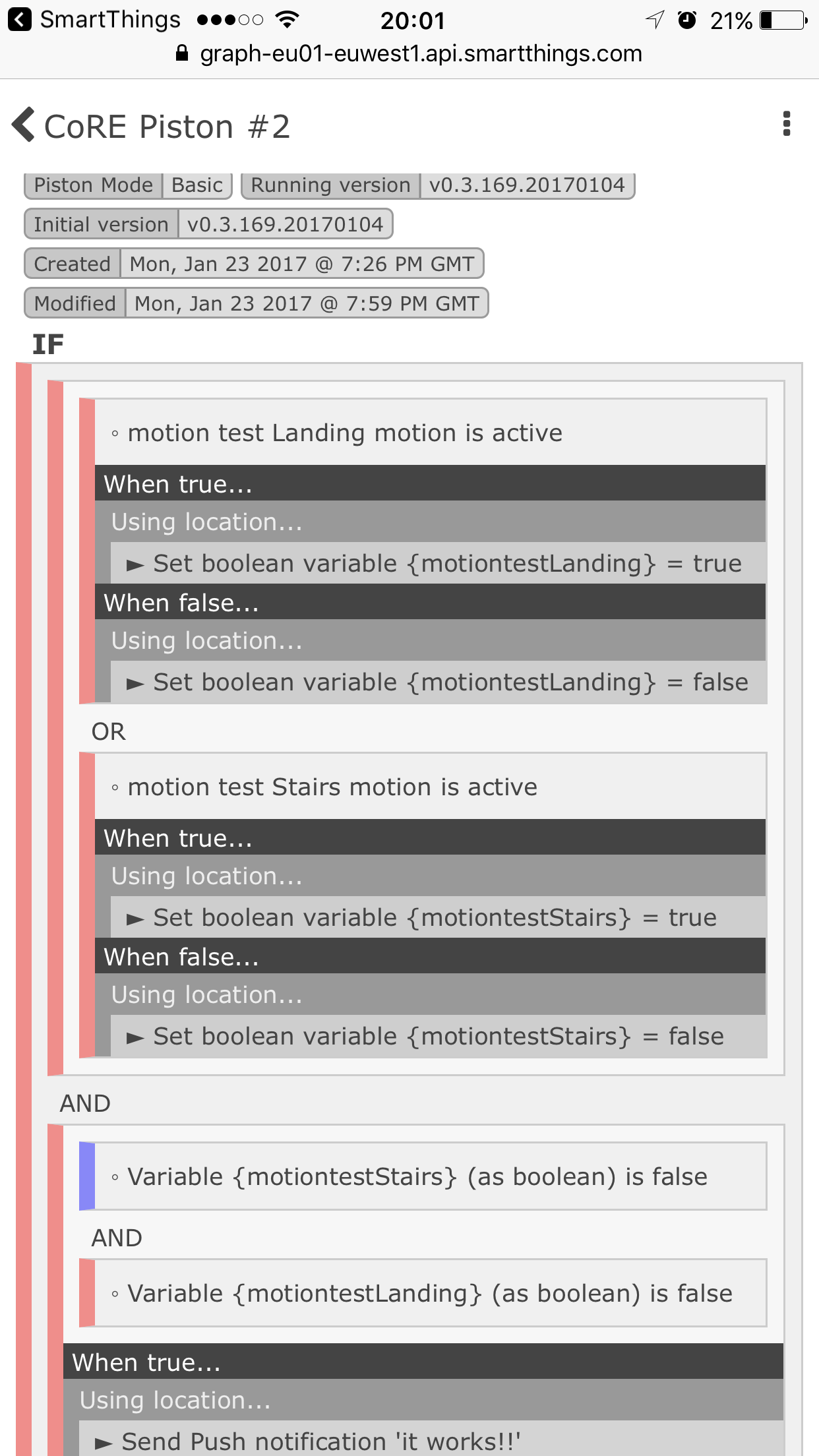
I am open to whatever works, JDRoberts just suggested that a color changing “tile” might be easier.
I could create 1 buttons and 3 different virtual switches with each virtual switch telling me what the status of the door was.
Just super noob and didn’t know if there was a better way…
Definitely open to other thoughts or ideas
I must admit I’m getting confused.
Are you saying all you want if for a light to turn on if motion is not active for 1 minute?
If so why not just use:-
IF
Each of motion sensor a and b are not active.
THEN
Using location
Wait 1 minute
Send notification.
Using Lamp
Wait 1 minute
Turn On.
Almost!
use all lowercase in your variable (don’t know if it matters)
shorten variable motionlanding
Use an Or separator where the And is separating the two groups<----biggest issue in your piston
Or separators in Basic Pistons are like separate Pistons. They work independently to within the group to satisfy an argument.
Make suggested changes and it should work.
Nowhere near as confused as I’m getting! Haha.
For my test piston I want an action (light off - but a notification will do for my test piston) to happen when both of two motion sensors have been inactive for at least 1 minute (or to paraphrase, when the last active motion sensor has been inactive for 1 minute)
It’s for my landing light, which I want turned off only if there hasn’t been motion on either the landing, or the stairs, for at least one minute
I’ll try your suggestion. This might be becoming over complicated.
If you were to use a tile, where would you be viewing it? From a dashboard like ActionTiles?

Hello everyone
Sorry for the repost, it was late last night.
Without using IFTT, how can I get CoRE to see if its raining and turn lights to certain colors?
TIA
Sometimes you have to just realize that it might not be worth trying to make one huge gigantic piston to accomplish a slew of task!
Talking to myself here. I am kinda getting out of the habit of making Virtual Switch for internal processing but in the case of a Laundry Monitor, I found it easier to just make VS and then build Nag Rules off of the switch status.
Ended up with these two Pistons which are working great. From here, I build specialized nag rules based on who is home.
Thanks again!


1 Like
I believe someone wanted to create something like what you’re trying to do before. I don’t know of a device that has that attribute ‘rain’ or something similar that we can use to figure out if it’s raining.
Now, if you’re the McGyver kind… maybe you can make on of the one below and now put the two ends of the wire on each end of a half piece of pvc that’s slanted slightly so that water will flow one direction. If water is flowing, the wires will be shorted (raining), once it stops, the circuit will break (no more rain) lol. I don’t know how accurate it would be but that’s one way to skin this cat 

Yes from within the app off an iPhone
Hmmm, I just had a thought. I wonder if you can use a virtual thermostat, but the temp you’re going to feed it would be 1, 2 or 3 which would correspond to the states you want to monitor.
your the boss, if you say so lets do it