Heh, I will PM you when I get home. I have some more questions on syncing the states.
ady624
Sep '16
This is my outdoors light piston - it combines variables, Switch, and follow up. It didn’t have to, but I tested the Switch this way. I could have simply put all the tasks in each individual ELSE IF condition (when true).
IMG_1357.PNG375x1398 65.2 KB
During the months of September and October (well, should be October only - but again, I tested with it), the light gets turned on before sunset, then it changes colors and then follows up with itself to continue the color cycle.
Adrian, when using the switch and case like this, how do I set this up? I begin switch and select my variable name (lightMode), but then I don’t feel like I am setting up my Begin Case correct (I don’t see an end case).
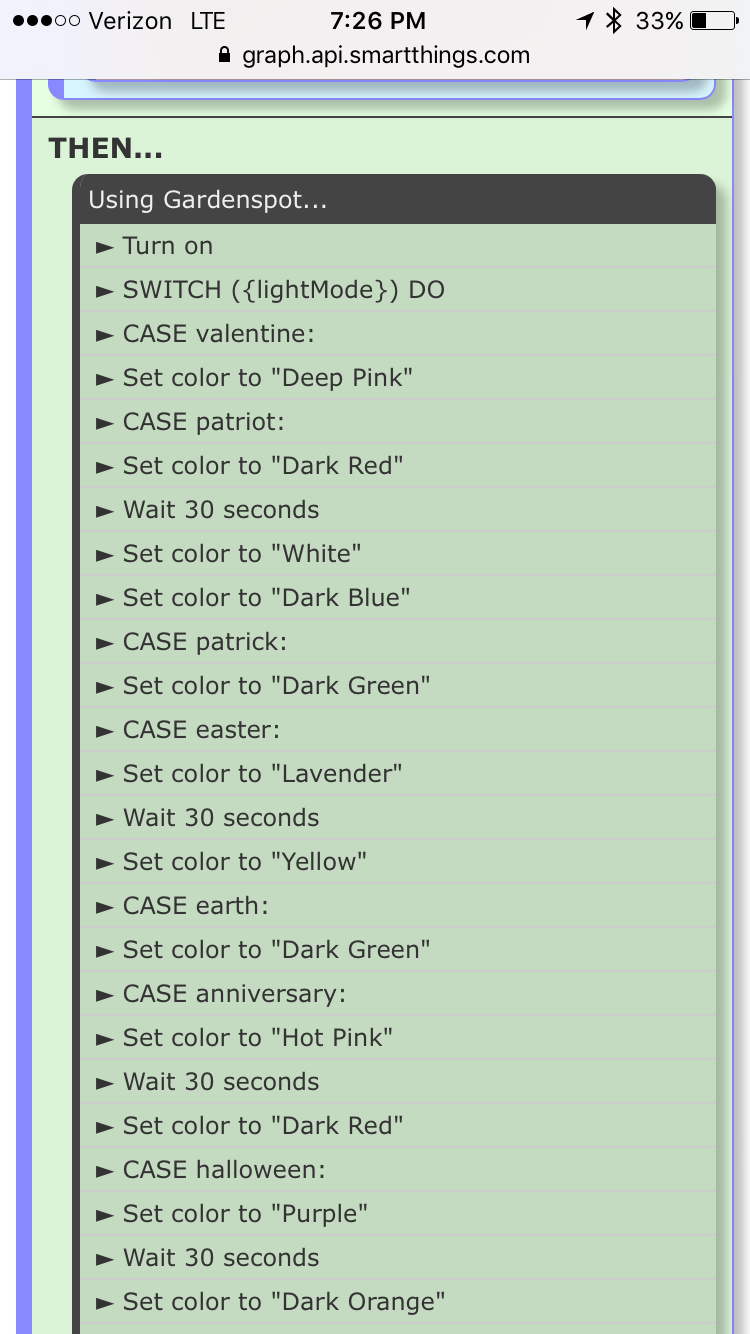
There is no end case. Case ends when another case starts or when the switch ends.
I remember reading that. So why does my dashboard view not have those lines in front? Just trying to nail this down. also, do I do a follow up piston for each case that repeats or one follow up for the entire piston before the end switch.
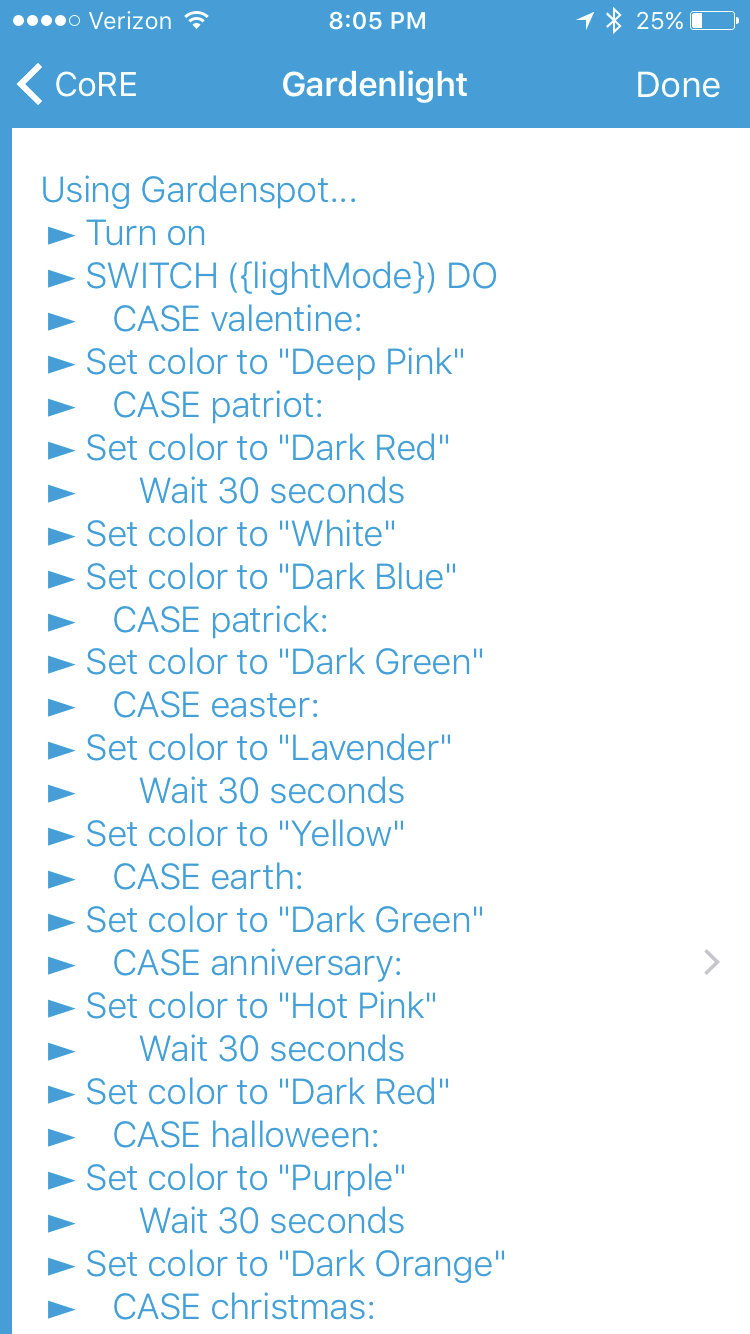
Not sure why the set is not properly aligned…
Go pats!
1 Like
Is there a reason you just didn’t use a timed piston that runs every 15 minutes to trigger the Refresh/Poll?
I get this error.
4b670813-a64e-4ec8-aadd-2911b5f81ae2 9:15:03 PM: debug ╔═══ Done
4b670813-a64e-4ec8-aadd-2911b5f81ae2 9:15:03 PM: trace ║╔══ Task processing took 615ms
4b670813-a64e-4ec8-aadd-2911b5f81ae2 9:15:03 PM: error ║║░░ ERROR: Error while executing processTasks: java.lang.ClassCastException: java.lang.Long cannot be cast to java.lang.Boolean
4b670813-a64e-4ec8-aadd-2911b5f81ae2 9:15:03 PM: trace ║║░░ Rescheduling time triggers
4b670813-a64e-4ec8-aadd-2911b5f81ae2 9:15:03 PM: trace ║╚══ Processing tasks (v0.1.139.20160810)
4b670813-a64e-4ec8-aadd-2911b5f81ae2 9:15:03 PM: debug ║╔══ Finished subscribing
4b670813-a64e-4ec8-aadd-2911b5f81ae2 9:15:02 PM: debug ║╚══ Initializing subscriptions…
4b670813-a64e-4ec8-aadd-2911b5f81ae2 9:15:00 PM: debug ╚═══ Initializing app…
Is it possible for a second presence sensor not to turn on lights if the first presence sensor has turned the lights off (via Alexa).
For example, my wife comes home and the lights turn on and she decides to take a nap so she has them off. Then later I come home and rather than lights turning on, they stay off until we tell Alexa or the st app to turn them on
How do you mean?
My suggestion would be to add a virtual switch that your wife can turn off if she decides to take a nap. Now add that virtual switch in your condition when evaluating if you want to turn on the light when presence arrives.
1 Like
Sorry I never got back to you, busy day yesterday. Actually had to do work at work. (That’s just wrong)
I see someone else more knowledgeable jumped in and your set up.
Great!!!
1 Like
You leaded me in the right direction for the count and it works after a little trial and error. I am starting to get a better understanding of how “Variables” can help build better pistons!
BTW, this piston works great and the wife actually approves! Win!
1 Like

You can get that trigger from Date & Time (Capability) happens at (Comparison) every number of minutes (Value) and 15 (Number of minutes)
Also in looking at my logs without the piston above paused, my SmartWeather tile seems to update fairly regularly on its own. So I am not sure why you need to create a piston for it to refresh. Granted I also run a customer DTH for SmartWeather (Weather Station Tile 2.0) by @takissd so maybe that is controlling the refresh.
Not sure on the refresh for v2 of the smart tile. Using “Time” and then selecting the Weather Tile, LUminosity, this looks pretty simple to update the Tile using timed refresh:
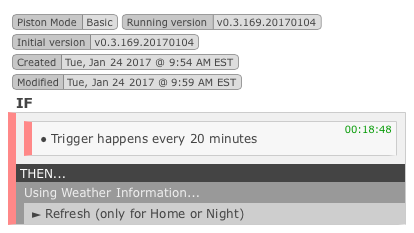
The app I posted a few posts above is driven from motion sensor events, rather than time.
What is the best way to troubleshoot duplicate events? I have a piston going off more than once and I and trying to prevent it from running so close together.
Is there a way to view your CoRE dashboard from IDE? I don’t have access to my phone and need to TS a piston. I noticed when you click on the dashbard in the app, it launches the display in a browser from the IDE address.
Thanks.
You can launch the dashboard from a pc.
When you open up the dashboard on your phone, if you go to the bottom you will see the url for it.
I copied and pasted it to am email to myself.
Opened on my pc and bookmarked it.
Give it a try.
I think the issue is he doesn’t have the phone 
Must learn to read…