Thank you. What i meant was can I run the edgebridge app on a Synology NAS rather than having to run it on my PC?
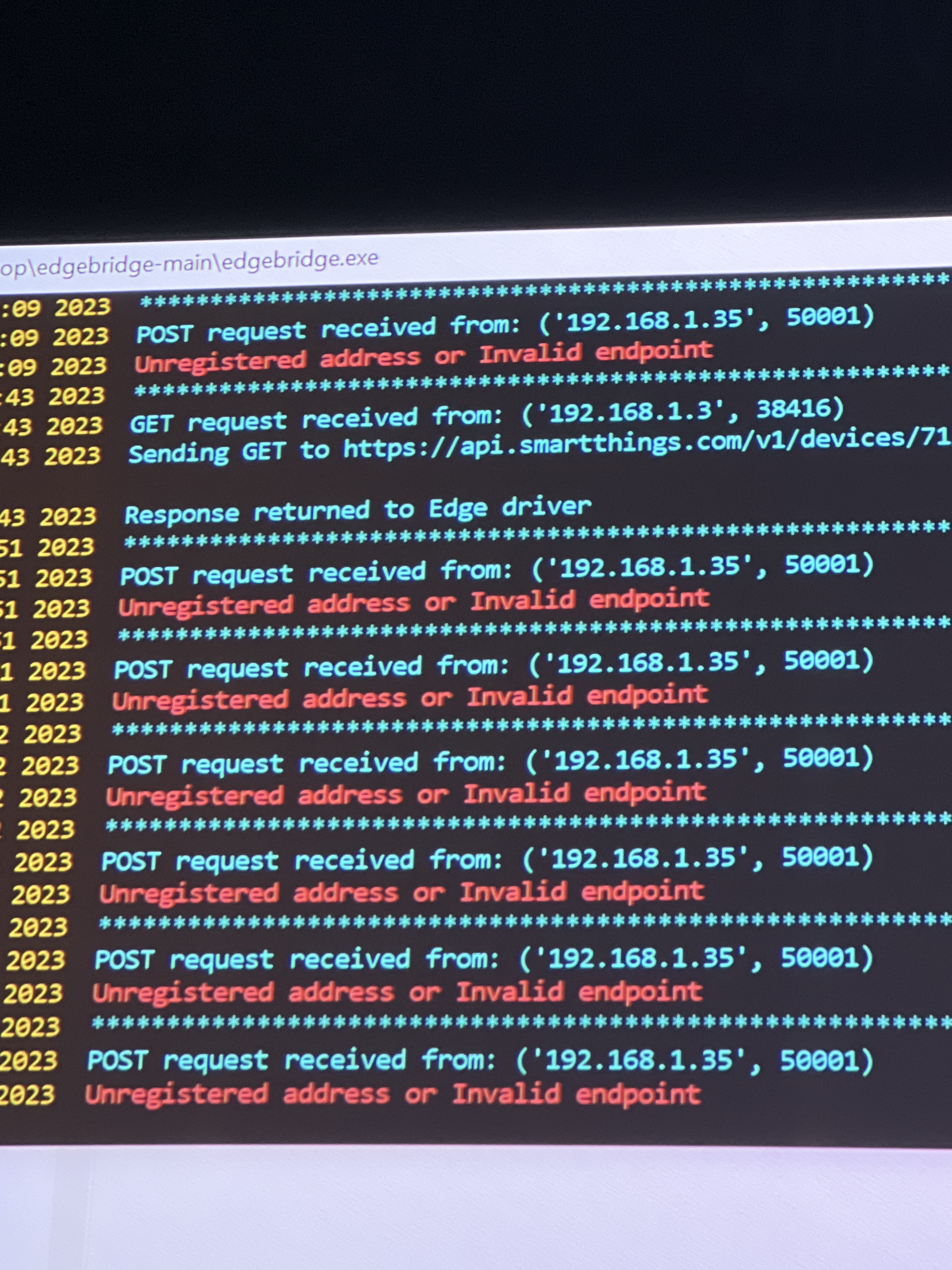
Whilst im here. Ive just had this error and no idea what it means. Running the windows exe file you supplied.
Thank you. What i meant was can I run the edgebridge app on a Synology NAS rather than having to run it on my PC?
Whilst im here. Ive just had this error and no idea what it means. Running the windows exe file you supplied.
Sorry if I totally misundertood you! I rather doubt that you could run a Python script on your Synology NAS. I don’t know too much about them other than they run a form of Linux with a custom operating system. But I suspect they won’t let you install or run your own apps.
Regarding your error message, a few questions:
EDIT: After looking at this a bit more, I would guess that the device at 192.168.1.2 is your hub and this is a forwarding request coming from an Edge driver (the online monitor driver)? Can you show me the log output from edgebridge associated with this request? There shouldn’t be a problem forwarding an https request, but I’m wondering if there is a problem doing that on Windows.
Sorry for not replying to this mate I didn’t even know you replied to my original question. Sorry about that.
I managed to get it all up and running but I’ve recently been getting this error. I don’t know if this has anything to do with me running something called ‘scrypted’ on the same machine, it’s like another sort of version of homebridge.
Figured I’d ask incase you knew.
Thanks.
It looks like you have a phone presence app trying to report its status to a LAN Presence driver device, but that SmartThings device isn’t properly registered with edge bridge.
Go to the device settings for your LAN Presence device and temporarily change the edge bridge IP address to something else (wrong or otherwise unused); wait 10 seconds; then change it back to the correct address again. That should force the driver to re-register with your edge bridge app. Keep an eye on the console output of your edge bridge app to make sure you see the registration transaction.
Is it possible your hub address changed as some point? It looks like there were registrations with the hub address of 192.168.1.2, which you can see got scrubbed after 3 failed attempts.
But it still looks like you have an Edge LAN Presence device that is still not registered, since anytime your phonepresence app is sending updates edgebridge is still not finding anywhere to send it.
Can you show me the log for when you temporarily changed the edgebridge address in your device settings? I want to see if it is getting the registration request from 192.168.1.3.
Or check your .registrations file to be sure you have an entry for that hubaddress. You can post it here so I can confirm.
I actually had this same question. First, let me say I’m not a programmer, but a fairly advanced tech user. That said, the Synology NAS does allow running Python scripts - Install and use Python 3.9 in your Synology – Synoguide
I have in the past had third party software running on mine. It’s currently the only always-on computer in the house. I’m only really looking for one thing - to monitor when a device goes offline so I can run some routines to configure the house to efficiently run off batteries when we lose grid power. I can either build a device (I’ve seen a few kits) that uses smartthings capable parts that run off the battery backed side of my power system and will report that state change when the grid-only side goes down or I could have a smarttings device powered by the grid-only side and have my smartthings hub pay attention to when it goes offline. I haven’t found a smartthings device that can easily solve this using scenario 1, so I’m looking at things like your tools to implement scenario 2, but I’d want to run it off of the NAS, or have to get a rasberry pi just to run it.
You could put a PI on the grid side and have a simple Apache setup that can be queried. You can then use the Web Requestor Edge driver to check whether the webpage is available.
Does the Synology have an API/web interface that can be queried for the power state? That would be another option using the same driver.
I think I’m going to try a DIY sensor setup. Less failure modes. I’m taking a normally closed relay ($7) that stays open when 5v is applied, then taking a door/window sensor that has terminals for an external magnetic contact and using the relay in place of the magnetic switch. I’ll plug a 5v power supply into a grid-only outlet to power the relay to stay open. If it loses power, it’ll trip the sensor and I can build my routines off of that event. When grid-power comes back, the relay opens again, and I can use that event to reverse the routines. $15 in parts (I already have the sensor). I think this should be a very reliable process. Only thing I don’t like is having a battery-operated sensor in the mix. If it works as expected, I’ll look to replace that sensor power with power from the battery-backed side of my home grid.
The whole point of this is that by tweaking things like thermostat settings (ecobee) and disabling a few other things using z-wave outlets/switches, I can extend my home battery life from hours to days and still keep the house reasonably comfortable.
Thanks for the suggestion, though, because I may have another use for the Web Requestor Edge driver. I didn’t know it existed. My Inverter setup uses a web interface to change system configuration. One of my next projects will be something (hopefully Smartthings) to watch for at weather alerts as triggers for routines that change my inverter configuration based on severe weather approaching that may lead to an outage. If I have 4-5 hours of advance notice of severe weather, I can change my system parameters to fully charge the batteries from the grid, then go back to normal after. I normally have the system set up to use the batteries for peak-shaving so I don’t buy power during peak hours, but with a full charge and managing loads, I can get days of fairly normal use.
You might look at the Shelly line of products. You can get a fairly inexpensive device like the Plus 1 or I4 that would make implementing this pretty easy. And to integrate it with SmartThings all you need is to run an MQTT broker on your synology server.
I have some similar products. They’re good for integrating dumb circuits into the ecosystem, but my use case needs a sensor that stays powered and reports state changes promptly while the thing being sensed changes state due to power loss. Using this kind of relay gets back to the need to sense offline status as an affirmative state change signal - which is not something that Smartthings does in a reliable way without some external polling system checking status regularly. That’s (as I understand it) what your Python script product does - then reports through an Edge driver for use in automations. Using a relay/sensor combination with independent power sources should be an absolutely reliable signal to key off of. Maybe I’m not seeing something, but that’s my understanding at this point.
This may be more suitable:
https://www.shelly.com/en-us/products/shop/shelly-uni?_gl=1*t0x6mk*_up*MQ..&gclid=Cj0KCQjwldKmBhCCARIsAP-0rfwP-QwjXx75NMkUQwGMV3B4XiD_CNt-qXWCVMJweOovyB3aZGMtxNUaArh2EALw_wcB
The beauty of integrating via MQTT is that there is no polling. The Uni would monitor your device and publish MQTT messages any time it needs to and the messages would be instantly picked up on your local network assuming you have a SmartThings hub.
No edgebridge or similar required. Instead you’d have an MQTT broker running on your server that would manage all messaging.
The more I thought about doing something that required anything running on a separate computer, the more I thought it was a bad idea for my use case. Let me explain.
I want the house to be a self-contained system. The Smartthings hub is just another part of the house infrastructure, along with all the z-wave switches/outlets, cameras, irrigation controls, and other permanently installed hardware. When I sell the house it all needs to continue to work as designed. If I do something that requires my NAS to be in the mix, I have to replace that function if I decide to sell, right?
If this was just me playing around as a hobby, I’d be willing to have other hardware involved and probably do a lot more experimenting, but I’m trying to implement a fairly idiot proof setup for managing lighting control, and basic automations. If my wife (who just wants it to work) can use it and understand it, then I’ve succeeded. If not, I still have work to do. It needs to be something that the next owner can take over without special knowledge.
I’m a general contractor - I design and build houses for a living. I’m looking for a solution that I can implement in my product that is more affordable than the high-end lighting control systems on the market, but still capable. I think Smartthings can do that, but I need to weed through all the hobby-oriented stuff that fails as often as it works and narrow down a set of things that I can warrant with my homes.
This specific problem of sensing grid power loss is not one that the commercial products guys will see as enough volume to care about, but if I can use standard parts that are robust to sense the condition, I can work around that. Using a door/window sensor to do exactly what it’s designed to do, and just replacing its magnetic contact with a dumb relay that is also a robust part with no possibility of logical or communication related failure modes seems a good choice. The closest packaged option I found was a power use sensor that uses CT’s to measure power use. The problem there is that my power system often has no power flowing from the grid because the solar array is powering the house fully. That would cause that kind of sensor to trip any rule I might implement to monitor grid power. The quesion I need to answer isn’t whether I’m USING grid power, but whether it’s available. That logical failure mode would exist because I’d be trying to use it as an indirect indicator of a condition. I need a positive indicator of power failure, so I need a sensor to change state when the grid drops out.
All that said, I still like playing with this stuff. I’m glad it’s finally getting to the point where I’m willing to put it into my houses.
I understand. If you build your device with the new Matter protocol (actually I don’t know if that’s even possible yet for individual developers), you could integrated in directly with SmartThings.
An easier approach would be to implement some kind of HTTP -based RESTful API into your device that could be contacted on your local LAN by an Edge driver. If it’s simple enough, you could probably implement something using my webrequestor driver on the SmartThings side of things (requires a hub). Another approach is to build a custom Edge driver, which would probably be a more elegant solution.
If there’s anything I can help with, just let me know.