Thanks, much appreciated your work. I just started past weekend and shameless borrowed your code and modified/stripped it to only switch on/off motion detection (not toggle). Got everything to the way I wanted, auto switch motion detection ON while in away mode and auto switch OFF when in “home” mode. I just bought another Amcrest camera today thinking this is exactly what I need but finger happy and updated my firmware only later to find out it broke it.
I’m seeing the CGI SDK behaving strangely as well. Been trying to get digest auth working in postman but it is still being a pain even then. It seems like the best way to handle it if the legacy sdk is just rejecting auth is to try and use the RPC2 API but I have no idea where the documentation is from that other than sniffing traffic from the webapp. I was able to get basic config data out providing a sessionid, and I believe RPC2_Login should be able to get it if you fill in all the dots it needs.
I’ve read through the entire thread, but am still having some issues getting anything to work in ST. To make sure I have the configuration correct, here’s what I have so far:
IP Address: MyDDNSName
Port: 37777 (this was the default port in the Amcrest App, which works)
RTSP Port: 554
Username: myusername
Password: mypassword
Camera Channel: 0
Video Channel: 1
Channel Fix: (tried this both ways)
Added the following port forwarding rules in my router:
- Camera Port: 37777 (both UDP and TCP) forwarded to local static Camera IP Address (I’ve seen that Port 80 is referenced several times, but that didn’t work either)
- Camera Port: 554 (both UDP and TCP) forwarded to local static Camera IP Address
What’s happening:
- Trying to view the MJPEG stream just stays at “connecting”.
- Trying to view the RTSP stream says “Connecting” for a few seconds, then says “Camera Unavailable”.
- The same is true when I try to access video inside my network.
Any advice as to what to try?
Thanks!
Yes, it works in the Amcrest app and any NVR app you want to try, but it is not normally used for HTTP access, which is what you want.
You mentioned that you have port forwarding enabled… what rule do you have defined? All TCP inbound on 37777 to port???
Did you turn on debug mode and look at the live logging to determine if the camera is being reached? What are the errors logged in my DTH trap?
Any updates on this as I did the upgrade today since I got a pop-up saying there is a newer firmware? Now wished I didn’t do the upgrade as I can’t view my cameras within smarttiles.
Sorry, I am not a developer. I just know enough to read other people’s code. I never use the full features of the handler in ST. I like Amcrest app for viewing. It was the automation/integration that I would like to have with ST. I ended up having the handler in ST talk to a home server (already have it running 24/7 anyway)and then have the home sever using wget in a batch to send the GET/POST to the camera, triggering whatever control I want turn on/off.
Update. I was able to roll back to firmware V2.420.AC00.16.R.20160909 and now able to see my cameras in smarttiles again. The Amcrest app worked on the newer firmware just fine but broke the url that I used for mpeg viewing in ST. So unless someone can figure out the workaround for firmware V2.420.AC00.17.R.20170322, I’ll be sticking with the older firmware for now even though there are security updates in the Marc 2017 update.
This works well as long as you stay in your network and do not need any of the features the DTH tries to provide. I am glad to hear you found something that works for you. Seems like an interesting work-around.

The firmware numbers are different for different cameras, but I just download the update for 1 of my cameras (IP3M-954E) last night, so I will try to find some time over the weekend to break it (update the firmware) and see if I can fix the issue.
Yeah, I have two IP2M-841 cameras. I also noticed the new firmware required activex plugin on my windows laptop. Even rolling back firmware still required reinstall of activex plugin before it allowed the live viewing. Hope you can find a resolution or workaround.
This actually works even I am not within local network. Your code handles the internal calls from ST to the internal web server (not exposed to internet). The server running dotNet framework and response to web query from any internal clients (I can have the web server required basic authentication which also works with your code).
In case anyone interest in the aspx and aspx.vb
Example: turn motion detection on.
aspx:
<%@ Page Language=“vb” AutoEventWireup=“false” CodeFile=“MotionON.aspx.vb” Inherits=“WebForm1” %>
aspx.vb
Imports System
Imports System.IO
Imports System.Diagnostics
Partial Class WebForm1
inherits System.Web.UI.Page
Private Sub Page_Load(ByVal sender As System.Object, ByVal e As System.EventArgs) Handles MyBase.Load

  	Dim strBatchPath = "C:\inetpub\CAM01\batch\MotionON.bat"
Dim psi As New ProcessStartInfo(strBatchPath)

    psi.RedirectStandardError = True
    psi.RedirectStandardOutput = True
    psi.CreateNoWindow = True
    psi.WindowStyle = ProcessWindowStyle.Hidden
    psi.UseShellExecute = false
    psi.WorkingDirectory = Path.GetDirectoryName(strBatchPath)


    Dim process As Process = process.Start(psi)
    process.WaitForExit()

End Sub
Batch file: MotionON.bat
wget.exe “http://username:password@/cgi-bin/configManager.cgi?action=setConfig&MotionDetect[0].Enable=true”
Glad you were able to roll back and continue to work. I was able to roll back but still failed to authenticate via DTH even though it is clearly saying “Basic” (WWW-Authenticate: Basic realm=“Device_CGI”). I did a full reset as well, copied/pasted my password. It appears to me that the new firmware may have written a config file outside of the firmware which rolling back will not replace that file or removed whatever entries were added by the newer firmware. Instead of 1/2 a$$ between the newer/older firmware, I ended up going to the newer since rollback didn’t fix my problem (or some steps I missed).
Just remember, without HTTPS or some other form of secure tunnel (like VPN), and basic authentication can easily be read by anyone.
Understood the concern of clear/basic authentication. However, the web server is not exposed to the internet.
MobileApp (ST - handler)–>Smarthub (internal)–> Web server (internal IP no port forwarding)–>camera (internal IP no port forwarding)
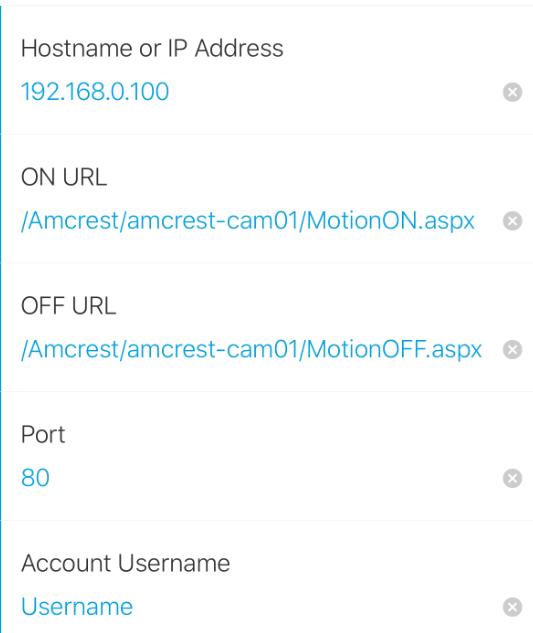
192.168.0.100 is the web server, unless you can capture the traffic between the ST hub to the web server (both internal/same subnet) the password is not exposed. This is the same as what DTH was doing; clear text password between the ST hub and the camera. My work around was added a server in between. In fact, ST don’t know the password to the camera. it only have the password to the web server site and the web server uses another username/password to access the camera.
Yep, that is the only thing that I was pointing out. While you can use DDNS instead of an IP with my DTH, some have set this up using Port Forwarding to allow access to their cameras from the WAN, which is the kind of thing I was cautioning against.
But you knew that already.
Looks like I ran into the new firmware issue as well with my IPM-841. RTSP stream still works but I can’t control anything else. Authentication errors.
not sure what i did wrong but “Amcrest Camera” does not show up on device Type when adding new device. Please Help, thanks
Did you install the custom Device Type Handler in the IDE?
my bad, i found it on the very bottom of the drop down, was looking alphabetical order.
Hi, I’m thinking about buying a IP3M-956E , did you manage to make it work? Thanks!