Maybe, but I think it would be overkill. Although nobody has said so officially, it seems very likely That Meross will add matter support, since they already work locally with HomeKit. So smartthings should eventually be able to bring them in locally through matter for those who have a hub. We will have to see, but I think that’s going to be the easiest if you can be patient for another couple months. 
1 Like
I ask to you wath DTH use this device to see wath happen.
Could you send me the screenshot of zigbee Thing Mc for cluster info? Or cli logs of device reply
I added your LIFX driver, and found my bulbs.
But after opening one of my bulbs, this is all I get. Am I missing something?
When I added your edge driver, all of my lifX bulbs showed up new in an unassigned room. But they are also still showing in my other rooms that I originally had them in. Is there some sort of way I have to get rid of the duplicates?

Anyone get google Chromecast working with an Edge driver. I use @TAustin Roku driver which works great. Would be nice to control Chromecast as well.
1 Like
Try requesting a routine to turn the bulb on and to a specific dimmer and color (like when another light turns on, turn this bulb on to 44% brightness red color), it might help.
1 Like
Yes, of course I’m not in a big hurry, it’s just a “nice-to-have”. TP-Link is in almost the same position, in terms of Matter commitment I think. As I said, I only suggested it because of what I saw barry accomplish.
Understood—there’s been some amazing work done by the community with Edge Drivers.
That said, Meross already has HomeKit-compatible devices in all their model lines. And it looks like that’s a pretty easy architecture to clone for matter-compatibility. TPLink Kasa is in a different position—they just added their first HomeKit-compatible smartplug a few months ago. So I would expect Meross to get to Matter compatibility first, but we will see.
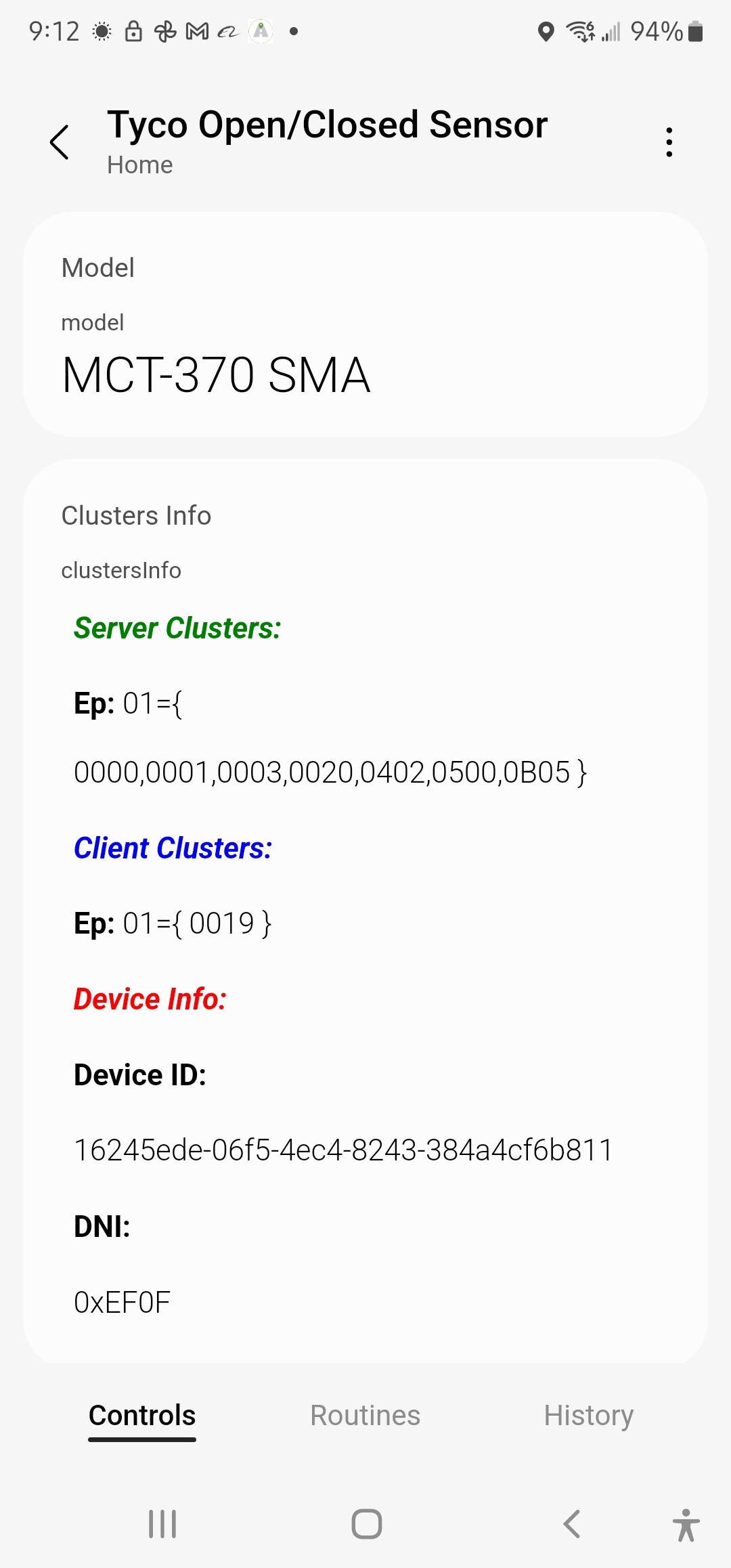
Hi @sdbg
Because of the clusters that use, 0500 should work, if with the dth it didn’t work either, maybe the device is broken, right?
I need driver
“MHCOZY 4 Channel 12V ZigBee Relay Switch”
- application: 50
- endpointId: 01
- manufacturer: _TZ3000_excgg5kb
- model: TS0004
- onOff: catchall
- zigbeeNodeType: ROUTER
01 0104 0100 01 07 0003 0004 0005 0006 E000 E001 0000 02 0019 000A
1 Like
Hi @chumarro
I make a note to add it when I have access to the cli
2 Likes
I have a PetSafe dog door (from back in the Iris days) that I can’t find any info on for support under the new system.
- application: 01
- endpointId: 0C
- manufacturer: PetSafe
- model: APA11-113808
- zigbeeNodeType: SLEEPY_END_DEVICE
I currently have a virtual “Momentary Switch Normally On” DTH, and can’t find one for edge. There are plenty of ‘normally off’ momentary switches, but those do not work for me. Does one exist already?
Hello,
@troy_owens That are really good news. But I can’t get any information about that on the web. Do you know something more?
As @plboucher I also have one custom device handler - dbdevelopment : Govee LED Strips (DBDEV)
Anyone knows if any Edge driver was created?
Thank you.
1 Like
Picked up a couple ThirdReality Smart Button devices today.
I’m unable to pair them with SmartThings.
I added one to my Hubitat hub to get the details.
- endpointId: 01
- model: 3RSB22BZ
- application: 10
- manufacturer: Third Reality, Inc
Button supports press, double press, hold, and release based on what the built-in Hubitat driver says.
EDIT: Here are the debug/info logs as produced by Hubitat for the four actions:
2022-09-17 08:54:40.230 am info ThirdReality Button button 1 was pushed
2022-09-17 08:54:40.223 am debug descMap:[raw:AE3B0100120A5500210100, dni:AE3B, endpoint:01, cluster:0012, size:0A, attrId:0055, encoding:21, command:0A, value:0001, clusterInt:18, attrInt:85]
2022-09-17 08:54:40.212 am debug descMap:[raw:catchall: 0104 0006 01 01 0040 00 AE3B 01 00 0000 01 00 , profileId:0104, clusterId:0006, clusterInt:6, sourceEndpoint:01, destinationEndpoint:01, options:0040, messageType:00, dni:AE3B, isClusterSpecific:true, isManufacturerSpecific:false, manufacturerId:0000, command:01, direction:00, data:]2022-09-17 08:55:45.088 am info ThirdReality Button button 1 was doubleTapped
2022-09-17 08:55:45.085 am debug descMap:[raw:AE3B0100120A5500210200, dni:AE3B, endpoint:01, cluster:0012, size:0A, attrId:0055, encoding:21, command:0A, value:0002, clusterInt:18, attrInt:85]
2022-09-17 08:55:45.081 am debug descMap:[raw:catchall: 0104 0006 01 01 0040 00 AE3B 01 00 0000 00 00 , profileId:0104, clusterId:0006, clusterInt:6, sourceEndpoint:01, destinationEndpoint:01, options:0040, messageType:00, dni:AE3B, isClusterSpecific:true, isManufacturerSpecific:false, manufacturerId:0000, command:00, direction:00, data:]2022-09-17 08:56:11.998 am info ThirdReality Button button 1 was held
2022-09-17 08:56:11.996 am debug descMap:[raw:AE3B0100080800002002, dni:AE3B, endpoint:01, cluster:0008, size:08, attrId:0000, encoding:20, command:0A, value:02, clusterInt:8, attrInt:0]
2022-09-17 08:56:11.996 am debug descMap:[raw:AE3B0100120A5500210000, dni:AE3B, endpoint:01, cluster:0012, size:0A, attrId:0055, encoding:21, command:0A, value:0000, clusterInt:18, attrInt:85]2022-09-17 08:56:13.513 am info ThirdReality Button button 1 was released
2022-09-17 08:56:13.510 am debug descMap:[raw:AE3B0100120A550021FF00, dni:AE3B, endpoint:01, cluster:0012, size:0A, attrId:0055, encoding:21, command:0A, value:00FF, clusterInt:18, attrInt:85]
Having the device’s fingerprint would be super important for a developer to know. Can Hubitat provide that? If not, there’s an Edge driver by @Mariano_Colmenarejo called Zigbee Thing that provides all those details that you can install and use to get a ton of device details:
https://api.smartthings.com/invitation-web/accept?id=6b68563b-1905-4654-8d2b-e677a2997424
1 Like
What I provided above came from Hubitat.
EDIT: Actually i can get the debug logs which provides a lot more detail.
I’ll have to do that from my laptop.
I provided similar in the past and Mariano was able to use it to add support for other devices that were problematic (Ikea bulbs in particular).
I have Mariano’s Zigbee Thing Mc installed but not sure how to use it when the device refuses to connect to my SmartThings hub.
Hi @Belgarion
This fingerprints are not in stock driver then if smartthings enable generics devices in the production drivers It will work as generic switch-level profile
Now You can install Z-Wave Switch driver from smartthings beta channel in your Hub, unistall device and reinstall It with search nerby from app, to try if device works
Has anyone created a simulated presence sensor to track (iPhone) presence state?
Since the new app arrived, I have been using this smartapp for that purpose and just realized it will be one of the casualties.
If ST would just add back the phone as a visible device in the app this would not be needed (for my cases anyway), but since they’ve had years to do that I don’t holdout much hope.  FWIW, my primary use case is a quick check to see when the mobile presense detect is broken which is about 30% of the time. Robust iPhone presence is another item I’ve long ago given up hope for.
There are a couple of custom Presence sensors. If you just need one you can turn on and off, check virtual devices. Otherwise check miscellaneous.
You will find these on the quick browse lists in the community – created wiki.
well.
If you just want to use your iPhone presence, you may be able to use HomeKit and a device that is visible to both systems as a proxy. Here’s the how to for that method:
How to Use a Meross Plug to Use HomeKit Presence to Trigger ST Routines
And this thread discusses a couple of other post groovy options:
Phone as Presence Sensor w/o Access to SmartThings App
But it all comes down to the details of what you need.