[OBSOLETE] Original & Aqara Xiaomi Zigbee Sensors (contact, temp, motion, button, outlet, leak, etc)

Yes v2 hub. I don’t know if you saw my second comment, but after I removed them and then repaired them (leak sensor and temperature sensor), they have been working for about 48 hours.

The tile layout for these is different than they used to be (prior to me switching to the newer DH), and this didn’t show up until i removed them and reconnected. (When i just got them to connect without removal, the tile layout didn’t change). Not sure if that is meaningful at all.

yeah i just can’t get them to reconnect at all. using the same pana cr2450 batteries and have removed device completely and run discovery after pressing the button on side of xiomi sensor til it flashes blue and nothing comes up.

not even a thing auto appears under my devices.

i moved off the beta firmware and my xiami devices are now working fine (tho they show as 0% battery on fresh batteries).

That’s not very good news. So when the beta is official, Xiaomi devices won’t work for anyone on SmartThings? Did you report this to the beta team?

Try checking the “Recently” tab for your Xiaomi device in the ST mobile app that shows device events. You will see the reported voltage like this:

Do you see any reported Voltage value?

yes they are aware. I’ve given feedback straight to Tom.

re voltage - no voltage under recently at all.

Excellent, and hopefully they will find a way to allow Xiaomi devices to continue working.

So there are no battery events listed at all?

That’s why voltage is at 0%. The device handler needs a battery report from the device in under to update it to the correct percentage.

You should see the first battery report within 1-3 hours of pairing. How long has it been?

[BETA RELEASE] Xiaomi Aqara Vibration Sensor (Model DJR11LM) v0.5b

I have uploaded the code for an initial beta release of a SmartThings device handler for the new Xiaomi Aqara Vibration Sensor (Model DJT11LM).

The new code can be grabbed from here.

I do not yet own an Aqara Vibration Sensor, so it is completely untested and needs beta testing by users who do own one. Please know that it will very likely generate errors in your log, and also not all planned features are implemented.

The initial features are as follows:

  • Vibration / Movement detections will generate a Motion - Active event
  • When the sensor is tilted, an Acceleration - Active event is generated
  • When the sensor is dropped, a Button 1 - pushed event is generated
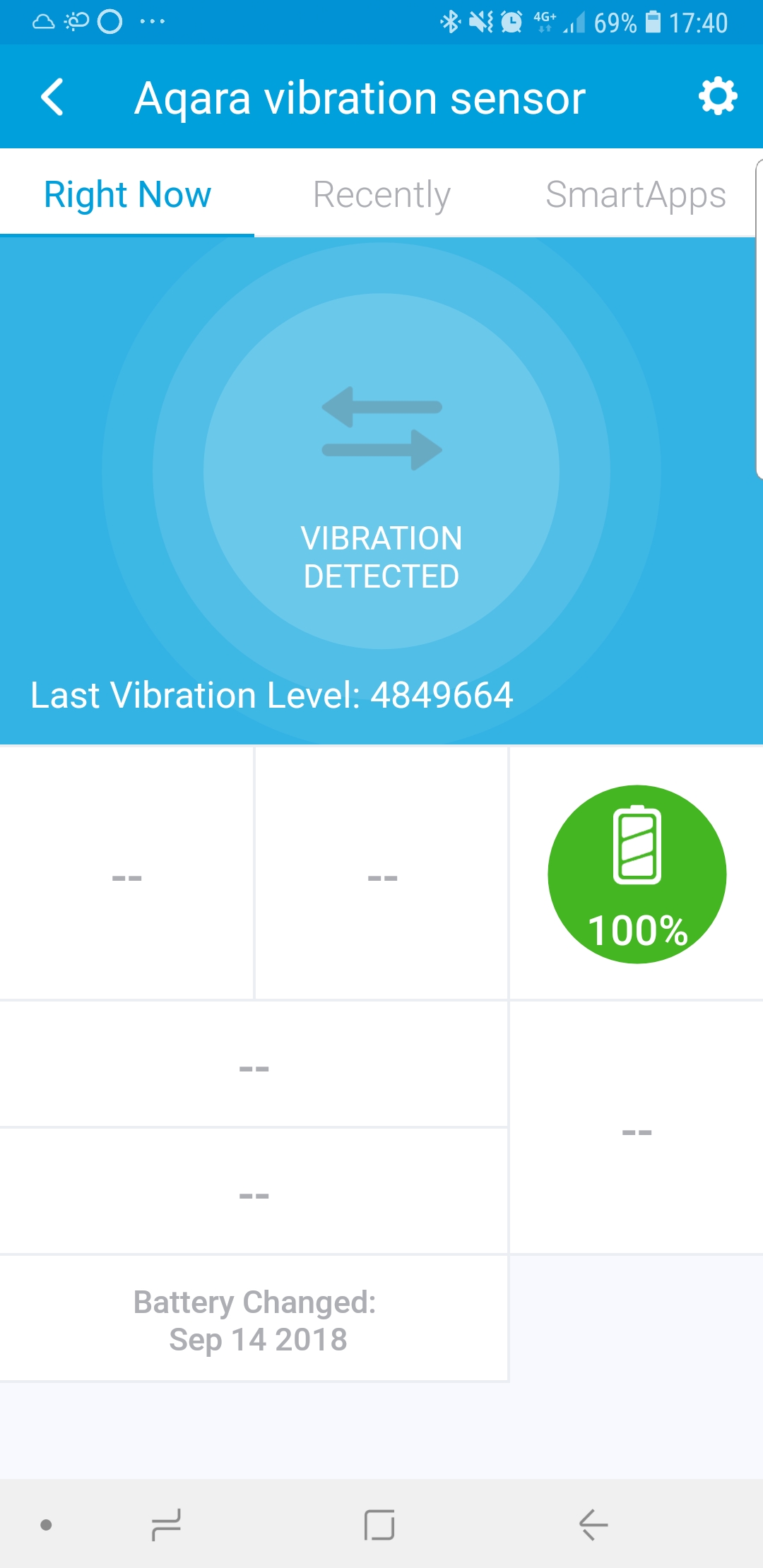
  • The above three event types will be displayed as “Vibration Detected”, “Tilt Detected”, and “Drop Detected” in the main tile for the sensor in the SmartThings mobile app. If no other events occur within 61 seconds, the display will clear out with a grey background, meaning the sensor is motionless.
  • When the sensor is tilted, if the value of tilt angle change is reported, this will be displayed in the mobile app, and also in the events list and in live logging. It is not yet associated with any SmartThings capability so it cannot be used by any SmartApps other than WebCoRE.
  • After the sensor has moved, if a 3-axis value is reported, it will generate a Three-Axis event. The X, Y, Z values are the raw values given by the sensor in the range of -2048 to +2047. This feature needs more development to make it useful.
  • After vibration events, if the sensor reports the “level” of vibration, it will be displayed in small text at the bottom of the main tile for the sensor in the mobile app, as well as in the events list and in live logging. It is given as the raw reported value on a scale of 0-512.
  • The time/date of the most recent vibration, tilt, and drop events are displayed in smaller GUI tiles for the sensor in the mobile app
  • As with other bspranger/Xiaomi device handlers, the battery voltage and % level are reported and its replacement date is stored and displayed in a GUI tile for the sensor in the mobile app.
  • Preference Settings are similar to those in other bspranger/Xiaomi device handlers, but also include toggles for informational (“info”) and debug log messages to be displayed in the Live Logging page of the IDE.

Any and all comments, suggestions, and bug reports are highly encouraged in order to improve this device handler and its functionality.

I’m also working on a DTH, I have four of those sensors on my desk. So far I have implemented vibration as motion and am trying to get the acceleration into the 3 axis property in a meaningful way. Also have the sensitivity preference working. I’m not getting any battery info and it doesn’t seem possible to pair the device via the button (catchall method needed to get the device ID). I’m not using the drop info. Personally I have two use cases:

  • sleep monitor (repeating vibration is reported at intervals but I don’t see the logic yet). I might be building a simpler implementation via a smart app companion
  • occupancy. I’m planning to stick one under the lower part of the stairs and one at the upper part. This should enable me to detect if someone is going up or down the stairs and count the number of people upstairs.

I’m interested to see what use cases people see, especially in relation to acceleration (mine are more focused on vibration) or drop. This device can also function as a button; a short press is regarded as a range test, but we can use it for button functionality (albeit with a minuscule button). A long press resets the device and gives it a new id so not very useful.

I have one of these on order, hopefully it arrives somewhat soon. I want to see if I can detect the wash machine running.

Once I get it I will help with the DH if it is not already completed.

I’d recommend reading through this discussion on GitHub, which already has a wealth of information people have discovered about the device. A SmartThings user with the Github handle oltman has devised a way to convert the XYZ Acceleration values from the device into the current resting position angle, and that value could be compared with the previous one to check if the change in angle has gone past a certain threshold. This just needs to be linked with an appropriate SmartThings capability to make it useful for things like knowing the open/close state of your garage door or whether your mailbox door has been opened/close. There’s also the device’s built-in tilt angle change value reporting, which could be used for similar purposes if the device will tilt mainly along one axis in its use case.

Also, I’ve started a discussion on GitHub the DTH code I put together here. oltman has joined in on that discussion, and I definitely welcome any kind of collaboration that results in full utilization of all of the features of this new sensor.

Excellent. This is on my to-do list, and again I highly recommend reading the first discussion I linked to above for important information I gleaned from the technical sheet on the accelerometer device used in this Aqara sensor which means the XYZ values output represent a different range depending on the sensitivity setting.

If the battery reporting method is like all the other Xiaomi sensors, then the bspranger/Xiaomi DTHs’ code should work. As for pairing, the fingerprint line in the DTH I put together is based on very detailed information from someone who used a Zigbee sniffer, and should work in getting the device recognized. But that doesn’t mean it will pair easily with the ST hub. My water sensors, for example, have a lot of difficulty pairing, and it has nothing to do with what DTH is used.

Sure, but note that the reset button is probably a small-duty momentary contact, and not meant to be used all the time.

I look forward to see what you’ve come up with - if you decide to share it, of course - and can’t wait for my sensors to be delivered so I can start the real testing myself!

That’s what works currently. I’m adapting your code to see what I can get working.

The 0505 attribute does not seem to be a level, it is reported at some interval. Judging by the fact that it is referred to as a bed sensor I think it’s just a timer with time elapsed since last vibration. In any case it reports a large value when the sensor is not moving, so the value needs to be something in seconds I guess.

ca98cab-69db-4d26-9295-807a7a299c5a 6:03:43 PM: debug Aqara vibration sensor: Creating event [name:vibrationLevel, value:5177344, descriptionText:Aqara vibration sensor: Vibration level reported at 5177344]

8ca98cab-69db-4d26-9295-807a7a299c5a 6:03:43 PM: info Aqara vibration sensor: Vibration level reported at 5177344

8ca98cab-69db-4d26-9295-807a7a299c5a 6:03:43 PM: debug Aqara vibration sensor: Parsing ‘read attr - raw: C92E0101010E05052300004F00, dni: C92E, endpoint: 01, cluster: 0101, size: 0E, attrId: 0505, encoding: 23, value: 004f0000’

8ca98cab-69db-4d26-9295-807a7a299c5a 6:03:43 PM: debug Aqara vibration sensor: Parsing ‘read attr - raw: C92E0101010E05052300004F00, dni: C92E, endpoint: 01, cluster: 0101, size: 0E, attrId: 0505, encoding: 23, value: 004f0000’

I’ve seen that 004f0000 value a lot over the last days and only the first 4 digits change, the last 4 stay at zero. I’m not an expert at value encoding so I need some expertise there :slight_smile:

Aside from the 1,2 and 3 value for the 0055 attribute it also reports a larger value which now causes an error:

error java.lang.NumberFormatException: For input string: “00522105030002” @line 205 (parseReadAttrMessage)

debug Aqara vibration sensor: Parsing ‘read attr - raw: C92E0101011455002102000305215200, dni: C92E, endpoint: 01, cluster: 0101, size: 14, attrId: 0055, encoding: 21, value: 00522105030002’

Just received a battery report, that seems to work.

Axis measurement issue:
error java.lang.NumberFormatException: For input string: “02a” @line 223 (parseReadAttrMessage)

8ca98cab-69db-4d26-9295-807a7a299c5a 6:14:39 PM: debug Aqara vibration sensor: Parsing ‘read attr - raw: C92E010101120805252A000A00A704, dni: C92E, endpoint: 01, cluster: 0101, size: 12, attrId: 0508, encoding: 25, value: 04a7000a002a’

This gives somewhat meaningful values:

		else if (attrId == "0508") {
			//def x = (short)Integer.parseInt(value[9..11],2)
			//def y = (short)Integer.parseInt(value[5..7],2)
			//def z = (short)Integer.parseInt(value[1..3],2)
            
            def z = zigbee.convertHexToInt(value.substring(0,3))
            def y = zigbee.convertHexToInt(value.substring(4,7))
		def x = zigbee.convertHexToInt(value.substring(8,11))

I still hold the theory that this is raw output of number of vibration samples data from the on-board accelerometer. I just forgot to only convert the first 4 bytes (16-bits) of data. I have fixed that in the DTH code on GitHub. So now the value of 004f should give an integer value of 79. Even when the sensor is stationary, it’s totally possible that the accelerometer is picking up some slight movements. A real test of my theory would be to really shake the sensor hard and see if the attribute 0505 output caps at an integer equivalent of 512.

Ah yes, it was mentioned in the information I’ve read that attribute 0055 reports can actually include two attribute reports. So in your example the value of 00522105030002 can be parsed going backward like this:

0002 = the actual value for attr 0055, which corresponds to a tilt detection
0503 = a secondary attr report for attr 0503, corresponding to tilt angle change value
21 = encoding
0052 = value for attr 0503, corresponding to a tilt angle change of 82 degrees

I will fix my code to handle this correctly.

The thing is the output from the accelerometer chip itself for the raw acceleration data of each axis is a 12-bit two’s complement, equating to a raw decimal output range of -2048 to 2047. Byte #1 can be ignored because it’s just repeats the sign bit in all 4 bits. So if the sign is + then that first byte is 0 (bits 0000) and if the sign is - then the first byte is F (bits 1111). So it seems with using convertHexToInt only 3 bytes should be used, like this:

def z = zigbee.convertHexToInt(value.substring(1,3))
def y = zigbee.convertHexToInt(value.substring(5,7))
def x = zigbee.convertHexToInt(value.substring(9,11))

Does that change the values for you? The code I used was based on an example I found online which should convert hex to decimal using two’s complement. I haven’t tested it though.

8ca98cab-69db-4d26-9295-807a7a299c5a 6:44:00 PM: debug Aqara vibration sensor: Creating event [name:threeAxis, value:2,1,74, linkText:Aqara vibration sensor, handlerName:null, isStateChange:false, descriptionText:Aqara vibration sensor: Accelerometer axis values = 2,1,74]

8ca98cab-69db-4d26-9295-807a7a299c5a 6:44:00 PM: info Aqara vibration sensor: Accelerometer axis values = 2,1,74

8ca98cab-69db-4d26-9295-807a7a299c5a 6:44:00 PM: debug Aqara vibration sensor: Parsing ‘read attr - raw: C92E0101011208052520001400A604, dni: C92E, endpoint: 01, cluster: 0101, size: 12, attrId: 0508, encoding: 25, value: 04a600140020’

Values seem off compared to the github thread. 04a6 should be 1190?

also I’m not sure if my sensitivity code is working:

preferences {
    
    //Sensitivity Config
    input description: "", type: "paragraph", element: "paragraph", title: "SENSITIVIY"
	input name: "sensitivity", type: "enum", title: "Sensitivity", options: ["0": "High", "1": "Medium", "2": "Low"], description: "Select sensitivity", required: false  

def updateSensitivity() {

device.endpointId = 1
switch (sensitivity) {
	case "0":
		zigbee.writeAttribute(8, 0x10, 0x20, 0x01)
		break
	case "1":
		zigbee.writeAttribute(8, 0x10, 0x20, 0x0B)
        break
	case "2":
		zigbee.writeAttribute(8, 0x10, 0x20, 0x15)
        break
}

}

No, it has the high-bit set so it’s a negative number. Converted as a two’s complement it’s -858.

According to what I’ve read, the sensor will send a confirmation attribute report immediately after the write attribute packet for changing the sensitivity setting is received.

But I suspect it’s not working, because of several reasons. Firstly:

So if the change to sensitivity level is made via the preference settings, then the writeAttribute command should be sent immediately after the user presses “save” in settings. Pressing save will call the updated() routine in the DTH code, so the command should be sent from there (either every time the user hits save, or do a check to see if the value of sensitivity has changed.

So according to what @Zach_Varberg says above, you’d want to explicitly send the hub command like this (for the low sensitivity setting):

sendHubCommand(zigbee.writeAttribute(0x0000, 0xFF0D, 0x20, 0x15, [mfgCode: 0x115F]).collect { new physicalgraph.device.HubAction(it) }, 0)

The above line addresses the second reason your zigbee.writeAttribute call probably doesn’t work.

From the ST Developer’s Reference here, the correct signature for the call is this:

zigbee.writeAttribute(Integer Cluster, Integer attributeId, Integer dataType, value, Map additionalParams=[:])

I’ve added [mfgCode: 0x115F] as an additional parameter to the zigbee.writeAttribute call because from what I’ve read here, manufacturer specific code needs to be included in the ZCL header of the message sent to the sensor in order for the write attribute command to be recognized.

So that should hopefully get it to work. I will be adding it the DTH code I’m working on, but of course still have no way to test.

As far as checking whether the sensitivity setting is working, the best method would be to place the sensor on something with a constant level of vibration (like an oscillating fan) and then change the sensitivity setting and observe if there’s any major change in the XYZ Acceleration values.

I’ll test your releases. You’re way ahead of my DTH anyway so I’ll ditch that for now and make some smartapps off your DTH once it’s complete.

@CopyCat73 the use case I have in my head is to put it in my doorbell ringer box and see if the vibration will trigger. If it does then my non smart doorbell gets smarter :grinning: . I have an ST sensor but its too big to fit inside my doorbell box.

[BETA UPDATE] Xiaomi Aqara Vibration Sensor (Model DJR11LM) v0.6b

Updated code can be grabbed for testing from here.

Changes

  • Added preference setting to set the sensor’s accelerometer sensitivity level (untested) which will also display an event, live logging entry, and update a new mobile app tile displaying the current sensitivity level. Note that the sensitivity level will be unknown and displayed as blank until it is set in the preference settings for the first time. I plan to see if there’s a way to read in the sensitivity level when pairing the device so that it is known and displays from the start.
  • Fixed the handling of tilt event messages, which should be correctly recognized now
  • Fixed the handling of tilt angle change value reports, and there is a new function parseTiltAngle() which could be expanded to link to a SmartThings capability (such as button 02 - pushed) to notify the user or take actions when the change in tilt is greater than a user-set threshold.
  • Changed the way “Vibration level” values are converted to an integer, with a max possible value of 65535, though I expect only values up to 512 will be seen. Any reports of observed values, when they occur, and how often would be greatly appreciated.
  • Other minor code refinements, organization, and clean up

I haven’t yet changed the code that converts the Accelerometer XYZ axis value reports, as I’m doing some code testing and research to see what would work best and be the most useful.

Heh - I’m gonna get one now. And here I thought you were all Hubitat now, Keith!

Yes, Nearly 100%, but I still feel like giving back to the ST community. :smile: