you get some of the strangest responses… what specifically did you ask?
I see …
A single Thread border router can theoretically support hundreds of devices, with OpenThread specifications allowing up to 511 end devices per individual router node and a total network capacity of over 16,000 devices across a mesh of up to 32 routers. In practice, a network typically operates with 16–23 routers for optimal performance.
to answer your question, all my Thread devices are connected to the same TBR.
Actually it says the following, but it also said somewhere , perhaps in a different chat that adding a second tbr would help. I was researching this v late last night with multiple ai chats, unsurprisingly there wasn’t a lot of consensus, and I do believe the content of this thread is feeding ai learning, so could lead to circular discussion
Your hub is advertising itself as a Matter commissioner and Thread Border Router on your LAN.
Specifically:
SmartThings Hub#87A4**._meshcop._udp.local.**
This is a Thread Mesh Commissioning Protocol (MeshCoP) service advertisement that indicates that the device is a TBR and commissioner that can form a Thread network.
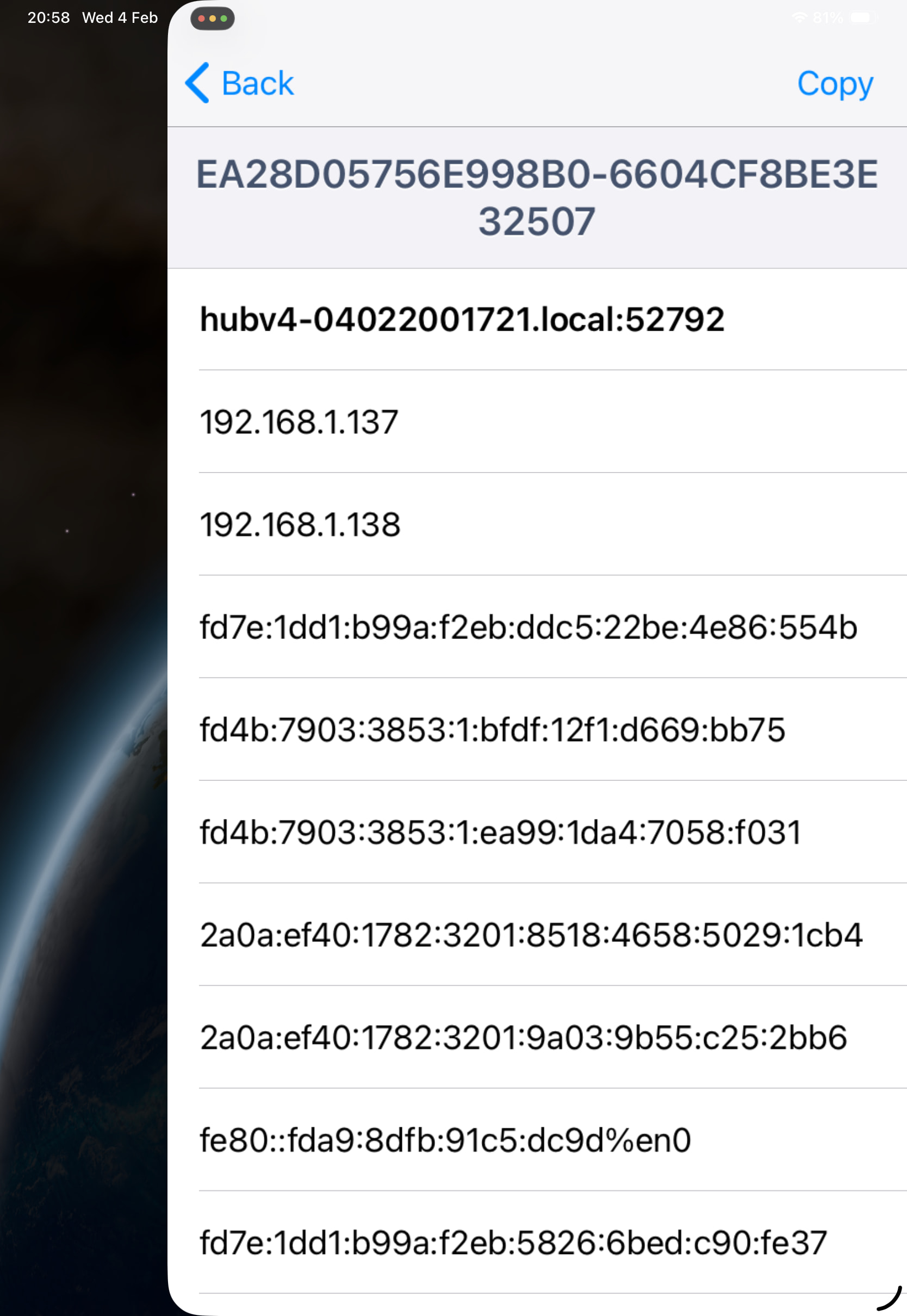
hubv4-04022001721.local:49154
.local → mDNS domainname

49154 → MeshCoP UDP port
IP Addresses
Every address the hub is reachable on, across multiple scopes and fabrics.
192.168.1.138:49154
192.168.1.137:49154
There are two IPv4 addresses likely a Wi-Fi and Ethernet interface
This is a Thread on-mesh ULA prefix. This hub is actively participating in the Thread mesh and has multiple Thread IPv6 addresses which is common for Border Routers (router + leader roles, multiple IIDs). Given this is a Smartthings hub, it also being used as the Off-Mesh Route prefix which you could confirm by looking at the route tables of devices on the LAN. This prefix is Thread-internal and ISP-independent.
These addresses are from the mesh-local prefix fd7e:1dd1:b99a:f2eb::/64. They are used for Thread routing, leader election, and network control traffic. They are not routeable, never affected by the ISP, and never used by Matter controllers directly.
These are the link local addresses of hub. %en0 is the iOS Wi-Fi interface. These are used for for same-link communication and confirms the iOS device and hub are on the same L2 LAN and that mDNS is not being relayed.
These are the Global Unicast IPv6 addresses assigned by your ISP (confirmed to be Vodafone via whois) from the prefix 2a0a:ef40:1782:3201::/64. These are globally routeable and assigned via by your ISP via RA or DHCPv6-PD. It tells you that your hub has direct Internet connectivity and may advertise an off-mesh route into the Thread mesh, but not this specific prefix.
TXT Fields Decoded
Identity & vendor
vn = SmartThings
mn = Hub
nn = ST-4021230952
tv = 1.4.0
rv = 1
Vendor: SmartThings
Product: Hub
Node name: ST-4021230952
Thread version: 1.4.0
Record version: 1
Thread / Matter identifiers
xp = <7e1dd1b9 9ac2f2eb>
xa = <d282f34e 681787a4>
omr = <40fdd589 0af41600 01>
These encode:
Extended PAN ID
Border Router ID
OMR (Off-Mesh Routable prefix) info
The presence of omr confirms this hub is advertising off-mesh routes.
Commissioning & security
sq = y
dn = DefaultDomain
bb =
sb = <00000ab1>
sq =y → supports secure commissioning
dn→ Thread domain
sb → steering data (used during device join)
This is what allows iOS to commission Thread devices and do Matter pairing.
In summary:
The SmartThings hub is:
A Thread Border Router
A Thread Commissioner
Advertising:
Mesh-local prefix
On-mesh ULA prefix
Off-mesh routing capability
iOS can see the hub via:
IPv4
IPv6 link-local
IPv6 ULA (Thread)
IPv6 global (ISP)
ISP involvement is limited to:
Providing the global IPv6 addresses
NOT affecting:
Mesh-local prefix
Thread on-mesh ULA prefix
This tells me that on the LAN side of your hub, things appear to be working as expected. Tells us a little about the Thread mesh side in that the hub appears to have all the necessary prefixes and constructs created to operate a functional Thread mesh and TBR.
Your ISP router has nothing to do with managing/maintaining the Thread network and the fact that it drops the mDNS packets in no way affects the ST Hub and its function as a TBR. You could have a functioning Matter network that supports Matter over Wi-FI and Matter over Thread without having an ISP router at all (not Smartthings since it is Cloud dependent).
Please stop believing the AI hallucinations. The references I’ve found for MOD_PIT relate to cellular networks not physical networks.
Thanks for the detailed response Bruce.
ai also suggesting my isp hub up isn’t up to the job of supporting 29 thread devices, that’s BS I think, you agree ?
So, you have 28 Thread devices on your mesh. Did you receive more responses for the dns-sd or just the 9 you listed? If just the 9, are all the devices on the mesh Matter capable?
So, for at least 9 of the Thread devices, you are seeing valid service announcements and in theory you should be able to ping the fd4b address of those devices from your iOS device. If that works, then the hub is performing its TBR function properly.
It would be interesting to look in the AWA or CLI to determine what those 9 devices are. As I mentioned in an earlier post, you can use the Instance Name to locate the specific device in ST.
All my matter devices, the only 2 online are matter over WiFi.
Discovery output doesn’t include instance name so hard to see if any of these are the 9 listed (yes, that’s the full list)
Offline only means that the ST cloud doesn’t believe it’s in communication with the devices. The output suggests that there are service announcements from other than the two Matter over Wi-Fi devices and those could potentially be Thread devices. It would be worth figuring out what those devices are.
Keep in mind that the comm paths we’re looking at are different than what ST is doing. For ST, its’s:
ST App→ST Cloud→ST Hub (as controller)→Thread mesh device
For your iOS device, it’s
iOS device→ST Hub (as TBR)→Thread mesh device
The Instance Name of the devices is the output in the first screenshot. You can see those instance names in the AWA as networkID when you go to the device details. That’s a tedious way to do it. I find it faster to use the CLI and output to a file that I can search through (smartthings devices -j).
As an example, my Eve Energy Outlet has instance name/networkID of 4576FE5C14395B2F-926396EF0AD72CED. In the AWA, we see:
Ok I did that, used cli and searched output. Only two matched with device list, the last two on my discovery screenshot. They are my two matter over wifi plugs. None of the others appear in the device output
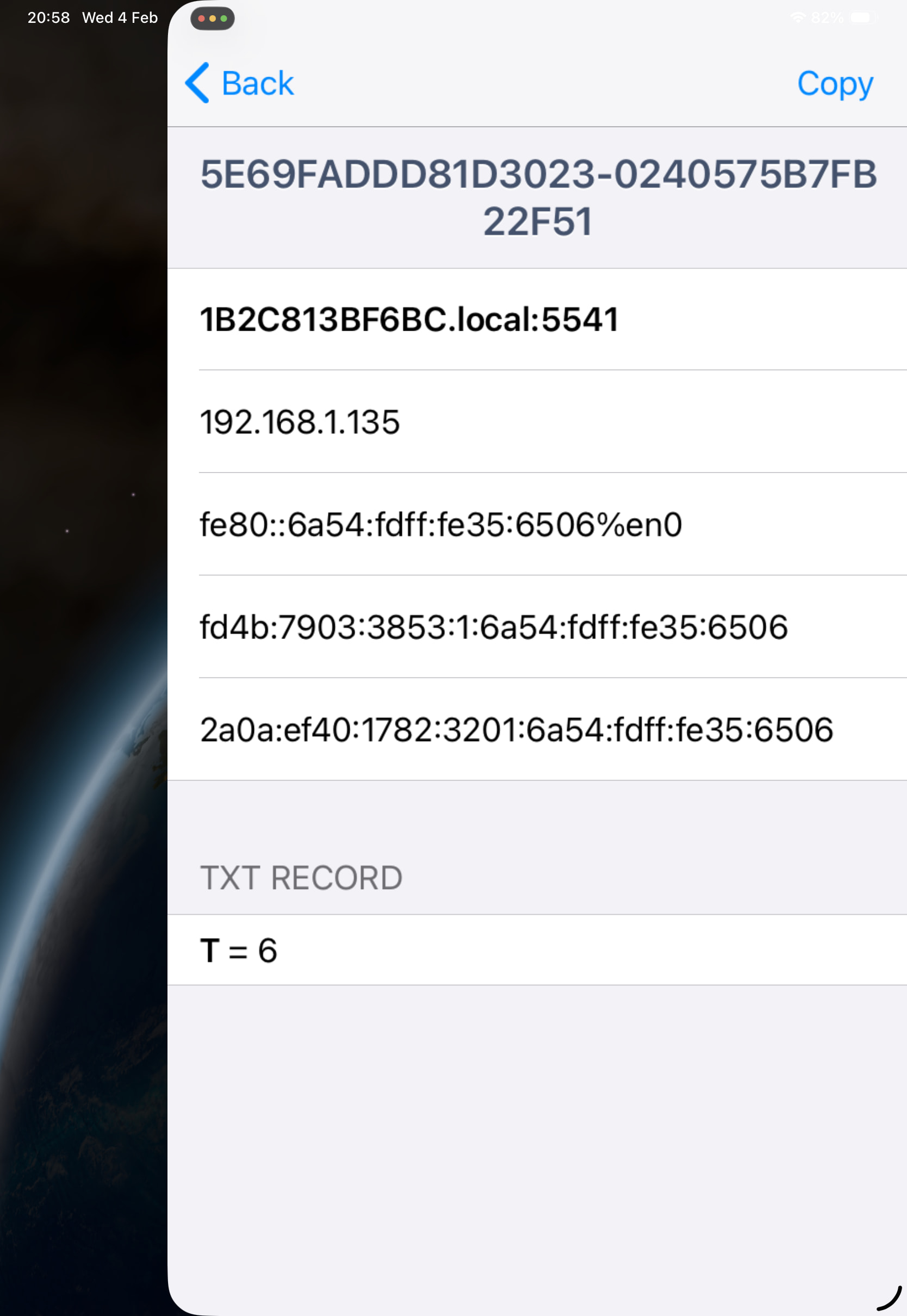
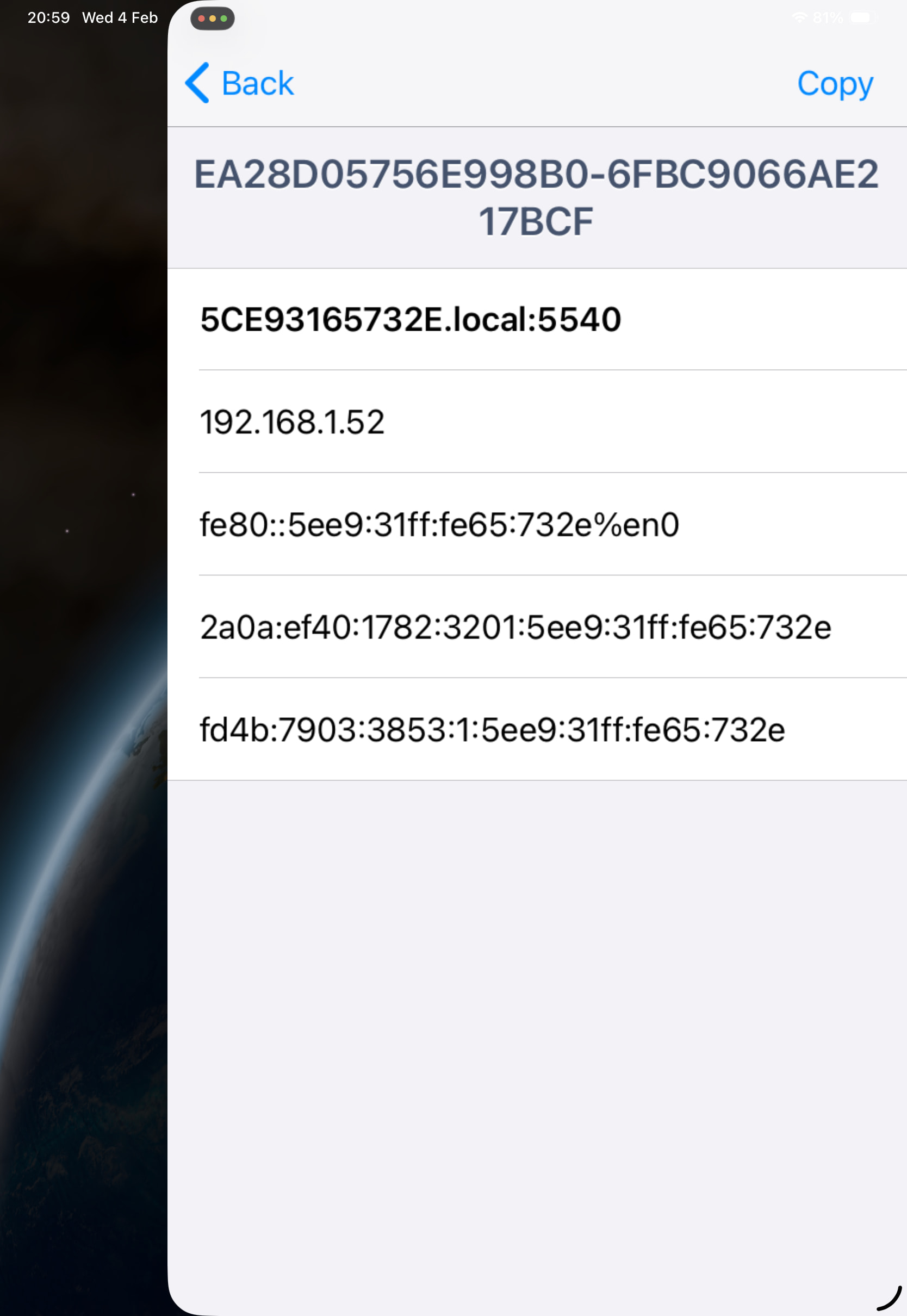
Well, duh on me. There are two different sets of Matter devices in the dns-sd output. There are the ones associated with the instance names that starts with 5E69. And there are the ones associated with the instance names that start with EA28. For the EA28, there are only 3 devices, the ST hub itself (which we can tell from the hostname) and your two Wi-Fi devices. So there are no Thread devices with service adverts on your LAN side.
Let’s recap what we know then. The ST hub appears to be announcing itself as a TBR and has all the proper prefixes and constructs to form a valid Thread mesh network and act as a TBR. BUT, no devices seem to be able to communicate outside the mesh and we are not seeing Matter service announcements on the LAN side. That would seem to indicate a problem with the hub communicating on the Thread side. The only other piece of information I’m curious about is whether your iOS device sees the OMR/on-mesh ULA route in its route table. If it’s there, then everything on the LAN side is working correctly and it’s the Thread mesh side that is clearly broken.
Hi @Declankh we’re continuing to investigate your case with the engineering team, and we’d like to ask a few follow-up questions to better understand what may have happened with your Thread network.
Could you please let us know if you performed any of the following actions recently?
Changed or modified Thread network settings using another ecosystem or platform
Used another controller or border router to manage your Thread network
Performed any kind of Thread network unification / merge between ecosystems
Connected or migrated your Thread devices to another system
Reset or recreated your Thread network
If you did perform any of these actions, please let us know which ecosystem(s) were involved and what steps you remember taking.
This information is very important for us to determine what recovery options may be available and how to proceed.
Ok thanks for this, I will answer each question embedded below
1 Changed or modified Thread network settings using another ecosystem or platform
No, but I did onboard some ikea thread over matter devices to Amazon Alexa using SmartThings as the thread network tbr (NONE of my Alexa devices have thread network capabilities). I also shared devices from SmartThings to Alexa using matter share
2 Used another controller or border router to manage your Thread network. Not to manage the thread network no. Only to share devices to Alexa
3 Performed any kind of Thread network unification / mergebetween ecosystems No, I only have the SmartThings thread network.
4 Connected or migrated your Thread devices to another system. Yes, i used matter share to share ikea air quality monitor to Alexa, similar with bilresa buttons.
5 Reset or recreated your Thread network No. I’m not even aware of an option to do that within SmartThings.
Finally, I’ll add that sometimes recently when onboarding on the SmartThings app it was asking me to first confirm the thread network I wanted to use, giving me a choice of only one (logical since I only have the one SmartThings thread network ) . After confirming the network it then asked for the network key. Sometimes this behaviour went away and pairing worked without this after a SmartThings hub reboot.
Hi @Declankh Im looking into your thread network issues and while I believe I have identified the reason why your network is not performing as it should, I am still trying to find the root cause. I have some suspicions but need more logs to fully validate. Would you be willing to delay a potential fix a bit longer to help us pull more debug logs? I also have in mind for you steps for a potential fix you can try once we obtain more debug logs, however it should be noted that without full root cause I cannot be certain that will fully fix things. If you are willing to help with the first part let me know and I will provide the steps we need you to take. If you would like to skip to the thing that will hopefully be a more immediate fix that it fully understandable; I know your network has been offline for far too long so I hope to get things fixed for you ASAP. Either way let me know if you are open to the debug step and I will outline what is needed. It should be minimal / low effort.
If you’ve looked at this topic, you’ll see I’ve been trying to help @Declankh with determining what’s going on with his Thread network. It appears that everything is working from a TBR on the LAN perspective as all the service announcements and routing appear to be correct. It seems to be something exclusively on the Thread mesh side.
Would you mind sharing what you suspect is the cause of the issue he is seeing?
Still working on a full root cause thanks to Declan assisting with additional debug logging/steps but essentially packets are not being routed onto and off of the mesh, which as I am sure you are all aware is an essential service that border routers provide to stub networks, where in this case the stub network is the thread mesh. It cannot do that currently because the hub is in a child role on the thread mesh; I am still investigating the why but I suspect it is due to a bad actor (likely old FW) on the thread mesh that is currently in the mesh leader role. I suspect the leader is not allocating a router ID to the hub so it cannot become a router, which is the role a border router needs to route packets on the mesh and to also take on the SRP service registrar role.
When a device is in the child role, it dosnt keep a set of the network dataset which is what we request when you look at the thread network info. There was no mesh local prefix from the perspective of the hub as a child on the mesh; child nodes dont keep a mesh local prefix they only maintain one link to a parent node.
The first step to a fix here is to make sure the hub can boot up and become a router by powering off all mains-powered devices on the thread mesh that can act as a router. While those devices are off power back on the hub should ensure it upgrades to the correct role. The next step is to make sure all of your FW is as up to date as possible on your end devices
No problem. I will also share this is very bad and not something I have ever seen before. We have seen devices with old firmware break SRP, but Ive never seen it prevent role promotion especially for a node type as critical as a border router. I will be recommending that we reach out to device partners about this as well as the Thread group and in the meantime its a great reminder for folks to make sure you keep your end device FW as up to date as possible.